FarmingTracker
A simple WoW addon that tracks your farming time and automatically stops once all target items have been collected in the desired quantities.
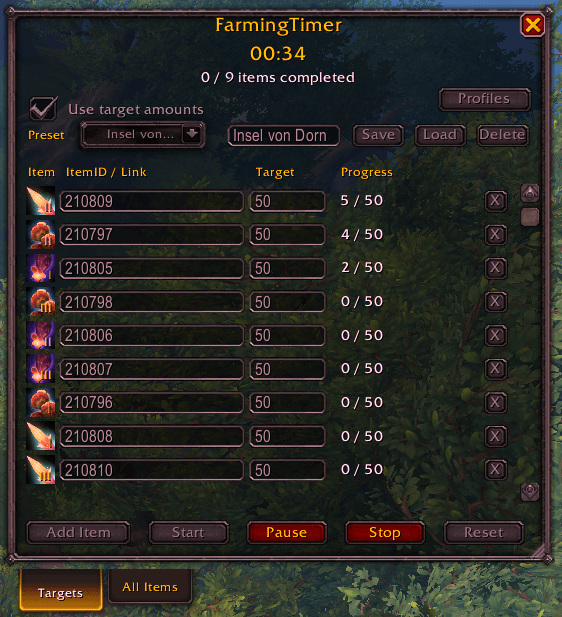
Screenshot 2026-02-13 162056.png
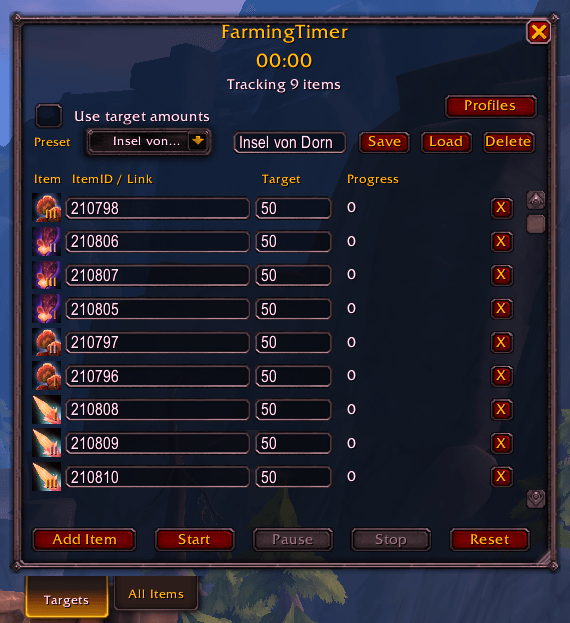
Screenshot 2026-02-13 161945.png
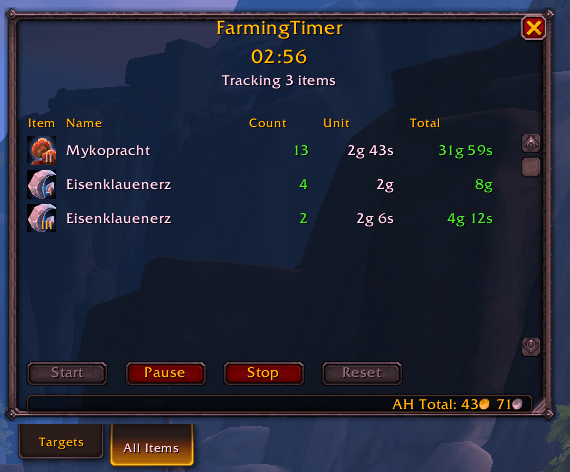
Screenshot 2026-02-13 161907.png
Description
FarmingTimer
A simple WoW addon that tracks your farming time and stops automatically when all target amounts are reached.
Features
- Track multiple items at once.
- Set items via drag and drop from your bags or by ItemID/Item Link.
- Define target amounts per item.
- Start / Pause / Resume / Stop / Reset.
- Two modes with tabs: Targets (configured list) and All Items (auto-detect).
- Auto-stop with a success sound when all targets are met.
- Movable main window plus Options panel.
- Main window height is resizable (drag the bottom-right handle).
- Minimap button (toggleable).
- Save, load, and delete presets.
- Optional: use target amounts (auto-stop) or just track time and counts.
- Export/import all presets or just a selected preset.
- Import with merge mode (do not overwrite existing presets).
Quick Start
- Open with
/ftor the minimap button. - Click Add Item.
- Drag an item into the slot or paste an ItemID/Link into ItemID / Link.
- Enter the target amount in Target.
- Press Start and begin farming.
Modes
- Targets: configure items + targets, optional auto-stop when all targets are met.
- All Items: tracks every item you collect while the mode is running (net change since start). No manual item setup required.
- Auction House values (All Items): open the Auction House first so the addon can scan reagent prices; values are then taken from the saved scan.
- AH total (All Items): the status line shows the total AH value of collected items; if some prices are missing it shows "partial".
Main Window Controls
- Add Item: adds a new row.
- Start: starts the timer and tracking.
- Pause: pauses time tracking (progress stays visible).
- Resume: appears instead of Start when paused.
- Stop: ends the run.
- Reset: resets timer and progress.
- Preset: dropdown to select saved presets.
- Preset Name: enter a name and click Save.
- Load: loads the selected preset.
- Delete: deletes the selected preset.
- Use target amounts: if enabled, timer auto-stops when all targets are met. If disabled, the timer runs and only counts items.
- Profiles: opens the Profiles window for import/export.
Profiles Window
- Export All: exports all presets into a shareable string.
- Export Selected: exports only the currently selected preset.
- Import: paste a previously exported string to restore presets.
- Merge (do not overwrite): keeps existing presets and skips duplicates.
Progress / Counting
- Counts are net since start:
current bag count - start count - If you consume/turn in items during the run, progress can go down.
- Only items in your bags are counted (no bank).
- In All Items mode, the collected list remains visible after Stop and clears on Reset.
- AH prices only update after a reagent scan (with the Auction House open).
Options (Interface -> AddOns -> FarmingTimer)
- Open FarmingTimer: opens the main window.
- Show minimap button: toggle minimap button.
- Reset frame position: resets the window position.
Slash Commands
/ft/farmingtimer
FAQ
Why does my item show a question mark? The item may not be cached yet. Wait a moment or open its tooltip so WoW can load the item data.
Why is progress 0 after Stop? In Targets mode, Stop ends the run and progress resets. Starting again creates a new baseline.
Feedback
Suggestions or bugs are welcome.
FarmingTracker Team