Farmboard
- By
Lightweight farming goal tracker with customizable boards for World of Warcraft: Midnight.
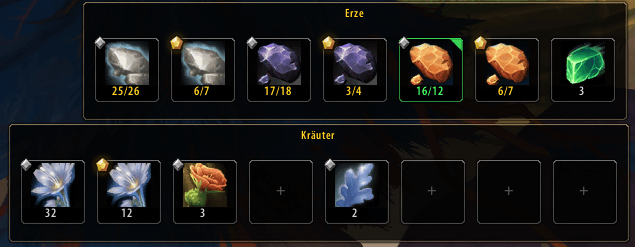
# Farmboard
**Farmboard** is a lightweight farming progress tracker for **World of Warcraft: Midnight**.
Create multiple customizable farming boards, drag items into tracking slots, set collection goals, and monitor your progress directly in-game.
Farmboard is designed to stay simple and lightweight while giving you a clear overview of materials, reagents, fish, ore, herbs, or any other items you want to farm.
## ✨ Features
- Add items via **drag & drop**
- Create **multiple independent Farmboards**
- Set custom farming goals from **1 to 9999**
- Track items in **bags, character bank, and Warband/Account Bank**
- Display **Midnight crafting/reagent quality**
- Configure **1 to 24 slots** per board
- **Horizontal and vertical layouts**
- Movable and lockable boards
- Rename and duplicate boards
- Show, hide, reset, and delete individual boards
- **Minimap button** with global Farmboard management
- Visual marker when a farming goal is completed
- Custom goal-complete sound
- Center-screen **"- Ziel Erreicht! -"** notification
- Persistent settings through SavedVariables
- No external libraries required
## 🎯 How It Works
1. Drag an item from your bags onto a free Farmboard slot.
2. Right-click the occupied slot and enter your farming target.
3. Collect the item and watch your progress update automatically.
4. When the target is reached, Farmboard can play a sound and show a completion notification.
## 🖱️ Controls
**Drag item onto a slot**
Add or replace an item.
**Right-click item slot**
Set the farming target.
**Shift + Right-click item slot**
Remove the item.
**Drag Farmboard**
Move the board while it is unlocked.
**Right-click Farmboard**
Open board-specific options.
**Left-click minimap button**
Show or hide all Farmboards.
**Right-click minimap button**
Open the global Farmboard menu.
**Drag minimap button**
Move the button around the minimap.
## ⚙️ Commands
`/farmboard` or `/fb`
Show/hide all Farmboards.
`/fb new`
Create a new Farmboard.
`/fb show`
Show all Farmboards.
`/fb hide`
Hide all Farmboards.
`/fb reset`
Reset all Farmboard positions.
## 💾 Saved Data
Farmboard stores board positions, tracked items, farming goals, layouts and notification preferences using World of Warcraft SavedVariables.
## 🐛 Feedback
Bug reports and feature suggestions are welcome.
**Author:** Loyftwa
The Farmboard Team