FallenTooltip
- By
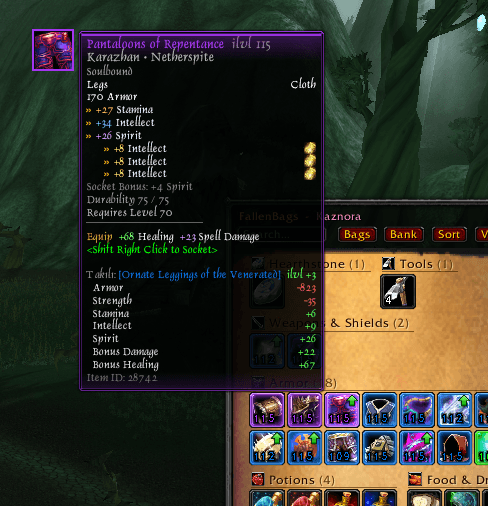
Prettier item tooltips: quality-colored border, large icon, drop source, colored stats and gems, compact Equip lines and comparison with your equipped gear. For WoW Forever and TBC Anniversary.
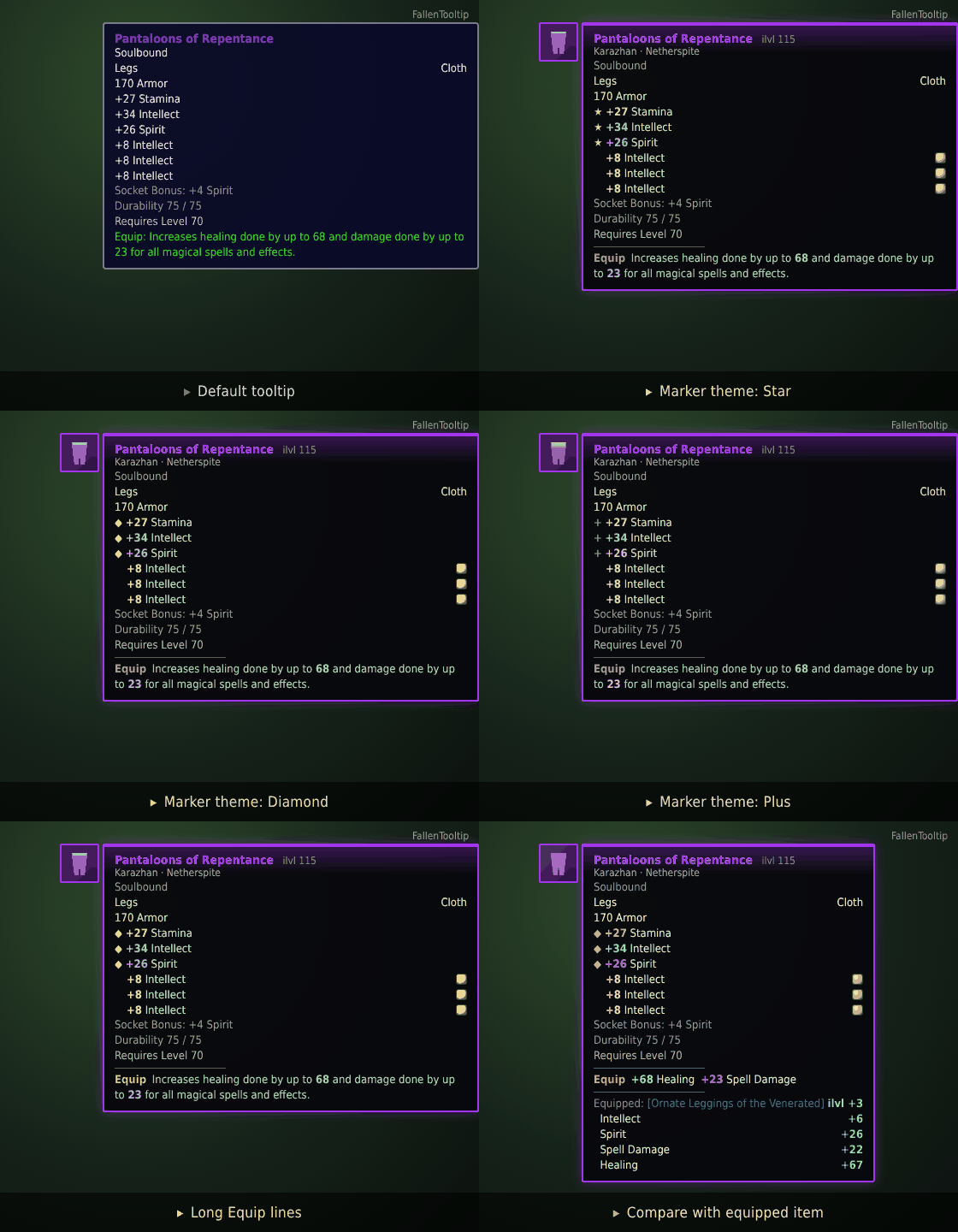
preview.gif
1792957120388_image.png
Ekran görüntüsü 2026-10-26 183915.png
Ekran görüntüsü 2026-10-26 183951.png
Description
FallenTooltip
Item tooltips that are actually pleasant to read. FallenTooltip restyles the item tooltips you already use, with a quality-colored frame, a large icon, colored stats, clean gem lines and a built-in comparison with your equipped gear. It adds no new windows and changes nothing about how you play.
Made for WoW Forever and TBC Anniversary.
Features
Themes and customization
- Four preset themes: Default, Minimal, Gold and Clean, applied with one click (
/ftt theme gold) - Border color: follow item quality or force Gold, Red, Blue, Green or White
- Stat colors: colorful, all gold, or all white
- Font size 9 to 16, plus an optional soft pulse on the glow of epic and better items
- Large icon on the left or right side of the tooltip
Look
- Quality-colored border, soft glow, thin inner border and optional dark background
- Large item icon at the top-left corner of the tooltip, in the item's quality color
- Item level next to the item name (weapons and armor)
- Drop source line right under the name, for example
Karazhan · NetherspiteorHellfire Ramparts (Heroic) · Omor the Unscarred. About 6,000 Vanilla sources on WoW Forever and about 11,000 Vanilla and TBC sources on TBC Anniversary are included (TBC-only items show no source on Forever): dungeon and raid bosses, reputation rewards (The Aldor · Exalted), PvP gear (PvP · Arena Season 1), Badge of Justice vendor, world events, quest rewards (Quest · The Fall of Magtheridon) and crafted items (Crafted · Alchemy).
Stats and gems
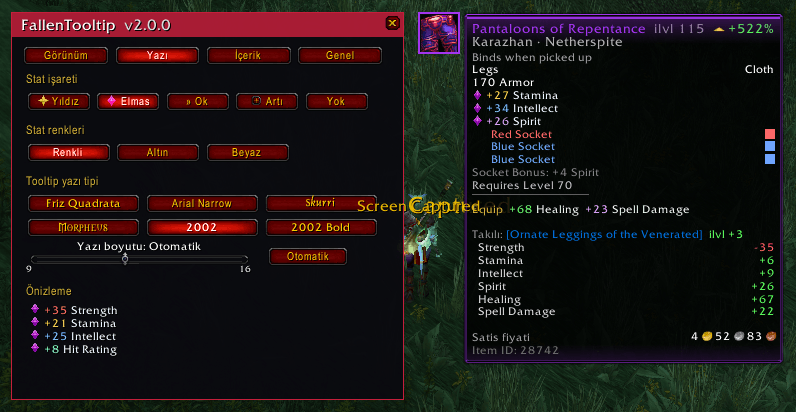
- Stats get a marker and a colored number: Strength, Agility, Stamina, Intellect and Spirit each have their own color
- Choose a marker theme: Star, Diamond, Arrow, Plus or None
- Gem lines use the gem's color, and the gem icon sits on the right edge so every stat lines up in one column. Empty sockets show their socket color.
Equip, Use and proc lines
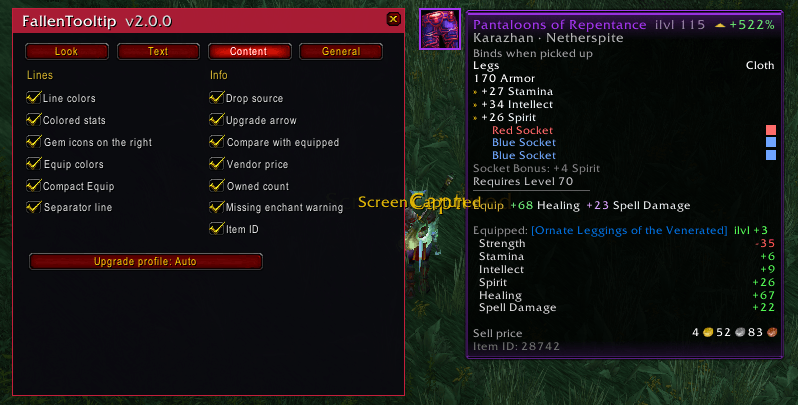
Equip:,Use:andChance on hit:lines are colored and their numbers are highlighted- Compact Equip (optional) turns long text into short lines:
Increases healing done by up to 68 and damage done by up to 23 for all magical spells and effects.becomesEquip +68 Healing +23 Spell Damage - Optional thin separator between stats and Equip lines
Upgrade arrow
- A green ▲ +12% or red ▼ -8% next to the item name tells you at a glance whether an item beats what you are wearing
- Scores use stat weights for your role: Melee, Tank, Caster, Healer or Hunter. The default Auto picks the role from your talent points, or choose one in the settings (
/ftt profile). - Rings, trinkets and one-hand weapons are compared against your weaker slot, two-handers against both hands
- The weights are approximate, so treat the arrow as a quick hint, not a guarantee
Extra info
- Sell price at the bottom of the tooltip (hidden when the game already shows it)
- You have: 37, the bag and bank count for stackable items such as herbs and potions
- A red Not enchanted warning on your equipped gear (level 60+), for slots that can be enchanted
Set bonuses
Set:lines are restyled: inactive bonuses show the needed piece count and dim numbers, active ones turn green
Compare with equipped
- Hover any item and see the stat and item level difference against what you are wearing, in green and red
- Handles rings, trinkets and one-hand weapons by comparing both slots
Fonts
- Pick the tooltip font from six built-in game fonts: Friz Quadrata, Arial Narrow, Skurri, Morpheus, 2002 and 2002 Bold. Each button previews its own font.
Settings
- Settings window with a live preview tooltip beside it, so every change is visible at once. Open it from Interface > AddOns, the minimap button or
/ftt - Every feature can be turned off on its own
- English and Türkçe interface
Usage
Open the settings with the minimap button or /ftt.
| Command | What it does |
|---|---|
/ftt |
Open the settings window |
/ftt panel |
Open the Interface > AddOns panel |
/ftt <option> |
Toggle an option: border, glow, icon, bigicon, ilvl, recolor, stats, shine, gemright, equip, compact, sep, source, compare, upgrade, price, owned, enchant, darkbg, id, minimap |
/ftt marker <star|diamond|arrow|plus|none> |
Stat marker theme |
/ftt font <default|arial|skurri|morpheus|f2002|f2002b> |
Tooltip font |
/ftt profile <auto|melee|tank|caster|healer|hunter> |
Role used by the upgrade arrow |
/ftt theme <default|minimal|gold|clean> |
Apply a preset theme |
/ftt accent <quality|gold|red|blue|green|white> |
Border color |
/ftt statcolor <colorful|gold|white> |
Stat number colors |
/ftt iconside <left|right> |
Side of the large icon |
/ftt fontsize <0|9-16> |
Font size (0 = game default) |
/ftt lang <en|tr> |
Interface language |
/ftt debug |
Show timing, errors and unrecognized Equip lines (for bug reports) |
/ftt dump |
Print the raw tooltip lines of the next item to chat (for bug reports) |
Good to know
- Sources cover Vanilla and TBC (new Classic+ content in WoW Forever has no source data yet) dungeon and raid bosses, reputation rewards, PvP gear, Badge of Justice items, world events, quest rewards and crafted items.
- Compact Equip recognizes the common Equip lines in English. Special effects are left untouched on purpose.
- FallenTooltip only changes how tooltips look. It does not read or send any data.
Bug reports and ideas
Something looks wrong? Type /ftt debug and post its output. For a single item, type /ftt dump, hover the item, and post the chat output together with a screenshot. That shows exactly which line was not recognized.
Source data: the boss, reputation, PvP, event and crafting sources are generated from the open source AtlasLootClassic loot tables (GPL-2.0). The quest reward sources come from the CMaNGOS Classic and TBC databases (GPL-3.0).
Made by FallenSkullCorp.
FallenTooltip (Türkçe)
Gerçekten okuması keyifli item tooltip'leri. FallenTooltip, zaten kullandığın item tooltip'lerini kalite renginde çerçeve, büyük ikon, renkli statlar, düzenli gem satırları ve takılı ekipmanla yerleşik karşılaştırma ile yeniden tasarlar. Yeni pencere eklemez, oynayışını değiştirmez.
WoW Forever ve TBC Anniversary için yapıldı.
Özellikler
Temalar ve kişiselleştirme
- Dört hazır tema: Varsayılan, Sade, Altın ve Temiz. Tek tıkla uygulanır (
/ftt theme gold) - Çerçeve rengi: item kalitesini izler ya da Altın, Kırmızı, Mavi, Yeşil, Beyaz seçilir
- Stat renkleri: renkli, hepsi altın ya da hepsi beyaz
- Yazı boyutu 9-16 ve epic ile üstü item'larda hafif nabız atan parıltı (isteğe bağlı)
- Büyük ikon tooltip'in solunda ya da sağında
- Tooltip yazı tipi: Friz Quadrata, Arial Narrow, Skurri, Morpheus, 2002, 2002 Bold
Görünüm
- Kalite renginde çerçeve, yumuşak parıltı, ince iç çerçeve ve isteğe bağlı koyu arka plan
- Tooltip'in sol üst köşesinde büyük item ikonu
- Item adının yanında item level
- Adın hemen altında düştüğü yer satırı:
Karazhan · Netherspite,The Aldor · Exalted,PvP · Arena Season 1,Quest · The Fall of Magtheridon. WoW Forever'da yaklaşık 6.000 Vanilla kaynağı, TBC Anniversary'de yaklaşık 11.000 Vanilla ve TBC kaynağı dahil (TBC'ye özel item'larda Forever'da kaynak çıkmaz): dungeon ve raid boss'ları, itibar ödülleri, PvP ekipmanı, Badge of Justice satıcısı, dünya olayları, quest ödülleri ve craft ürünleri (Crafted · Alchemy).
Statlar ve gem'ler
- Statlara işaret ve renkli sayı gelir. İşaret: Yıldız, Elmas, Ok, Artı ya da Yok
- Gem satırları gemin renginde, gem ikonu sağ kenarda. Böylece tüm statlar tek sütunda hizalanır. Boş soketler soket renginde görünür.
Equip, Use ve proc satırları
Equip:,Use:veChance on hit:satırları renklenir, sayılar vurgulanır- Kısa Equip (isteğe bağlı): uzun cümleyi kısaltır.
Increases healing done by up to 68 and damage done by up to 23 for all magical spells and effects.satırıEquip +68 Healing +23 Spell Damageolur
Yükseltme oku
- Item adının yanında yeşil ▲ +12% ya da kırmızı ▼ -8%: takılı olandan iyi mi, tek bakışta görürsün
- Puan, rolünün stat ağırlıklarıyla hesaplanır: Melee, Tank, Caster, Healer, Hunter. Otomatik mod rolü yetenek puanlarından bulur, istersen ayardan seçersin (
/ftt profile) - Ağırlıklar yaklaşıktır, ok kesin bir hüküm değil, hızlı bir ipucudur
Ek bilgiler
- Satış fiyatı tooltip'in altında (oyun zaten gösteriyorsa gizlenir)
- Sende: 37: ot, iksir gibi yığınlanabilir item'larda çanta ve banka adedi
- Takılı ama büyüsüz ekipmanda kırmızı Büyü yok uyarısı (seviye 60+)
- Set bonusları yeniden biçimlendirilir: pasif bonuslar gerekli parça sayısıyla soluk, aktifler yeşil görünür
Takılıyla karşılaştırma
- Herhangi bir item'ın üstüne gel, takılı olana göre stat ve item level farkını yeşil/kırmızı gör
Ayarlar
- Sekmeli ayar penceresi ve yanında canlı önizleme tooltip'i: yaptığın her değişiklik anında görünür. Interface > AddOns, minimap düğmesi ya da
/fttile açılır - Her özellik ayrı ayrı kapatılabilir
- İngilizce ve Türkçe arayüz
Kullanım
Ayarları minimap düğmesiyle ya da /ftt ile aç.
| Komut | Ne yapar |
|---|---|
/ftt |
Ayar penceresini açar |
/ftt panel |
Interface > AddOns panelini açar |
/ftt <ayar> |
Bir ayarı açar/kapatır (border, glow, bigicon, upgrade, compare, compact, source, price, owned, enchant ...) |
/ftt theme <default|minimal|gold|clean> |
Hazır tema |
/ftt marker <star|diamond|arrow|plus|none> |
Stat işareti |
/ftt accent <quality|gold|red|blue|green|white> |
Çerçeve rengi |
/ftt statcolor <colorful|gold|white> |
Stat renkleri |
/ftt font <default|arial|skurri|morpheus|f2002|f2002b> |
Yazı tipi |
/ftt fontsize <0|9-16> |
Yazı boyutu (0 = oyun varsayılanı) |
/ftt profile <auto|melee|tank|caster|healer|hunter> |
Yükseltme oku için rol |
/ftt lang <en|tr> |
Arayüz dili |
/ftt debug |
Süre, hata ve tanınmayan Equip satırlarını gösterir (hata bildirimi için) |
Bilmeye değer
- Kaynak satırı Vanilla ve TBC içindir. Forever'ın yeni item, quest ve dungeon'ları (Classic+) için henüz veri yok, bunlarda satır çıkmaz. Veri her item'ı kapsamaz, bulunamayan item'larda satır çıkmaz. Toplama meslekleri (ot, madencilik, deri) craft kaynağı sayılmaz.
- Kısa Equip modu yaygın İngilizce Equip satırlarını tanır. Özel efektlere bilerek dokunmaz.
- FallenTooltip sadece tooltip'lerin görünüşünü değiştirir. Hiçbir veri okumaz ya da göndermez.
Hata bildirimi
Bir şey yanlış mı görünüyor? /ftt debug yaz ve çıktısını paylaş. Tek bir item için /ftt dump yaz, item'ın üstüne gel, sohbet çıktısını ve bir ekran görüntüsünü paylaş.
FallenSkullCorp tarafından yapıldı.
FallenTooltip Team