Facet Emotes
- By
One-click emotes for WoW: Forever: a compact favorites panel, a hold-to-use emote wheel, searchable emote list and emotes in unit menus.
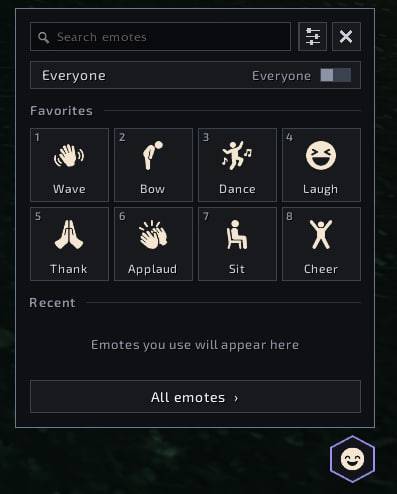
photo_2026-10-13_11-05-40.jpg
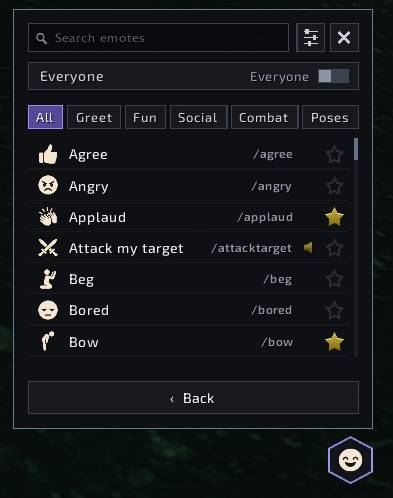
photo_2026-10-13_11-05-35.jpg
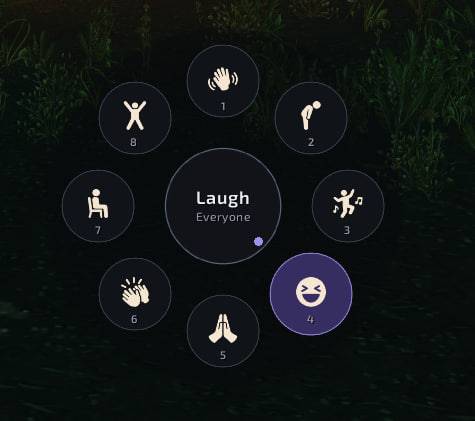
photo_2026-10-13_11-05-27.jpg
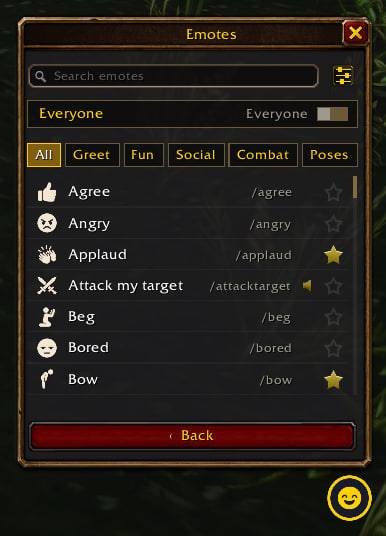
photo_2026-10-14_01-32-10.jpg
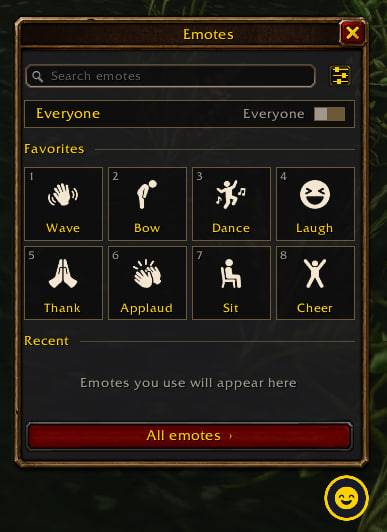
photo_2026-10-14_01-32-14.jpg
Description
Facet Emotes
Emotes in one click for World of Warcraft: Forever. No more remembering slash commands: a compact panel with your favorite emotes, a hold-to-use emote wheel, search through every emote in the game, and emotes right in the unit right-click menu.
Features
- Quick panel — 8 favorite emotes with icons and labels, plus your 5 most recent ones. Opens from a small screen button, the minimap button or a key binding.
- Number keys 1–8 — while the panel is open, press a number to perform that favorite (Shift + number keeps the panel open).
- Emote wheel — hold a key, flick the mouse toward an emote, release. Release in the center to cancel. Works anywhere, including in combat.
- All emotes — a searchable list of every emote in your client, grouped into Greet, Fun, Social, Combat and Poses. Search finds emotes by name and by any of their slash commands.
- Favorites in one click — star an emote in the list (or right-click it) to add it; right-click a favorite to remove it. Empty slots keep their place, so your number keys never shift.
- Target or everyone — the panel shows who the emote goes to; one click switches between your target and "everyone" without dropping your target.
- Unit menus — right-click a player or party member portrait: an Emotes submenu with your favorites.
- Two looks — Classic (default) uses Blizzard's own window frame, gold Friz Quadrata titles, standard slots and buttons, a gold-ringed launcher and a classic minimap button; Modern is a clean flat dark style. Switch any time in the settings, no reload needed.
- Consistent icons — a matching set of icons for the most popular emotes, voice emotes marked, nothing that jumps around: the panel keeps the same size in every view.
- All client languages — English, Russian, German, French, Spanish (EU and Latin America), Portuguese (Brazil), Italian, Korean, Simplified and Traditional Chinese. Emote names follow your game client.
How to use
- Panel: click the hexagon button or the minimap button, or bind a key: Options > Keybindings > Facet Emotes > Open emotes.
- Wheel: bind Emote wheel (hold) in the same place.
- Move the screen button: Shift + drag. Move the minimap button: drag it along the minimap edge.
- Settings: the slider button in the panel or right-click either button: look (Classic / Modern), minimap button, screen button, number keys, unit menus, clear recent.
Commands
/fe— open or close the panel/fe scale 1.2— scale of the buttons, panel and wheel (0.5–2)/fe style— switch between the Classic and Modern look/fe reset— put the buttons back to their default positions
Notes
- Built for WoW: Forever (interface 16001). Emotes are performed through the game's own emote function, exactly like the chat emote menu.
- Standalone: no libraries or other addons required.
- Font: Exo 2 (SIL Open Font License, included).
Missing an emote on the quick panel or have an idea? Please leave a comment — feedback is very welcome.
Facet Emotes Team