Facet Bags
- By
A clean all-in-one bag window for WoW Forever with smart categories, search, sorting, gear upgrade arrows and automatic reagent sorting into profession bags.
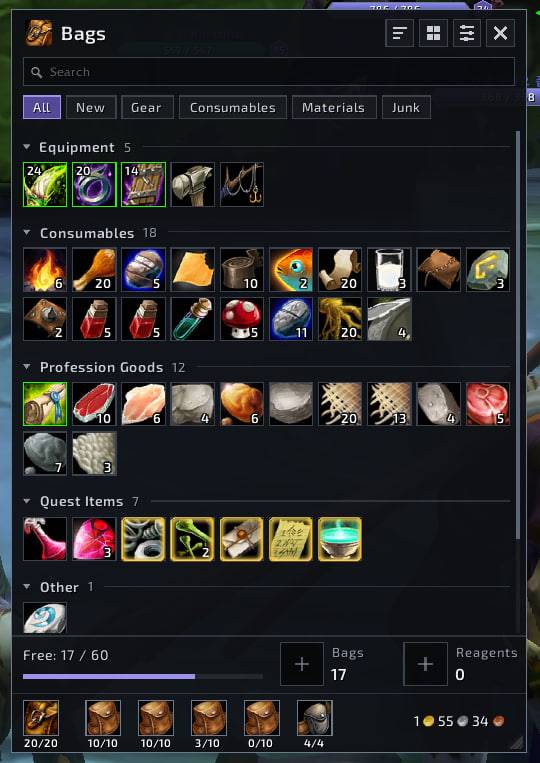
photo_2026-10-12_01-26-57.jpg
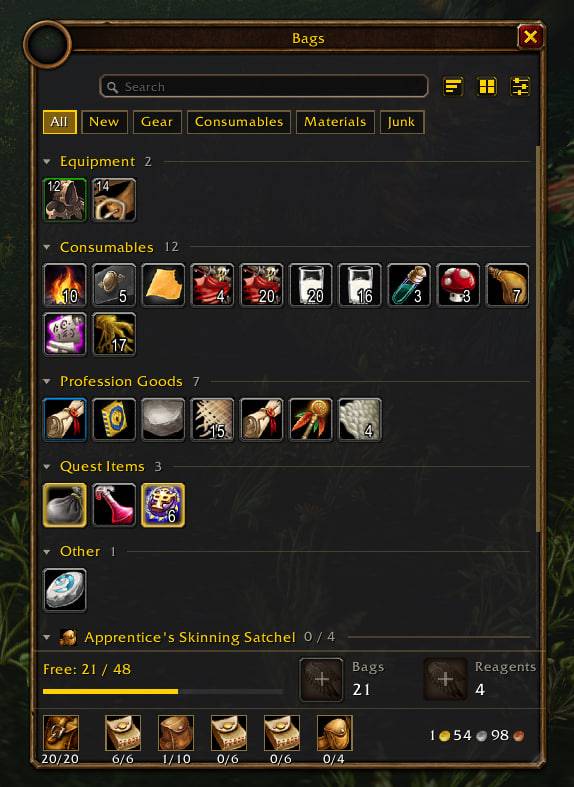
photo_2026-10-14_01-32-18.jpg
Description
Facet Bags
A clean, all-in-one bag window for World of Warcraft: Forever. Facet Bags replaces the default bag frames with a single window — in the familiar Blizzard style or a flat modern one: your items are grouped into categories, searchable and sortable, and gear that is better than what you wear is marked with an upgrade arrow.
Features
- Two looks — Classic (default) uses Blizzard's own bag frame, portrait, fonts and item slots, so it looks like the standard bags; Modern is a flat dark window. Switch any time in the settings, no reload needed.
- One window for all bags — opens with the usual bag keys and bag buttons; your backpack and bags are shown together.
- Stable size, stable items — the window never jumps: you set the number of columns and drag the corner for height, the rest scrolls. While the window is open, items stay where they are: a used-up item leaves an empty slot in place, new loot is added to the end of its section.
- Smart categories — Equipment, Consumables, Trade Goods, Quest Items, Other and Junk, plus profession and reagent bags. Sections collapse, and the state is remembered.
- Quick filters — All, New, Gear, Consumables, Materials, Junk.
- Search — a full-width search box; non-matching items are dimmed without moving anything.
- Clear item cells — quality-colored borders, item level on equipment, stack counts, a calm dot on new items, junk dimmed.
- Upgrade arrows — equipment that beats your currently equipped item is marked; grey items that are upgrades (common while levelling) stay with your gear instead of Junk. The comparison uses per-class stat weights (in the spirit of Pawn), tuned for levelling.
- Free-slot receivers — the footer shows free bag and reagent slots; drop an item there to store it.
- Bag view — switch to a per-bag layout to see every bag slot in order.
- Sorting — one click moves reagents into profession bags first, then runs the standard sort.
- Bag bar — hover a bag to highlight its items, click to pin the highlight, drag a new bag onto a slot to equip or replace it.
- Safe bag replacement — when you replace a full bag, its items are moved into your other bags first (with a confirmation and a free-space check). Right-click a bag to empty it.
- Automatic reagent sorting — trade goods are moved into matching profession bags automatically.
- Sell junk — at a merchant the Junk section shows a Sell button with the total value.
- All standard actions work — split stacks, drag and drop, sell, bank, mail, trade, apply items — the cells are Blizzard's own item buttons.
- Settings — the settings button in the header: look (Classic / Modern), columns (8–14), item level, reagent auto-sorting.
Commands
/fb style— switch between the Classic and Modern look/fb auto— toggle automatic reagent sorting into profession bags/fb debug— list which items the addon considers valid for your profession bags
Notes
- Built for WoW: Forever (interface 16001) and its client restrictions: no combat log, no protected actions from addon code. Item moves never happen in combat.
- Languages: English, Russian, German, French, Spanish (EU and Latin America), Portuguese (Brazil), Italian, Korean, Simplified and Traditional Chinese. The language follows your game client; category names use Blizzard's own translations.
- Standalone: no libraries or other addons required.
- Font: Exo 2 (SIL Open Font License, included).
Found a bug or have an idea? Please leave a comment or open an issue — feedback is very welcome.
Facet Bags Team