Exact Item Count
- By
Shows how many of an item you own — split by item level and crafting quality — right in the tooltip, counting your bags, banks, warband bank, equipped gear, profession tools, and every alt
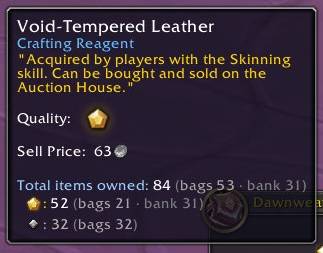
Count by quality
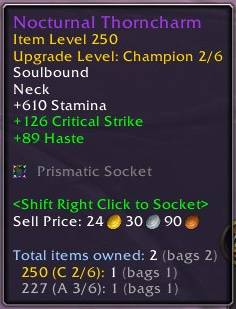
Count by upgrade level
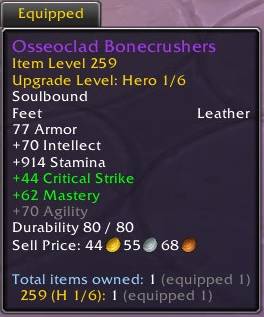
Equipped items
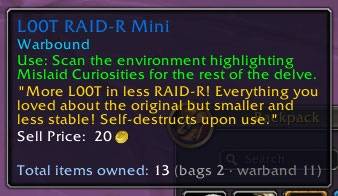
Multiple sources
Description
You have 2 of those boots. Are they the R5s, or last week's R4s? And those 38 hides: gold or silver?
Any bag addon can count to 2. Exact Item Count tells you which 2: split by item level, crafting rank and reagent quality, across your bags, banks, mail, auctions and every alt. Right in the item tooltip.
What it does
- Every place you own it: bags, character bank, warband bank, equipped gear (profession tools included), mailbox, and every alt by name.
- One row per item level, highest first, with its crafting-rank star.
- Upgrade tracks too: dropped gear shows its progress, like
658 (H 2/6): 1. - Reagent tiers under one total: silver and gold count together, one row per star.
- Recipes count their crafted item, usually the number you're actually after.
- Auctions stay separate: your listings get their own
On auctionline, never mixed into what you own. - Mail keeps counting: items sent to your alts, AH buys on their way to you, and cancelled listings all show as mail until collected.
- Every count says where:
(bags 2 · warband 60 · Liara 30). - Search from chat: no item in hand?
/eic find hidelists every match with counts and places, alts named. Click a result for the full breakdown. - Remembered between sessions: bank and alt counts show up anywhere, anytime.
What it looks like
(★n stands in for the in-game quality icon.)
About to craft R5 boots? Check whether the pair in your bags is already R5. The rank you're hovering is always listed, even if you own 0 of it:
Total items owned: 3 (bags 2 · equipped 1)
  681 ★5: 0
  668 ★4: 3 (bags 2 · equipped 1)
And the 38 hides:
Total items owned: 38 (bags 20 · warband 12 · Liara 6)
  ★2: 18 (warband 12 · Liara 6)
  ★1: 20 (bags 20)
A recipe counts its crafted item too, with the full breakdown:
Total items owned: 1 (bags 1)
Crafted items: 12 (bags 4 · Liara 8)
  ★2: 8 (Liara 8)
  ★1: 4 (bags 4)
Mailed a stack to an alt? It counts under their name until they collect it. Bought mats or cancelled a listing? Yours as mail the moment it goes through. And your live auctions stay on their own line, because a listed item isn't yours unless it fails to sell:
Total items owned: 24 (bags 10 · mail 2 · Liara 12)
On auction: 3 (yours 1 · Liara 2)
Have no item in hand and can't remember which alt has the hides? Ask in chat:
/eic find hide

Exact Item Count — 2 matches for "hide":
  [Stormhide]: 38 (bags 20 · warband 12 · Liara 6)
  [Stormhide Boots]: 2 (bags 2)
Options
All settings are display-only: flip anything and flip it back, no rescan needed. Under Options → AddOns → Exact Item Count (or /eic): each location can be always counted, counted only while you hold a modifier key, or off; tooltips can stay compact until you hold the key; alt detail is your call (top-N by count, every name, or one total); and there's a character list with per-character hide and delete.
Light by design
Reads your bags only when they change, and snapshots your bank, auctions and mailbox while their windows are open. It's read-only and touches nothing secure, so it can't taint Blizzard's UI.
Also by me
Like your counts exact? Fish & Tips does it for fishing: every catch tracked by zone, session and lifetime, across all your characters. Plus double-right-click casting, auto-loot for your catch, and a live read on what the session is worth at the AH.
If it spares you some bag math, you can buy me a coffee. ☕
Found a bug? Report it on GitHub.
The Exact Item Count Team