


Eversong Unit Frames
Unlocked Frames.png

Frames.png
Aggro Highlight.png
Aggro Override.png
Dispel Highlight.png
Description
Eversong Unit Frames
A unit frame addon built from scratch for World of Warcraft: Midnight (12.1). Midnight's Secret Values stop addons from reading health, auras and unit state during a fight. Which is why many unit frame addons, like Shadowed Unit Frames, don't work anymore or go quiet exactly when you need them. Eversong is built the other way round: it hands the decision to the game and displays the answer, so everything on your frames keeps working in combat.
Frames
- Player, Pet, Pet Target, Target, Target of Target, Focus, Focus Target
- Party, with optional Party Pet and Party Target frames per member
- Raid and Raid Pet, up to forty players (see Raid below)
- Boss frames
- Every frame individually enabled, sized, scaled and positioned; drag them into place, or type exact coordinates
- Frames anchor to each other or to the screen, so moving one takes its companions with it
- Secure click handling throughout: targeting, menus and click-casting work mid-fight
- Blizzard's own frames hidden per element, only where you have replaced them
Raid
- Raid and Raid Pet as two independent blocks, each with its own size, layout and position
- Sorted by roster index or by name, ascending or descending, and banded by raid group, class or assigned role before that. Blizzard's own group header does the work, so the order stays correct even in a fight.
- Optionally one block per raid group, wrapped into a grid you shape: groups per row, the spacing between bands, and which groups are drawn at all.
- The raid block can stand in for your party frames, and either block can hide itself while the raid is still a single group of five.
- Main Tank and Main Assist blocks for the raid's role assignments, each with a frame for what that player is holding beside it. The Main Tank block draws the players your raid has marked, anyone the game has in the tank role, or both.
- Frames per column, growth direction, and the whole grid moved as one piece.
- Aura rows drawn by the game on the member, Main Tank and Main Assist frames: debuffs, buffs, dispellable-only debuffs, enlarged role debuffs, and the big defensive-cooldown icon.
- The dispel cue works here too, and knows what your specialisation can remove
- Roster icons resized for a small frame: leader, role, ready check, resurrection and pending summon
Bars
- Health bar with class, reaction or static colouring, plus optional threat colouring
- Heal prediction: incoming heals, absorb shields and heal absorbs as separate overlays, with a glow where a shield runs past the end of the bar
- Power bar, with an optional "only show for mana" mode
- Cast bar with channel and uninterruptible states
- Class resource pips: combo points, Holy Power, Chi, Runes, Soul Shards, Arcane Charges, Essence and the rest. Plus vehicle combo points, and charged combo points in their own colour
- Empower stage markers on the cast bar, so an Evoker can see where the next stage begins while holding a spell
- Stagger bar for Brewmaster monks
- Soul Fragments for demon hunters, drawn as a row of points
- Alternate power for the resources quests and encounters add
- XP and reputation bar, rested experience included, and reputation in the colour of whichever scale the faction is on: a standing, a renown level, a friendship rank or a paragon cycle
- Bars can be detached into free-standing widgets with their own size, scale and anchor
- Vertical, reversed and inverted fills; smooth animated movement
Auras
- Buff and debuff groups on the single frames and the party, each with its own size, layout, growth direction and sorting. The raid frames take the game-drawn rows below instead, which is the display that fits an eighty-pixel frame and keeps working in a fight
- Filtering by duration, by who cast it, by dispel type and by your own spell list
- Dispel-type coloured borders on icons
- Own cooldown numbers in your font and colours, with a warning colour below a threshold you set, and a highlight when an aura enters its refresh window
- Private auras drawn on your frames by the game itself
- Game-drawn aura rows on your party and raid frames — buffs, debuffs, dispellable debuffs and the big defensive cooldown, laid out by the game on its own side of the line, so they keep updating in combat
Dispel cue
Two independent cues, per frame, neither of which reads an aura, so both survive a fight:
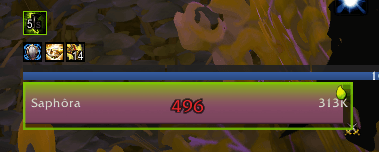
- Blizzard's dispel overlay: the same pulsing highlight its raid frames use, and it knows what your specialisation can remove
- Health bar tint in the debuff's own colour, with adjustable style and strength
Text and indicators
- Tag-based texts: name, health, power, percentages, absorbs, threat, AFK and offline timers, druid forms, class-specific resources and more
- Text blocks placed anywhere on the frame or on any bar
- Status icons: combat, resting, PvP flag, leader and assist, raid role, group role, raid target marker, ready check, resurrection, pending summon, class icon, rare and elite badge, and quest boss
- Phasing and separate-instance-group icons on the party and raid frames, so you can see at a glance who you cannot actually reach
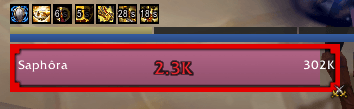
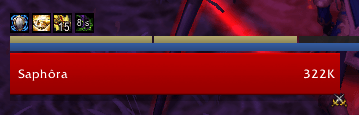
- Border highlighting for aggro, curable debuffs, your current target or focus, mouseover, rare and elite units on Blizzard's own artwork, and the aggro ring flashes when your threat changes
- Range fading: frames dim when the unit is out of the range of your own spells
- Fader: frames fade out when nothing is happening and return in combat, on target, or when hurt
- Floating combat text over the frame
Click-casting
- Bind a spell, an item, a macro, targeting or the unit menu to any modified mouse click, any of the other mouse buttons, or a key held while the cursor is over a frame
- Two bindings can share one button by splitting friendly and hostile, a heal and an attack on the same click
- Per frame family, so the raid block can be bound while the target frame is left alone
- Bindings live in the profile, so per-specialisation profiles carry their own set and an exported layout brings them with it
- Plain left and right click are never touched: they target and open the unit menu the way the game does it
- The game checks its own click bindings first, so any of yours that clash with one are marked in the list rather than silently doing nothing
Buff manager
- Track named buffs as small icons in the corners of a group frame's health bar: your own HoTs, somebody's external, a raid cooldown
- Spells go into indicators: a set of spells, a corner to put them in, and what the icons show picked one at a time or through a filter, a named set you build once and assign wherever you want it
- Three filters ship with the addon, and they are the ones your own spellbook cannot offer you: Externals, Raid cooldowns and Immunities
- Each icon can carry the cooldown sweep, the seconds remaining, the stack count, and a refresh marker that brightens it once recasting would waste nothing
- Per frame family, with a scale beside it, so the same indicators can be small on a raid button and larger on a party one
- Buffs on friendly units. The game refuses to filter debuffs by spell on someone you can help, and a refused filter shows every debuff rather than none. Curable debuffs already have their own cue, and boss debuffs come through the game's own aura rows
Configuration
- Full in-game options panel, everything live, no reload needed
- Profiles, plus per-specialisation profiles via LibDualSpec
- Shared bar textures, fonts and borders through LibSharedMedia, including ten bar textures of our own, handed back to it so your other addons can use them too
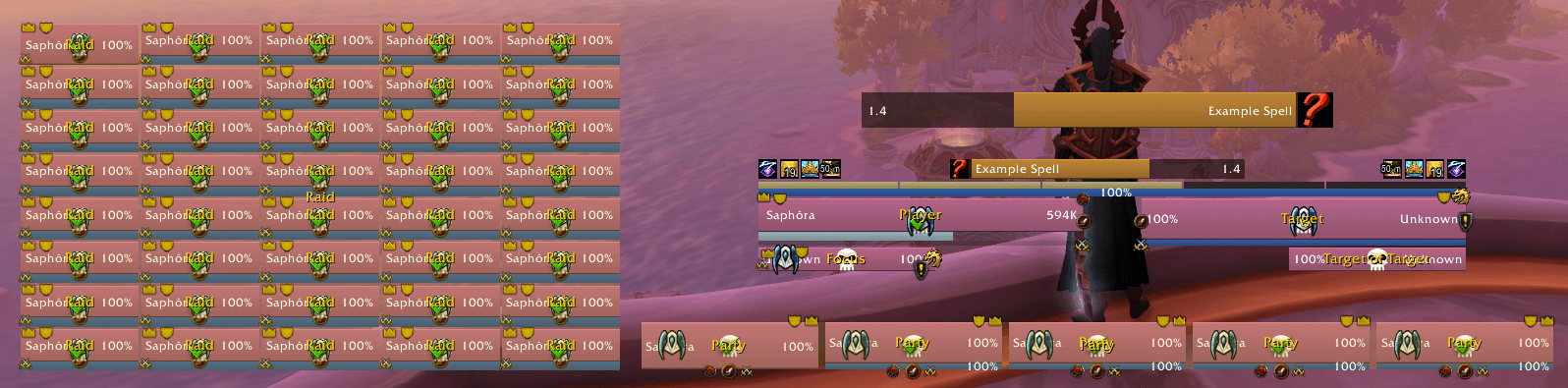
- Unlock mode shows every frame, even empty ones, so you can lay out your whole UI at once
Not in this release
Arena and Battleground frames are not built yet, and neither is the totem bar.
One feature still ships untested, because I do not play the class it belongs to: charged combo points (Rogue). If you play one, a bug report is very welcome. Getting started
/eversong opens the options. /eversong unlock frees the frames for dragging; combat locks them again by itself. Raid, Raid Pet, Main Tank, Main Assist and the boss frames start switched off — tick them on under Enabled Units, and unlock mode will show you the whole grid even when you are standing in town on your own.
The Eversong Unit Frames Team
