


EAM(EventAlertMod)
- By
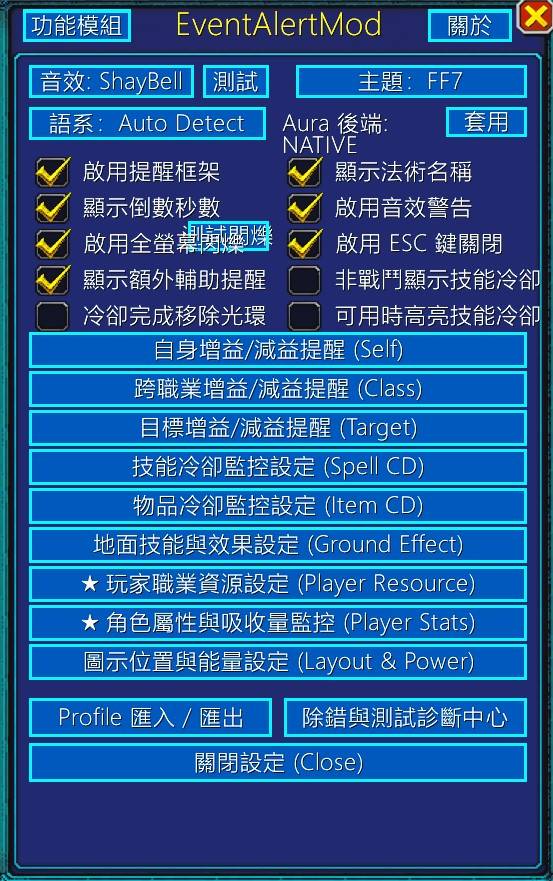
01_主è¨å®é¢æ¿_MainOptions.jpg
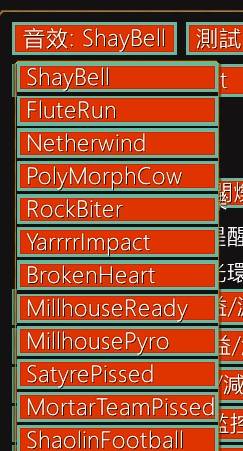
05_æ示é³æä¸æé¸å®_SoundDropdown.jpg
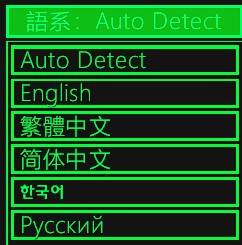
06_å¤åèªç³»ä¸æé¸å®_LocaleDropdown.jpg
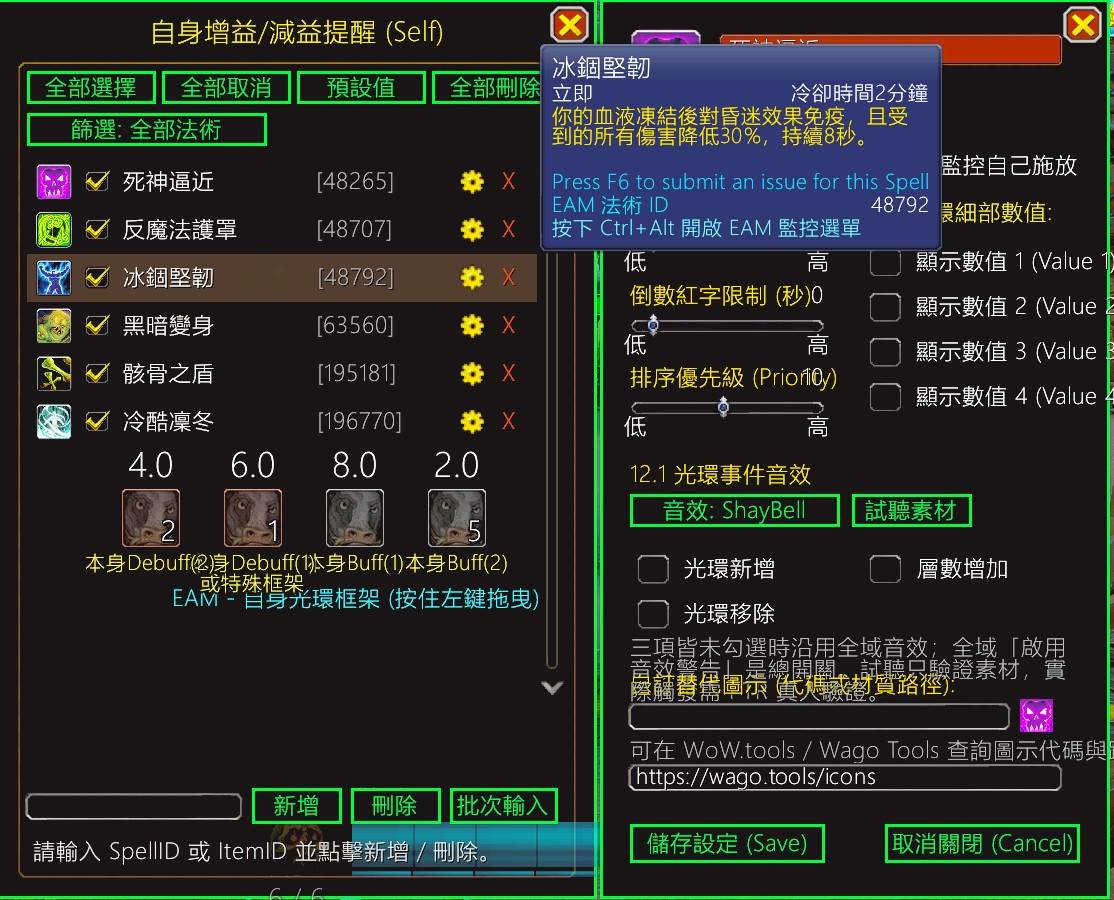
07_èªèº«å ç°æ¸ å®èç´°é¨æ¢ä»¶è¨å®_SelfAuraConditions.jpg
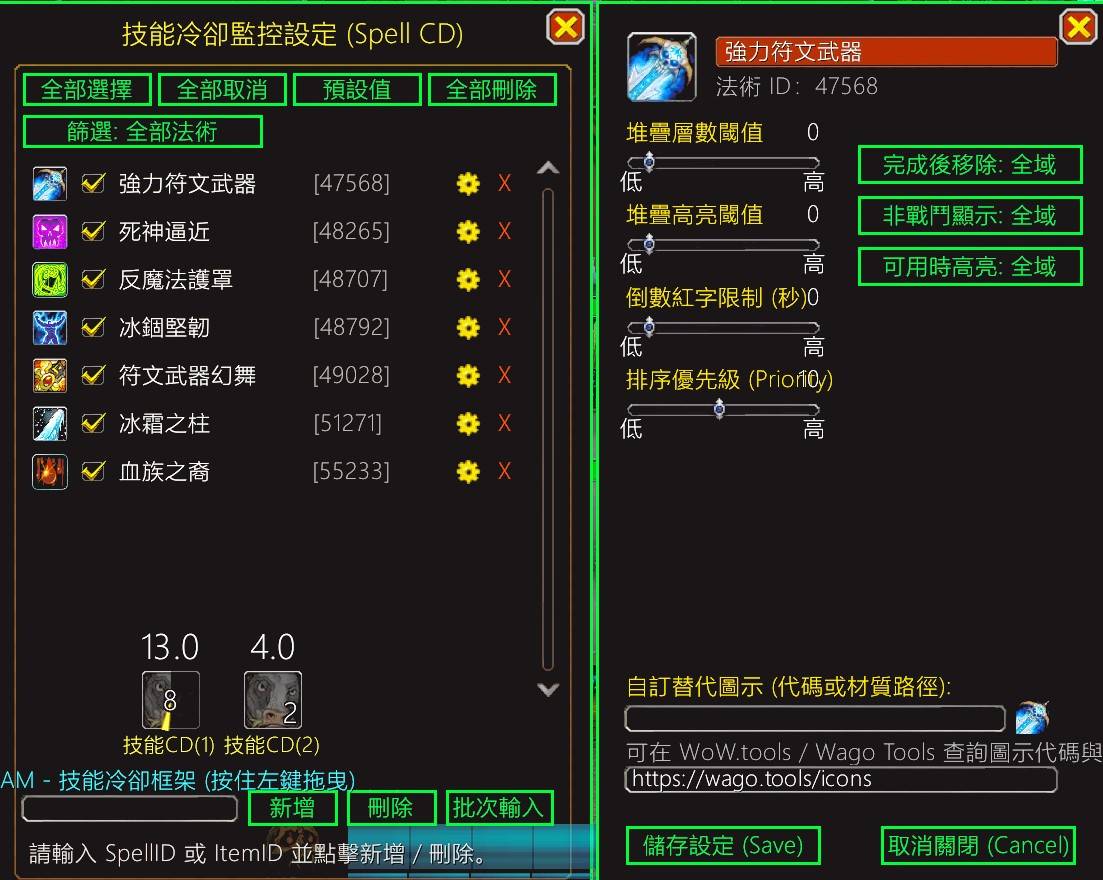
08_æè½å·å»ç£æ§èè¡çºè¦å¯«è¨å®_SpellCooldownOptions.jpg
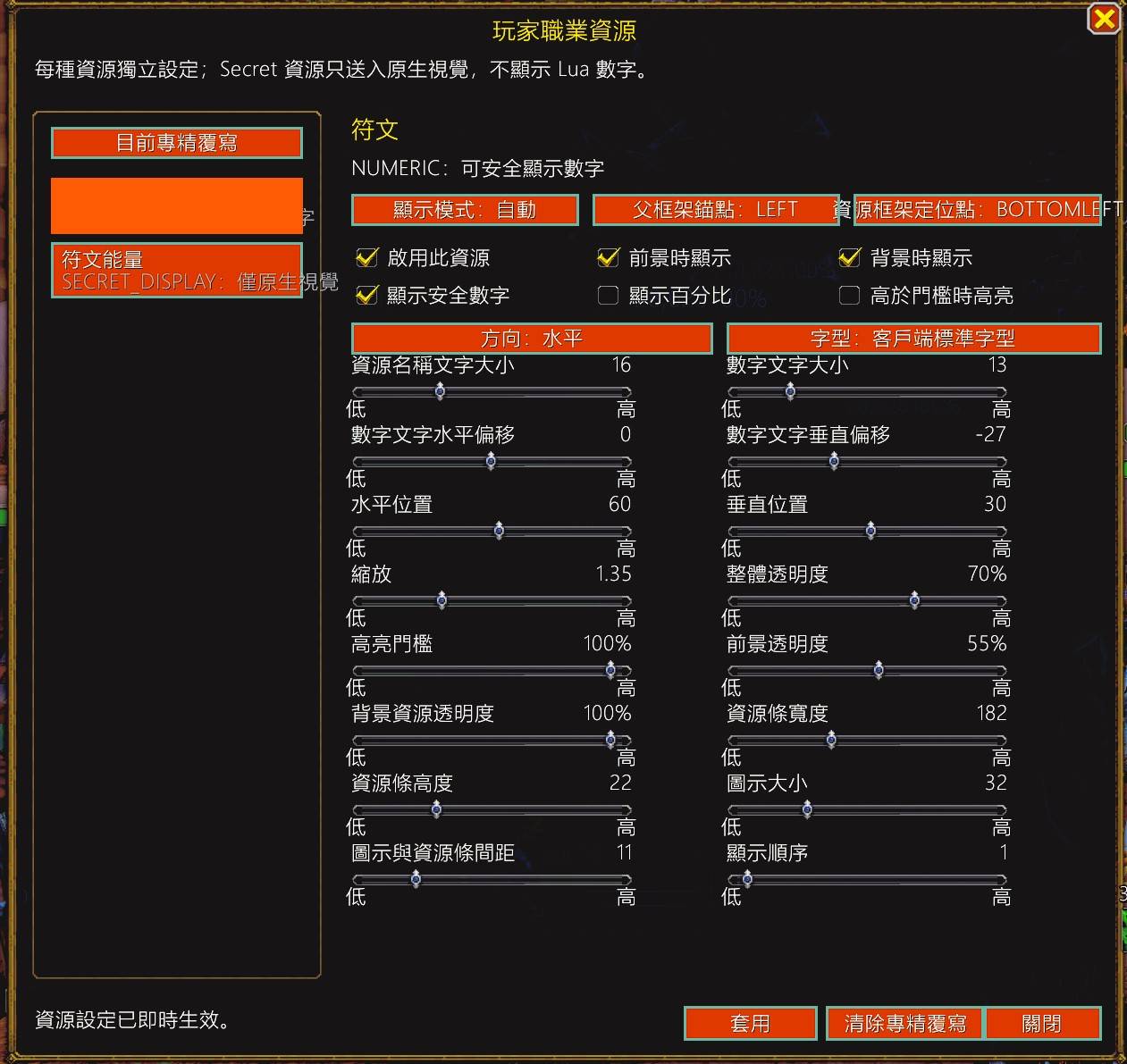
11_ç©å®¶è·æ¥è³æºè¨å®é¢æ¿_PlayerResourcePanel.jpg
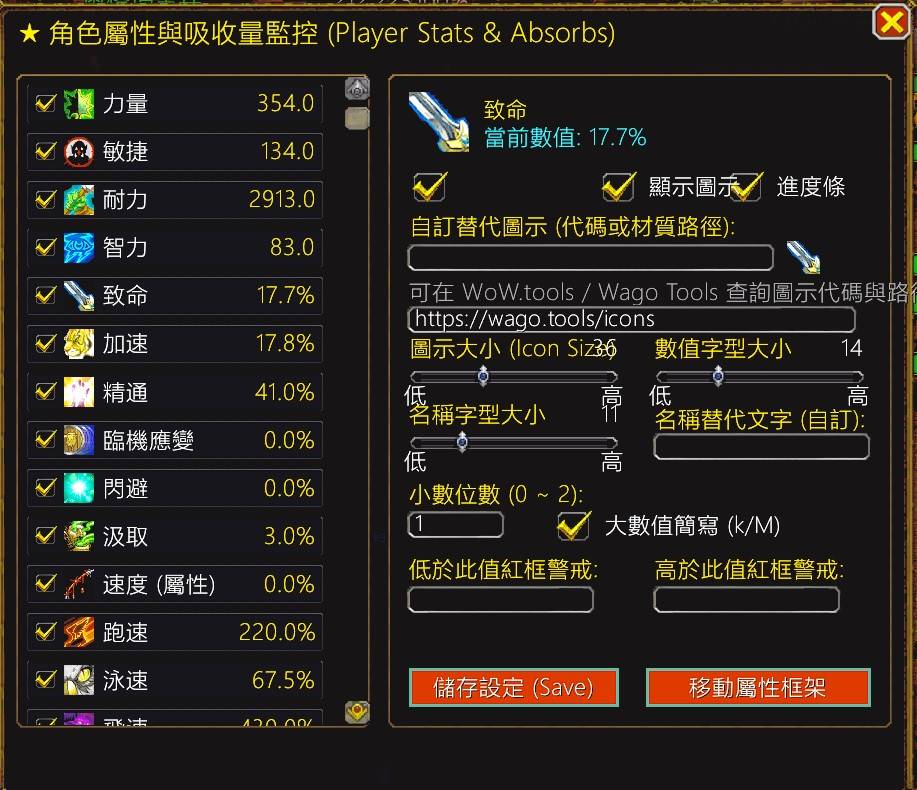
12_è§è²å±¬æ§èå¸æ¶éç£æ§é¢æ¿_PlayerStatsPanel.jpg
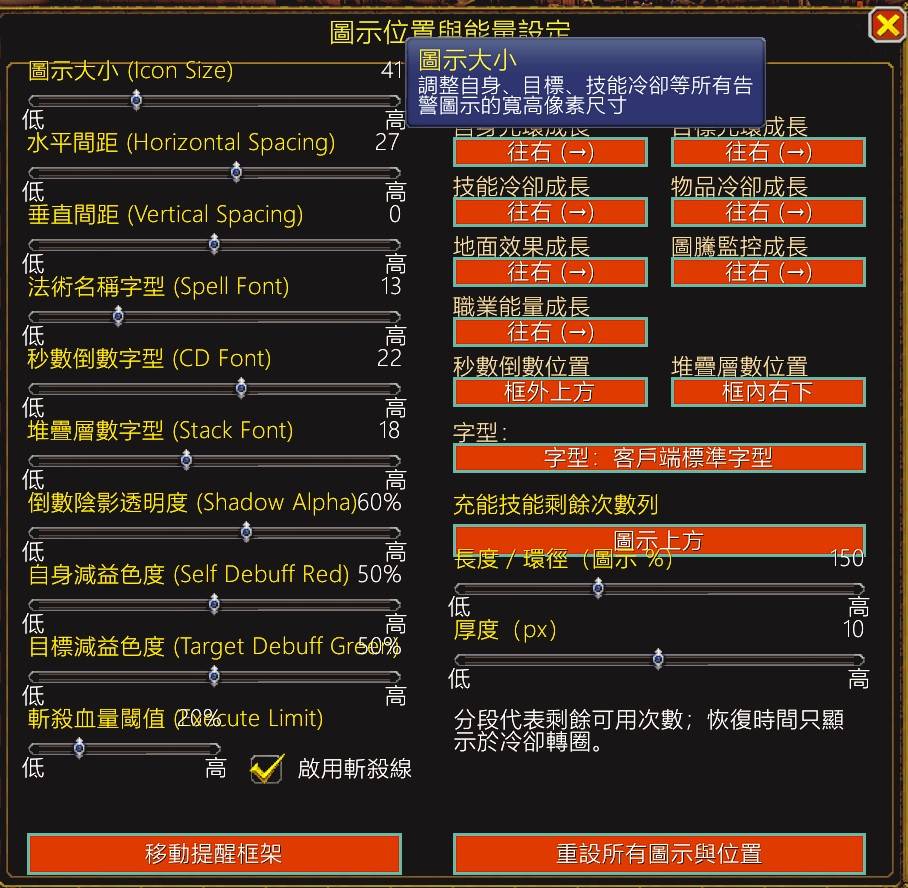
13_åè¦æ¡æ¶ä½ç½®æçèæ¸åæ示_LayoutPositionOptions.jpg
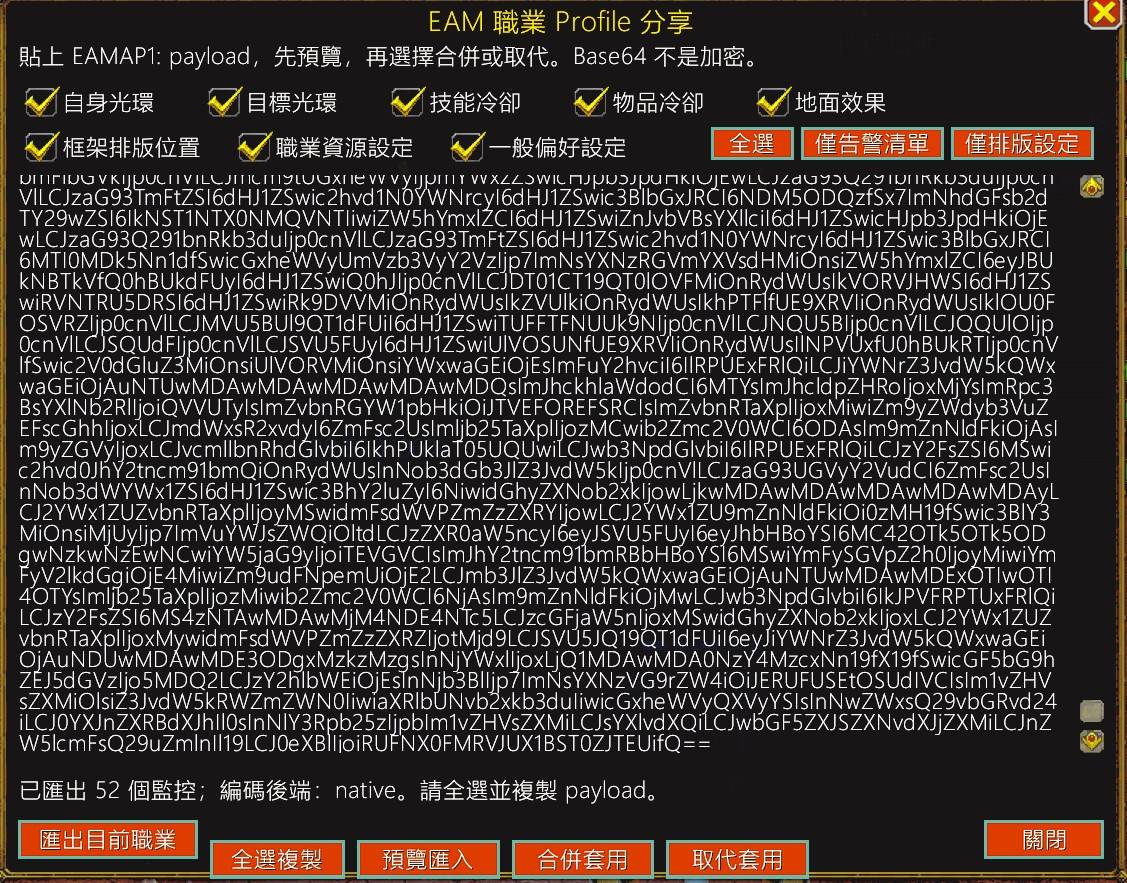
14_è·æ¥Profileå享èå¯å ¥å¯åºé¢æ¿_ProfileCodecPanel.jpg
Description
EventAlertMod Retail 12.1 (EAM)





🚀 專為《魔獸世界:正式服 (Retail 12.1 / 12.0+)》打造的超輕量、零污染、純事件驅動法術監控與戰鬥告警插件!
🌐 官方線上說明文件與導航中心:https://ziyuefan.github.io/EventAlertModRemake/
🌟 為什麼選擇現代版 EventAlertMod (EAM)?(四大差異化核心優勢)
| 傳統法術監控 / 複雜大型插件 | 現代重構版 EventAlertMod (EAM) |
|---|---|
| ⚠️ 沉重且佔用資源:大量背景 OnUpdate 輪詢、吃記憶體、引發戰鬥掉幀。 | ⚡ 極致輕量與零負擔:純事件驅動架構,全面引入物件池技術(State Pools),消滅 GC 記憶體垃圾。 |
| ❌ 容易受污染報錯:12.0+ 暴雪引入 Secret Values 後,常常在戰鬥中報錯噴黃字或引發 UI 異常。 | 🛡️ 暴雪 12.0+ 終極安全防護:獨家採用原生 C-Level StatusBar:SetValue 直通渲染技術,絕不觸發 Taint 污染。 |
| 🔄 設定繁瑣、需匯入字串:需手動到網站翻找 WA 字串或手寫 Lua 條件判斷。 | 🎯 直覺易用、秒加監控:滑鼠停在任何技能、光環或物品上按 Ctrl + Alt 一秒加入,無需查 ID。 |
| 🐢 速度顯示不準確:傳統插件無法偵測 10.0+ / 11.0+ / 12.0+ 飛龍騎術的真實衝刺速度。 | 🏃 業界唯一:四合一速度淬鍊:專屬對接 C_PlayerInfo.GetGlidingInfo(),完美支援 830%~1400% 動態極速! |
✨ 八大獨立告警模組 (8 Independent Alert Modules)
EAM 擁有 8 個完全解耦、獨立排版、自由拖曳的專業監控模組:
🔮 自身光環 (Player Buff / Debuff):監控自身增益與減益,支援堆疊層數與高精度倒數。
🎯 目標光環 (Target Buff / Debuff):精確監控當前目標之光環、控制與 Debuff 狀態。
⚔️ 跨職業光環 (Cross-Class / Target Cast):監控敵方關鍵爆發或隊友重要增益。
⏳ 技能冷卻 (Spell Cooldown):精確監控技能冷卻與充能層數;支援圓形環狀進度條 (
Radial Mode) 與框外線性條 (TOP/BOTTOM/LEFT/RIGHT)。🎒 物品冷卻 (Item Cooldown):飾品、主動使用裝備與消耗品冷卻監控。
🌋 地面效果 (Ground Effect):監控玩家施放的無光環地面範圍技能(如死亡凋零、褻瀆、冰霜之球、反魔法立場),支援天賦法術族群智能對齊。
⚡ 玩家職業資源 (Player Resource):支援全 13 職業、40 組專精、17 種資源獨立節點(法力、怒氣、能量、連擊點、真氣、狂亂、符能、奧術充能、靈魂裂片、神聖能量、精華等)。
📊 角色屬性與吸收量 (Player Stats & Absorbs):全方位即時監控 18 種角色數值(主屬性、副屬性、四合一速度、護甲值、總吸收盾量與治療吸收量)。
🎨 現代化視覺與極致操作體驗
🏷️ 多維戰術群組與標籤管理 (Group Management):支援技能多對多標籤歸屬、內建 4 大系統戰術群組(爆發/減傷/控場/地面)與自訂群組、獨立二級管理側窗、戰鬥情境過濾與技能細節視窗下拉複選器。
🎵 LibSharedMedia-3.0 (SharedMedia) 素材生態全面整合:動態探測所有第三方 SharedMedia 音效、字型與材質包,支援自適應長清單滑鼠滾輪選單與字型全域 60fps 熱套用(免 /reload 即時生效)。
🐮 經典奶牛頭位置預覽:排版模式下以經典奶牛頭圖示 (
Spell_Nature_Polymorph_Cow) 清楚標記 8 大告警框架定位。🖼️ 全模組自訂替代圖示 (Custom Icon Override):所有模組均可輸入官方 FileID(例如
132307)或材質路徑,自訂取代預設圖示,並附即時動態預覽方塊與 Wago.tools 查詢指引。💀 死亡騎士符文儀表板:依專精動態切換專屬圖示,內建 6 格微型充能冷卻條(0%..100% 平滑動畫)與
/eam rune 槽位診斷視窗。⚡ 60fps 全方位即時熱預覽:調整尺寸、間距、透明度、轉圈動畫、文字大小等,畫面上即時動態響應,非戰鬥不需
/reload。💬 全介面控制項懸停提示 (Hover Tooltips):所有按鈕、核取方塊、滑桿、編輯框與選單均附帶直觀指引,使用門檻為零。
🎨 11 套精美主題風格:EAM 原版經典(石板金框深紅按鈕)、FF7 戰鬥視窗(皇家藍漸層白框)、Windows XP(Luna 藍)、Windows 7(Aero 玻璃)、Windows 10、Windows 3.1(3D 凸面按鈕)、Borland C++ IDE、DOS CRT(P1 磷光綠)、倚天中文、Red Alert(紅色警戒裝甲)、macOS Aqua(果凍膠囊藍)等自由切換,全面支援 Modern WoW 垂直漸層與所有子視窗無縫連動。
📈 暴雪原生 CurveObject / ColorCurveObject 曲線架構全面接入:
• 能量/資源條動態色彩曲線染色:消耗型與累積型資源自動以三色階動態染色(警戒深紅 ➜ 預警金黃 ➜ 專職代表色),完美相容 12.0+
UnitPowerPercent 原生硬體級渲染。• 階梯閥門曲線 (Step Gate Curve):透過二元階梯函數安全穿透受保護秘密值,實現精確斬殺與警戒,零報錯零 Taint。
• SecondsFormatter 自適應精度曲線:時間倒數文字依剩餘秒數平滑切換精度(長時間整數,關鍵 <= 5 秒小數點),零 GC 負擔。
• 非線性冷卻進度曲線:支援線性均勻 (Linear)、三次加速衝刺 (Cubic) 與餘弦平滑 (Cosine),營造大招即將就緒的戰鬥衝刺張力。
• 全螢幕瀕死動態呼吸警示:血量危急時全螢幕邊緣動態呼吸脈動,血量越低紅框越濃烈,脫戰自動平滑隱藏。
🚨 進入戰鬥紅框閃爍:提供全螢幕戰鬥進入警示動畫與即時測試按鈕。
📦 Profile 設定檔跨角色分享:支援 8 大分類自選項目匯出/匯入(EAMAP1 JSON / Base64 編碼),附防禦性白名單校驗。
🌐 完整多國語系支援:繁體中文 (zhTW - 嚴格對齊台灣官方術語:致命、加速、臨機應變)、簡體中文 (zhCN)、英文 (enUS)、韓文 (koKR)、俄文 (ruRU)。
📸 介面圖文導覽與功能展示 (Feature & UI Showcase)
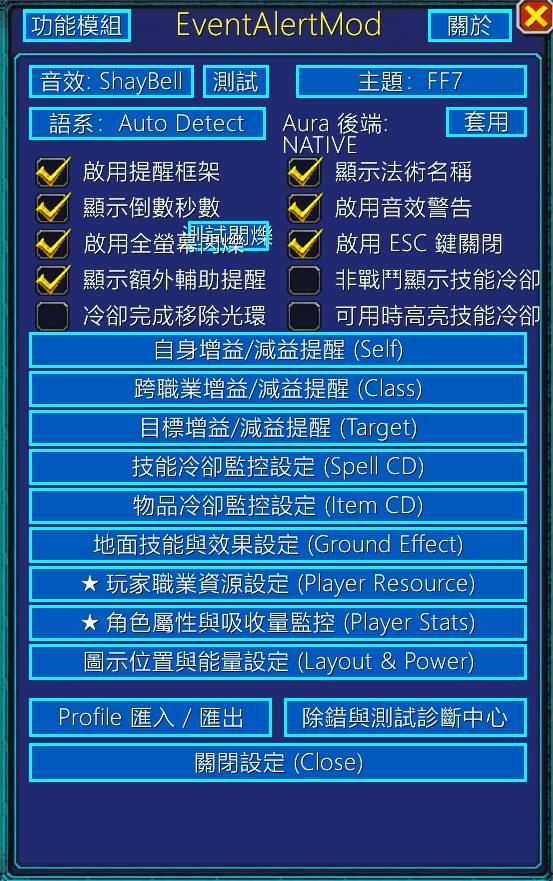
1. 主設定與系統選單 (Main Options & System Preferences)
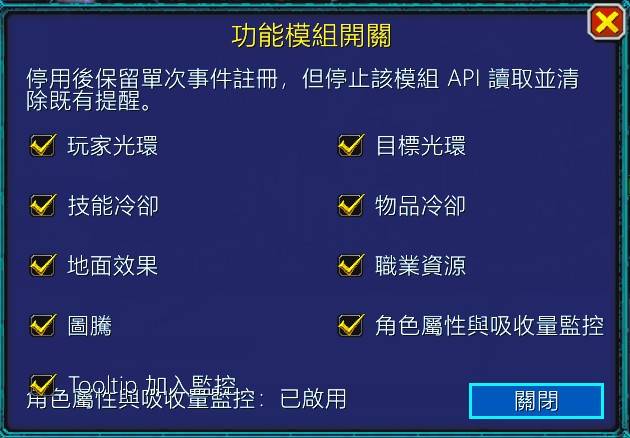
| 主設定面板 (Main Options) | 功能模組開關 (Module Options) | 關於插件資訊 (About Panel) |
|---|---|---|
 |
 |
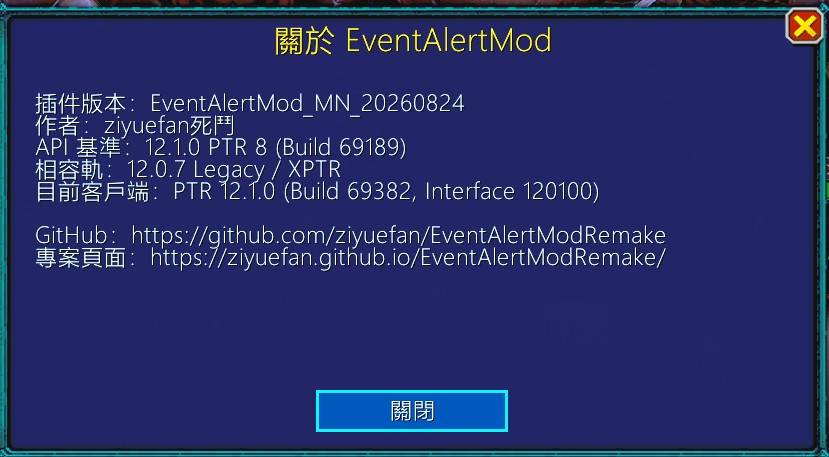 |
| 整合主題/音效/語系選單、光環後端切換與全域開關 | 8 大功能模組獨立事件監聽與資源開關 | 插件版本、作者資訊、API 基準 (12.1.0 PTR) 與專案連結 |
| 11 套主題樣式 (Theme Dropdown) | 12 種經典音效 (Sound Dropdown) | 6 大多國語系 (Locale Dropdown) |
|---|---|---|
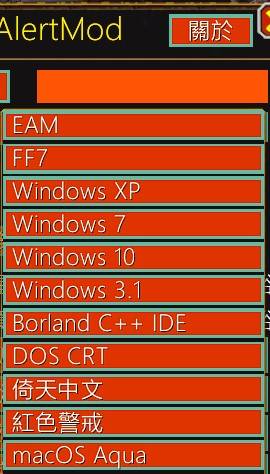 |
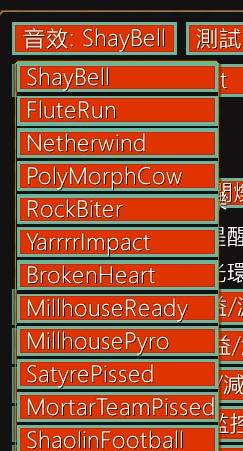 |
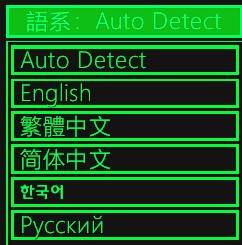 |
| 內建魔獸經典、FF7、WinXP、Borland 等 11 套風格 | 內建 ShayBell、Netherwind、PolyMorphCow 等音效 | 自動偵測、繁體中文 (台灣官方術語)、簡中、英文、韓文、俄文 |
2. 法術清單、細部條件與階層吸附 (Alert Lists, Conditions & Docking)
| 自身光環與奶牛頭預覽 (Self Aura & Preview) | 技能冷卻與行為覆寫 (Spell Cooldown Overrides) |
|---|---|
|
|
| 自身法術清單、奶牛頭排版預覽、層數/高亮/紅字限制、12.1 光環事件音效與自訂圖示 | 技能冷卻清單、完成後移除/非戰鬥顯示/可用時高亮三態覆寫與自訂替代圖示 |
| 物品冷卻設定 (Item Cooldown) | 三級階層吸附與地面效果 (Ground Effect Docking) |
|---|---|
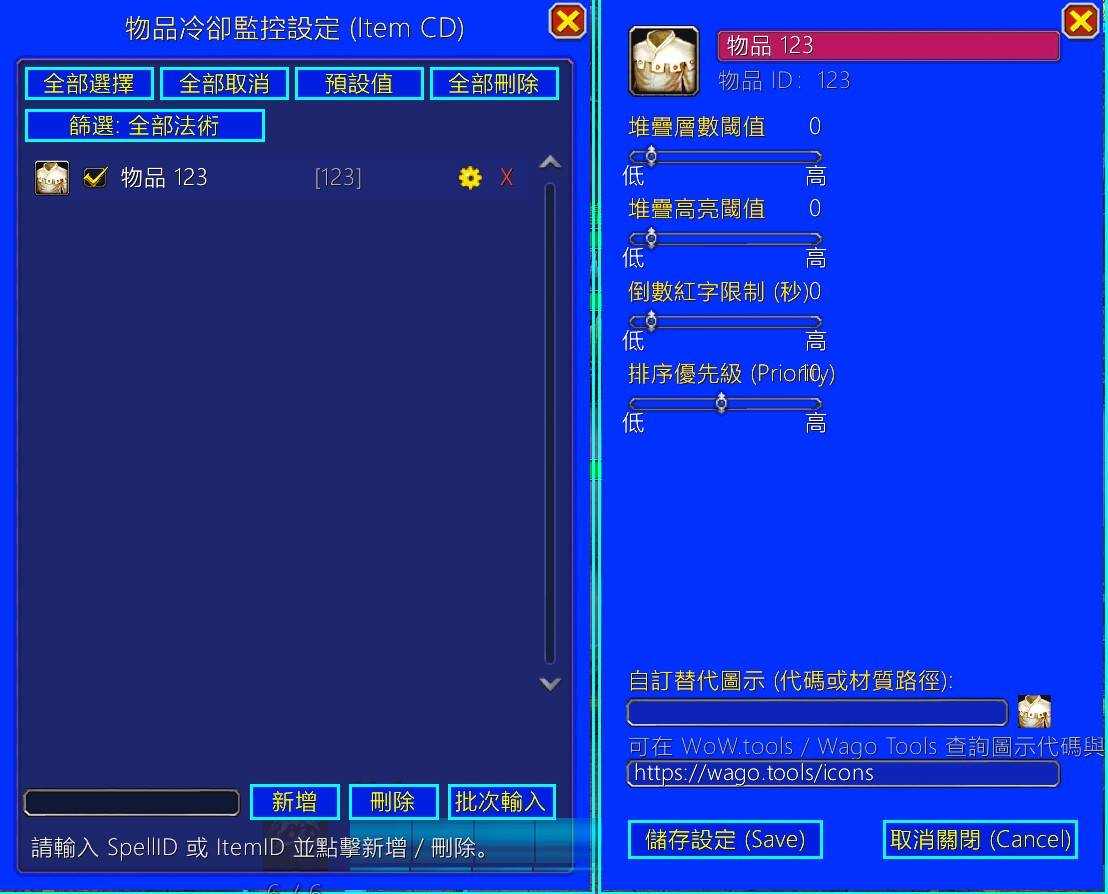 |
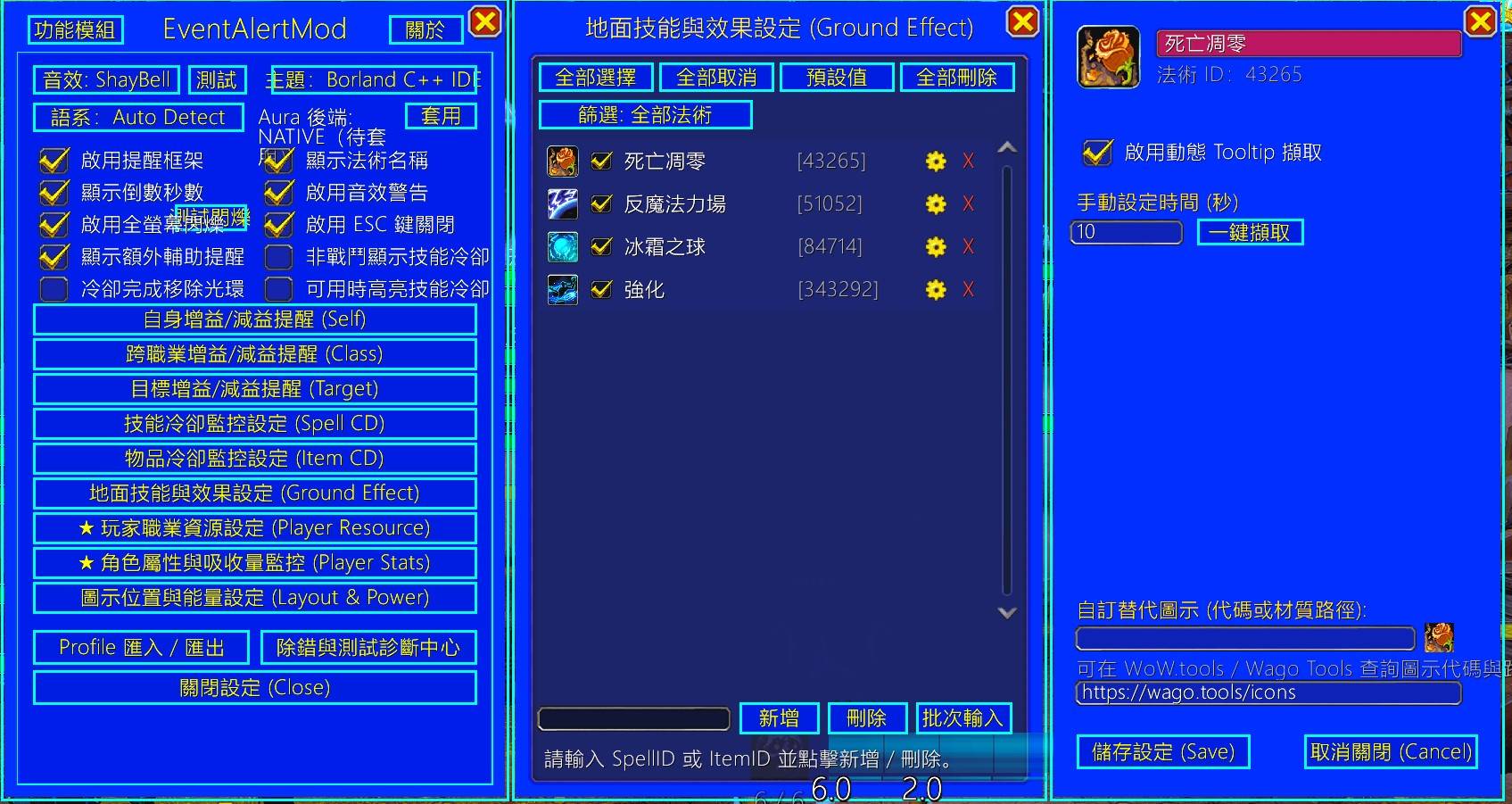 |
| 裝備與飾品冷卻清單、層數閾值、優先級與自訂圖示 | 主選單 ➔ 清單 ➔ 細部條件無縫平滑貼合 (APPEND Docking) 與動態 Tooltip 擷取 |
3. 職業資源、角色屬性與排版設定 (Resources, Stats & Layout)
| 玩家職業資源設定 (Player Resource Panel) | 角色屬性與吸收量監控 (Player Stats & Absorbs) |
|---|---|
|
|
| 符文/符能與各專精能量條、顯示模式、錨點定位、16 項細部滑桿與 Secret 原生保護 | 18 項核心屬性取值、跑速/泳速/飛速/飛龍速度、圖示/進度條開關與警戒值設定 |
| 告警框架排版與懸停提示 (Layout & Tooltips) | 職業 Profile 分享與匯入匯出 (Profile Codec) |
|---|---|
|
|
| 尺寸/間距/字型/透明度滑桿、7 大框架成長方向、充能列設定與控制項懸停 Tooltip 指引 | 8 大自選項勾選、快捷按鈕與 EAMAP1 Base64 字串匯出/預覽/合併套用/取代套用 |
⌨️ 命令列與斜線指令 (Command Line Reference)
EAM 提供豐富完整的斜線命令,主入口為 /eam 或 /eventalertmod(不分大小寫):
| 指令 | 縮寫 / 別名 | 說明 |
|---|---|---|
/eam 或 /eam opt |
/eam option, /eam options |
開啟 EAM 主設定選單 |
/eam preview |
無 | 開啟獨立即時效果預覽小視窗(免進戰鬥測試變色、光效、扇形倒數與屬性) |
/eam reset |
/eam resetpos, /eam center |
將 EAM 主視窗重置回螢幕正中央(解決視窗被拖出畫面找不到的問題) |
/eam list |
無 | 顯示目前職業已啟用的監控清單(自身、目標、冷卻、物品、地面效果) |
/eam add <spellID> |
/eam add player <spellID> |
新增指定法術 ID 至「自身光環」監控清單 |
/eam add target [spellID] |
無 | 新增「目標光環」監控;若不輸入 ID 則開啟手動輸入與候選視窗 |
/eam add cd <spellID> |
/eam add cooldown <spellID> |
新增指定法術 ID 至「技能冷卻」監控清單 |
/eam add item <itemID> |
/eam add itemcooldown <itemID> |
新增指定物品 ID 至「物品冷卻」監控清單 |
/eam remove <spellID> |
/eam remove <player|target|cd|item> <ID> |
從指定監控類別中移除指定法術或物品 ID |
/eam lookup <名稱> |
/eam l <名稱> |
依關鍵字模糊查詢目前職業可用法術候選與 Spell ID |
/eam lookupfull <全名> |
/eam lf <全名> |
依完整名稱精確查詢目前職業可用法術候選與 Spell ID |
/eam showcast |
/eam showc |
開始或停止記錄本次登入成功施放的法術(方便查詢自己剛放的技能 ID) |
/eam profile |
/eam profile export, /eam profile import |
開啟 Profile 設定檔匯出/匯入與字串分享面板 |
/eam rune |
/eam runes, /eam probe rune |
開啟死亡騎士 6 格符文槽位即時狀態、充能秒數與診斷 JSON 視窗 |
/eam unitpower background <KEY> |
無 | 標記指定背景資源缺少事件,啟動 0.5s demand-driven 共用取樣器 |
/eam doctor |
/eam validate |
執行客戶端 API 邊界與運行環境診斷報告 |
/eam test [suite] |
/eam test live |
開啟遊戲內流程測試面板,或執行指定測試套件 (quick/core/boundary/aura121/all/live) |
/eam debug |
/eam export |
開啟系統狀態與精簡 AI 除錯報告輸出視窗 |
/eam debug ground <spellID> |
無 | 測試並除錯特定地面技能之 Tooltip 持續時間解析 |
/eam show / /eam showtarget |
/eam shows, /eam showt |
顯示 Retail 12.1 安全加入光環之操作指引(滑鼠懸停按 Ctrl+Alt) |
/eam help |
/eam ? |
列出所有可用斜線命令說明 |
🖱️ 快速操作指引:滑鼠懸停加入監控 (Ctrl+Alt Quick Add)
在遊戲中,您可以完全不需手動查詢法術 ID:
• 將滑鼠懸停於自身頭像、目標頭像的光環圖示,或快捷列上的技能/巨集/物品上。
• 同時按下鍵盤上的
Ctrl + Alt 組合鍵。• 畫面即刻彈出 EAM 專屬加入視窗,一鍵將其指派至自身光環、目標光環、技能冷卻或物品冷卻監控清單中!
📦 安裝說明 (Installation)
EventAlertMod_MN_*.zip。解壓縮後將
EventAlertMod 資料夾放置於魔獸世界安裝目錄:• 正式服路徑:
World of Warcraft\_retail_\Interface\AddOns\EventAlertMod• 啟動遊戲,在角色選擇畫面確認「插件」清單中已勾選啟用
EventAlertMod。📜 版本更新歷史 (Beautified CHANGELOG.TXT)
🌟 Retail 12.1.0 Alpha 8 系列 (最新架構重構)
🌟 [Retail 12.1.0 Alpha 8.7] - 2026.09.27
• 警示排隊佇列零記憶體分配 (Zero-Allocation Queue):
AlertManager 採用持久化槽位(persistentSlots),消除高頻警示更新時每秒數千次的臨時 Table 堆疊分配,根除 Lua GC 垃圾回收卡頓隱患,實機實測記憶體佔用顯著降低約 12 MB,FPS 飆升 +15.1%(86 → 99 FPS)。• 冷卻狀態髒檢查與無效重繪阻斷 (Cooldown Dirty State Diffing & Render Suppression):
CooldownService 與 ItemCooldownService 於狀態刷新前嚴格快照並比對 12 項關鍵屬性(顯示、啟用、佔位、灰階、發光、充能、時間),在資料未實質變更時全面抑制狀態廣播與後續繪製,渲染繪製次數暴降 96.9%(從每秒 21 次驟降至 0.65 次)。• 全域冷卻事件同幀合併排程 (Frame-Level Cooldown Event Coalescing):針對
SPELL_UPDATE_COOLDOWN、ACTIONBAR_UPDATE_COOLDOWN 與 BAG_UPDATE_COOLDOWN 等無特定法術 ID 負載之高頻全域事件實裝同幀合併調度,杜絕同一幀/Tick 內多次重複的全清單遍歷,極大平滑團隊副本與大秘境高負載環境下的幀率。• 暴雪官方 AddOn Profiler 深度整合:實裝
C_AddOnProfiler 遙測探針,支援 /eam metrics 即時查看暴雪 C++ 遊戲引擎量測之外掛 CPU 耗時(每幀 CPU 耗時小於 0.08ms)與幀掉落刺波。角色屬性與吸收量監控全面升級 (Player Stat & Absorb Monitor Upgrade):
• 模組即時開關與生命週期修復:切換開關即時隱藏框架並停止輪詢;底層 Native Aura 結構變更時提供醒目
/reload 警示與一鍵重載按鈕。• 移動所有屬性與主錨點 GPU 樹狀零延遲同步聯動:拖曳主錨點時,全組屬性框架即時同步跟隨移動。
• 依附目標框架多選:支援 EAM 主錨點、UIParent、玩家頭像、目標頭像、焦點頭像、寵物頭像與 9 大方位錨點。
• 進度條雙色漸層渲染 (
SetGradient API):支援水平與垂直雙色漸層混色渲染,並相容經典降級。• 全項自選色彩:進度條主色、次色、數值文字、名稱標籤均提供自選調色盤。
• 屬性堆疊自選排序:清單新增上移、下移、重設控制,即時更新畫面堆疊順序。
全模組自訂技能與法術名稱功能實裝 (Custom Display Names Across All Modules):
• 全新支援自訂圖示顯示名稱 (簡稱):滿足在圖示間距密集、緊湊排版時避免名稱過長互相遮擋的需求(例如可將「聖盾術」簡稱為「盾」、「斬殺」簡稱為「斬」)。
• 條件設定視窗佈局全面升級:新增「自訂顯示名稱 (簡稱)」專屬輸入框,並將視窗高度擴展至 680px。
• 清單列表即時標記:若該項目有設定自訂簡稱,設定清單將即時以「法術名稱 (|cff00ff96簡稱|r)」醒目標註。
• 全模組服務層深度整合:涵蓋自身 Buff、自身 Debuff、目標 Debuff、技能冷卻、物品冷卻(含裝備欄位)與地面效果全流程。
• 原生光環防覆蓋機制:針對 Retail 12.1.0 原生光環容器 (Native Aura) 實裝文字守護鉤子 (Text Guard Hook),防止暴雪底層預設光環名稱回寫覆蓋。
原生光環字型大小即時熱套用修復 (Native Aura Font Size Live Hot-Apply & Zero Reload):
• 徹底修復原生光環在設定介面調整「秒數倒數字型大小」、「堆疊層數字型大小」或「法術名稱字型大小」後無法即時反應、必須
/reload 才能生效的重大缺陷。• 實裝
NativeAuraRenderer 弱引用按鈕註冊池與 updateButtonFonts 零配額熱套用機制,拉動滑桿直接原位更新,零延遲、無需銷毀容器、不消耗 18 次配額。目標光環切換目標即時刷新、殘留圖示清理與倒數鬼影根治 (Target Aura Target-Switching Live Refresh, Ghost Icon Purge & Countdown Ghost Elimination):
• 徹底根除切換目標時原目標光環圖示殘留或秒數仍持續倒數的頑疾,實裝 Native 12.1 容器生命週期重置與 Legacy 渲染器即時同步清空與計時器解綁。
技能冷卻與地面效果第一格消失及移動模式坐標漂移根治 (Alert Layout Slot 1 Zero-Anchor Guard & Drag Coordinate Normalization Fix):
• 徹底修復 Slot 1 首次渲染時物理消失的重大缺陷,根治
StopMovingOrSizing 強制改寫 BOTTOMLEFT 導致的幾何漂移。全語系 CLI 命令列擴充 (Slash Commands Expansion):
• 補齊
/eam preview、/eam rune、/eam add ground 與 /eam lang 即時語系切換指令。快捷懸停加入 (CTRL+ALT) 跨職業法術歸類為自身光環修復:
• 明確注入
catalogScope = "SELF",杜絕法術被誤歸入跨職業清單。地面效果法術圖示解析、清單排版與預覽避讓:
• 實裝多層原生降級解析;預覽牛頭人智能避讓,杜絕第 1 格被遮蔽;自動清理歷史幽靈筆誤法術。
🌟 [Retail 12.1.0 Alpha 8.6] - 2026.09.19
• 徹底解決地面效果在戰鬥中施放不顯示的痛點:校正預熱機制從當前職業專精 Profile 取得地面技能,非戰鬥期間預先建立 Frame、完成定位排版並將透明度設為 0 常駐於記憶體中。
• 移除服務層戰鬥中阻斷施法的延遲拒絕邏輯,改為純記憶體即時編譯法術快取(耗時 < 0.05ms)。戰鬥中施放暴風雪、寒冰寶珠等地面技能時直接瞬間以
SetAlpha(1.0) 點亮並觸發 Pop 動畫,零 Taint、零 GC、零延遲!• 持續時間結束後以
Alpha = 0 常駐保留槽位,不再銷毀,下次施法即時再次點亮。自訂警示條件視窗元件洩漏隔離修復 (Condition Panel Lifecycle & Item Control Isolation Fix):
• 徹底修復自訂條件視窗開啟時,物品裝備欄位輸入框與說明文字殘留於地面效果面板上的缺陷。
• 實裝條件視窗建立預設隱藏 (
:Hide())、分類專屬隔離與 OnHide 生命週期清理,確保各類技能面板乾淨俐落。冷卻可用發光金框比例幾何修復 (Cooldown ActionButton Glow Geometric Ratio Fix):
• 徹底根除冷卻可用或 Proc 時「低於圖示大小的小金框」視覺缺陷。
• 拋棄舊版
SetAllPoints 強制壓縮做法,改為動態置中並依原廠材質有效邊框比例放大 1.778 倍 (64/36),金屬邊框 100.0% 精確貼齊按鈕邊緣,四周透明羽化柔和溢出為標準金色流光!預覽視窗 (PreviewPanel) 同步支援置中縮放。Retail 12.1 原生光環容器幾何錨點解耦 (Native Aura Container Direct Anchor to UIParent):
• 解決 Retail 12.1 原生光環容器因依賴框架被
Hide() 導致世界幾何坐標失效、致使目標 DoT 光環在實機中徹底消失的暴雪 FrameXML 幾何陷阱。• 原生容器直接物理錨定至
UIParent,坐標直讀設定檔;排版移動拖曳放開即時更新物理位置,重載介面 (/reload) 100% 準確記憶自訂位置。技能充能次數僅顯示當前可用次數 (Spell Charges Show Available Charges Only):
• 充能次數文字顯示精準優化,僅顯示當前可用充能數(例如 2),不再冗餘顯示最大次數(如 2/2),介面更加清新簡潔。
Native Aura 光環後端設定變更醒目提醒與一鍵重載 (Native Aura Prominent /reload Reminder & One-Click UI Reload):
• 針對 12.1 底層 Native Aura 安全容器沙盒機制,於一般設定頁提供醒目金黃色警告提示與快捷
[/reload] 重新載入按鈕。• 自身增益/減益、目標減益光環清單底部操作欄位即時提示光環變更若未即時生效,請執行
/reload 重新載入介面;手動套用時於聊天視窗輸出明確引導。地面效果動態反向法術家族解析 (Ground Effect Reverse Spell Family Resolution):
• 支援天賦替換技能、巨集施放與子法術觸發時透過
C_Spell.GetBaseSpell 與 GetOverrideSpell 雙向反查並動態建立快取,覆蓋技能 100% 穩定捕獲。• 外部新增或快捷加入地面效果時即時廣播更新,免
/reload 即時生效。快捷加入彈窗 (CTRL+ALT) 支援地面效果模組與多向自選 (Ctrl+Alt Quick-Add Ground Effect & Multi-Route Support):
• 游標懸停技能、物品或巨集時按下 Ctrl+Alt,彈窗升級為 2x2 現代化四按鈕佈局。
• 法術支援四分流(技能冷卻、地面效果、自身光環、目標光環);物品自動解析關聯法術一鍵加入地面效果。
• 繁中 (zhTW)、簡中 (zhCN)、英文 (enUS)、韓文 (koKR)、俄文 (ruRU) 5 大語系詞條全數對齊。
多框架移動模式綠色高亮外框與滾輪即時微調 (Green Mover Frame & Realtime Wheel Spacing Adjustment):
• 移動模式以半透明翡翠綠外框包覆整個警示群組,點擊外框任意區域即可平滑拖曳。
• 支援滑鼠滾輪即時微調圖示大小與間距,附帶半透明浮動 HUD 即時呈現當前數值反饋。
🌟 [Retail 12.1.0 Alpha 8.5] - 2026.09.12
• 全新開發可自由拖曳、螢幕鎖定之獨立效果預覽視窗,提供「告警圖示」、「職業資源條」、「角色屬性」3 大頁籤。
• 支援倒數變色曲線滑桿、Proc 金光、Pandemic 綠框、充能百分比與屬性項目即時動態測試。
• 主設定視窗、常規排版、職業資源與屬性面板全面增設「效果預覽」按鈕與雙向熱更新連動。
角色屬性設定面板 4-Tab 模組化與防遮擋排版 (Player Stats 4-Tab Modular Layout):
• 屬性面板尺寸擴大至 720x540,重構成「顯示與圖示」、「字型與格式」、「警戒門檻」、「位置與錨點」4 大獨立頁籤。
• 滑桿垂直留白擴充至 50~60px,徹底消除暴雪原生滑桿 Low/High 刻度標籤與下方元件嚴重重疊遮擋問題。
飛龍模式飛速專屬:僅滑翔時顯示圖示 (Skyriding Speed Gliding-Only Display):
• 為「飛龍模式飛速 (
skyridingSpeed)」新增專屬特殊選項「僅滑翔顯示 (Glide Only)」。• 角色處於空中御空術/飛龍滑翔飛行 (
isGliding == true) 時才於畫面呈現圖示與速度百分比;未滑翔(站立/步行)時自動隱藏,避免 0% 佔用畫面。• 支援排版移動模式保護:開啟「移動屬性框架」時強制顯示以便玩家拖曳定位。
冷卻扇形倒數色彩與透明度自訂 (Cooldown Swipe Color & Alpha Customization):
• 告警圖示與預覽面板之冷卻扇形倒數 (Cooldown Swipe) 支援透明度與色彩自訂,預設經典黑 (
0, 0, 0, 0.8),徹底解決純白扇形刺眼與遮擋圖示問題。• 於常規排版設置中提供自訂色塊按鈕與原生調色盤即時熱套用,支援 ProfileCodec 編解碼與佈局指紋同步。
自身光環非本職業專屬法術防誤加確認對話框 (Non-Class Spell Interactive Confirmation):
• 在自身光環提醒中輸入不屬於當前職業的 Spell ID 時,取消靜默自動轉移至跨職業清單行為,改為彈出互動式主題確認對話框。
• 顯示法術圖示、法術名稱、ID 與詢問提示;點擊「確定」強制於當前所在模組清單(自身光環提醒)中正式加入,絕不擅自竄改至跨職業;「取消」按鈕(及 ESC 鍵)安全關閉不變更任何設定。
職業資源狀態條垂直生長修復 (Vertical Resource StatusBar Growth Fix):
• 修復資源條切換為垂直 (VERTICAL) 模式時無法向上生長問題。
• 正確轉置寬高、旋轉暴雪原生 StatusBar 材質 (
SetRotatesTexture(true))、將圖示錨定置底向上生長,並轉置點數分隔線與槽位條。11 大經典復古與現代主題調色盤深度重構 (11 Classic & Modern Themes Visual Overhaul):
• 深度考證並精確還原 11 款主題:EAM 經典復刻(9.0.1 石板黑金深紅)、FF7 經典戰鬥視窗(皇家寶石藍漸層純白框)、Windows XP (Luna)、Windows 7 (Aero)、Windows 10 (Metro)、Windows 3.1、Borland C++ IDE、DOS CRT、倚天中文、Red Alert、macOS Aqua。
• 修復 Modern WoW 垂直漸層著色管線,解決頂點著色器衝突;全子視窗與面板背景無縫主題連動覆蓋。
ESC 鍵無損純透明度抑制與自動喚醒 (Zero-Alpha Suppression on ESC Key):
• 在遊戲中按 ESC 鍵隱藏畫面圖示全面改採純透明度抑制 (
SetAlpha(0)),絕不銷毀 Frame 物件,完整保留 2D 排版矩陣與背景冷卻動畫。• 觸發新提示、進入戰鬥或打開設定面板時自動無損還原顯示;具備戰鬥中防 Taint 安全守衛。
暴雪原生 CurveObject / ColorCurveObject 曲線架構全面接入 (Native C-Level Curve Architecture):
• 全面接入暴雪 Patch 12.0.0 / Midnight 底層 C-Level 曲線系統,杜絕戰鬥鎖定與 Taint 污染。
• 支援資源條動態色彩三色平滑過渡、二元階梯閥門曲線突破受保護秘密值防線、SecondsFormatter 自適應精度曲線、非線性冷卻進度衝刺曲線與全螢幕瀕死低血量動態呼吸警示。
五國語言完整對齊與存檔時間戳蓋章:
• 5 國語言(繁中/簡中/英文/韓文/俄文)字典 100% 同步新增 20+ 個新功能與專屬選項詞條。
• 存檔資料庫新增本地時間與 Unix 秒數雙重時間戳自動標記。
🌟 [Retail 12.1.0 Alpha 8.4] - 2026.09.04
• 2D 網格折行排版引擎 (2D Grid Layout Engine):自身光環 (
selfAura)、目標光環 (targetAura)、技能冷卻 (spellCooldown)、物品冷卻 (itemCooldown) 與地面效果 (groundEffect) 等模組全面升級為二維矩陣排版。圖示數量超過指定欄數 (Columns) 時,依成長方向自動向下一列 (Row) 折行,杜絕圖示單向無限延伸遮擋或超出螢幕。• 清單視窗頂部每列欄數控制滑桿 (Columns per Row Slider):於監控清單視窗 (
listFrame) 頂部專精下拉選單右側增設「每列欄數 (Columns)」滑桿 (範圍 1~20,預設 8),支援即時調整與多分類獨立設定保存。• 零延遲即時重新排版:滑桿拖曳或切換時,畫面圖示與父容器尺寸零延遲即時重新折行計算,且完全相容非戰鬥/戰鬥中延遲套用防護。
• 設定檔匯出匯入與存檔向後相容:
ProfileCodec 匯出/匯入與 SavedVariables 自動遷移補齊各框架 columns 欄位,升級無痛無縫相容。預渲染冷卻隨戰鬥隱藏與純透明度切換 (Pre-rendered Cooldown Combat Visibility & Zero-Alpha Toggle):
• 尊重「非戰鬥顯示技能冷卻」設定:開啟預渲染 (
cooldownPreRender) 佔位的技能冷卻圖示,若設定為隨戰鬥關閉 (showSCDOutsideCombat == false),在戰鬥外 (not inCombat) 自動透過 SetAlpha(0) 隱藏。• 戰鬥狀態自動切換:進入戰鬥時圖示瞬間以灰階待命顯現 (
SetAlpha(1)),施法進入冷卻正常彩色計時;脫離戰鬥時再次平滑隱藏 (SetAlpha(0))。• 槽位完全常駐:隱藏過程僅變更透明度,絕不釋放 Frame 物件或更動排版 order 槽位,杜絕戰鬥中 Frame 創建限制、Taint 污染與 2D 矩陣跳動。
戰鬥中移動速度防護與回退機制 (Combat Speed Restriction Guard & True Cache Fallback):
• 解決 14.3% 戰鬥跑速異常:解決 Retail 12.x / Midnight 進入戰鬥後,暴雪將
GetUnitSpeed("player") 限制並固定回傳 1.0 導致插件依照傳統公式除以 7.0 計算出荒謬的 14.3% (1.0 / 7.0 * 100) 跑速問題。• 安全快取回退機制:當檢測到數值
<= 1.05 且處於戰鬥狀態時,自動回退至脫戰真實有效記憶快取 (lastKnownStats),確保在戰鬥中依然穩定顯示 100% 或 130% 等真實移動速度。技能冷卻清單 Location Order 排序與單一法術獨立預佔位 (Cooldown Location Order & Per-Spell Pre-render Placeholders):
• 技能冷卻排序位置 (Location Order):清單每一列新增 Location Order 數字輸入框,顯示在畫面排版中的唯一自然數槽位 (1..N)。支援點擊
▲/▼ 上下調換、拖曳排序或直接輸入數字快速跳轉,順位自動連續校正。• 嚴格禁止未啟用項目預先佔位:未啟用 (
enabled == false) 的技能冷卻項目徹底杜絕建立預渲染圖示或佔位顯示,完全不佔用畫面槽位與系統資源。• 單一法術獨立預先佔位開關:取消全域 Global 級開關,改由各技能在細部條件設定中獨立開啟/關閉預先佔位 (未冷卻時灰階待命,施法冷卻即亮起),預設為關閉。
• 清單視窗滾動緊密跟隨與選定高亮 (Scroll Tracking & Selection Highlight):調換順位或點擊項目時,卷軸視窗平滑滾動並緊密跟隨目標技能,並呈現湛藍選定背景高亮,徹底避免操作時視窗重置至頂部或失焦。
角色屬性戰鬥即時更新與 C-Level 零 GC 渲染 (FontString:SetFormattedText & In-Combat Stat Updates):
• 全面採用暴雪原生
FontString:SetFormattedText 進行屬性數值文字渲染,達成 0.00ms C-Level 格式化與零 Lua GC 暫態字串記憶體分配。• 補齊全 18 大屬性之
getRawValue 戰鬥即時取值路由,配合 Retail 12.x / Midnight 的 AllowedWhenTainted 與 Enum.SecretAspect.Text 規範,徹底修復過去因安全過濾導致戰鬥中屬性數值凍結未更新或文字被清空的缺陷。• 單一屬性圖示自訂拖曳報錯修復:修復
PlayerStatService 於拖曳移動單一屬性圖示放開後,在地化格式字串參數個數不足導致的 bad argument #4 (format) Lua 報錯。🌟 [Retail 12.1.0 Alpha 8.3] - 2026.08.28
• 5 語系離線先驗資料庫:收錄全 13 職業、40 專精與 39 英雄天賦樹共 4,463 個核心法術與 466 個光環,支援繁中/簡中/英文/韓文/俄文即時切換。
• 階層式樹狀法術庫面板 (
SpellCatalogTreePanel):支援專精展開/收合、三態勾選、名稱與 ID 即時搜尋。• 目標模組自由切換:頂部下拉選單可自選將勾選技能指派至技能冷卻、自身光環、目標光環、特殊光環或地面效果模組清單。
• 一鍵天賦智慧同步:整合
SpellBookScannerService 動態探測玩家當前天賦樹與法術書,一鍵自動同步核心技能至所選模組。• 全法術懸停原生技能說明提示 (
GameTooltip:SetSpellByID):滑鼠懸停於法術項目時完整顯示原生法術說明、射程、施法時間與 ID。多維戰術群組與標籤管理模組 (Multidimensional Group Management Module):
• 群組管理核心服務 (
GroupService):內建 4 大系統戰術群組(主要爆發、關鍵減傷、控場打斷、地面效果)並支援玩家自訂標籤群組。• 支援法術與群組多對多歸屬、群組獨立全域開關與「僅戰鬥中顯示」情境過濾。
• 獨立群組管理側窗 (
GroupManagerPanel):支援群組名稱編輯、獨立儲存按鈕、戰鬥情境切換、所屬法術多選與全介面 GameTooltip 懸停說明。• 技能細節視窗整合群組下拉複選器 (
Options.lua):所有技能條件設定視窗頂部增設「所屬群組 (可複選)」下拉按鈕與即時摘要。穩定性與相容性強化 (Hardening & Bug Fixes):
• 嚴格禁止過時 API:全面替換
GetSpellInfo, GetItemInfo, GetSpellCooldown 為現代 C_Spell / C_Item API,並於 CI 加入靜態 AST 審查。• Profile Codec 匯出/解碼修復:在
buildPayload 加入唯一性過濾,徹底修復實機歷史重複 ID 導致的 duplicateAlertID 報錯。• 字型驗證修復:修正 LSM 載入時的旁路判斷,確保非法字型一律安全回退為 STANDARD。
• 修正條件設定視窗下拉文字
SetText 型別不相容問題。🌟 [Retail 12.1.0 Alpha 8.2] - 2026.08.27
• 全面接入社群廣泛使用的 LibSharedMedia-3.0 素材生態,完整支援所有第三方 SharedMedia 音效包、字型包與材質包。
• 實作
MediaService.ensureLSM() 動態探測機制與 PLAYER_LOGIN 延遲同步刷新,徹底解決 EAM 早於其他 SharedMedia 擴充插件載入時音效清單被凍結在初始 12 種內建音效的問題。• 同時查詢
lsm:List("sound") 與 lsm:HashTable("sound") 雙軌資料來源並自動去重,保證 100% 完整抓取所有第三方 SharedMedia 註冊音效。• 支援安全雙軌音效播放 (
MediaService.playSound):無縫相容數字 FileDataID、原生 SoundKitID 與自訂字串 FilePath (.ogg / .mp3) 檔案。12.1 Native Aura 原生光環規則編譯器 (
AuraRuleCompiler) 接入 MediaService,光環觸發時亦可播放 LSM 自訂音效。全域字型熱套用與存檔修復(免 /reload 即時生效)(Zero-Delay Font Application & SavedVariables Whitelist):
• 解除字型存檔白名單限制:
SavedVariables.lua 放行所有通過 LSM 註冊的自訂字型名稱,防止重登、重載或切換專精後被強制還原為預設字型。• 畫面預覽圖示即時聯動:更換字型時,畫面上的奶牛頭與位置預覽圖示 (Preview Icons) 立即同步重繪新字型。
12.1 Native Aura 規則指紋補齊:將
fontFamily 納入 Native 佈局指紋 (buildLayoutFingerprint),修復過去因指紋相同而略過原生容器重建的問題。• 全子系統文字廣播聯動:透過
EAM_FONT_FAMILY_CHANGED 事件,同步即時刷新一般告警圖示 (Renderer)、能量條文字 (PowerRenderer / PlayerResourceService) 與人物屬性文字 (PlayerStatService),選取字型後畫面上所有文字零延遲即時套用。• 職業資源文字面板 (
PlayerResourcePanel) 之字型切換按鈕全面支援循環切換所有 SharedMedia 字型。UI 下拉選單長清單自適應捲動容器 (Scrollable Dropdown Menus with MouseWheel):
• 實作通用自適應捲動選單
buildScrollableDropdownMenu:當 SharedMedia 包含數十或數百種字型/音效時,選單自動限制高度為 10 筆並啟用 UIPanelScrollFrameTemplate 捲軸與滑鼠滾輪支援,版面整潔不破圖。• 展開音效與字型選單時自動以
forceRefresh 模式向 LSM 抓取最新註冊素材清單。📌 [Retail 12.1.0 Alpha 8.1] - 2026.08.26
• 徹底解決技能冷卻在戰鬥中首次施放無法建立框架或延遲至脫戰後才出現的架構問題。
• 進入世界、切換天賦或載入設定時,非戰鬥狀態下自動預先建立所有已監控之技能冷卻與物品冷卻 Frame,並完成精確座標計算。
• 冷卻完成時透過
SetAlpha(0) 隱藏圖示,保留 Frame 結構與座標常駐,避免戰鬥中動態釋放與排版重算;冷卻觸發時瞬間恢復 SetAlpha(targetAlpha),實現 0.00ms 零 GC 零排版延遲且 100% 免疫戰鬥鎖定。角色屬性與副屬性戰鬥中防歸零修復 (Combat Stat Cache & Multi-Tier API Fallback):
• 解決 Retail 12.0+/12.1+ 進入戰鬥後呼叫原生 Unit / Stat API 受限回傳 Secret Number 導致力量、敏捷、智力、耐力、致命、加速、精通、臨機應變等數值歸零問題。
• 建立全 18 項屬性
lastKnownStats 記憶體快取表,並在登入、切換專精、更換裝備及脫離戰鬥時自動執行預熱 (prewarmStats),戰鬥中若遇受限環境自動無縫回退至最後有效真實數值。• 副屬性全面補齊系別 API (
GetCritChance / GetSpellCritChance 等) 與等級評級轉換公式容錯。角色屬性依職業獨立設定 (Per-Class Player Stat Profiles):
• 角色屬性監控全面升級為「依職業獨立配置設定」:每種職業(例如聖騎士、法師、戰士、牧師等)擁有專屬獨立的屬性監控項目開關、圖示大小、字型、閾值與獨立位置座標。
• 切換不同職業角色時自動無縫載入該職業設定,設定面板標題即時標註當前職業名稱(例如「★ 角色屬性與吸收量監控 [聖騎士]」)。
吸收盾與治療吸收量雙軌偵測強化 (Dual-Channel Shield & Heal Absorb Detection):
• 強化總吸收盾量 (
totalAbsorb) 與治療吸收量 (healAbsorb) 取值核心:支援原生 Unit API 與 C_UnitAuras 增益/減益點數 (aura.points) 雙軌即時累加運算,徹底解決吸收盾無法顯示問題。• 補齊
UNIT_HEAL_ABSORB_AMOUNT_CHANGED、UNIT_HEALTH、UNIT_MAXHEALTH 與 PLAYER_SPECIALIZATION_CHANGED 事件監聽。光環模組支援護盾吸收量即時顯示 (Aura Shield Absorb Amount Display):
• 光環監控核心 (
AuraService) 自動從 C_UnitAuras 提取護盾類光環(如真言術:盾、冰甲護盾、靈魂汲取等)的即時剩餘吸收盾數值 (state.absorbAmount)。• 渲染器 (
Renderer) 於光環圖示右下角疊加層精確格式化顯示剩餘吸收盾量(如 45.2k、1.2M),若同時具備多層數則自動並列顯示(如 3(45k))。圖示物件池 (IconPool) 擴容與安全放行:
• 預熱池容量由 16 擴增至 64,並在池耗盡時直接安全呼叫
createIcon 建立,杜絕戰鬥中回傳 nil。📌 [Retail 12.1.0 Alpha 8.0] - 2026.08.25
• 新增「整體排列方向」下拉選單(向右、向左、向上、向下),支援整組屬性即時方向重構。
• 支援各單項「獨立自訂位置與獨立拖曳」:每項屬性可勾選啟用獨立位置,具備專屬 X/Y 軸像素滑桿,並提供「移動此單項」與「移動所有屬性」按鈕,在畫面上直接以滑鼠拖曳定位並即時雙向同步座標。
• 取消圖示純文字自適應排版與指定位置 (Iconless Adaptive Layout & Positioning):即使取消顯示圖示,純文字標籤與數值依然完整支援指定「獨立自訂位置」或依設定「整體方向」自動延伸排版。
• 支援無圖示排版方位自訂:在關閉圖示時可選擇數值相對於名稱之「上方/下方/左側/右側」佈局。
• 移動模式保護機制:開啟拖曳錨點時自動顯示高亮外框與拖曳提示,防止高頻計時器重設位置。
• 修復飛龍模式飛速圖示黑框問題:改用數值型 FileDataID 4667307 與動態 API 獲取原生圖示。
• 重構左右列表與細部表單雙向同步,增加選中條目金框高亮,新增「全選監控」與「全部停用」批次按鈕。
主選單排版精確對齊與控制項優化:
• 修復「測試閃爍」按鈕覆蓋文字問題,獨立配置於專屬按鈕列。
• 將「啟用 12.1 原生圓形光環倒數光圈」完整回歸主設定選單核心控制區。
⚡ Retail 12.1.0 Alpha 7 系列 (功能擴充與模組重構)
🌟 [Retail 12.1.0 Alpha 7.9] - 2026.08.24
• 在全部按鈕、核取方塊、滑桿、下拉選單、輸入編輯框與清單操作列加入直觀的懸停說明提示 (Hover Tooltips),清晰標註控制項用途、設定範圍與操作指引。
• 實作通用工具函式
EAM.UI.setTooltip,支援純文字、多語系字串與表格綁定,徹底消除介面操作門檻。• 覆蓋主設定面板、告警框架排版、法術清單、細部條件、批次輸入、角色屬性、職業資源、功能模組、Profile 分享與除錯中心共 10 大視窗。
主視窗螢幕邊界鎖定與一鍵居中重置 (ClampedToScreen & Center Reset Command):
• 主視窗增加
SetClampedToScreen 螢幕邊界鎖定,防止拖出畫面無法找回。• 新增
/eam reset (或 /eam center / resetpos) 斜線命令、小地圖按鈕中鍵點擊與 Shift+點擊,一鍵將主視窗拉回螢幕正中央。• 修正關閉主視窗時在
closeAllSidePanels 缺少 close() 引發的 nil call 錯誤,實作防禦性 safeClosePanel 機制。官方 README 圖文導覽與 GitHub 直連展示 (Visual Showcase):
• 整理 14 張全功能高畫質介面截圖,分類涵蓋系統選單、法術條件與階層吸附、職業資源與屬性排版。
📌 [Retail 12.1.0 Alpha 7.8] - 2026.08.24
• 支援 18 種核心屬性取值監控(主屬性:力量、敏捷、耐力、智力;副屬性:致命、加速、精通、臨機應變;輔助與生存:閃避、汲取、速度屬性評級、跑速、泳速、飛速、飛龍模式飛速、總吸收盾量、治療吸收量、護甲值)。
• 速度類別全面淬鍊:跑速 (
GetUnitSpeed 地面即時與上限跑速)、泳速 (水下速度)、飛速 (穩定飛行 310%~420%)、飛龍模式飛速 (調用 C_PlayerInfo.GetGlidingInfo 專屬 API 取得 830%~1400% 動能滑翔速度),並以 0.1s 高頻計時器平滑刷新。• 繁體中文術語嚴格對齊台灣官方用語(致命、加速、臨機應變)。
• 獨立二級設定面板:無縫依附主視窗右側並支援同步平滑拖曳;支援個別自訂開關、是否顯示圖示、替代圖示路徑/代碼、圖示大小、數值字型大小、代表名稱字型大小、名稱替代文字、小數位數 (0~2)、大數值簡寫 (k/M)、警戒值上下限紅框警示、進度條開關與獨立框架定位排版。
Secret Value 防護與原生 StatusBar Sink 整合:
• 針對 Retail 12.0+ / 12.1+ 部分 Unit API 在戰鬥/受污染環境下回傳受保護之 Secret Number,全面加入安全數值檢查,防止 Lua 層運算或格式化報錯。
• 為屬性框架預建原生 C-Level
StatusBar,遭遇 Secret 數值時直接將原始數值單向傳入 StatusBar:SetValue 展現視覺進度比例。• 支援依屬性類別專屬著色(吸收盾天藍、治療吸收紫紅、移速青綠、副屬性金黃、主屬性橙紅、護甲鋼藍)。
全模組自訂替代圖示支援 (Custom Icon Override):
• 在自身光環、目標光環、技能冷卻、物品冷卻、地面效果等所有模組細部設定中,新增「自訂替代圖示(代碼或材質路徑)」輸入框、即時動態預覽方塊與 Wago.tools 查詢網址框。
• 服務層發布告警狀態時優先採用自訂圖示覆蓋原生預設圖示。
經典奶牛頭位置預覽 (Classic Cow Head Anchor Preview):
• 拖曳排版位置時改用經典奶牛頭圖示 (
Spell_Nature_Polymorph_Cow) 作為畫面預覽,並支援 8 大告警框架即時標籤名稱與紅/綠框高亮區分。全方位即時熱預覽 (Live Real-time Config Preview):
• 調整圖示尺寸、水平/垂直間距、透明度、扇形倒數轉圈動畫、轉圈透明度、自身/目標減益色度、法術/倒數/堆疊字型大小、成長方向時,畫面上告警框架與圖示即時 60fps 熱更新響應,無需重啟。
進入戰鬥全螢幕紅框閃爍 (In-Combat Fullscreen Red Edge Flash):
• 實作
UI/CombatFlash.lua 全螢幕低血/戰鬥紅框閃爍動畫,監聽 PLAYER_REGEN_DISABLED 事件觸發戰鬥進入警示,並在主選單提供即時測試按鈕。主題樣式與預設回歸:
• EAM 預設主題改回經典魔獸紅色選單按鈕與仿石框邊緣。
📌 [Retail 12.1.0 Alpha 7.7] - 2026.08.24
• 排版位置全開模式:開啟「告警框架位置與排版」視窗時自動亮起全部 7 大框架移動錨點,關閉子視窗或主選單時自動隱藏所有錨點並套用最新座標排版。
• 全二級附屬側窗互斥:開啟職業資源、除錯中心、Profile 匯入/匯出、功能模組、關於或清單子視窗時,自動關閉其他側邊面板,徹底消除多個側窗堆疊重疊問題。
• 除錯中心與診斷匯出修復:修正流程測試分頁運行非同步回傳布林值導致的 index error,補全格式化輸出;修正系統診斷報告匯出按鈕調用。
📌 [Retail 12.1.0 Alpha 7.5] - 2026.08.23
• 全視窗快速關閉:所有視窗右上角加入原生
[X] 快速關閉按鈕。• 階層式無縫吸附 (APPEND Docking):主選單 ➔ 清單/排版/資源 ➔ 細部條件/批次輸入 視窗依序向右緊密貼合,並支援多視窗同步平滑拖曳。
• Profile 分享功能升級:支援 8 大自選項目匯出/匯入(自身/目標光環、技能/物品冷卻、地面效果、框架排版位置、職業資源設定、一般偏好設定),並提供快捷選取按鈕與預覽區塊分析。
• 職業資源設定即時生效:設定滑桿與下拉選單數值變更時即時驅動原生渲染器更新,非戰鬥不需
/reload。• 死亡騎士符文強化:圖示依血魄 (250)、冰霜 (251)、穢邪 (252) 專精動態切換專屬圖示;下方增設 6 格微型充能冷卻條,由排程器平滑驅動;提供
/eam rune 槽位診斷與複製視窗。📌 [Retail 12.1.0 Alpha 7.4] - 2026.08.23
currentCharges 回到 maxCharges 時成立。• 死亡騎士符文改由
GetRuneCount/GetRuneCooldown 六槽初始化與 RUNE_POWER_UPDATE(index, added) 即時驅動;消耗/恢復更新 0..6 分段,符能仍為獨立資源。• 地面效果設定會在非戰鬥中編譯 Base/Override/目前 SpellInfo 法術族群;死亡凋零/褻瀆等替換 ID 可命中同一監控項,設定 ID 完全相符時優先。
📌 [Retail 12.1.0 Alpha 7.3] - 2026.08.23
currentCharges 只直送 Blizzard C-level SetValue sink。• 新增框外 TOP/BOTTOM/LEFT/RIGHT 與環形 RING 版面;預設長度/環直徑為圖示 150%、厚度 8px,並依安全
maxCharges 顯示分隔線。12.1 環形使用 StatusBar Radial render mode;能力或材質不可用時回退 BOTTOM 線性條。
📌 [Retail 12.1.0 Alpha 7.2] - 2026.08.23
•
SpellChargeInfo 改採欄位級 Secret 判讀;安全 current/max 顯示文字,Secret currentCharges 則以圖示同寬 StatusBar 接收官方 DurationObject。• 冷卻技能細部設定隱藏 Aura 專用「僅監控自己施放」,三項冷卻行為按鈕不再重疊。
📌 [Retail 12.1.0 Alpha 7.1] - 2026.08.23
• 無計時時清除並隱藏 CooldownFrame 的 edge/bling,避免技能圖示留下白色空框。
• Glow Border 支援內嵌
LibButtonGlow-1.0;自訂顏色、戰鬥首次建框或 library 不可用時回退 EAM 動畫邊框。• 玩家資源設定面板開關後即時重套用視覺狀態,非戰鬥不需
/reload。📌 [Retail 12.1 Alpha 7] - 2026.08.23
UNIT_DISPLAYPOWER 只更新前景,不再因形態切換拆除背景追蹤。• 補強德魯伊 Bear/Cat/Caster/Moonkin/回 Bear、Energy→ComboPoints renderer ownership、PAIN 專用 legacy key 與模組停用清理。
• 每項資源新增/補齊字型、數字文字大小與位置、方向、尺寸、透明度、排序、前景/背景與數值能力設定;非戰鬥變更即時套用。
🧱 Retail 12.1.0 Alpha 早期重構歷程 (Alpha 6 ~ Alpha 1)
📌 [Retail 12.1 Alpha 6] - 2026.08.23
cooldownRemoveAura、showSCDOutsideCombat、glowSCDWhenUsable 三項 per-spell 覆寫。• Target Aura 提供匿名 diagnostics 與明確
/eam add target 手動 popup route;不保存 Secret、AuraData、Frame 或猜測 ID。📌 [Retail 12.1 Alpha 5] - 2026.08.14
• 新增 STANDARD、ARIALN、MORPHEUS、SKURRI 字型選擇;十一套主題統一控制按鈕底色與邊框。
📌 [Retail 12.1 Alpha 4 ~ Alpha 1] - 2026.07 ~ 2026.08
• 引入 VectorGraphics / Texture SVG A/B 能力探針與完整流程測試。
• 徹底重構解耦 AuraService、CooldownService、ItemCooldownService、GroundEffectService 五大數據服務。
• 數據服務引入零分配狀態緩衝池(如 AuraStatePool 等),完全消滅運行期 GC 記憶體垃圾。
• 引入 AlertManager 中介控制器與 Scheduler 節流,消除 Layout Churn 與高頻重複計算。
📜 歷史經典版本摘要 (TWW / DF / SL / Classic)
📜 歷史經典版本摘要 (2020 ~ 2026)
• [Classic MOP / Retail TWW] 2025.11:新增俄語支援;微調顯示秒數小數點進位方式;光環數值依語系支援萬/K/M簡寫。
• [Retail TWW] 2025.07:定時更新改由 C_Timer 驅動;PositionFrame 更新頻率優化,大幅降低 CPU 佔用。
• [Retail DF] 2023.02:支援喚能師 (Evoker) 職業與龍能 (Essence) 顯示;支援飛龍騎術活力 (Vigor) 提示。
• [Retail SL] 2020.10:支援全職業核心能量高亮(真氣、聖能、碎片、狂亂、暴怒怒氣);支援 DK 符文列切換。
📌 相容性與支援邊界 (Compatibility)
• 《魔獸世界:正式服》World of Warcraft: Retail 12.1.0+ (Interface 120100)
• 相容通道 Retail 12.0.7+ (Interface 120007)
不支援環境:
• 經典懷舊服全系列(Classic Era、MoP Classic、TBC Classic、Wrath 等不在本專案支援範圍)。
🌐 說明文件與相關連結 (Documentation & Links)
📦 GitHub 專案原始碼與 Release 發布:https://github.com/ziyuefan/EventAlertModRemake
📜 CurseForge 專案發布頁面:https://www.curseforge.com/wow/addons/eventalertmod
💬 WoWInterface 專案發布頁面:https://www.wowinterface.com/downloads/info26550-EventAlertMod.html
EAM(EventAlertMod) Team
