EquipmentSetMarker
Equipment Set Marker highlights every item in your bags that belongs to one of your saved Equipment Manager sets
Screenshot 2026-08-20 230103.jpg
Screenshot 2026-08-21 234031.jpg
Description
Equipment Set Marker
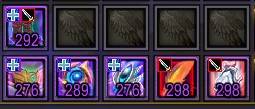
Never dig through your bags looking for that one piece again. Equipment Set Marker highlights every item in your bags that belongs to one of your saved Equipment Manager sets — with a colored glow and a small per-set icon badge — so you can see at a glance exactly what you're holding and which set(s) it's part of.
Features
- Automatic bag marking — any bag item that belongs to a saved equipment set gets a colored glow border, no setup required.
- Per-set color coding — each equipment set is automatically assigned its own distinct color, so DPS, Healing, Tank, PvP, or any other sets you've created are visually distinguishable at a glance.
- Corner icon badges — a small colored badge (using that set's own Equipment Manager icon, if you've set one) appears in the top-left corner of each matching item. If an item belongs to more than one set, you'll see multiple stacked badges.
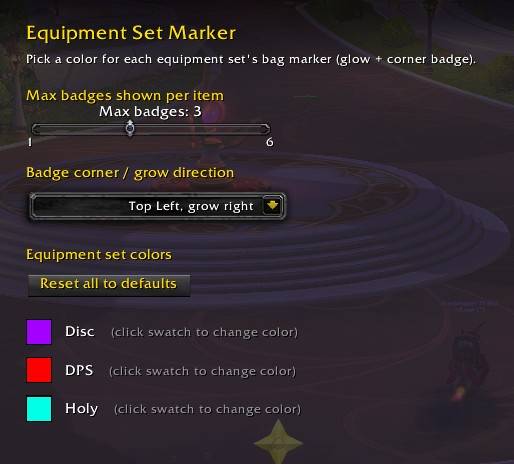
- Fully customizable colors — open the in-game settings panel and click any set's color swatch to pick exactly the color you want, or use a quick chat command if you prefer.
- Tooltip integration — hover over a marked item to see which set(s) it belongs to, listed in that set's assigned color.
- Lightweight and self-healing — updates automatically whenever your bags change or your equipment sets are modified, with built-in safeguards so a display glitch never leaves items stuck unmarked.
- No dependencies — works out of the box with the default Blizzard bag UI.
How it works
Equipment Set Marker reads the item list from every equipment set you've saved in the Equipment Manager and cross-references it against the contents of your bags in real time. Matching items get:
- A colored glow border around the icon — a quick "this is part of a set" signal.
- One or more small badges in the top-left corner — one per matching set, so you can tell exactly which set(s) claim that item.
Both update live as you loot, swap gear, move items around, or edit your equipment sets.
Settings
Open the settings panel in-game with:
/esm optionsFrom there you can click any equipment set's color swatch to open the standard color picker and choose exactly the color you want. Changes apply instantly and are saved permanently.
Slash commands
All commands start with /esm.
| Command | Description |
|---|---|
/esm or /esm toggle |
Enable or disable marking entirely |
/esm help |
Show chat line options |
/esm options |
Open the settings panel (per-set color picker) |
/esm sets |
List your tracked equipment sets, their assigned colors, and their index numbers |
/esm color <index> <r> <g> <b> |
Set a color from chat without opening the panel (values 0–1; get the index from /esm sets) |
/esm badges |
Toggle the corner icon badges on/off (keeps just the glow) |
/esm max <n> |
Set how many badges to show per item if it belongs to multiple sets (1–6, default 3) |
/esm refresh |
Force a full rebuild of the set cache and refresh your bags |
Compatibility
- Retail World of Warcraft, Interface
120100(patch 12.1) - Works with the default Blizzard bag UI, including combined bags
- No external library dependencies
Notes
- Badges and glow only mark items sitting in your regular bags. Bank and reagent bag support may be added in a future update.
- An item's color/badge is driven entirely by which equipment set(s) it belongs to in your own Equipment Manager — create or edit sets there, and Equipment Set Marker will pick up the changes automatically.
Feedback & Support
Found a bug or have a feature request? Please open an issue or leave a comment on the project page — feedback is always welcome.
EquipmentSetMarker Team