EmotesWheel Emotes Wheel
- By
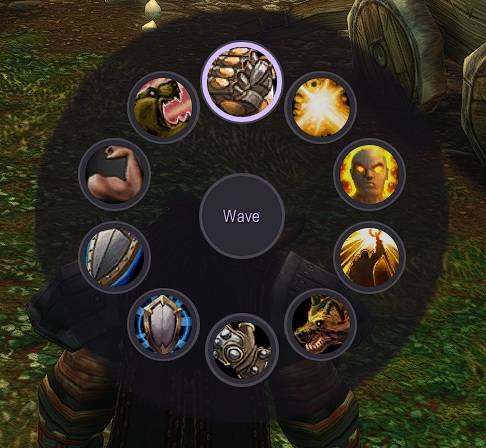
EmotesWheel opens a radial emote wheel with a keybind, similar to the ping wheel: hold the key, point the mouse at an emote and release the key to perform it.
Description
Features
- Opens the wheel at the mouse cursor or in the screen center.
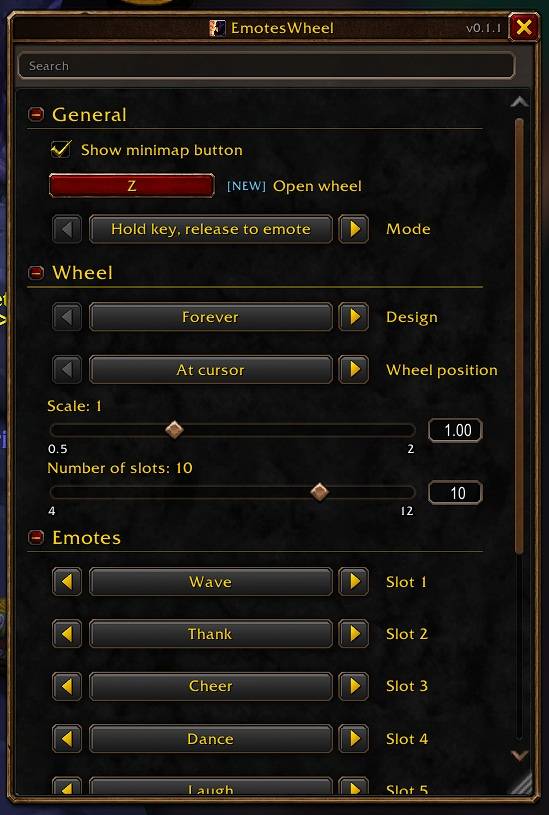
- Two modes:
- Hold: hold the key, release it to perform the selected emote.
- Toggle: press to open, press again to perform the selected emote.
- Releasing in the center of the wheel cancels.
- 4 to 12 slots, each with its own emote from a list of common emotes.
- Adjustable scale.
- Adjustable colors for background, border, slots, selected slot, text and selected text, with a button to reset them.
- Emote names follow the client language.
- Settings window with search and a minimap button.
Usage
- Open the settings with
/emoteswheel(or/ewheel) or a left click on the minimap button. - Set the key under General → Open wheel. Keyboard keys, modifier combinations and mouse buttons 3 to 5 work. Backspace or Delete clears the key.
- Shift + right click on the minimap button hides it.
Notes
- Emotes run through a secure macro button, so the wheel works without restricted emote APIs.
- In combat the addon cannot change that button. On Classic clients the emote is then sent directly. On Retail a message says that wheel emotes are not possible in combat.
Localization
Locale files exist for all World of Warcraft client locales:
deDE, enUS, esES, esMX, frFR, itIT, koKR, ptBR, ruRU, zhCN, and zhTW.
Translations other than English and German are machine-generated and may benefit from native-speaker review.
EmotesWheel Emotes Wheel Team
Owner