EasyOnAggro
- By
Lightweight, secret-safe threat HUD and smart aggro alerts for WoW Forever — 100% nameplate-free.
eoa4.jpg
eoa2.jpg
eoa.jpg
Description
EasyOnAggro is a lightweight, modern, secret-safe threat HUD and personal aggro alert addon built from the ground up for World of Warcraft: Forever (Interface: 16001).
Unlike traditional threat addons that hook or repaint enemy nameplates, EasyOnAggro is 100% nameplate-free. It runs cleanly alongside Plater, BetterBlizzPlates, ElvUI, or the default Blizzard UI with zero conflicts, zero OnUpdate frame lag, and zero combat taint.
Features
- 100% Secret-Safe Design (
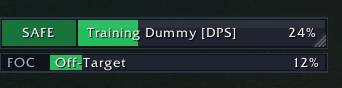
16001): Engineered specifically for WoW Forever's Secret Values architecture (issecretvalue,canaccessvalue,C_CurveUtil, andpcall-guarded APIs). Never performs forbidden Lua math or comparisons on protected combat values. - Nameplate-Free Modern Flat HUD: Sleek dark translucent bar with a crisp 1px reactive border, status badge pill, target name, scaled threat percentage, and a native
AnimationGroupcritical pulse glow. - Smart Role Semantics (Tank vs. DPS / Healer): Automatically detects your group role or Classic tank stances/forms/auras (Defensive Stance, Bear Form, Righteous Fury) and inverts visual colors & alerts accordingly — with a per-character manual override.
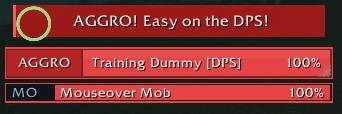
- Focus & Mouseover Mini-Bar: Optional compact secondary bar docked right beneath the main HUD (
MOprioritized overFOC, with automatic cleanup when your cursor leaves an enemy). - Anti-Spam Visual & Audio Alerts: Floating emergency toast banner paired with 8 selectable built-in WoW alert sounds, live sound preview, configurable cooldown (1s–10s), and smart state-transition tracking.
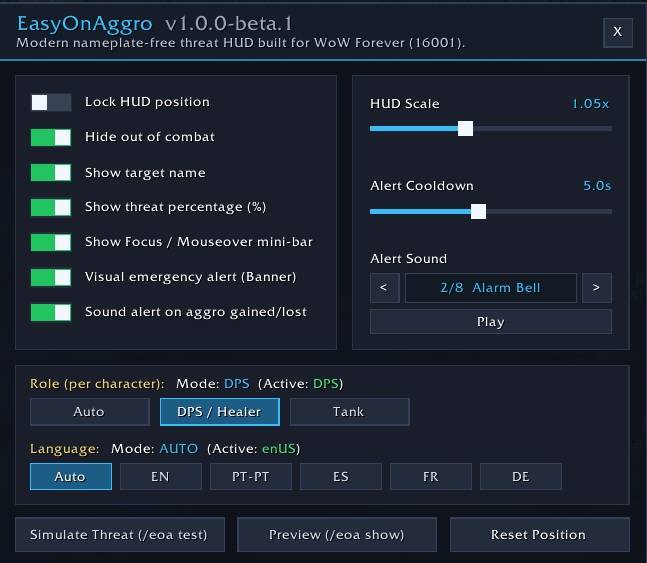
- Standalone Modern Settings Window: Clean custom configuration window (
/eoa config) with toggle switches, smooth flat sliders, live role/language selectors, andESC-to-close withoutUISpecialFramestaint. - Out-of-Combat Simulation (
/eoa test): Cycles through all threat stages (0 → 3for DPS or3 → 0for Tank) in town so you can position your HUD and test alerts before stepping into a dungeon or raid. - Multilanguage Support (Live Switching): Full built-in localization for English (
enUS), European Portuguese (ptPT), Spanish (esES), French (frFR), and German (deDE) — switchable live in-game without/reload. - Zero-Allocation Raid Performance: Purely event-driven with raid unit filtering and pre-allocated threat caches to prevent Lua garbage-collection stutters in 20/40-player raids.
How It Works
1. Role-Aware Threat States
EasyOnAggro reads real WoW threat states (UnitDetailedThreatSituation / UnitThreatSituation) and adapts both colors and alert logic to your active role:
DPS & Healer Mode:
- SAFE (Emerald Green): Below 75% scaled threat — safe to DPS freely.
- HIGH (Amber Yellow): 75%–99% scaled threat — approaching the tank's lead.
- WARN (Orange): Status
1(100%+ raw threat) — one step away from pulling aggro (110% melee / 130% ranged threshold). - AGGRO (Crimson Red + Critical Pulse + Alert): Status
2or3(isTanking == true) — you have aggro! Fires the"AGGRO! Easy on the DPS!"banner and your chosen alert sound.
Tank Mode (Inverted Logic):
- LOCK (Sky Blue): Status
3— securely tanking with a comfortable lead. - SLIP (Amber Yellow): Status
2— still tanking (isTanking == true), but another player has reached 100%+ threat and is close to pulling off you. (Does not falsely trigger "Aggro Lost" while you still hold aggro!) - LOW / LOST (Orange-Red / Crimson + Critical Pulse + Alert): Status
1or0(or an in-combat mob where you have0threat) — you do not have aggro! Fires"AGGRO LOST! Taunt!"only when actively losing aggro (2/3 → 0/1) on your current target, avoiding false-positive spam when tab-targeting across packs.
- LOCK (Sky Blue): Status
2. WoW Forever (16001) Secret Values Compliance
In Interface: 16001, granular combat telemetry can be wrapped as opaque Secret Values during combat. EasyOnAggro inspects every return value safely via issecretvalue() / canaccessvalue(), passes secret threat percentages directly into native C++ widget methods (StatusBar:SetValue(), FontString:SetFormattedText()), and includes isTanking and C_CurveUtil color-curve fallbacks so your HUD never throws Lua errors in raid encounters.
3. Focus & Mouseover Sub-Indicator
When enabled, a slim secondary bar appears beneath your main HUD whenever you have a hostile mouseover (MO) or focus (FOC) unit that differs from your current target — ideal for Tanks watching an off-target add or DPS checking threat on cleave targets without switching targets.
Installation
- Fully close your World of Warcraft game application (or prepare to run
/reload). - Download EasyOnAggro from CurseForge.
- Extract the
EasyOnAggrofolder into your WoW Forever addons directory:
World of Warcraft\_forever_\Interface\AddOns\ - Launch the game and type
/eoa configto open the settings window, or/eoa testto run a live threat simulation.
Slash Commands
(You can use either /eoa or /easyonaggro)
Main Commands
/eoa config— Open the standalone modern settings window/eoa test— Toggle out-of-combat threat simulation (0 → 3/3 → 0)/eoa show— Toggle static preview mode out of combat for easy positioning/eoa status— Display version, active role/language, and16001API capability diagnostics/eoa— Show available command help in chat
Appearance, Role & Language Commands
/eoa lock— Lock HUD position and hide the resize grip/eoa unlock— Unlock HUD to drag or resize from the bottom-right corner/eoa reset— Reset HUD position, size, and scale back to defaults/eoa role auto|tank|dps— Set role detection mode (saved per character)/eoa lang auto|en|pt|es|fr|de— Switch addon language live (no/reloadrequired)/eoa sound— Toggle audio alerts on or off (choose from 8 sounds in/eoa config)/eoa sub— Toggle the Focus / Mouseover secondary mini-bar/eoa ooc— Toggle hiding the HUD when out of combat
If you would like to support development, you can leave a voluntary tip:
PayPal: https://paypal.me/rcsf89
EasyOnAggro Team