Dungeon Quest Forever
- By
Dungeon quests in the quest tracker: what to pick up before you go, the short way there, bosses in order and their loot.
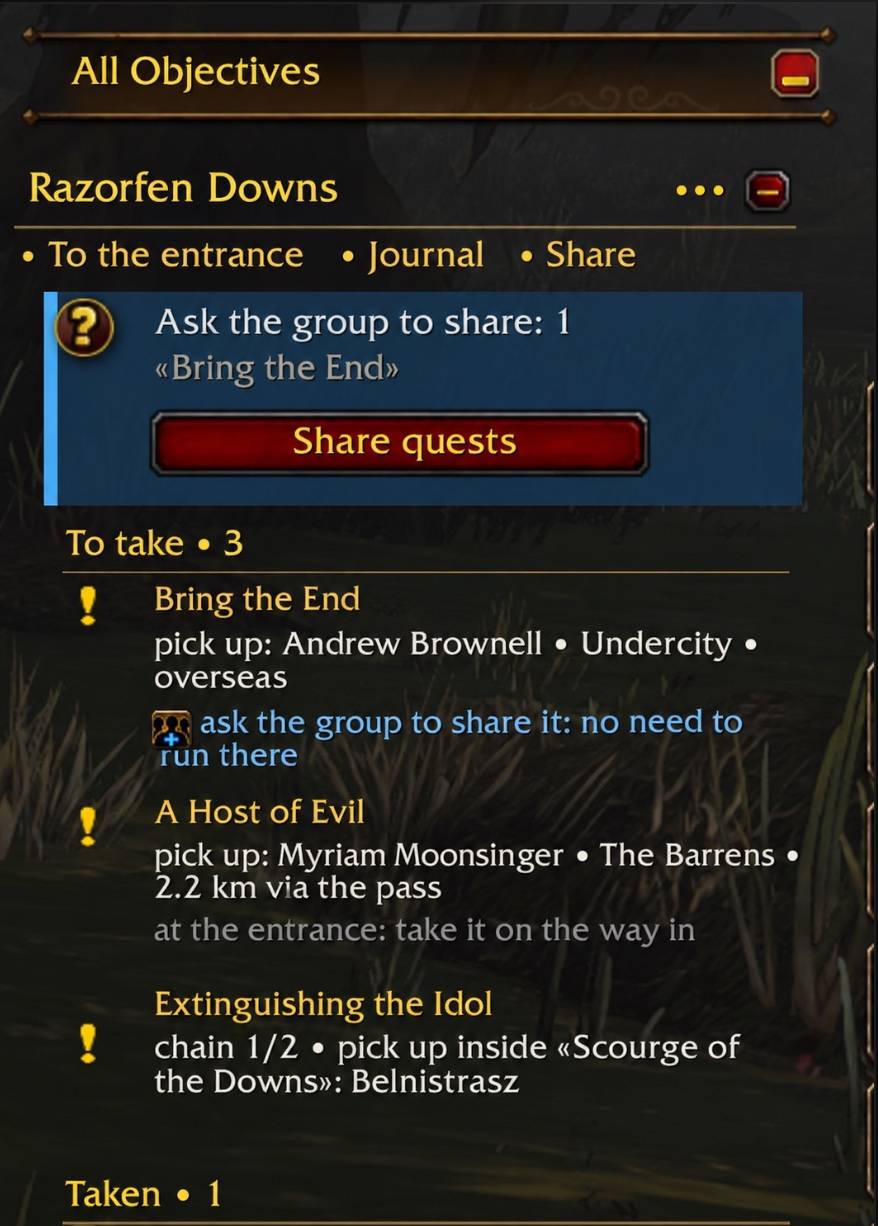
1-before-the-dungeon.jpg
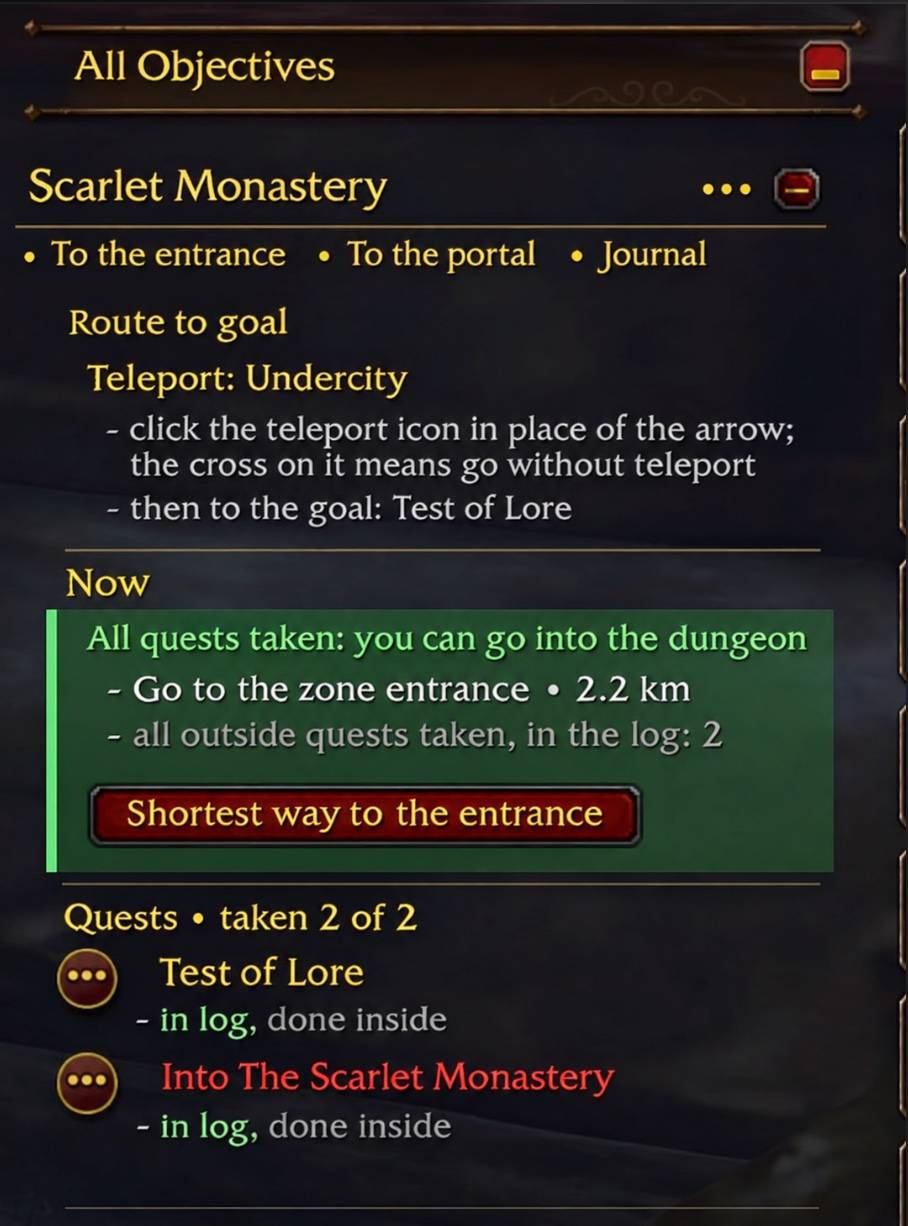
2-all-taken-go.jpg
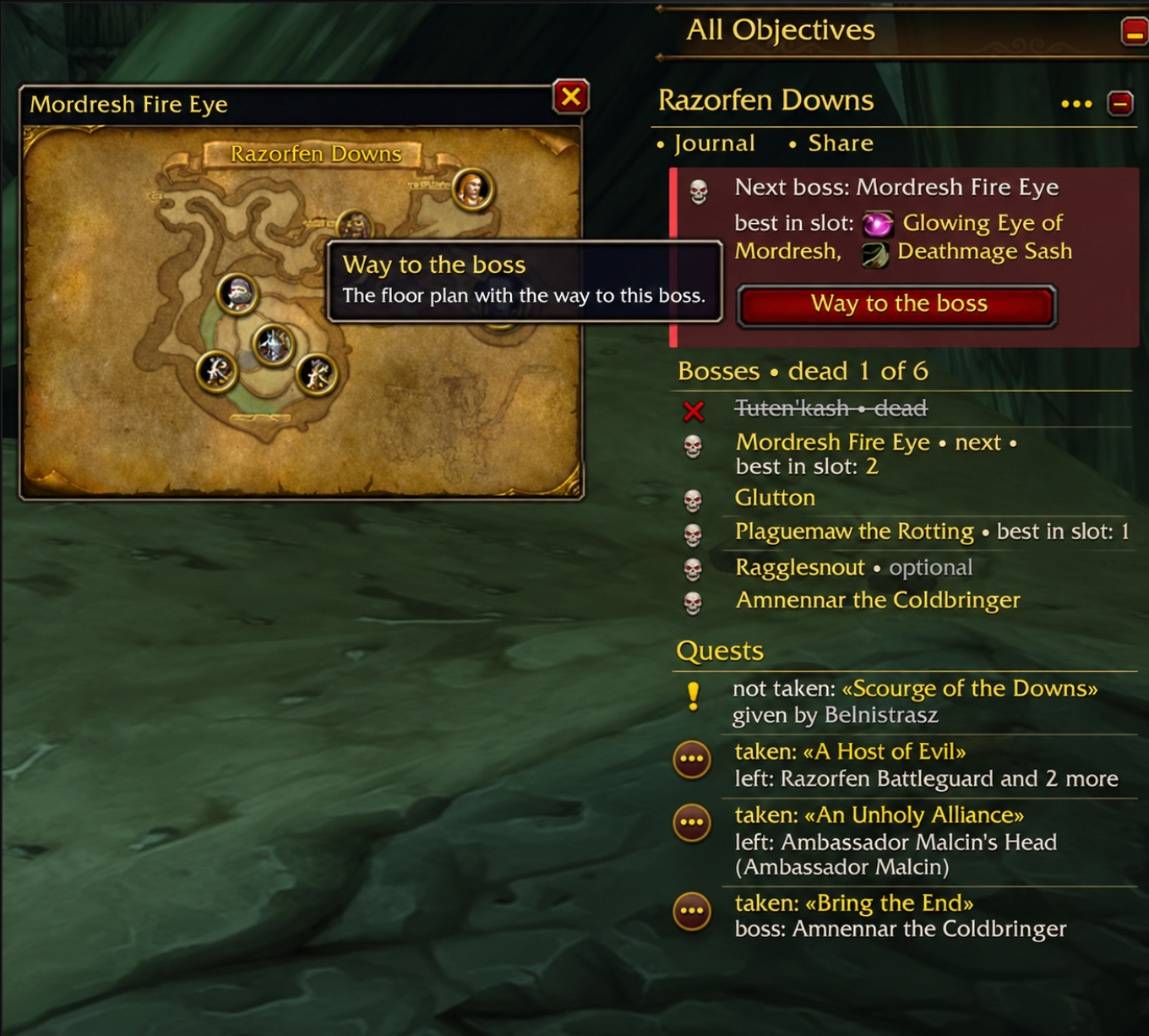
3-inside-floor-plan.jpg
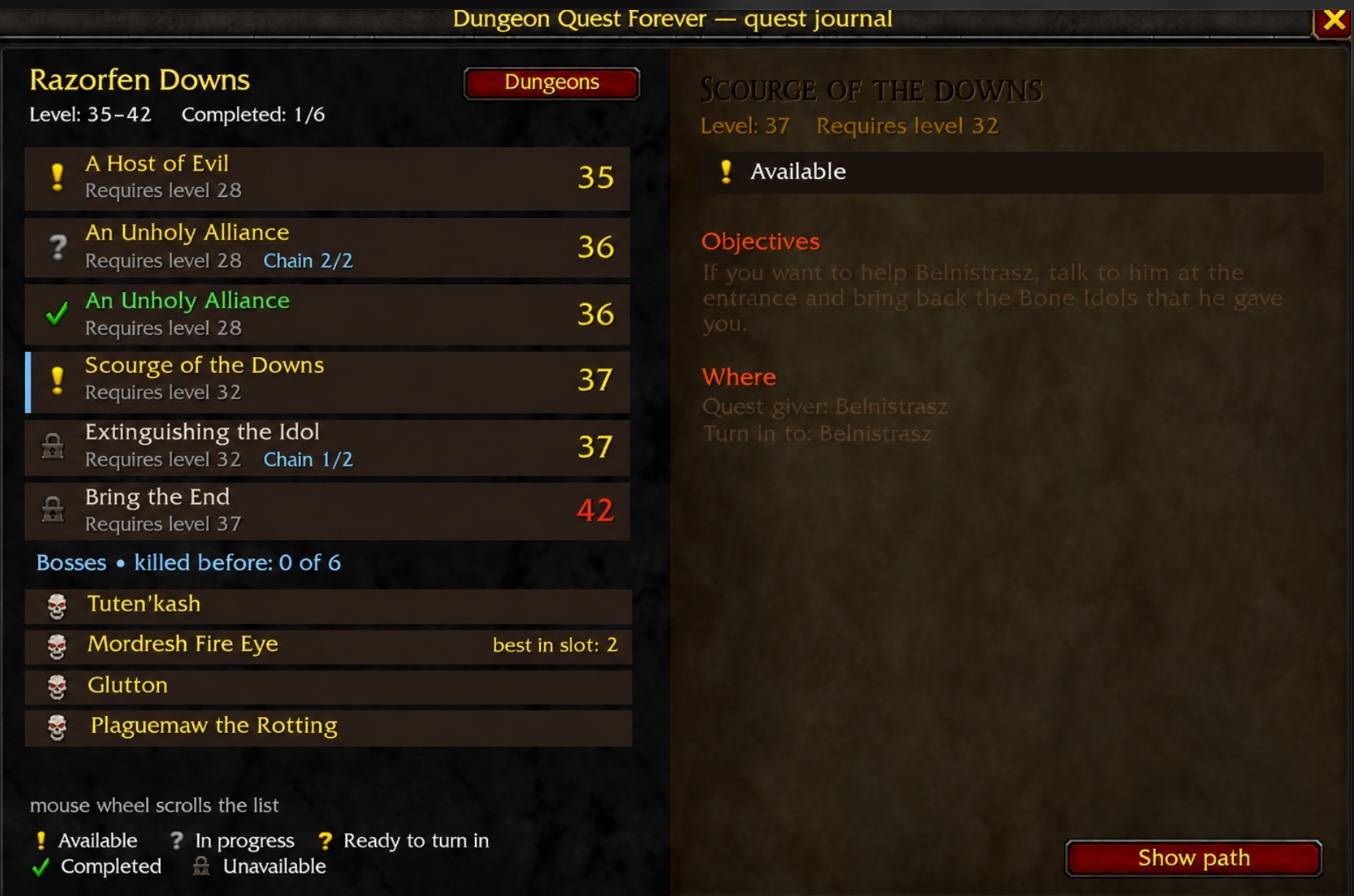
4-journal.jpg
Description
Dungeon Quest Forever
По-русски — ниже, в конце страницы.
An addon for World of Warcraft: Forever (Interface 16001). It gets you ready for a dungeon right in the quest tracker.
- Before the dungeon. Which quests to pick up, where, and in what order: chains are followed step by step, and the arrow moves on by itself when a step is turned in.
- The way there. The arrow takes the short way: flight masters, zeppelins and ships, mage teleports, and on foot it follows walkable paths around mountains and cliffs instead of a straight line. Flight points you have not discovered yet are shown in silver on the world map and the minimap, even under the fog of war: click one to go to its master.
- Inside: the way to every boss. The game shows no map and no position inside a dungeon, so the addon says in a line or two how to walk to the next boss from the last one, in every classic dungeon. Bosses in order, what is left to do at each, and their loot with the best items for your class marked.
- Best gear. The Gear button opens a window like the character frame with the best item for every slot for your class and talent tree, at your level and the next ones: which boss of which dungeon drops it or which quest gives it, and how much better it is than what you wear.
- Your group. After a boss the group is told who is next, what he drops (with the chance, where known) and which classes among you it is best in slot for. A finished quest is told to the group, or yelled when you are alone. Both can be turned off in the settings menu.
- Less clicking. Quests are picked up and turned in automatically (grey and repeatable ones are left to you), and junk quests can be cleared from the log with one button.
All the classic dungeons and the new ones of Forever (Hall of Thanes, Ruins of Lordaeron, Excavation Site, City of Dalaran, The Drowned City, Krol'dok Stronghold, Alcaz Prison, Blackmaw Hold, Shaper's Terrace).
English and Russian. On a Russian client the addon speaks Russian, on any other, English.
Install
Nothing else is needed. Put the ForeverDungeonPrep folder into World of Warcraft/_forever_/Interface/AddOns/.
Use
- The panel stands in the quest tracker column.
•••in its heading chooses the dungeon. - Click a quest: it unfolds in place and sets the arrow. Right-click: the quest in the journal.
Journalopens the book with every quest, boss and loot table of the dungeon.Shareshares your quests of the dungeon with the group and asks in the group chat for the ones you lack.- Inside, with Dungeon Quest Atlas installed, a small floor plan shows the way to the next boss; hover a boss on it to see what he is and what he drops.
- The round button on the minimap opens the settings; right-click opens the journal.
/dqopens the list of dungeons. Other commands:/dq welcome,/dq auto,/dq junk,/dq dock,/dq cards,/dq bug,/dq bis,/dq done,/dq run(a new run).
Bugs and ideas
Write in Issues. In the game, the little bug (on the welcome page, in the menu behind •••, or /dq bug) shows the address and a few lines about your game to paste into the report.
Credits and licence
GPL-3.0-or-later, see LICENSE.
- The quest, NPC, object, item and zone data in
Data.luaand the boss loot table inBook.luaare taken from QuestieDB (GPL-3.0) by the scripts indev/; only the part the addon reads is included. - The walkable paths in
Paths.luaare thinned from the graph of Guidelime Pathfinder (GPL-3.0-or-later, Copyright (c) 2026 JagTheHero), which is made from the game's terrain and buildings, bydev/paths/make-paths.py. - Coordinates of the passes between zones were compiled from public sources (the zone connection table of Carbonite Classic, RestedXP and Guidelime guide steps) and cross-checked against the game's map geometry.
- The best-gear lists in
GearData.lua(item, slot, level and source for every class, talent tree and level) are taken from the WoW Forever leveling gear lists of Timesaver.gg (checked 13 November 2026) bydev/make-gear.py; the Russian names come from QuestieDB. - The quests of Alcaz Prison and Shaper's Terrace, and the bosses' tips, were compiled from the WoW Forever database of Wowhead (checked 16 November 2026) by
dev/make-forever-quests.pyanddev/make-boss-tips.py. - The quest rewards in
Book.luawere compiled from the VMaNGOS world database (GPL-2.0) and the WoW Forever database of Wowhead bydev/make-rewards.pyanddev/make-rewards-lua.py; the game's own answer is read in play and preferred. - Where the goals of the quests lie inside (
P.InsideSpots) was computed bydev/make-inside-spots.pyfrom the spawn points of the AzerothCore world database (GPL-2.0) and the client's map tables served by wago.tools. - The drop chances in
Book.lua(P.LootChance) come from the Classic database of Wowhead; Krol'dok's loot from Wowhead's WoW Forever database and the Krol'dok guide of Conquest Capped (checked 21 November 2026). - The walking directions to the bosses were written for this addon from public dungeon guides.
- The pointer hand artwork was generated for this addon.
- If Dungeon Quest Atlas is installed, its dungeon maps are used for the small floor plan; nothing of that addon is included here.
Dungeon Quest Forever (по-русски)
Аддон для World of Warcraft: Forever. Готовит к подземелью прямо в колонке заданий.
- До подземелья. Какие задания взять, где и в каком порядке. Цепочки ведутся по шагам, стрелка сама переходит к следующему шагу, когда сдаёшь задание. Когда всё взято, панель говорит «можно идти в подземелье» и ведёт ко входу.
- Дорога. Стрелка ведёт коротким путём: перелёты, дирижабли и корабли, телепорты мага, а пешком — по проходимым тропам в обход гор и обрывов, а не по прямой. На карте полётов подсвечивается точка, куда лететь. Неоткрытые точки перелёта видны серебром на карте мира и на миникарте, даже под туманом войны: щелчок ведёт к распорядителю.
- Группа. Кнопка «Поделиться» раздаёт группе твои задания этого подземелья и просит в чате группы недостающие. У кого стоит аддон, поделятся сами. После каждого босса аддон пишет группе по-английски, кто следующий, что с него падает и какому классу это лучшее в слот, а о выполненном задании — в группу или криком. И то и другое выключается в меню.
- Внутри: путь к каждому боссу. Внутри подземелья игра не показывает ни карты, ни где ты, поэтому аддон одной-двумя строками говорит, как дойти от прошлого босса до следующего, во всех классических подземельях. Боссы по порядку, что осталось сделать у каждого, их добыча с пометкой лучшего для твоего класса. С аддоном Dungeon Quest Atlas рядом стоит маленький план этажа с путём к следующему боссу; наведи на босса — что он умеет и что с него падает. Над предметами, которые можно нажать (гонг, сундук, нужный для задания предмет), висит палец.
- Лучшие вещи. Кнопка «Вещи» открывает окно, как у персонажа: лучшая вещь в каждый слот для твоего класса и ветки талантов на твоём уровне и дальше — с какого босса какого подземелья падает или за какое задание даётся, и насколько она лучше надетой.
- Меньше кликов. Задания берутся и сдаются сами (серые и повторяемые — на твоё усмотрение), мусорные задания убираются из журнала одной кнопкой.
Аддон говорит по-русски в русском клиенте, в любом другом — по-английски.
Установка
Ничего дополнительно ставить не нужно. Папку ForeverDungeonPrep положить в World of Warcraft/_forever_/Interface/AddOns/.
Как пользоваться
- Панель стоит в колонке заданий.
•••в её заголовке — выбор подземелья. - Щелчок по заданию раскрывает его и ставит стрелку. Правая кнопка — это задание в журнале.
Журналоткрывает книгу: все задания, боссы и добыча подземелья.- Круглая кнопка у миникарты — настройки; правая кнопка по ней — журнал.
/dq— список подземелий. Ещё:/dq welcome,/dq auto,/dq junk,/dq bug.
Ошибки и идеи
Пишите в Issues, можно по-русски. В игре /dq bug показывает адрес и строки о твоей игре, которые стоит приложить.
Usage analytics and bug reports
Players who enable analytics in Wago App can contribute usage statistics. The addon works without Wago App. Custom events use fixed action names and numbers. They contain no message text, character names or coordinates. Wago handles its own session metadata.
Click the bug icon next to Close in the quest book, or type /dq bug. Copy the link into your browser and choose which diagnostics to include in the GitHub issue.
For maintainers, compare the number of participating sessions at each consecutive Flow_ step. Open the quest book, read a quest, request directions. Reached_ flags independent actions, and Count_ records their frequency. LastAction is the last observed action within that UI load. Its codes are 1 = Loaded, 2 = BookOpened, 3 = DungeonChosen, 4 = QuestRead, 5 = BossRead, 6 = RouteRequested, 7 = ReportOpened, 8 = LootOpened, 9 = GearOpened, 10 = ArrowRemoved, 11 = TeleportUsed, 12 = FlightPointClicked, 13 = StepClicked, 14 = SharedWithGroup, 15 = AutoAccepted, 16 = AutoTurnedIn, 17 = JunkRemoved, 18 = FloorPlanOpened, 19 = FloorPlanToggled, 20 = DungeonHidden, 21 = DoorPicked, 22 = SettingsMenuOpened, 23 = DungeonMenuOpened, 24 = WelcomeShown, 25 = Command, 26 = PanelCollapsed, 27 = NewRun, 28 = EnteredDungeon, 29 = BossKilled, 30 = ToldGroup, 31 = MetAddonUser, 32 = RewardClicked, 33 = BookModeSwitched, 34 = ToldBis. A session can end normally at any step.
Cmd_<word> counts the /dq words and the settings menu, which goes through them (only a fixed list of words). The Off_ switches (and On_DarkBack) are read once a session and tell which settings players have turned off. A Reached_ flag that stays off everywhere marks a part of the addon nobody uses.
In a dungeon group the addon says once in the group chat what it is, to group mates who do not have it yet (again after two hours, and not more often than every 20 minutes). The settings menu turns it off.
Dungeon Quest Forever Team