promotional bannermobile promotional banner

Dumpster

Quickly move matching items between your bags, Character Bank, Warband Bank, Guild Bank, mail, trades, and vendors.
item image

Description

Dumpster

Dumpster is a World of Warcraft inventory management addon for quickly moving groups of matching items between your bags, banks, Guild Bank, mail, trades, and vendors.

If you ever move a lot of stuff around, Dumpster is for you.

Quick Start

The two main commands are:

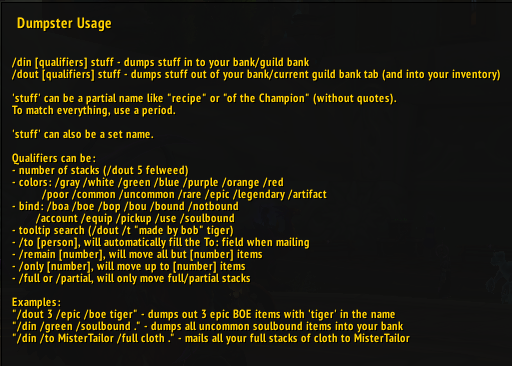
/din [qualifiers] stuff
Move matching items into the current destination.

/dout [qualifiers] stuff
Move matching items out of the current bank, Guild Bank, mail, or vendor.

stuff can be a full or partial item name, such as recipe, tiger, or of the Champion.

For example:

/din cloth

/dout recipe

To match everything, use a period:

/dout .

Commands

/din [qualifiers] stuff
Move matching items into the current destination.

/dout [qualifiers] stuff
Move matching items out of the current bank, Guild Bank, mail, or vendor.

/dall [qualifiers] stuff
Search all Guild Bank tabs for matching items.

/dumpster
Open the graphical interface and manage saved sets.

/dumpster help
Display expanded in-game help.

Supported Destinations

Dumpster works with the Character Bank, Warband Bank, Guild Bank, Mail, Trade, and Vendors.

Character & Warband Banks

On Retail, Dumpster automatically detects whether you are using your Character Bank or Warband Bank.

Deposit matching items:

/din dust

Withdraw matching items:

/dout dust

The same commands work with both bank types. The currently selected bank is used automatically.

Dumpster also includes compatibility handling for replacement bank interfaces such as Baganator.

Guild Bank

Dumpster supports depositing into and withdrawing from Guild Banks.

Deposit matching items:

/din cloth

Withdraw from the current Guild Bank tab:

/dout cloth

Search across Guild Bank tabs:

/dall cloth

Guild Bank transfers use a queue system to accommodate the slower pace of Guild Bank operations. If the Guild Bank is closed while a transfer is processing, the queue is cancelled.

Qualifiers

Qualifiers can be combined to control exactly what Dumpster moves.

Number of Stacks

Specify the number of stacks to move, for example: /dout 5 felweed

Tooltip Search

Search item tooltip text with /t, for example: /dout /t "made by bob" tiger

Quality

Quality levels: 0-6

Colours: gray / white / green / blue / purple / orange / red

Names: poor / common / uncommon / rare / epic / legendary / artifact

Example: /dout /epic tiger

Bind Status

Short names: boa / boe / bop / bou

Bind types: account / equip / pickup / use

Other: soulbound / notbound / warbound

Example: /din /green /boe .

Expansion

classic / tbc / wotlk / cata / mop / wod / legion / bfa / sl / df / tww / mn / tlt

Example: /din /green /boe /legion .

Tooltip Search

Use /t to search the item's tooltip text:

/dout /t "Made by Bob" tiger

Tooltip searches can be combined with other qualifiers.

Controlling Amounts

Dumpster provides several ways to control how much gets moved.

Move a Specific Number of Stacks

/din 5 cloth

Moves up to 5 matching stacks.

Leave Items Behind

Use /remain to leave a specified amount behind:

/din 5 /remain cloth

This leaves 5 matching stacks in your inventory.

Keep a Specific Amount

Use /only to ensure you have a specified amount:

/dout 10 /only apple

This withdraws only enough matching items to bring the amount already in your inventory up to 10.

Exclude Items

Use /except to exclude matching items:

/din /except apple

This moves everything except matching apples.

You can also use /full and /partial to restrict operations based on stack size.

Examples

Withdraw 3 epic BOE items containing tiger:

/dout 3 /epic /boe tiger

Deposit all uncommon soulbound items:

/din /green /soulbound .

Ensure you have 2 matching items in your inventory:

/dout of the tiger /boe /green /only 2

Mail 5 full stacks of Frostweave Cloth:

/din 5 /to MisterTailor /full frostweave cloth

Move unbound Dark Leather Gloves matching tooltip text:

/din /notbound Dark Leather Gloves /t "Made by Bob"

Mail all green Legion BOEs to another character:

/din /green /boe /legion /to "jabberie-draka"

Mail, Trade & Vendors

Dumpster isn't limited to banks. The destination is determined by the window you currently have open.

Vendors

Open a vendor and use /din to sell matching items:

/din mana thistle

/dout can also be used to buy matching items from a vendor.

Trade

Open a trade with another player and use /din to add matching items:

/din nether

Mail

Open Send Mail, enter the recipient, and use /din to attach matching items:

/din cobalt ore

To send all green BOEs:

/din /boe /green .

You can also specify a mail recipient directly:

/din /green /boe /legion /to "jabberie-draka"

/dout can be used to retrieve matching items from mail.

Saved Sets

Frequently used searches can be saved as sets.

Create a set:

/dadd setname setdetails

Delete a set:

/ddel setname

List your sets:

/dlist

Once created, use a set exactly like a normal search:

/din setname

/dout setname

Sets can contain searches, qualifiers, and even other sets.

Use /dumpster to open the graphical interface for creating and managing sets.

In-Game Help

For expanded command information:

/dumpster help

To open the Dumpster interface:

/dumpster

About Dumpster

Dumpster was originally created by Badhairday-Malygos and was later resurrected and maintained as Dumpster Reborn by Jabberie-Draka.

The goal remains simple: if you need to move a lot of stuff, Dumpster does the tedious part for you.

The Dumpster Team

profile avatar
  • 2
    Followers
  • 9
    Projects
  • 76.9K
    Downloads

More from JabberieView all