DuckMoo Concentration Planner
- By
Easy in game way to keep track of when your concentration maxes out and when to check for patron orders
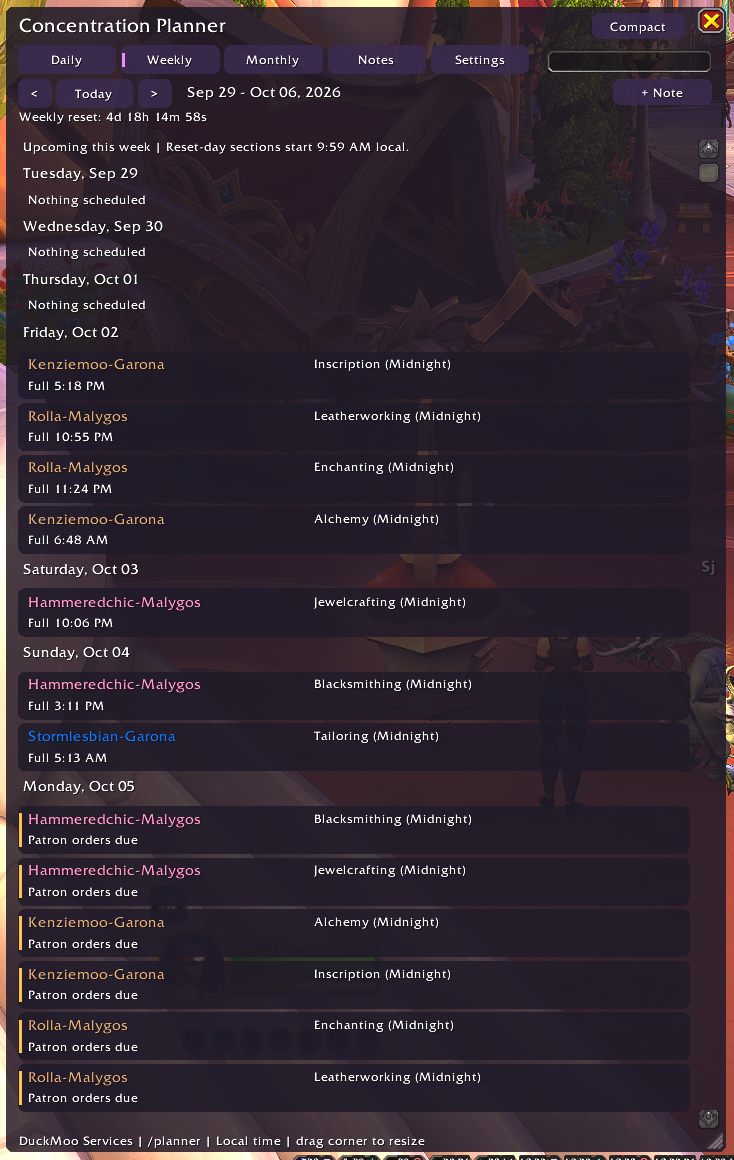
image.webp
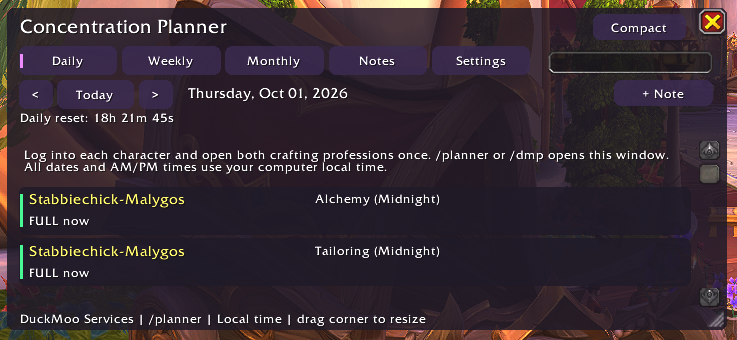
image.webp
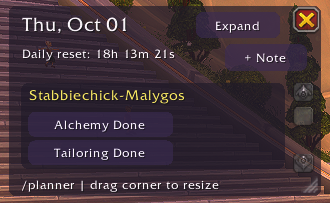
image.webp
Description
DuckMoo Services: Concentration Planner
By DuckMoo Media
Your alts are regenerating Concentration. Your patron orders need checking. Your brain has seventeen tabs open, and one of them is making duck noises.
Concentration Planner turns your crafting schedule into a calendar, so you can see who needs attention today, who will be ready later this week, and when each profession will reach full Concentration.
Whether you have two crafters or a small industrial civilization spread across several realms, give those tasks somewhere to live outside your head.
A view for every kind of crafting chaos
Daily planner: See professions already at full Concentration, those filling up today, patron order reminders, and your custom to-dos. Includes a countdown to daily reset.
Weekly planner: Plan upcoming work around your region’s weekly reset, with a countdown to the next reset.
Monthly calendar: See projected full-Concentration dates with character names, professions, and recharge times. Click a date to inspect that day’s work.
Compact dashboard: Keep the logged-in character’s Concentration recharge times, next patron checks, and per-profession Done buttons close at hand.
All displayed dates and times use your local clock, with AM/PM time formatting.
Patron orders without the mental spreadsheet
Give each profession its own reminder schedule: every four days or on a chosen weekday.
Mark its patron orders Done to schedule the next check. Haven’t configured that profession yet? Its Done button creates the default four-day schedule for you.
Reminders become due after that day’s regional daily reset. Missed reminders stay visible until you mark them complete.
These are reminders you control; completion is marked manually.
Remember the other things, too
Add your own dated notes and reminders, then edit, dismiss, restore, or delete them. Choose a one-time reminder or repeat it after daily reset, weekly reset, or a number of days you specify.
“Do the thing on that one alt” can finally become an actual plan.
Built for an unreasonable number of alts
Search and filter your roster by character, realm, profession, or custom groups. Sort the list, assign groups in bulk, and keep your logged-in character pinned at the top of Settings.
Midnight professions appear by default. Prior-expansion tracking can be enabled in Settings.
Resize the window, adjust full and compact opacity separately, and pick the view that fits your screen. Your window positions, sizes, and last-used mode are remembered.
Getting started
-
Enable the addon and log into each character you want to track.
-
Open each crafting profession window once so the addon can collect its Concentration data.
-
Open the planner using
/planner,/dmp, or the minimap button. -
Set patron schedules and add any reminders your future self will appreciate.
Concentration continues to be projected while your characters are offline. Spending Concentration updates the forecast when observed by the addon.
Standalone WoW Retail addon. No CraftSim dependency.
Another suspiciously useful thing by DuckMoo Media. For crafting gremlins, by a crafting gremlin.
DuckMoo Concentration Planner Team