Does it die - Classic
- By
*INSPIRED BY 'Does It Die' FOREVER ADDON BY JoeGG** See at a glance whether your DoTs will finish the enemy. Shows the damage your DoTs have left as a coloured block on enemy nameplate health bars.
did.png
did2.png
did3.png
Description
Does It Die?
World of Warcraft Classic Era
Stop guessing whether your DoTs will finish the job!
Does It Die? is a lightweight addon that predicts how much damage your active damage-over-time (DoT) effects will deal before they expire.
It displays this information directly on enemy nameplates, helping you decide whether to keep attacking or let your DoTs finish the enemy.
Designed for World of Warcraft Classic Era.
What You See
-
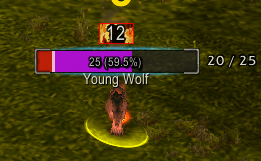
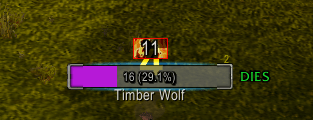
Customisable DoT damage indicator: A coloured section appears on the enemy's health bar, showing how much of their remaining HP your active DoTs are predicted to remove.
-
Separate health and damage colours: The enemy's remaining health keeps its normal colour, while predicted DoT damage is highlighted separately with a clear dividing line.
-
Custom colours: Choose from six presets (Purple, Pink, Cyan, Blue, Orange and Green), or create your own colour using the in-game colour picker.
-
Simple damage readout: Displays predicted DoT damage to the right of the enemy's health bar, such as
340 / ~410. -
DIES indicator: When your remaining DoT damage is predicted to kill the enemy, the text changes to a green DIES indicator.
-
Optional whole-bar colouring: Enable the original colour-changing health bar effect if you prefer that style.
The default DoT damage colour is bright purple, but you can change it at any time.
How It Works
Does It Die? automatically tracks your active damage-over-time effects and estimates how much damage they have left to deal.
Automatic DoT Tracking
-
Detects when your DoTs are applied, refreshed or removed using the combat log.
-
Reads spell tooltips to determine their estimated total damage and duration.
-
Supports multiple DoTs active on the same enemy.
-
Calculates remaining damage based on the number of ticks left.
-
Updates predictions as your DoTs expire or deal damage.
-
Supports different spell ranks automatically through tooltip scanning.
Examples of supported damage-over-time spells include:
-
Corruption
-
Shadow Word: Pain
-
Rend
-
Serpent Sting
-
Rake
-
Rip
-
Moonfire
-
Immolate
-
Flame Shock
-
Garrote
-
Rupture
-
Curse of Agony
And other compatible damage-over-time effects.
Enemy Health Estimation
In Classic Era, enemy health information is often available only as a percentage rather than an exact number.
Does It Die? estimates enemy maximum health by comparing damage recorded in the combat log with changes in the enemy's health percentage.
The addon remembers learned enemy health values, allowing predictions to improve as you fight the same types of enemies.
When fighting an enemy for the first time, you may briefly see HP unknown until enough information has been collected.
Previously encountered enemies can benefit from saved health estimates.
Automatic Damage Calculations
Does It Die? calculates predicted damage automatically using your spell tooltips and remaining DoT durations.
Most players won't need to adjust anything manually.
An optional damage multiplier is available in Advanced Settings for situations where you want to compensate for additional damage modifiers.
In-Game Settings Menu
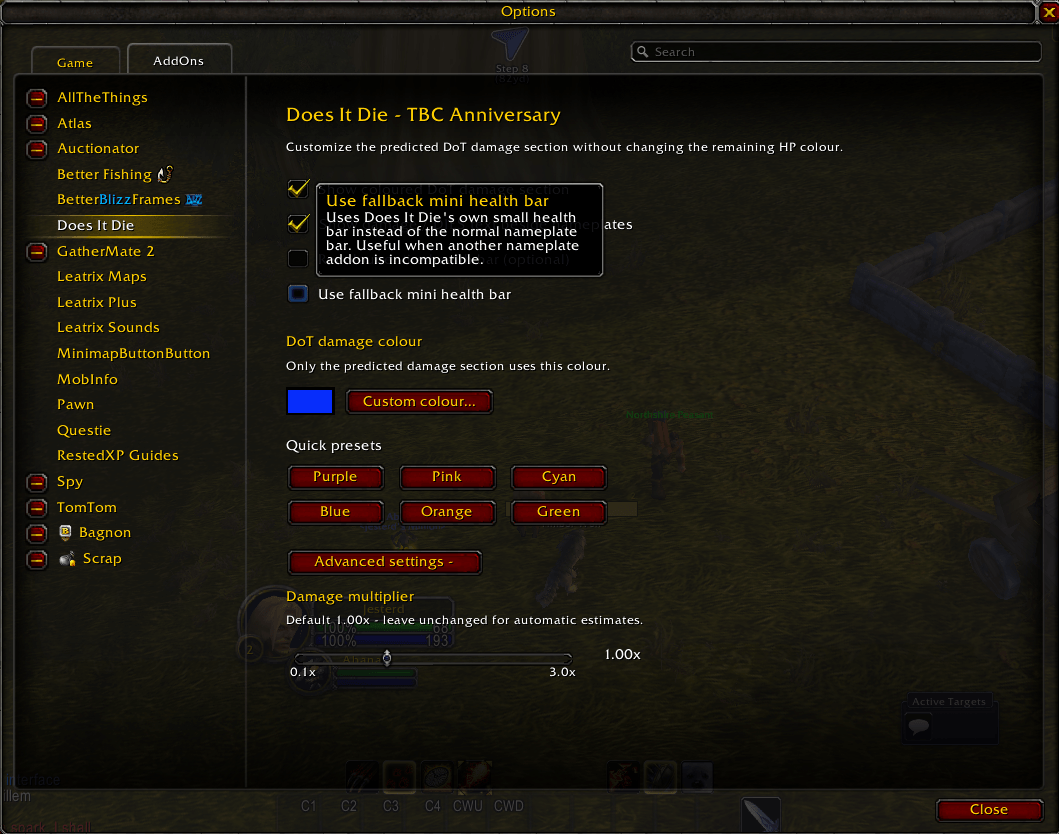
Does It Die? includes a built-in configuration menu, making it easy to customise the addon without remembering slash commands.
Open it through:
Esc → Interface / Options → AddOns → Does It Die
Or simply type:
/did options
Available Settings
-
Show Coloured DoT Damage Section: Enable or disable the predicted damage overlay.
-
Show Damage / DIES Text: Toggle the damage readout beside enemy nameplates.
-
Recolour Entire Health Bar: Optionally change the whole health bar colour based on predicted DoT damage.
-
Use Fallback Mini Health Bar: Use the addon's own small health bar instead of the normal nameplate health bar.
-
DoT Damage Colour: Choose from six presets or open the custom colour picker.
Helpful Tooltips: Hover over a setting's checkbox or label to see a short explanation of what it does.
Advanced Settings
The Advanced Settings section contains the optional Damage Multiplier.
This allows experienced players to manually scale predicted DoT damage when necessary.
The default value is 1.00×, and most players should leave it unchanged.
The multiplier affects only the addon's predictions, not your actual damage.
All settings are saved between sessions.
Works With Your Nameplate Addon
Does It Die? is designed to work with Blizzard's default enemy nameplates and attempts to support popular nameplate addons, including:
-
Plater
-
ElvUI
-
TidyPlates / Threat Plates
-
Kui Nameplates
-
Platynator
The addon automatically searches for a compatible health bar.
If it cannot find one, it can display its own small fallback health bar beneath the enemy nameplate.
The custom DoT damage colour works with both supported nameplate health bars and the built-in mini bar.
Important: Enemy nameplates must be enabled. Press V in-game to toggle them.
Compatibility with third-party nameplate addons may vary.
Slash Commands
Type /did to display the available commands.
| Command | Description |
|---|---|
/did options |
Open the in-game settings menu |
/did text |
Toggle damage / DIES text |
/did segment |
Toggle the coloured DoT damage section |
/did color |
Toggle whole-bar recolouring |
/did mini |
Toggle the built-in mini health bar |
/did plate |
Show which nameplate health bar was detected |
/did mult 1.1 |
Manually adjust predicted damage |
/did target |
Display tracked DoTs and damage information for your target |
/did parse 172 |
Test tooltip damage parsing for a spell ID |
/did reset |
Clear learned enemy health information |
Good to Know
-
English client support: Spell damage is read from English tooltip descriptions.
-
Damage predictions are estimates: Actual damage may vary depending on buffs, debuffs, resistances and individual spell mechanics.
-
Curse of Agony: Its damage increases throughout its duration. The addon currently estimates its damage using an even distribution, so predictions may be less accurate.
-
Enemy health: Some enemies require combat data before their health can be estimated reliably.
-
Damage modifiers: Effects that increase damage taken, such as Curse of the Elements, may not be automatically included in predictions.
-
Nameplate compatibility: Other addons may alter health-bar rendering, potentially affecting the overlay.
-
Automatic calculations: The damage multiplier is optional and does not increase your actual damage.
Found a Bug?
If something isn't displaying correctly, or Does It Die? isn't working with your nameplate addon, please report it.
Helpful information includes:
-
Your nameplate addon (if any).
-
The spell or DoT causing the issue.
-
What you expected to happen versus what actually happened.
-
Any Lua errors.
-
The output from
/did platewhen targeting an enemy.
Does It Die? — Know when your DoTs have already won the fight.
Does it die - Classic Team