Does It Die (TBC)
- By
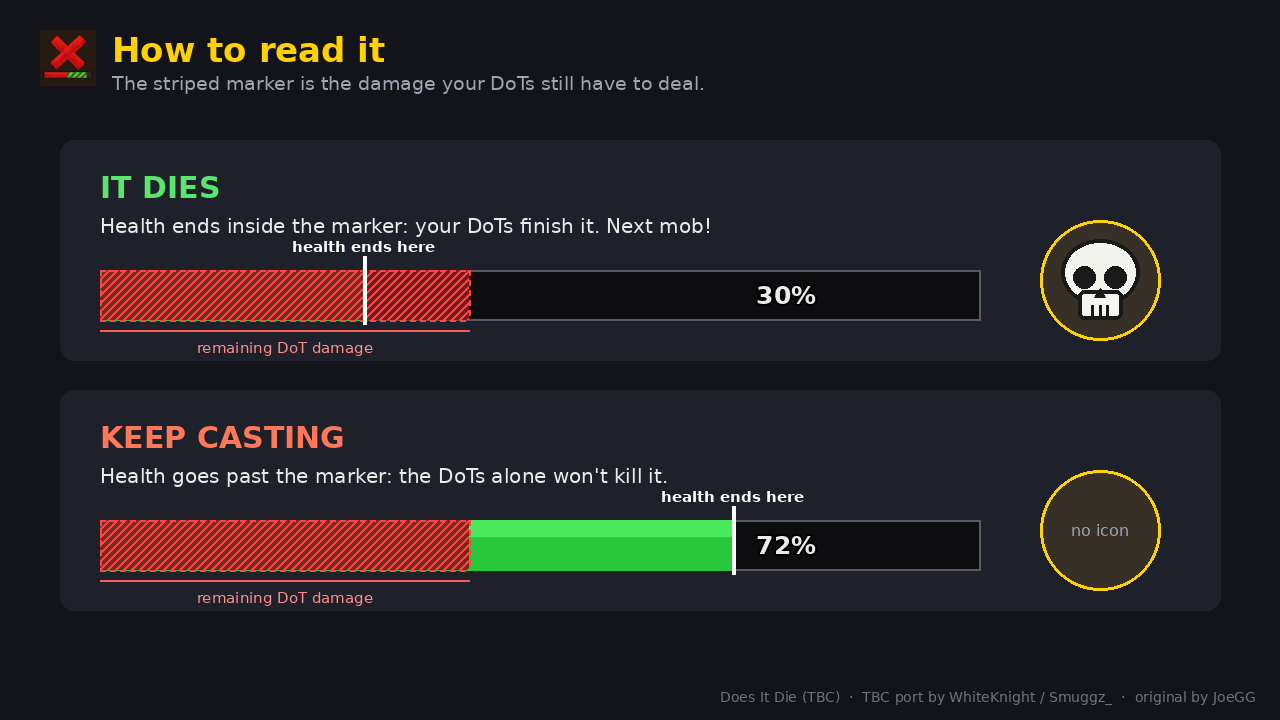
1-how-to-read-it.png
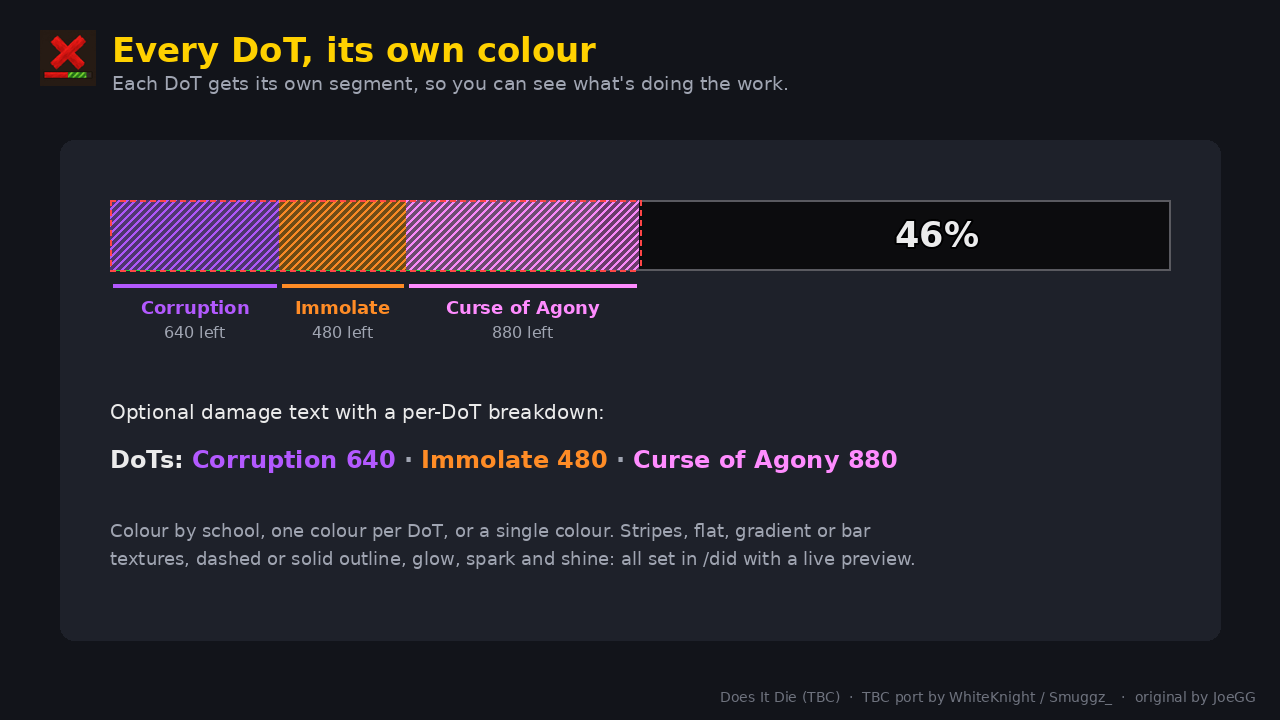
2-every-dot-its-own-colour.png
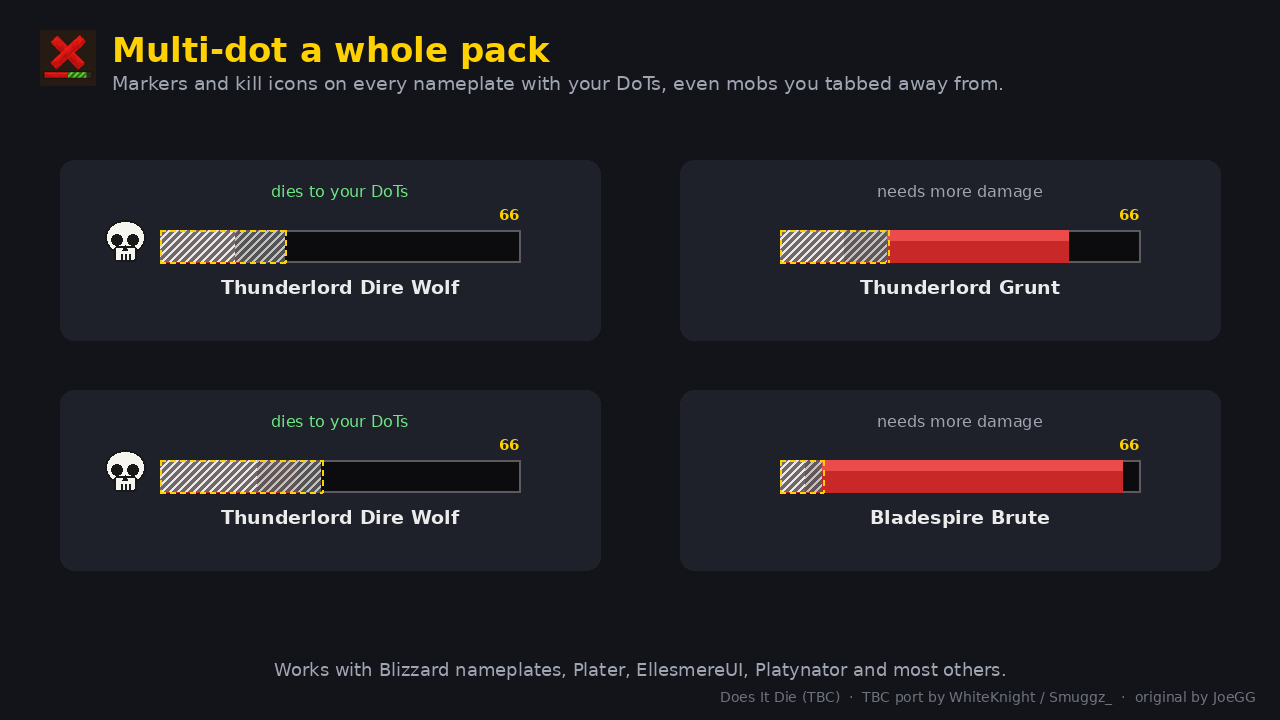
3-multi-dot-a-pack.png
4-drain-life-counts-too.png
5-in-game.png
Description
Does It Die (TBC)
Stop wasting casts on mobs that are already dead. Does It Die tracks your DoTs and shows, right on your target frame and nameplates, how much damage they still have to deal, and whether that's enough to finish the mob off.
Credit where it's due: this is a port of Does It Die by JoeGG, originally made for World of Warcraft: Forever (source on GitHub, MIT licence). All the core design, the marker, the kill icon and the options window are his work. I (WhiteKnight / Smuggz_) have ported it to TBC Classic Anniversary and updated it a little to take advantage of what the TBC client allows. Please support the original too!
What it does
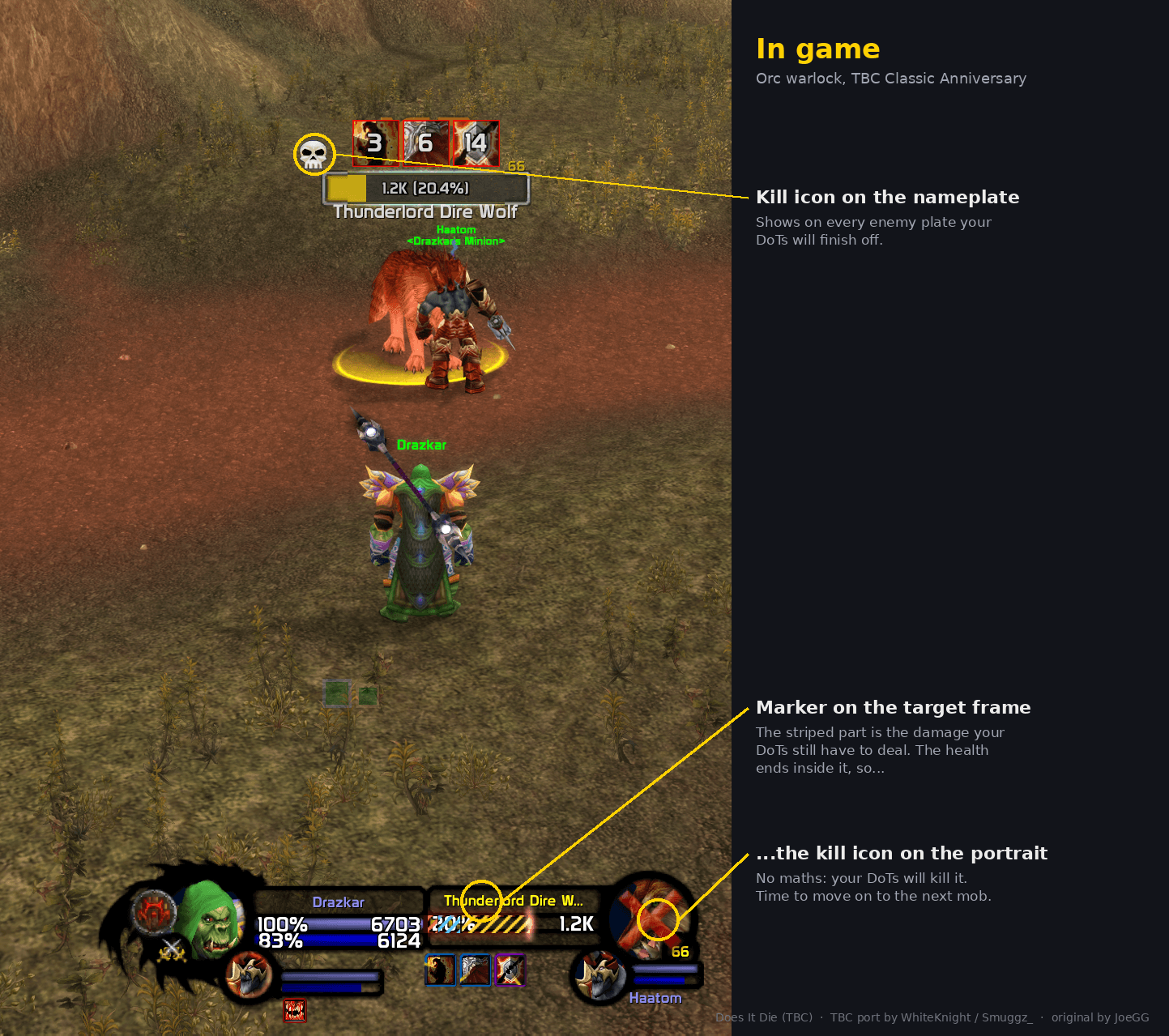
- Damage marker: a striped section on your target's health bar covers the damage your DoTs still have to deal. If the health ends inside the marker, the mob is going to die. Move on to the next one.
- Kill icon: when your DoTs are enough to kill the target, a skull (or red X, or tick) appears on its portrait. No maths, no guessing.
- Nameplates: the same marker and a small kill icon appear on every enemy nameplate that has your DoTs on it. Perfect for multi-dotting packs.
- Focus frame: the marker on your focus's health bar too, and
/cast [@focus]DoTs are tracked on the right mob. - Per-DoT colours: each DoT gets its own segment, coloured by school, so you can see Corruption, Immolate and Agony separately.
- Damage text (optional): the remaining DoT damage as a number, with a breakdown per DoT.
Great for warlocks and shadow priests multi-dotting, for levelling, and for knowing when to stop casting and start moving.
What's new in the TBC version
The original was built around WoW: Forever, which hides most combat information from addons, so it had to cleverly guess which hits were DoT ticks. TBC doesn't have those restrictions, so this version reads things directly:
- Exact tick tracking from the combat log. Every tick, miss, resist, dispel and death is read by spell name. Your Shadow Bolts, your pet and other players' DoTs are never mistaken for your ticks.
- Tab-dotting just works. DoTs keep counting down on mobs you've tabbed away from, even with no nameplate showing.
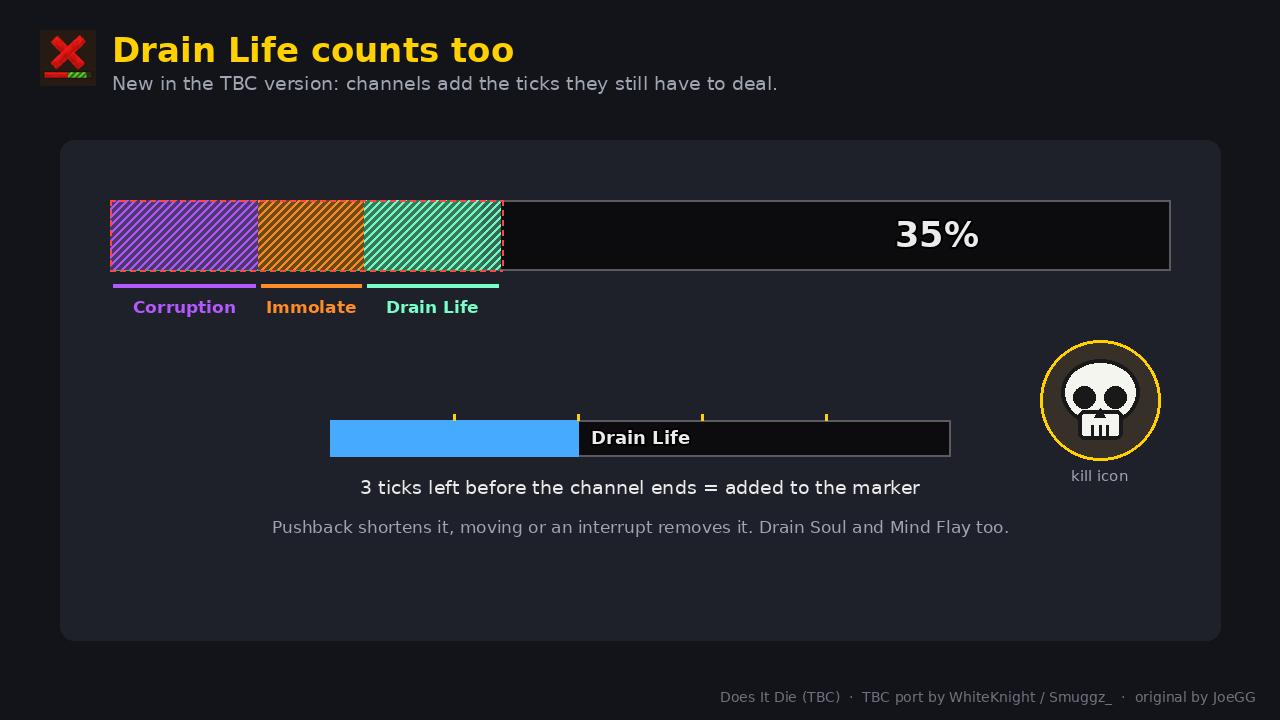
- Drain Life, Drain Soul and Mind Flay count toward the marker while you channel them, including pushback. (
/did channelsto turn off.) - Your spell power and attack power are read: when a trinket procs or you put on a flask, the estimate follows your power at the moment you cast.
- Real combo points for Rip and Rupture.
- Plater support: the marker sits on Plater's own health bar (also with Plater's "use UIParent" option). Other nameplate addons are detected automatically.
- DoT timing starts when the debuff lands, so Serpent Sting, Fireball and Pyroblast travel time doesn't throw it off.
- TBC spells and tooltips: Unstable Affliction, Vampiric Touch, Curse of Agony's slow-start ticks, Pounce Bleed, Immolation Trap and more.
Supported DoTs
| Class | Spells |
|---|---|
| Warlock | Corruption, Immolate, Curse of Agony, Unstable Affliction, Siphon Life, Seed of Corruption, Drain Life and Drain Soul (while channelling) |
| Priest | Shadow Word: Pain, Vampiric Touch, Devouring Plague, Holy Fire, Mind Flay (while channelling) |
| Druid | Moonfire, Insect Swarm, Entangling Roots, Rake, Rip, Pounce, Lacerate |
| Hunter | Serpent Sting, Immolation Trap |
| Mage | Fireball and Pyroblast (their damage-over-time part) |
| Rogue | Rupture, Garrote |
| Shaman | Flame Shock |
| Warrior | Rend |
Finishers (Rip, Rupture) use the combo points you actually spent.
How accurate is it?
The addon learns from your real ticks, so your spell power, spell rank, talents, buffs and debuffs on the mob are all in the numbers, and it remembers them between sessions.
- Before a DoT's first tick, the estimate is deliberately cautious: the lowest of your last few casts, scaled to your current spell power. Partial resists or debuffs on a mob can't be known until it ticks, so this means no false skulls. The very first cast of a new spell rank uses the tooltip, which leaves out spell power, so it starts low too.
- From the first tick on, that DoT is predicted from its own real ticks, so it's spot on.
/did accuracyshows predicted vs real damage for your last DoTs, including anything the mob resisted. After a big gear upgrade,/did resetmakes it relearn.
Fully customisable
Type /did to open the options window. It has a live preview, so you can style everything out of combat:
- Kill icon: raid skull, boss skull, red X, tick or sunglasses; size, position, optional pulse
- Marker fill: flat, health bar texture, raid bar texture, diagonal stripes (optionally scrolling) or a fade-in gradient, with colour presets and opacity
- Marker outline: dashed or solid, dash length, thickness, colour
- Animation: smooth motion, flash when a DoT lands, pulsing outline, spark, glow and shine
- Damage text: position, size and colour
- Nameplates and focus frame: their own look, since enemy plates are red
- Advanced: attach to other unit frame addons' target, focus or nameplate bars by frame path, with a "pick" mode
Commands
/didopens the options window/did channelstoggles Drain Life / Drain Soul / Mind Flay prediction/did skullshows the kill icon for 5 seconds, to check its position/did ticksshows what each of your DoTs really ticks for, compared with its tooltip/did accuracyshows predicted vs real damage for your last DoTs/did resetforgets learned tick sizes/did debugechoes the tracking log to chat (handy for bug reports)
Compatibility
- Client: TBC Classic Anniversary (2.5.5 / 2.5.6)
- Nameplates: Blizzard, Plater, EllesmereUI, Platynator, and most others automatically
- Unit frames: Blizzard's, EllesmereUI's, or any other via Advanced > custom frame path
Known limitations
- Only your own DoTs are tracked, not party members'.
- Proc DoTs with no cast (Deep Wounds, Ignite, poisons) aren't tracked.
- Healing on the target isn't accounted for.
- Curse of Doom isn't a DoT (one big hit after a minute), so it isn't shown.
Bugs and feedback
This port is new, so please leave a comment if something's tracked wrong or missing. Include your class, the spell, and if you can, the output of /did debug from the fight.
TBC port by WhiteKnight / Smuggz_. Original addon by JoeGG (Does It Die, GitHub). Ported to TBC Classic under the terms of its MIT licence, which is included in the download.
Does It Die (TBC) Team