Description







Disenchantum
Queue bag items and disenchant them with one secure click per item.
Report Bug · Request Feature
About The Project
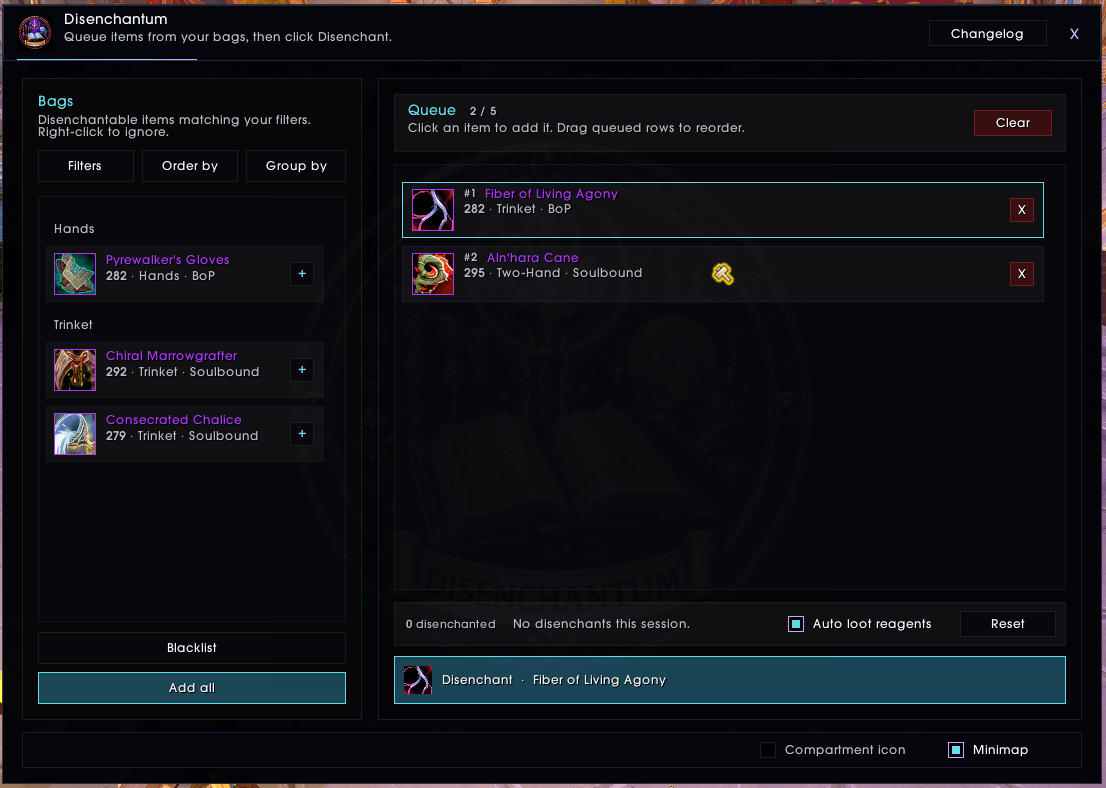
Disenchantum is a World of Warcraft Enchanting helper. It lists disenchantable items from your bags, lets you queue the ones you want, and casts Disenchant through a button.
The addon is meant to stay out of the way while you work a bag of greens, blues and purples:
- Scan bags for items that can be disenchanted
- Filter by quality, expansion, and item level grouping
- Queue, reorder, ignore, and confirm crafted gear
- Cast from a dedicated window, the minimap, or the Enchanting profession frame
Slash Commands
- /de - shows/hides the window
- /disenchantum - same as
/de
A keybind is also available: Disenchant next queued item.
Features
Queue and cast
- Bag list of disenchantable items matching your filters
- Click to queue, drag queued rows to reorder, Add all / Clear
- One Disenchant click per item
- Optional auto-loot of reagents after each cast
- Session recap with items disenchanted and reagent chips
Filters and ignore
- Quality filters (Uncommon, Rare, Epic)
- Expansion filters, including current expansion only
- Order and group bags by name, item level, quality, or armor type
- Right-click to ignore an item (hidden from Bags and Add all)
- Confirmation before queueing crafted gear
Access
- Minimap button and addon compartment icon
- Extra tab on the Enchanting profession window
- In-window changelog
Localization
- ZelionGG - French Localization
Help wanted on the other locales. Open a pull request, or see issue #1. You can also reach me on Discord or X (Twitter).
Contributing
Contributions are what make the open source community such an amazing place to learn, inspire, and create. Any contributions you make are greatly appreciated.
If you have a suggestion that would make this better, please fork the repo and create a pull request. You can also simply open an issue with the tag "enhancement".
- Fork the Project
- Create your Feature Branch (
git checkout -b feature/AmazingFeature) - Commit your Changes (
git commit -m 'Add some AmazingFeature') - Push to the Branch (
git push origin feature/AmazingFeature) - Open a Pull Request
This addon is Retail only. Please include the Disenchantum version and a Lua error dump when you report a bug.
License
Distributed under the All Rights Reserved License. See LICENSE for more information.
Disenchantum Team

Owner