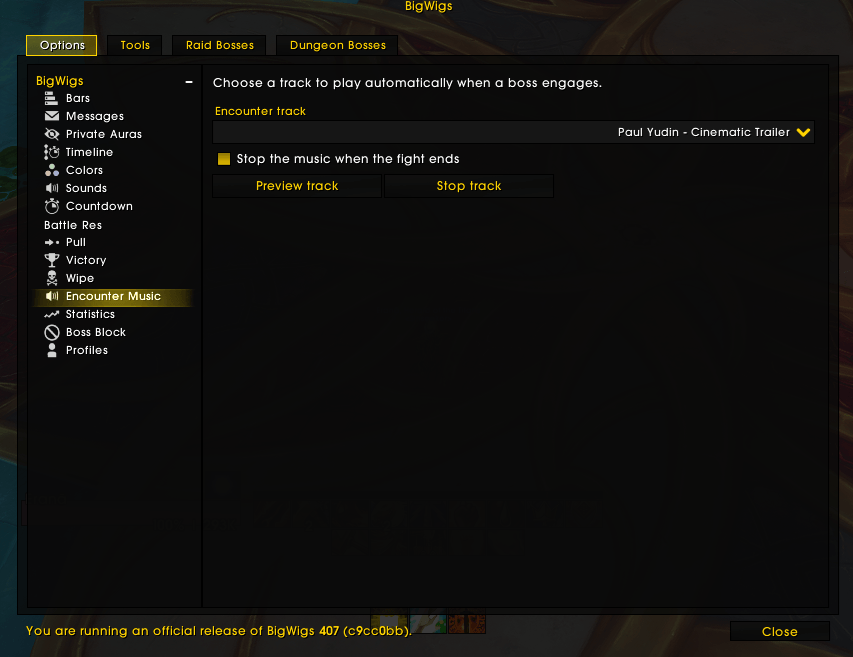
BigWigs Encounter Music settings in BigWigs
Description






BigWigs Encounter Music
`BigWigs_EncounterMusic` is a BigWigs plugin that automatically plays a selected music track when a boss encounter starts.
Report Bug · Request Feature
About The Project
The addon is designed to stay lightweight, configurable, and extensible:
- It integrates into the BigWigs options UI.
- It lets you choose a single global encounter track.
- It can stop the music automatically when the fight ends.
- It exposes a shared track registry so external music pack addons can register additional tracks.
DMCA/Content notice: the bundled example track is “no copyright music” / royalty-free, provided only as a sample. If you ship custom packs, ensure you have rights to the audio you include.
Features
- Automatic music playback on BigWigs boss engage
- Preview and stop buttons in the BigWigs options panel
- Global track selector
- Optional stop-on-encounter-end behavior
- Support for external music packs through
BigWigsEncounterMusicAPI - Built-in localization structure via
Locales.lua
Requirements
BigWigs
Installation
Install the addon into your WoW AddOns folder:
World of Warcraft/_retail_/Interface/AddOns/BigWigs_EncounterMusicHow to configure
In game:
- Open the BigWigs options
- Go to the
Encounter Musicplugin panel - Select the track you want to use
- Optionally enable or disable automatic stop at the end of the encounter
- Use
Preview trackto test the selected music - Use
Stop trackto stop playback manually
How it works
When BigWigs fires a boss engage event, the plugin:
- Reads the selected global track from the plugin profile
- Resolves the track from the shared registry
- Starts playback with
PlayMusic()when possible - Falls back to
plugin:PlaySoundFile()when needed
When the encounter ends, the plugin stops the currently active track if stopOnEnd is enabled.
Architecture
Core addon
BigWigs_EncounterMusic contains:
Core.lua- BigWigs plugin lifecycle
- option panel definition
- playback and stop logic
- encounter event handling
Registry.lua- global track registry
- registration and sorting helpers
- API exposed through
_G.BigWigsEncounterMusicAPI
Locales.lua- base English strings
- locale overrides
External music packs
Additional packs can register tracks without modifying the core addon.
The current example is:
BigWigs_EncounterMusic_EpicMusicPack
This companion addon registers tracks into the shared registry during load.
Shared API
The core addon exposes a global registry object:
_G.BigWigsEncounterMusicAPIAvailable functions:
RegisterTrack(id, data)GetTrack(id)GetTrackIds()GetTrackValues()
A registered track looks like this:
api.RegisterTrack("my_track_id", {
    name = "My Track Name",
    path = "Interface\\AddOns\\MyAddon\\Music\\MyTrack.mp3",
    source = "MyAddon",
    channel = "Music",
})
Track fields
id- unique string identifier
name- display name shown in the selector
path- full in-game file path
source- addon or pack name
channel- audio channel, usually
Music
- audio channel, usually
Creating a custom music pack
To create your own pack:
- Create a new addon folder
- Add a
.tocfile with a dependency onBigWigs_EncounterMusic - Load a Lua file that calls
BigWigsEncounterMusicAPI.RegisterTrack(...) - Store your audio files inside your addon folder
Example layout:
BigWigs_EncounterMusic_MyPack/
  BigWigs_EncounterMusic_MyPack.toc
  Tracks.lua
  Music/
BossTheme.mp3Current behavior
- The plugin uses one global selected track for all encounters
- There is no boss-specific music mapping
- If the selected track is missing, the profile is normalized to a valid fallback
- If no track is selected, the plugin does nothing on engage
Localization
Localization is defined in Locales.lua using the same simple pattern used by other BigWigs companion addons:
- English strings are the base
- Other locales override only the strings they need
Notes for development
- The addon is loaded on demand by BigWigs
- The plugin is created with
BigWigs:NewPlugin("EncounterMusic") - Do not manually call
plugin:Initialize() - Music packs should register tracks through the shared registry, not by editing the core addon
Troubleshooting
The panel does not appear
Check that:
BigWigsis enabled- the addon folder name is exactly
BigWigs_EncounterMusic - the plugin loaded without Lua errors
No music plays
Check that:
- a track is selected in the options
- the registered file path is correct
- the audio file exists in the expected addon folder
- your in-game audio settings allow music playback
The music pack tracks do not appear
Check that:
- the music pack addon is enabled
- its file paths point to the correct
Musicfolder
Project structure
BigWigs_EncounterMusic/
  BigWigs_EncounterMusic.toc
  Core.lua
  Registry.lua
  Locales.lua
README.mdThe BigWigs - Encounter Music Team


Owner