Ding LevelingTrace
- By
Optional companion to Ding: notes quests, NPCs and flights as you level, and lets you share them with us so we can make Ding's guides better.
Ding LevelingTrace: help make Ding's leveling guides better
Ding LeveingTrace is an optional companion to Ding Leveling, the leveling guide for WoW Forever. While you quest, it notes what the game shows you, and when you choose to share it, that data goes straight into making Ding's routes faster and more accurate for everyone.
You don't need it to use Ding. Install it if you'd like to help.
What it Traces
- Quests: which quests unlock others, who gives them and who takes them back, where objectives get done, the XP and rewards.
- NPCs and mobs: where quest givers, vendors, trainers and flight masters are; mob levels and where they are; which mobs drop quest items, and how often.
- Flights: how long each flight takes and what it costs.
- Leveling pace: time played and XP at each level, to check the guides' level ranges against real play.
What it does not do
- It sends nothing by itself. Everything stays in a file on your PC until you decide to share it.
- No character names. Your characters are anonomised
- It doesn't change how you play. It only watches; Ding Levelign works exactly the same with or without it.
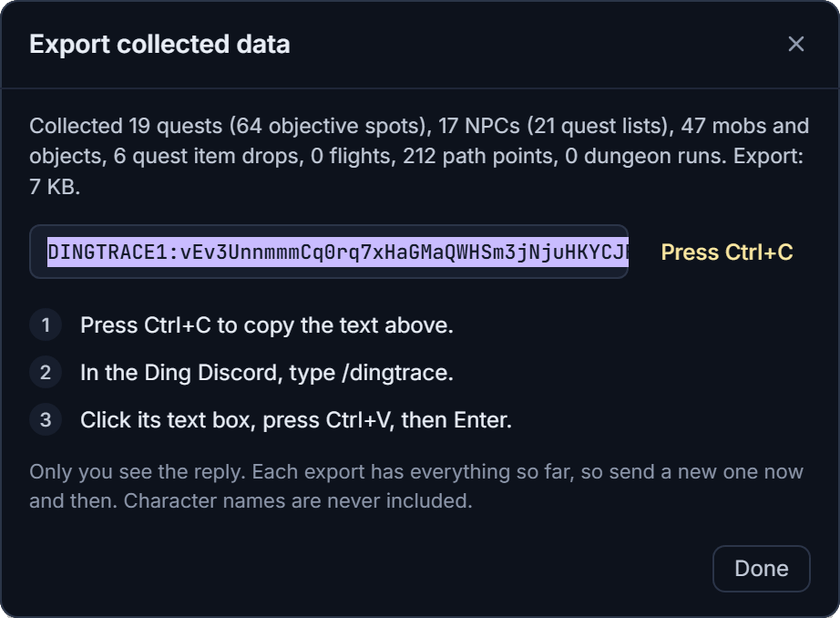
Sharing what it collected
- In game, type
/ding export(or Options > Export collected data). The text is already selected. - Press Ctrl+C.
- In the Ding Discord, type
/dingtrace:- Short export: click the text box, press Ctrl+V, then Enter.
- Long export (the window tells you): open Notepad, press Ctrl+V, save it as
ding.txt, then in/dingtracechoose file and pick it.
Only you see the reply. Each export holds everything so far, so just send a new one now and then.
Pausing or removing it
- Options > Collect quest data switches collecting off.
/ding datashows what's been collected. - Write combat log file, in the same place, is extra detail for the developer. Leave it off unless you're asked.
- To remove Ding LevelingTrace, uninstall it. Ding keeps working the same.
Install
Use the CurseForge app: installing DingTrace brings Ding with it. By hand, copy the DingTrace folder into
World of Warcraft\_forever_\Interface\AddOns\ next to Ding, and restart the game.Ding LevelingTrace Team