DemoAssist
- By
Visual-only Demonology Warlock next-press helper for Midnight. One clear icon. Never automates.
Screenshot 2026-10-25 065718.png
Screenshot 2026-10-25 065730.png
Screenshot 2026-10-25 201123.png
Screenshot 2026-10-25 201233.png
Description
DemoAssist
Visual-only Demonology Warlock next-press helper for Midnight. One clear icon. Never automates.
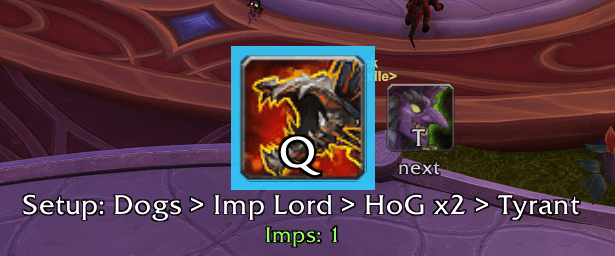
DemoAssist is an accessibility-focused rotation helper for Demonology Warlock (World of Warcraft Retail, Midnight 12.x). It shows one big, clear icon telling you what to press next. It is built for players with processing difficulties who find busy UIs overwhelming and need a single clear cue.
DemoAssist suggests only. It never casts, presses, or automates anything. You press every button yourself.
Features
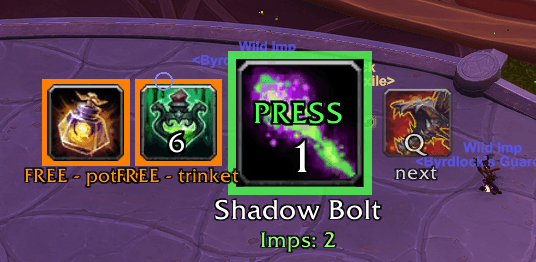
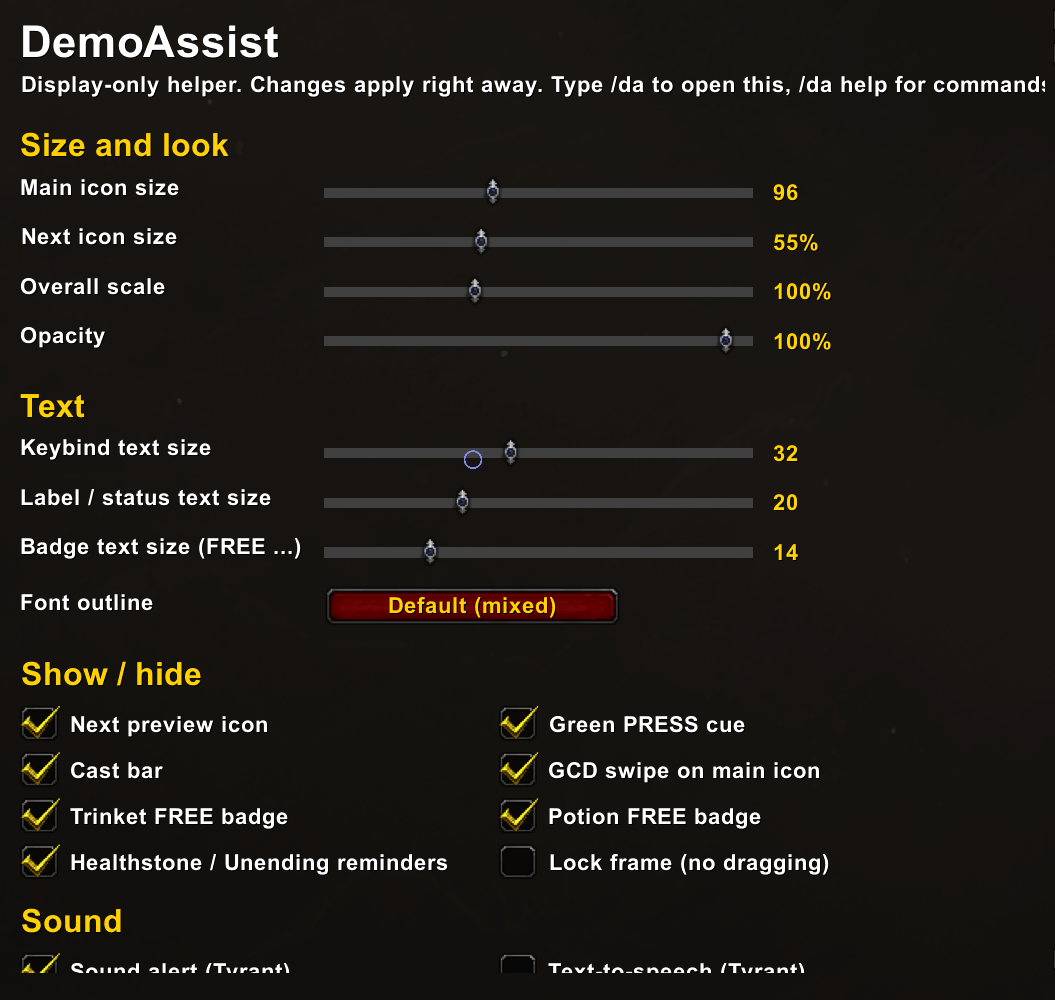
- Big next-press icon with your keybind shown on it. Built on Blizzard's own Assisted Combat suggestion (
C_AssistedCombat). - Small "next" preview icon for the press after that (toggle with
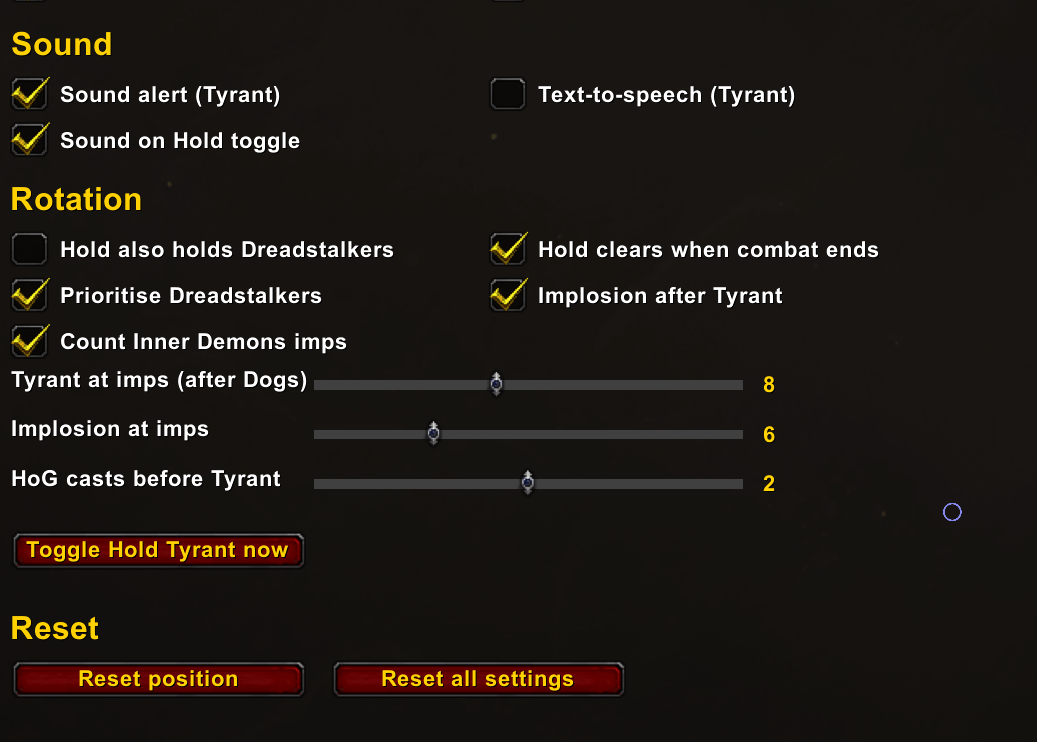
/da next, resize with/da nextsize). - Hold Tyrant toggle: keybind or
/da hold. Optionally holds Dreadstalkers too (/da holddogs), clears when combat ends (/da holdreset), and plays a toggle sound (/da holdsound). - Tyrant setup: Call Dreadstalkers, then 2 Hand of Gul'dan casts (
/da hog N) or 8+ imps (/da tyrantimps N), then TYRANT NOW. - Implosion suggested at 6+ imps (
/da imps N), respecting its cooldown. - Grimoire: Imp Lord step (modes:
smart,tyrant,cd). - Trinket and potion "FREE" badges during Tyrant (on-use trinkets, combat potions).
- GCD swipe, cast bar, and a green PRESS cue when it's time to queue the next press (
/da queue,/da presscue). - Optional defensive reminders: Healthstone and Unending Resolve at configurable health % (
/da defensives,/da hs N,/da ur N). - Optional sound and text-to-speech alerts.
- Movable, lockable, resizable frame.
/da debugprints what the addon can and can't read right now.
Slash commands
| Command | What it does |
|---|---|
/da |
List all commands |
/da hold |
Toggle Hold Tyrant |
/da holddogs |
Hold also holds Dreadstalkers |
/da holdreset |
Hold clears when combat ends |
/da holdsound |
Sound on hold toggle |
/da hog N |
Hand of Gul'dan casts after Dreadstalkers before Tyrant (default 2) |
/da tyrantimps N |
Imp count that also triggers Tyrant after Dreadstalkers |
/da window N |
Seconds after Dreadstalkers in which Tyrant may be suggested |
/da imps N |
Imp count for Implosion (default 6) |
/da implosion |
Toggle Implosion after Tyrant |
/da implcd N |
Implosion cooldown fallback |
/da implord smart\|tyrant\|cd |
Grimoire: Imp Lord timing |
/da implordcd N |
Imp Lord cooldown fallback |
/da dogscd N / /da tyrantcd N |
Dreadstalkers / Tyrant cooldown fallbacks |
/da impdur N / /da impsperhog N |
Imp estimate tuning |
/da impaura ID / /da innerdemons |
Imp aura ID / count Inner Demons imps in the estimate |
/da trinkets |
Toggle trinket badge |
/da trinketwith tyrant\|cd |
Use trinkets with Tyrant or on cooldown |
/da trinketcd N |
Trinket cooldown fallback |
/da potion [itemID\|auto] |
Toggle potion badge or set the potion item |
/da defensives |
Toggle Healthstone / Unending Resolve reminders |
/da hs N / /da ur N |
Health % thresholds for the reminders |
/da presscue |
Toggle green PRESS cue |
/da queue N\|auto |
Queue window in ms |
/da next / /da nextsize N |
Toggle / resize the next-preview icon |
/da size N / /da lock |
Icon size / lock or unlock the frame |
/da sound / /da tts |
Toggle sound / text-to-speech |
/da bind <spellID\|trinket1\|trinket2\|potion\|healthstone> <key> |
Override the keybind text shown |
/da debug |
Diagnostics |
Keybinds
Esc → Options → Keybindings → AddOns → DemoAssist → Toggle Hold Tyrant.
Install
- Install with the CurseForge app, or download the zip.
- Extract so the folder is
World of Warcraft/_retail_/Interface/AddOns/DemoAssist/. - Restart WoW or
/reload, and enable DemoAssist on the character select AddOns screen. - On a Demonology Warlock, drag the icon where you want it, then
/da lock.
Midnight secret-value notes
Midnight (12.x) hides many combat values ("secret values") from addons. DemoAssist works within those limits:
- It uses only Blizzard's Assisted Combat suggestion, your own cast events, and timers.
- Cooldown and power reads are attempted, and ignored if they are secret. In that case it falls back to timers you can adjust (
/da dogscd,/da tyrantcd,/da implcd, ...). - The imp count is estimated in combat from your own Hand of Gul'dan casts. It may be off by an imp or two.
- Some spell IDs are from before Midnight and may need checking in game.
/da debugshows what is readable.
Disclaimer
DemoAssist never presses, casts, or automates anything. It is a visual and audio aid only, and every action is yours. It is not affiliated with or endorsed by Blizzard Entertainment.
DemoAssist Team