


Delve Assistant
Delve checklist, weekly lockouts, and checkpoint reminder.
Screenshot 2026-09-03 200259.png
Description
Delve Assistant
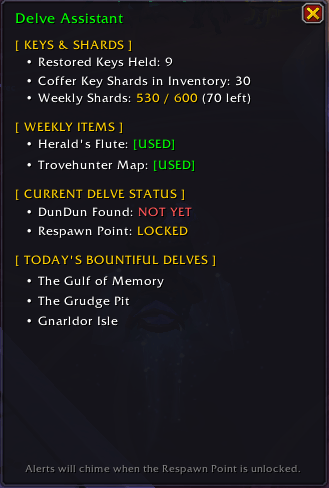
Your all-in-one dashboard, lockout tracker, and mid-run checklist for Delves.Delve Assistant is a lightweight, zero-dependency quality-of-life addon built specifically for World of Warcraft: Midnight. It tracks your essential Delve currencies, monitors your weekly lockouts across characters, lists active daily Bountiful Delves, and ensures you never forget to use your high-value consumables before completing a run.
Note: This addon is currently in Beta. Features are actively being tested and refined. Feedback and suggestions are welcome!
✨ Key Features
-
Keys & Shard Cap Management:
- Restored Coffer Keys: Real-time count of keys held in your currency tab.
- Inventory Shards: Displays your current Coffer Key Shards without confusing ratios.
- Weekly Shard Cap Tracker: Tracks your progress against the 600 weekly shard cap, showing exact progress and how many shards remain before capping.
-
Weekly Item Lockouts (Alt-Friendly):
- Instantly checks whether your character has used their weekly Scalebound Herald's Flute.
- Tracks whether you have consumed your weekly Trovehunter's Bounty Map.
- Clean, color-coded
[USED]and[UNUSED]indicators that update instantly when switching between alts.
-
Active Bountiful Delves Checklist:
- Scans and displays today's active Bountiful Delves without requiring you to open the World Map!
- Dynamic To-Do List: As you clear Bountiful Delves and loot the final chest, completed delves drop off the list so you always know what is left to run on that specific character.
-
Mid-Run "Respawn Point" Checklist & Alerts:
- When you unlock the halfway Respawn Point, Delve Assistant audits your run.
- Plays an alert and displays a reminder if you forgot to blow your Herald's Flute, haven't consumed your Trovehunter's Bounty, or haven't spotted DunDun yet before proceeding into the final encounters.
- Auto-opens the dashboard so you can see exactly what was missed.
-
DunDun Detection:
- Automatically detects when DunDun is discovered during your run and marks him complete on your dashboard.
🎮 Usage & Slash Commands
- Minimap Button: Click the key icon on your minimap rim to toggle the dashboard on/off. Click and drag the icon to position it anywhere around your minimap.
- Slash Commands:
/da— Toggle the Delve Assistant window./delve— Alternate command to toggle the window.
⚡ Lightweight & Dependency-Free
Delve Assistant is completely self-contained. It requires no external libraries (no Ace3, LibDataBroker, or heavy frameworks), ensuring lightning-fast load times and zero memory bloat.
Found a bug or have an idea for a feature? Please leave a comment or submit an issue on our project tracker!
The Delve Assistant Team


