DART - Threat Meter
A classic-style threat meter for WoW: Forever that keeps everyone’s threat on screen, with optional color-coded threat numbers on enemy nameplates.
Capture.PNG
Capture1.PNG
Capture3.PNG
Capture4.PNG
Description
DART - Threat Meter
A classic-style threat meter for WoW: Forever, with optional threat numbers on enemy nameplates.
On Forever, the only built-in way to see a number for your threat is to mouse over a mob and read the tooltip. That's no use mid-pull, when you're watching your rotation, your health and the mob all at once. DART - Threat Meter keeps those numbers on screen at all times, without mousing over anything, so tanks know when to build more threat and DPS know when to ease off.
Features
Threat window
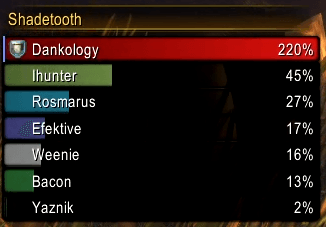
- Shows everyone's threat on your current target, sorted from most to least
- Uses the same numbers as Blizzard's own threat display:
- The player with aggro sees how far ahead they are of the next player (250% = 2.5x anyone else)
- Everyone else sees their threat as a share of the tank's (melee pull at 110%, ranged at 130%)
- Class-colored bars, with your own bar in red so you find it at a glance (optional)
- Tank icon on whoever holds aggro
- Always keeps you on the list, even outside the top rows
- Optional red glow on your row when you're about to pull
- Healers: target the tank and the meter shows the mob the tank is fighting
Nameplate threat (optional)
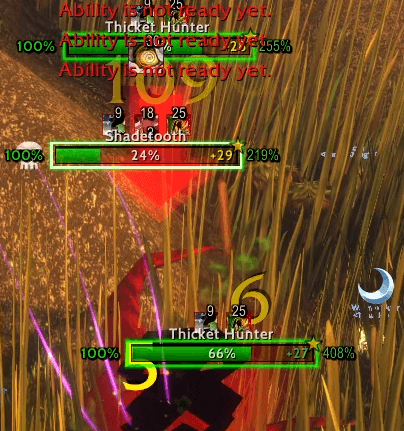
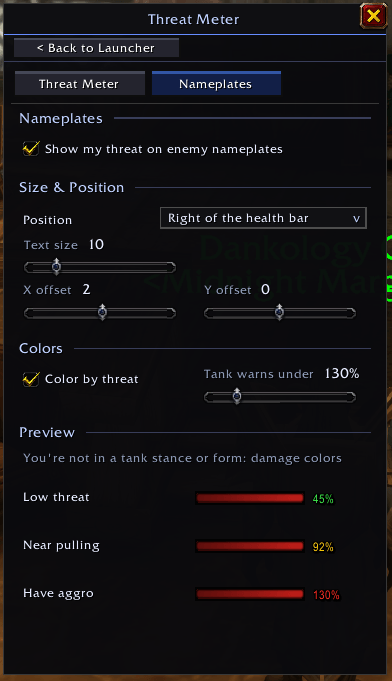
- Your threat number on every enemy nameplate, so you can watch every mob in a pull without targeting any of them
- Choose the size and position (left, right, above, below or on the health bar), then fine-tune with X/Y offsets
- Color-coded by threat:
- Tanking (Defensive Stance, Bear / Dire Bear Form, or Righteous Fury): green = you have aggro, yellow = someone is closing in, red = you've lost it
- Not tanking: green = safe, yellow = getting close to pulling, red = you have aggro
Built for the Forever client
- Uses the game's own modern damage meter art
- Lightweight: does nothing out of combat, and in combat updates on the same schedule as Blizzard's own threat display
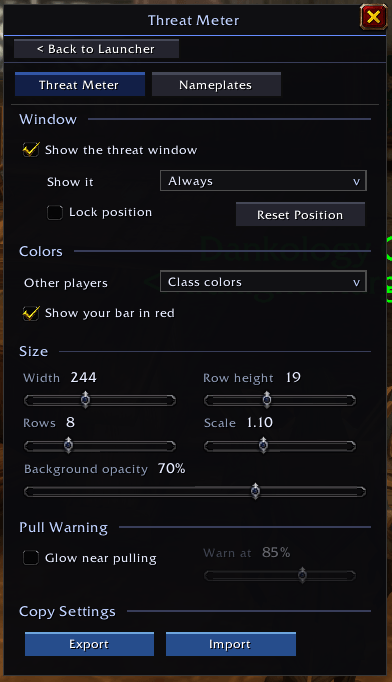
- Live preview while the settings are open, so you can see every change as you make it
- Copy your settings to other characters with Export / Import
Commands
/dtm– open settings/dtm lock– lock / unlock the window
Requirements
Requires DART Core.
DART - Threat Meter Team