Damage Time
- By
Damage Time is a personal damage meter for WoW Classic Era, with a compact, easy-to-use interface. Monitor your total damage and DPS during combat, or run a timed test to compare rotations, abilities and equipment.
WoWScrnShot_102426_074212.jpg
WoWScrnShot_102426_074224.jpg
Description
Damage Time
Track your damage. Choose your test duration. Review your results.
Damage Time is a personal damage meter for WoW Classic Era, with a compact, easy-to-use interface. Monitor your total damage and DPS during combat, or run a timed test to compare rotations, abilities and equipment.
Combat Tracking
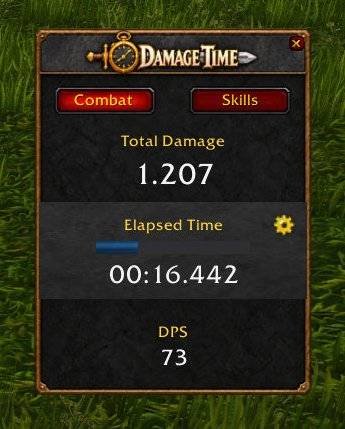
The Combat tab displays:
- Total Damage — your accumulated damage for the current measurement.
- Timer — elapsed combat time or a countdown for timed tests.
- DPS — your damage divided by the elapsed measurement time.
Results remain visible after the measurement ends, so you can review them before your next fight.
Automatic and Timed Modes
Click the gear icon to expand the timer settings.
- Automatic: starts when you enter combat and stops when you leave combat.
- 10 seconds / 30 seconds: quick presets for fixed-duration tests.
- Custom: choose a duration from 1 to 3,600 seconds.
In timed mode, the clock displays your selected duration before combat begins. The countdown and progress bar decrease to zero, then the results freeze.
Timed tests continue until the selected duration is complete, even if you leave combat early. DPS uses the elapsed time, including any pauses in attacking.
Skill Breakdown
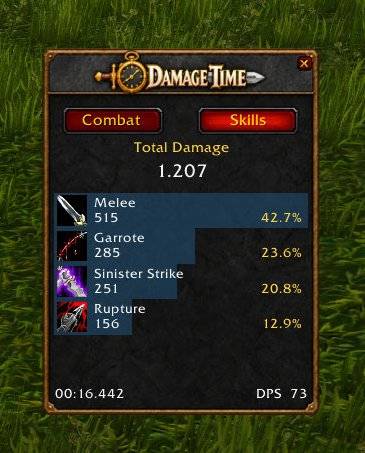
The Skills tab shows the abilities contributing to your damage, sorted by damage dealt.
Each entry includes:
- Ability icon and name.
- Total damage.
- Percentage of your total damage.
Hover over an ability to view its damage, damage events, critical events, DPS and percentage share.
Mouse-wheel scrolling and a scrollbar let you browse longer lists while keeping the window compact. Switching tabs preserves the current measurement.
Pet Damage
Include or exclude your current pet’s damage through the gear icon’s right-click menu.
Pet abilities appear separately in the Skills tab. Damage from other players and summoned guardians is not included.
Simple Controls
- Drag the panel to move it.
- Left-click the gear to configure the timer.
- Right-click the gear to reset the measurement or adjust pet tracking.
- Click X to hide the window.
Your position, visibility and settings are saved. Measurements continue while the window is hidden.
Commands
/dt— show or hide the window./damagetime— alternative toggle command./dt reset— reset the current measurement.
Compatibility
Designed for WoW Classic Era. No additional libraries or addons are required.
Damage Time Team