Daleme’s Cafe: Mage Water & Food
Conjure water and food with one button, then automatically fill trades for your group, guild and friends with the right amount for their class.
Cafe-1.png
Cafe-2.png
Description
Daleme's Cafe: Mage Water & Food
Summary: Conjure water and food with one button, then automatically fill trades for your group, guild and friends with the right amount for their class.
Being the group's water vending machine shouldn't mean dragging stacks into trade windows all night. Daleme's Cafe handles the busywork: one button keeps you stocked, and when a friend trades you, their water and food is already in the window.
Features
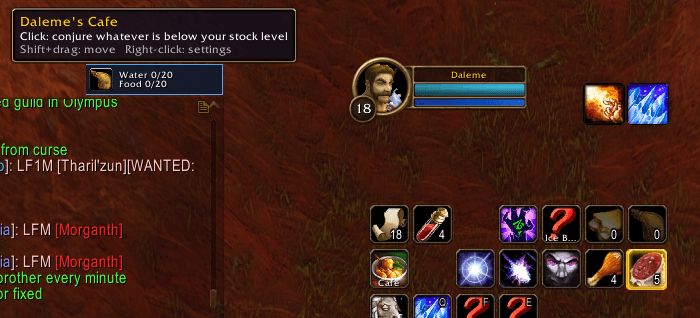
- One-button conjuring. A small button shows your stock (for example "Water 60/120, Food 20/80") and conjures whichever one is low, always at your highest rank. When you're fully stocked it shows the cafe logo.
- Stock up on demand. Ctrl+click conjures water and Alt+click conjures food, even when you're already above your stock level.
- Trades fill themselves. When someone in your group, guild or friends list opens a trade, the cafe puts in their share:
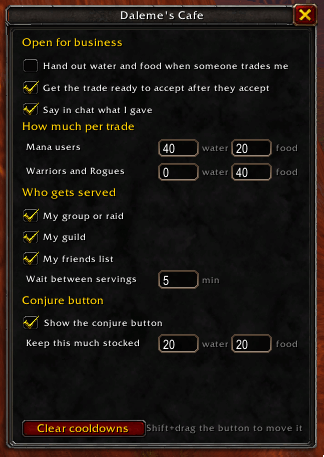
- Mana users: 40 water and 20 food
- Warriors and Rogues: 40 food
- The right rank for them. It hands out the best water and food the other player is high enough to use, and splits stacks to give exact amounts.
- One press to finish. After they accept, press your Cafe button or keybind to complete the trade.
- Fair-use cooldown. Each player can be served once every 5 minutes. If they trade again sooner, a Serve anyway button appears when you want to be generous.
- Strangers are left alone. Trades from anyone outside your group, guild or friends list work like normal trades.
- Chat receipts. "Served Bob 40 water and 20 food."
- Free. No tips required.
How to use it
- Click the Cafe button (or its keybind) until your stock is full. Ctrl+click for extra water, Alt+click for extra food.
- When someone trades you, wait for them to accept.
- Press the Cafe button, the green Accept trade button under the trade window, or your keybind. Done.
Shift+drag the Cafe button to move it. Right-click it to open settings.
Settings
Type /cafe to open the settings window. You can change:
- Amounts for mana users and for Warriors and Rogues
- Who gets served (group, guild, friends)
- The wait between servings
- How much water and food to keep stocked
- Whether the cafe readies trades for you, shows the button, and posts chat messages
Commands
| Command | What it does |
|---|---|
/cafe |
Open settings |
/cafe toggle |
Turn the cafe on or off |
/cafe reset |
Clear everyone's cooldown |
/cafe serve |
Fill the open trade right now, ignoring the cooldown |
/cafe debug |
Show what the addon sees in your bags (handy for bug reports) |
Keybinds
Under Keybindings > AddOns > Daleme's Cafe:
- Conjure water or food (accepts a waiting trade): one key does both. Ctrl plus that key conjures water and Alt plus that key conjures food, unless those combinations are already bound to something else.
- Accept the trade: optional, if you want accepting on its own key.
Good to know
- Accepting needs one key press. Blizzard doesn't allow addons to accept trades on their own. The cafe gets everything ready, and you press one button to finish.
- Conjuring needs a click or key press too. Addons can't cast spells by themselves.
- Mage only. On other classes the addon stays hidden.
- Built for English game clients. It finds water and food by name.
Dependencies
None. Works on its own.
Compatibility
World of Warcraft: Forever (1.60.1). Found a bug? Leave a comment with a screenshot of /cafe debug.
Daleme’s Cafe: Mage Water & Food Team