Daleme's Arcane Watch: Mage Buff Tracker
A small party frame for Mages that shows your Arcane Intellect, Dampen Magic and Amplify Magic timers on each player, warns you before they run out, and rebuffs with one click.
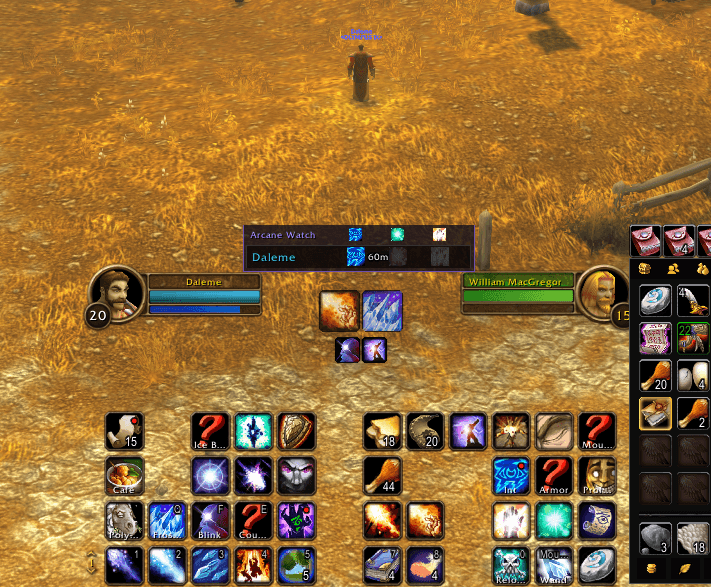
Untitled.png
Description
Daleme's Arcane Watch: Mage Buff Tracker
Summary: A small party frame for Mages that shows your Arcane Intellect, Dampen Magic and Amplify Magic timers on each player, warns you before they run out, and rebuffs with one click.
Keeping Intellect up on the whole group means checking every party frame and guessing who's about to drop. Arcane Watch puts your group and your buff timers in one small panel, tells you when something is running low, and lets you rebuff from the same spot.
Features
- Your group at a glance. You plus your party, with class-colored names, like Blizzard's raid frames. In a raid it shows your own subgroup. When you're solo it shows just you.
- Buff timers on every row. One slot each for Arcane Intellect, Dampen Magic and Amplify Magic, with the time left on your buffs.
- Other Mages' buffs too. Buffs another Mage cast are shown dimmed, so you know that player is covered. Arcane Brilliance counts as Intellect.
- Missing Intellect stands out. A red border marks anyone with no Intellect at all.
- Warnings before buffs drop. When one of your buffs gets low, its timer turns red, the row pulses gold and a sound plays once. Defaults: 5 minutes for Arcane Intellect, 1 minute for Dampen and Amplify Magic.
- Range and status at a glance. A row fades when that player is out of range, dead or offline.
- Click to rebuff. Always casts your highest rank:
- Click a name: Arcane Intellect
- Ctrl+click: Dampen Magic
- Alt+click: Amplify Magic
- Right-click: target that player
How to use it
- Find the Arcane Watch panel on your screen. Drag its title bar to move it.
- Click a name to buff that player. Use Ctrl or Alt for Dampen or Amplify Magic.
- When a row pulses gold, click it to refresh the buff.
Right-click the title bar to open settings.
Settings
Type /aw (or right-click the title bar) to open the settings window. You can change:
- How many minutes before each buff runs out the warning starts (0 turns it off)
- Whether the warning plays a sound and makes the row glow
- Whether buffs from other Mages are shown
- Locking the panel in place
- The panel's size
- A button to reset its position
Commands
| Command | What it does |
|---|---|
/aw or /arcanewatch |
Open settings |
/aw lock |
Lock the panel in place |
/aw unlock |
Let the panel be dragged again |
/aw reset |
Reset the panel's position and size |
/aw debug |
Show what the addon sees for each player (handy for bug reports) |
Good to know
- Buffing needs a click. Blizzard doesn't let addons cast spells on their own, so the panel warns you and you click to rebuff.
- Combat hides buff details. The game hides buff information from addons during combat. Timers keep counting from what Arcane Watch saw before the fight, and buffs you cast from the panel during combat show up right away. If another player buffs your group or a buff is removed mid-fight, the panel catches up when combat ends.
- Dampen and Amplify Magic replace each other, so a player only shows one of them.
- Made for Mages. Clicks cast Mage spells, so the panel isn't useful on other classes.
Dependencies
None. Works on its own.
Compatibility
World of Warcraft: Forever (1.60.1). Found a bug? Leave a comment with a screenshot of /aw debug.
Daleme's Arcane Watch: Mage Buff Tracker Team