CrossIgnore: (Forever) Smart Ignore and Spam Control
- By
An all-in-one ignore manager and chat spam filter — cross-realm and unlimited. Automatically blocks LFG group leaders when they decline your application.
CrossIgnore1.png
CrossIgnore2.png
CrossIgnore4.png
17f116e6ae858d6de3df9831742055ba.png
2a566b13b0e0a28aa92bad9193cf32d5.png
Description


WoW: Forever beta notice: CrossIgnore includes preliminary support for Forever’s first-and-last-name system. The Forever client and addon API are still changing, and blocking, unblocking, right-click menus, and saved ignores have not yet been fully verified in-game. If something fails, please report the steps and any error message.
What is CrossIgnore?
Tired of seeing the same trolls, boosters, gold ads, or spam every day? CrossIgnore gives you an unlimited, cross-realm ignore list alongside customizable chat filters and tools that extend Blizzard’s ignore system.
Keep notes on ignored players, set ignore expiry dates, manage players through right-click menus, and filter unwanted messages with simple words or complex conditional rules. Trusted Players lets friends and guildmates you add by name bypass your chat filters.
On Retail, Guild Ignore also lets you hide chat from identified members of guilds you choose.
What Does the Addon Do?
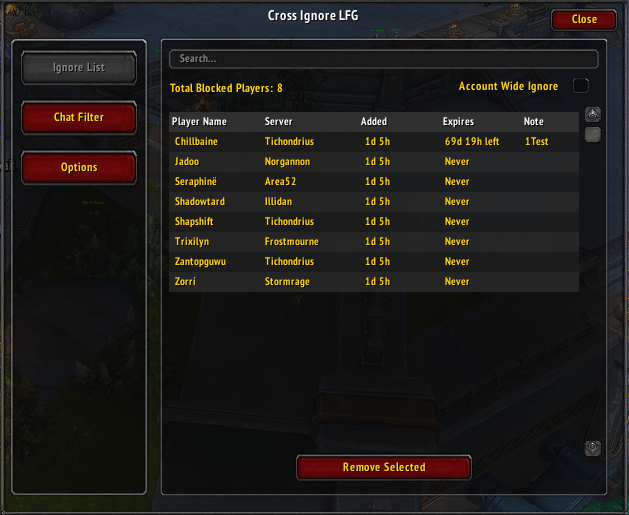
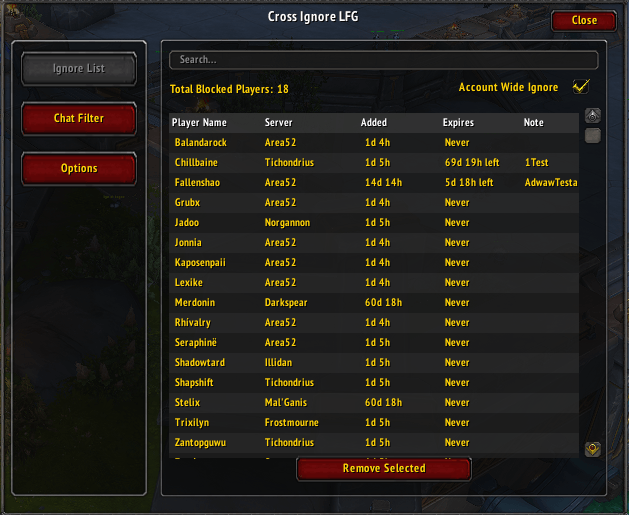
- Unlimited cross-realm ignoring — maintain an extended ignore list beyond Blizzard’s limit, including names like
Name-Realm - Advanced conditional filters — combine conditions with
and,or,not, and parentheses - Built-in spam filters — customize filters for boost sellers, power leveling, crafting advertisements, recruitment, and more
- Trusted Players — let named players bypass word and advanced filters
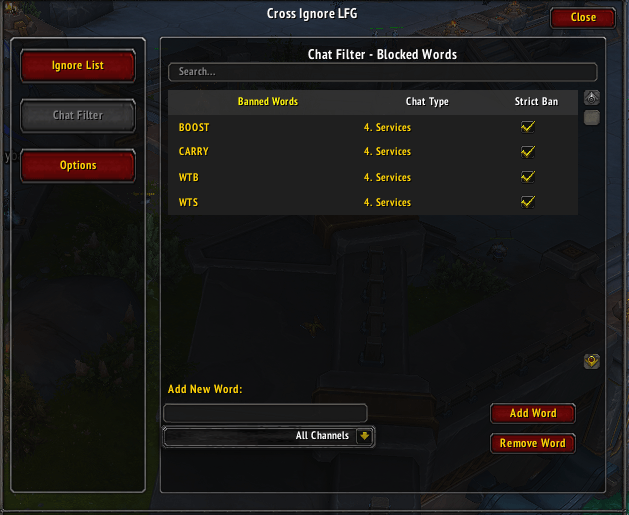
- Chat word filters — choose which channels to filter, with optional strict matching
- Filter testing and history — test advanced rules before saving and review blocked messages and counts
- Guild Ignore on Retail — filter chat from identified members of selected guilds
- LFG integration — automatically ignore leaders who decline your application, mark groups in red, or hide them
- Right-click menus — Ignore, Unignore, Edit Note, and Set Expiry
- Notes and expiries — record why someone was ignored and optionally set an end date
- More than chat — handle whispers, invites, trades, and duels from ignored players
- Tooltip warnings — see when a player is ignored
- Global or per-character player ignore lists
- Toggleable minimap icon and launcher
Advanced Chat Filters
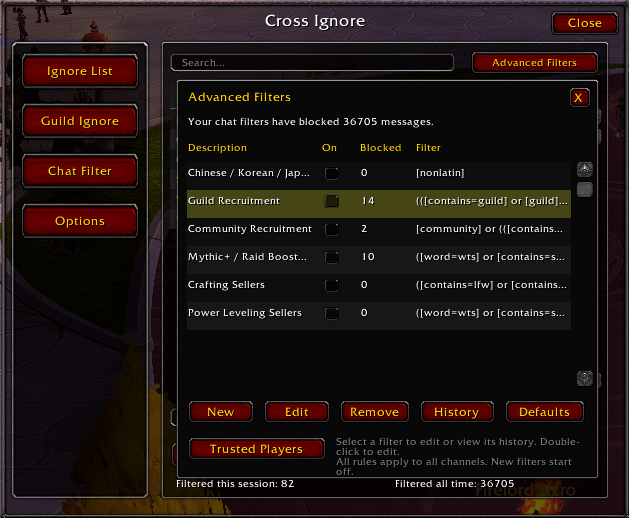
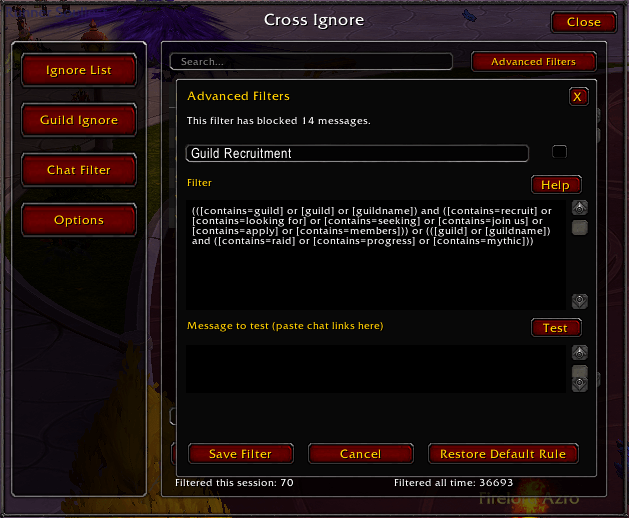
Go beyond simple blocked words in the Advanced tab. Build conditional filters that combine multiple checks, or start with six built-in filters:
- Mythic+ / Raid Boost Sellers
- Power Leveling Sellers
- Crafting Sellers
- Guild Recruitment
- Community Recruitment
- Chinese / Korean / Japanese characters
Combine conditions using and, or, not, and parentheses. Match words, text, chat links, and other message content to control what gets filtered.
For example:
[word=wts] and ([contains=boost] or [contains=raid])
This matches messages containing the whole word “wts” alongside text containing “boost” or “raid”.
Hover over a filter to see its details—Power Leveling Sellers is a useful example. Edit the built-in rules or create your own, test messages before saving, and review blocked-message history and counts.
Advanced filters apply across all supported chat channels. Built-in filters and newly created filters start switched off, so you choose what to enable.
Trusted Players — Keep Your Friends Heard
Want to block sales messages without catching your friends’ conversations? Open Advanced → Trusted Players and add friends, guildmates, or other players by name.
Messages from players you add bypass both word filters and advanced filters. Your Trusted Players list is shared across your characters.
Trust applies to the names you add; friends and guildmates are not automatically included. Player ignores and Guild Ignore still apply.
Guild Ignore
Open Guild Ignore and add a guild name or part of a name. CrossIgnore hides chat from members whose guild it has identified—including your own messages if you add your guild. Guild ignore rules are shared across your characters.
CrossIgnore learns guild membership from nearby players, tooltips, group members, guild rosters, and /who results. Use Look Up Player to check an unknown sender. Once a member is identified, CrossIgnore can also remove their earlier messages from your chat windows.
Membership is remembered for 24 hours by default, with 7-day and 30-day options available for each rule. Where supported, CrossIgnore can also hide known members’ say, yell, and party chat bubbles outside instances and combat.
Guild Ignore is a best-effort local filter. An unknown member’s messages may appear until their guild is identified, and /who may miss offline players. It does not add members to Blizzard’s ignore list, cover Battle.net whispers, or hide protected chat bubbles in instances. Bubbles are matched by text, so identical nearby speech may also be hidden.
Guild Ignore is currently available in the Retail version.
The Petty Feature Everyone Secretly Wanted
Ever had someone decline your LFG request… and then show up again five minutes later? CrossIgnore can auto-ignore group leaders who decline your application.
You can also mark groups from ignored leaders in red or hide them completely, making it easier to avoid applying again.
Why Use CrossIgnore?
- Keep adding players after Blizzard’s ignore list is full
- Filter unwanted advertisements with built-in or custom conditional rules
- Let trusted friends and guildmates bypass your chat filters
- Choose which channels your word filters apply to
- Manage ignores through the UI and right-click menus
- Keep individual player ignores and guild-wide chat rules in one addon
Quick Commands
| Command | Description |
|---|---|
/crossignore |
Opens the main CrossIgnore UI |
/ci ui |
Opens the UI |
/ci showMinimapIcon |
Toggles the minimap icon |
/ci useGlobalIgnore |
Enables or disables the global player ignore list |
You rarely need slash commands—the UI and right-click menus handle most actions.
CrossIgnore: (Forever) Smart Ignore and Spam Control Team

Owner