CritterTargeter
- By
CritterTarget detects critter units on mouseover & shows clickable persistent popup panels to target them easier.
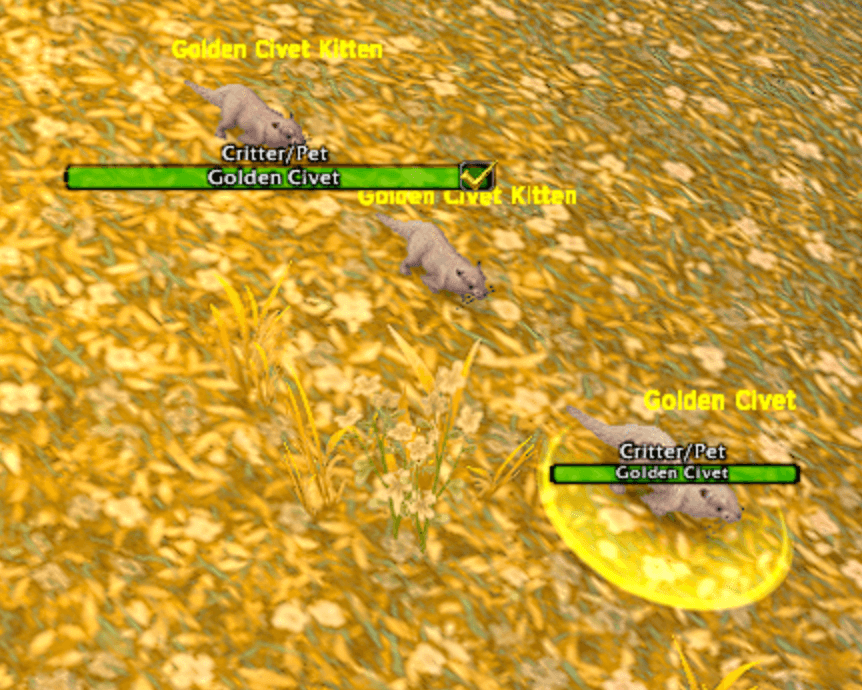
Works on regular Critters!
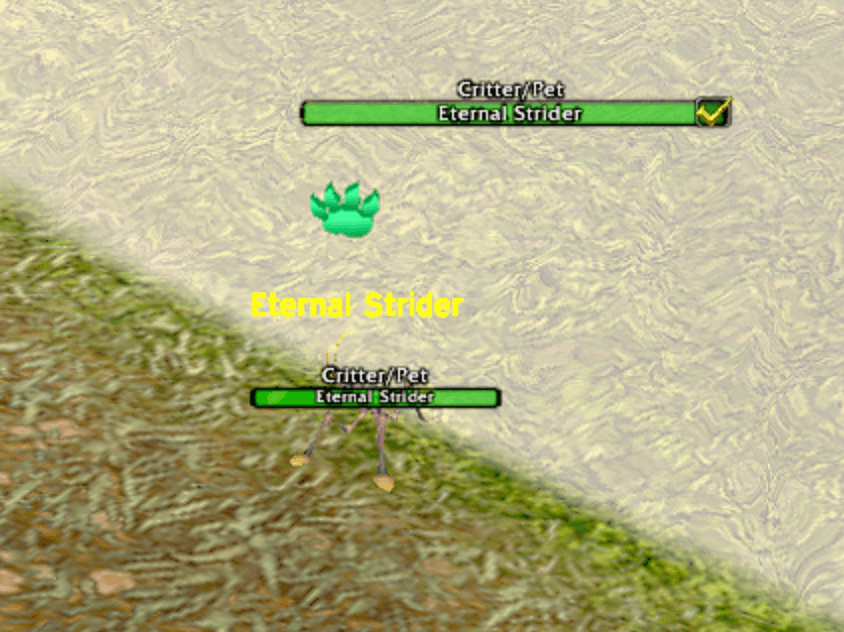
Also works with Battle Pets!
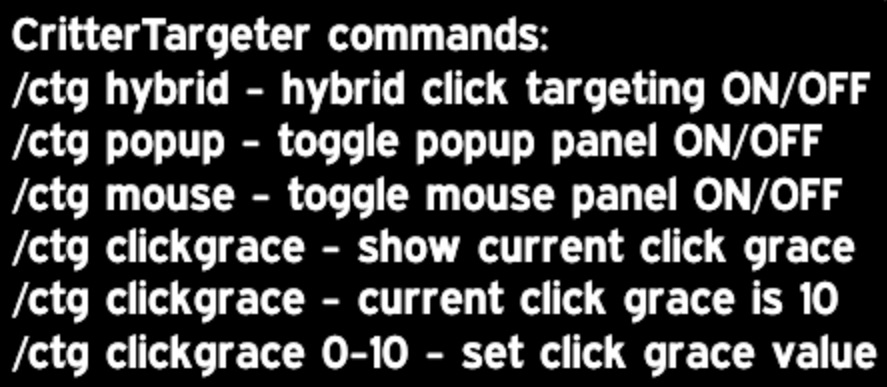
Easy to use options panel!
Description
WoW does not allow TAB targeting of all the Critters & Battle Pets in the game, so with this addon we make it easier to target those pesky Critters! The addon detects critters/pets on mouseover and gives you two clickable targeting panels: a mouse-follow panel just above the cursor that can be set for a specific amount of time to stay over your mouse cursor & a fixed popup panel that will display for 10 seconds after you've successfully moused-over them allowing you to click the popup panel to target the critter instead of trying to chase them around with your mouse to click on it. Both are meant to make hard-to-target critters/pets easier to click target. They do not even have nameplates like a regular NPC does, so they can be extremely hard at certain times to target when you are trying to click the mouse button to target them.
What you would notice in-game:
When hovering the mouse cursor over a valid critter/pet, the mouse-follow panel appears near the cursor kind of like a critter nameplate almost. The popup panel also appears at saved popup position, & both can be clicked to target the critter optionally rather than chasing it around with your mouse. When the popup timer expires (popup hides after 10 seconds), the same target can trigger popup panel again if moused over again. When entering combat popup disappears immediately & mouseover panel becomes visually hidden and non-useful. When clearing target the popup disappears also.
Detection features:
Critter/pet detection checks UnitClassification(unit) for trivial, checks UnitCreatureType(unit) for text containing critter or pet, uses tooltip scanning as a fallback, ignores players, ignores dead units, & ignores invalid/nonexistent units.
Tooltip keyword scan:
critter, pet, companion, battle pet, wild pet, flying wild pet, critter wild pet, beast wild pet, etc.
(One thing to note is that all of the features in this addon simply use /target commands to actually target the critters & since WoW API functions to /target by mouseover have been broken & disabled this is basically the only way it can function similarly to mousing over something and automatically targeting it now. Also, be aware that using /target commands to target anything can restrict the target you want from being the actual target you get if other critters with the same name are nearby. Example: If there are 3 critters with the same exact name near you, by default WoW settings when you /target CritterName, the target you are standing closest to is targeted and not the one you may want behind it. Wow limits the way people interact with certain things like that to avoid abuse of game mechanics but also blocks the use of targeting something by simply mousing over it and not actually clicking on it to target it. With this addon we can somewhat have a work-around for being able to target them easier with a mouseover though).
Mouseover panel features:
Mouse-follow panel creates a main secure clickable frame, follows the cursor while mousing over a valid critter/pet, displays the mouseover target’s name on the panel similar to a nameplate on a regular target, updates roughly every 0.03 seconds, refreshes all display logic continuously, & can fall back to a saved center position when not following the cursor.
Sticky cursor behavior keeps the mouseover panel active briefly after losing direct mouseover contact with the critter & uses a ClickGrace period where the panel will stay active for a limited time even though the mouse cursor is not directly on the target anymore allowing you to click the panel to target the critter still. ClickGrace default is 2 seconds & a current slash command can change it from 0 to 10 depending on your desired length of time the panel will stay active. You can hover the mouse cursor over a critter and have it set to 10 seconds and the mouseover panel will stay there for 10 seconds near the mouse cursor as long as you don't move it too much away from the panel to allow you to click on it within 10 seconds after the critter walks away from the cursor. The mouseover panel is centered and placed exactly 1 pixel over the top of the mouse curser, so upon hovering the mouse over a target it will make the panel appear. Moving the mouse gently up just a little bit will place your mouse cursor directly on the mouseover panel allowing you to click on the panel within your ClickGrace time to target the critter, and will remain on the panel unless you move your mouse off of it. The mouseover panel can be manually disabled by a slash command (/ctg mouse) which will basically make none of the addon features enabled any longer since they are primarily triggered by the mouseover features.
Optionally there is also a bonus popup panel that can have a saved position stored & will appear for 10 seconds by default after you mouse over a target, which will allow you to use the manual main panel drag and put it where you want for easy access to click on the popup panel and target the critter simply by clicking on the popup panel. The main popup panel can be dragged when not locked to your desired location. Includes a hide when empty option that is always enabled making the main mouseover panel hide when no valid critter/pet display data exists under the cursor, so it will only appear when you mouse over a target for a limited time. If mouseover panel is disabled the main mouseover panel and popup panel can only be shown by enabling it again.
Popup panel features:
Popup panel creates a second secure clickable frame with a fixed-position popup separate from the cursor-follow panel & displays target name & is clickable for targeting the critter. Uses saved popup position by default and can be moved anywhere on the screen you desire. Popup panel also has a built-in timeout. The popup panel auto-hides after 10 seconds by default after a mouseover target makes it pop up so it is not up constantly. It can only be forced to hide fully by a slash command (/ctg popup) that fully disables the popup panel, otherwise every time you hover over a critter it will pop up. Same-target repopup feature allows if the popup times out on the same target, it can appear again & the same target is treated as a fresh popup trigger after timeout because popupKey is cleared when the timer expires.
The Popup lock checkbox attached to the popup frame allows you to lock the popup panel in place so it cant be moved around. Checked = popup locked in place & unchecked = popup draggable. Popup drag-save feature is enabled 100% of the time and the popup can be dragged when unlocked & saves to the exact center-based position even if not locked. Popup target-clear hide feature makes the popup panel hide when your target is cleared, so if you target a critter and click your mouse anywhere on the screen it can make the popup panel disappear. Alternatively you can always hit the ESC key on the keyboard to clear your target as well and make the panel disappear. The popup panel also hides immediately upon entering combat & the popup timer is cancelled on combat start by default.
Targeting features:
Hybrid click targeting ensures both frames are secure action buttons, meaning it can assign /target mouseover & /targetexact <name> by clicking the panels and that's one of the best functions and makes it so simple to target those pesky critters. The hybrid toggle slash command can turn hybrid targeting on/off & if disabled the panel functions no longer work and you will not be able to click the panels to target, so it basically acts like it would if you didn't have the addon and will have to manually click the actual critter to target them instead of allowing it to be targeted by clicking on a panel. The panels will still display if disabled, but you will no longer be able to click the panels to target the critters. Targeting restrictions make the macro assignments blocked in combat with InCombatLockdown(), so the panels will never display in combat & by default will automatically hide upon entering combat.
Combat-safe behavior:
Combat-safe show/hide wrapper prevents protected show/hide calls in combat. Combat-safe anchor wrapper prevents protected movement/re-anchor calls in combat. Mouseover panel combat suppression makes the main mouseover panel safely hidden normally in combat. The addon instead visually suppresses it by: clearing text, clearing macros, making backdrop transparent, & hiding title and line alpha. Combat enter behavior means the popup is hidden, popup timer cancelled, popup macro cleared, mouseover panel visually suppressed, & mouseover panel text/macro cleared. Combat leave behavior makes mouseover panel visual state restored, macros refreshed based on current state, & display refreshed.
Slash commands:
/ctg
shows help text
/ctg help
shows help text
/ctg hybrid
toggles hybrid click targeting on/off
/ctg popup
toggles popup panel ON/OFF
/ctg mouse
toggles mouse panel ON/OFF
(basically disables the entire addon functions)
/ctg clickgrace
prints current clickGrace value
/ctg clickgrace <number>
sets clickGrace from 0 to 10 values
values below 0 clamp to 0
values above 10 clamp to 10
The CritterTargeter Team