TargetRangeBox
- By
TargetRange is a lightweight, click-through target range indicator for WoW Classic: Mists of Pandaria. It displays a small color-changing box that updates in real time based on your target’s distance using configurable spells or items.
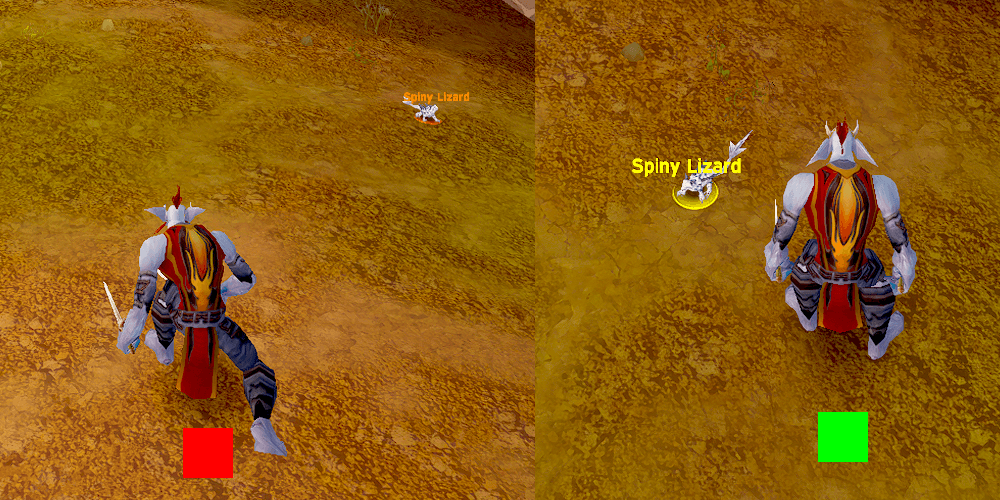
Works for Melee Combat
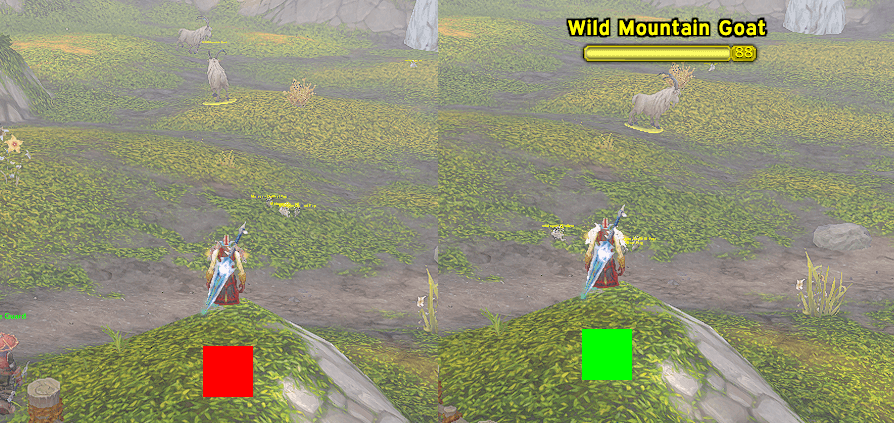
Works the same for Ranged Combat
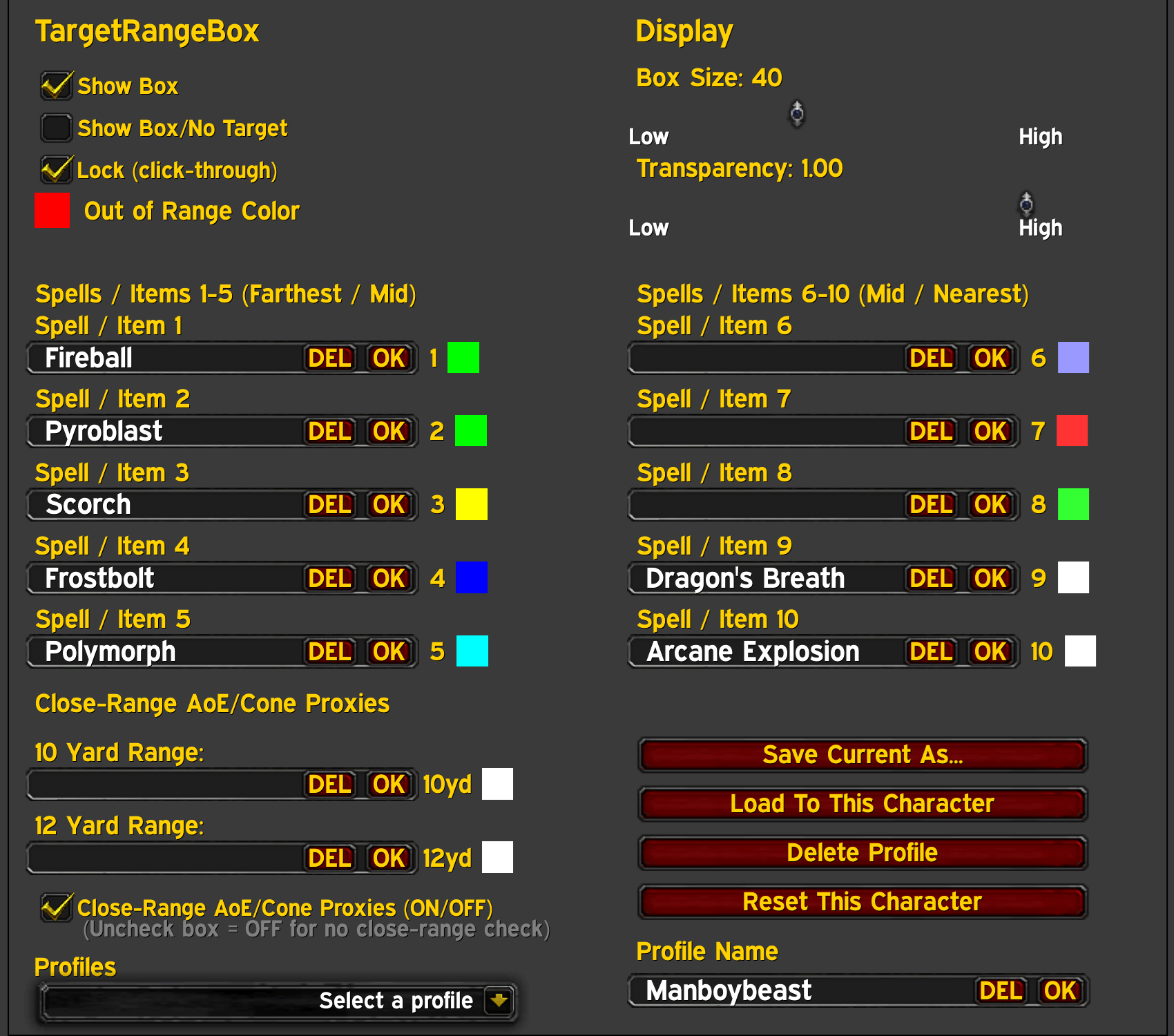
Very simple & easy to use options menu!
Description
Updated for Wow Forever
TargetRangeBox is a lightweight, no-library range indicator for WoW Classic: Mists of Pandaria & TBC Anniversary that provides a minimal, unobtrusive way to track your target’s range using spell or item checks (Now with a proxy system for close-range AoE and cone range checks) — ideal for PvP, arena, and precision PvE play. It displays a small, movable box that can be fixated anywhere on your screen and changes color based on your target’s range using your chosen spell/item range checks. Customizable with all friendly/unfriendly/neutral/invalid targets. No libraries. No Dependencies. No bloat. Fully transparent when no target is selected or with customizable colors if you want it to always show without a target. Keeping it transparent when it is not needed is really nice to avoid screen clutter. Designed to be click-through while locked, clean on-screen, and easy to configure.
The addon displays a small square on screen that changes color depending on which configured spell or item is currently in range of your target. When no target exists the box becomes fully transparent. You can change this in the options menu if you would rather have a fully solid box even with no target also. The frame is click-through by default and will never interfere with gameplay unless explicitly unlocked to move anywhere you decide you want it to be. All settings are available via the Blizzard Options panel on the AddOns tab.
How it works:
- TargetRangeBox checks your target against your configured spell/item names:
- It checks from nearest to farthest so the closest valid range wins.
- If nothing matches, the box uses your Out of Range Color.
- If you have no target (or target is dead/not visible): If Show box when no target is enabled, it will show using noTargetColor (black by default), but forced visible (still respects global transparency)
- Otherwise it stays invisible (default)
NEW FEATURES:
Slash command system beyond “open options”:
- /trb opens the options panel
- /trb lock and /trb unlock toggle the Lock (click-through) setting
- /trb show and /trb hide toggle Show Box
- /trb show nt and /trb hide nt toggle Show Box/No Target
(These also live-sync the options checkboxes if the panel is initialized/open).
One-time first-load welcome message:
- On the first-ever load for that character, it prints:
TargetRangeBox Loaded: Type (/trb) to open the options menu.
(It uses TargetRangeBoxDB._firstRunComplete so it only happens once).
AoE/Cone “custom spell” handling when IsSpellInRange returns nil:
- Special support for:
Arcane Explosion (treated as 10y)
Dragon’s Breath (treated as 12y)
(When these are configured in a slot and IsSpellInRange returns nil, it still can produce a range result via proxy/remote/interact fallback).
Proxy rows that can be either spell proxies or item proxies:
- Your “10 yard” and “12 yard” proxy input fields are not just spell proxies:
It tries IsSpellInRange(proxyName) first
If that fails, it tries IsItemInRange(proxyName)
(So you can type either a spell name or an item name as a proxy).
Proxy-color swatch override when a custom AoE/Cone check “wins”:
- If a slot is a custom spell (AE/DBreath) and the range is determined via the custom path, the box can tint using the proxy swatch color for that yard value (10y or 12y), instead of the slot’s own color.
Remote 10-yard proxy sharing in party/raid (Rogue Sap broadcast):
- If a Rogue running the addon is in your party/raid, they broadcast Sap-in-range (10y) for their current target GUID.
- Other clients can use that remote value as a 10y fallback when they can’t locally evaluate a 10y proxy spell (because they can’t cast the proxy).
- Includes staleness handling (maxAge) so old data is ignored.
Interact-distance fallback when proxies aren’t available:
- If proxy checks aren’t available for AE/DBreath, it uses CheckInteractDistance as a last fallback approximation:
Index 3 for ~10 yards
Index 2 for ~12 yards+
Dual options registration (modern + legacy):
- Registers in the modern Settings UI when available
- Falls back to the older Interface Options panel when needed
- Includes the “classic quirk” double-open workaround for InterfaceOptionsFrame_OpenToCategory.
Input quality-of-life: OK/DEL buttons in edit boxes:
- Every spell/item edit box has OK and DEL buttons embedded
- Proxy name edit boxes also have OK and DEL
- Profile name box also has OK and DEL
- Enter key triggers OK behavior.
Setup / Usage:
Install and enable TargetRangeBox addon.
Open settings:
Type "/trb" to open the options menu. (Esc → Options → AddOns → TargetRangeBox)
Enter spell or item names into the slots:
You can press Enter or click the OK button in each field to save.
Use spells/items that have known range checks (for your class only).
If a spell name doesn’t register for range, try Checking spelling or using a different spell/item with similar range.
Pick colors for each slot and for Out of Range.
Adjust: Box Size, Transparency, Lock/unlock for click-through vs dragging.
Profiles (built-in)
At the bottom of the options panel:
Saved Profiles dropdown (global library)
Profile Name field
Buttons:
Save Current As…
Load To This Character
Delete Profile (confirmation popup included)
Reset This Character
This makes it easy to maintain different setups for different characters or specs.
Compatibility:
World of Warcraft Classic: Mists of Pandaria (5.5.3)
No external libraries (no Ace3, no embedded libs)
Available Options:
- Show / Hide the box option (hidden by default with no target)
- Show box when no target option (for adjusting position)
- Lock (click-through) toggle (lock the box in place)
- Box size slider (make it bigger or smaller)
- Transparency slider (make it more solid or more see-thru)
- Spell or item name color range inputs (10 slots)
- Proxies for close-range AoE & Conal spells added that can mimic a melee ranged spell for casters.
- Color pickers (with alpha) for spells
- Out-of-range color
- Spell slots are evaluated from nearest to farthest, ensuring closer range checks take priority — matching Blizzard’s internal range logic.
Features:
- Real-time range detection using spell and item range checks
- Works on most targets no matter what they are.
- Uses IsSpellInRange and IsItemInRange against your current target
- Supports 10 spell/item slots (farthest → nearest priority)
- Range-based color indicator
- Each slot has its own color picker (RGBA)
- Out-of-range color when no spells are in range
- Custom color when none of your configured spells/items are in range
- Fully transparent when no target
- Fully solid when no target option
- When locked, the box won’t steal mouse clicks
- Click-through frame when locked
- Movable when unlocked (Unlock to drag and reposition)
- Optional: Show box when no target (useful for positioning)
- Global alpha multiplier: set from fully transparent to fully solid
- Adjustable size (5–100 px)
- Saved position
- No borders, no textures, no visual clutter
- Profiles system (no Ace, no libs)
- No external libraries
- Per-character settings by default
TargetRangeBoxDB(per-character settings)TargetRangeBoxProfilesDB(global saved profiles)- Single-file, lightweight design
- Global “Saved Profiles” library you can Save, Load, Delete (with confirmation), and Reset character
- UI updates instantly when loading profiles—no reload required
Known Notes / Limitations:
Range accuracy depends on Blizzard’s range APIs:
Some spells/items may not return a usable range value in all contexts.
Can not mimic spells/items that are not currently in the current characters spellbook or inventory.
This addon does not calculate yards directly—it uses in-range checks from Blizzard API.
TargetRangeBox Team