Crisp Plates
- By
The game's own nameplates, made crisp: readable names, thin bars out of combat and big ones in combat, threat colours, bigger debuffs and your DoTs' damage on the bar.
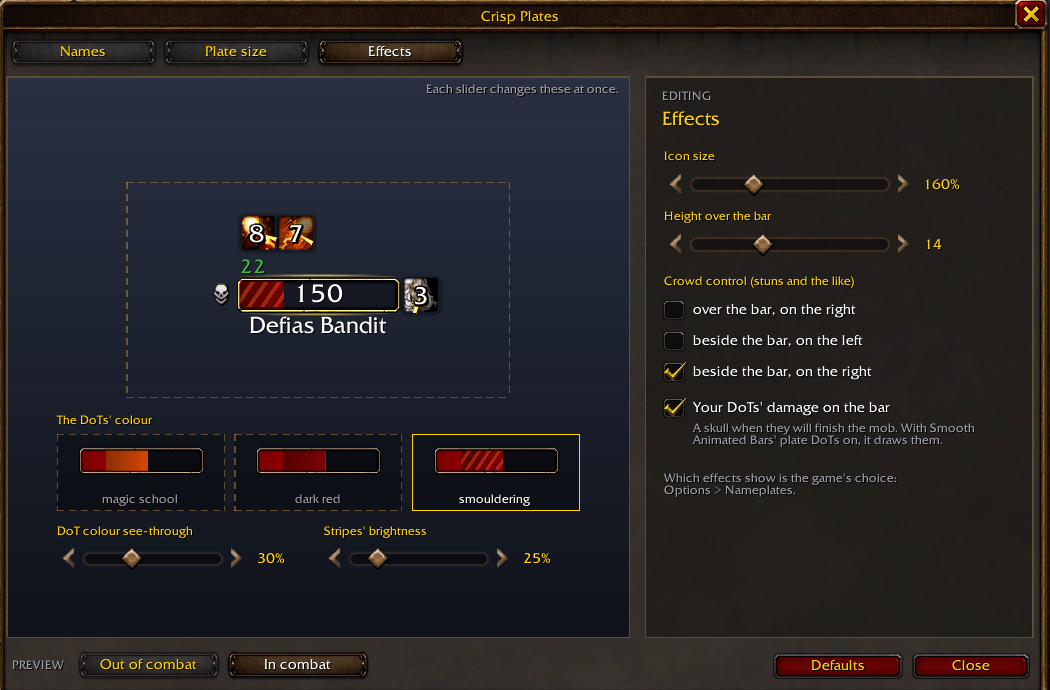
1-effects.png
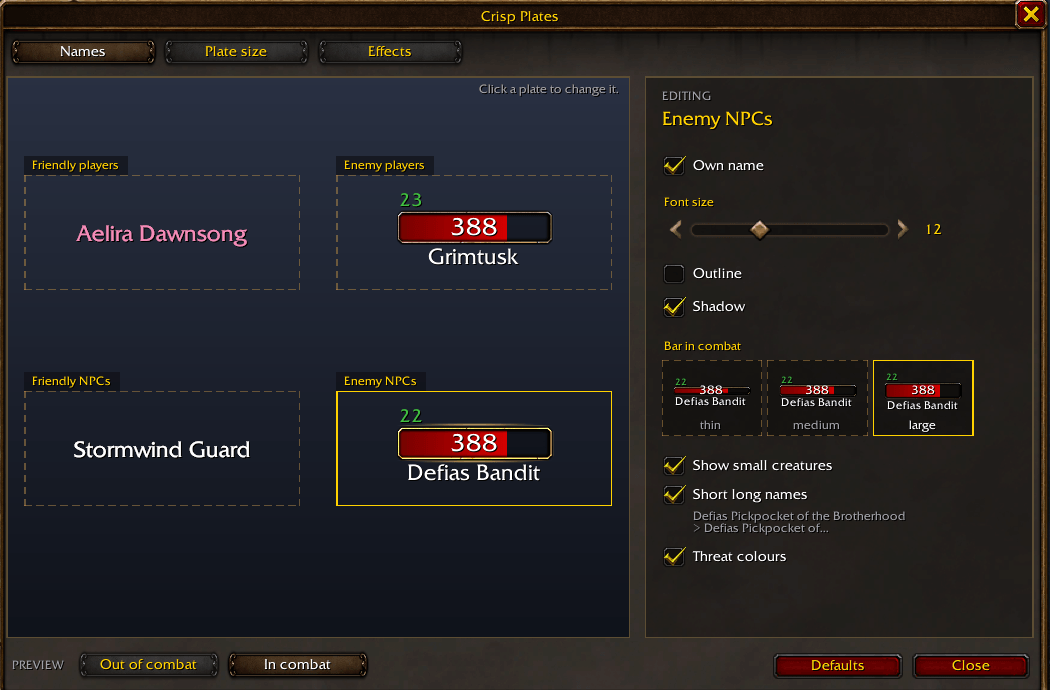
2-names.png
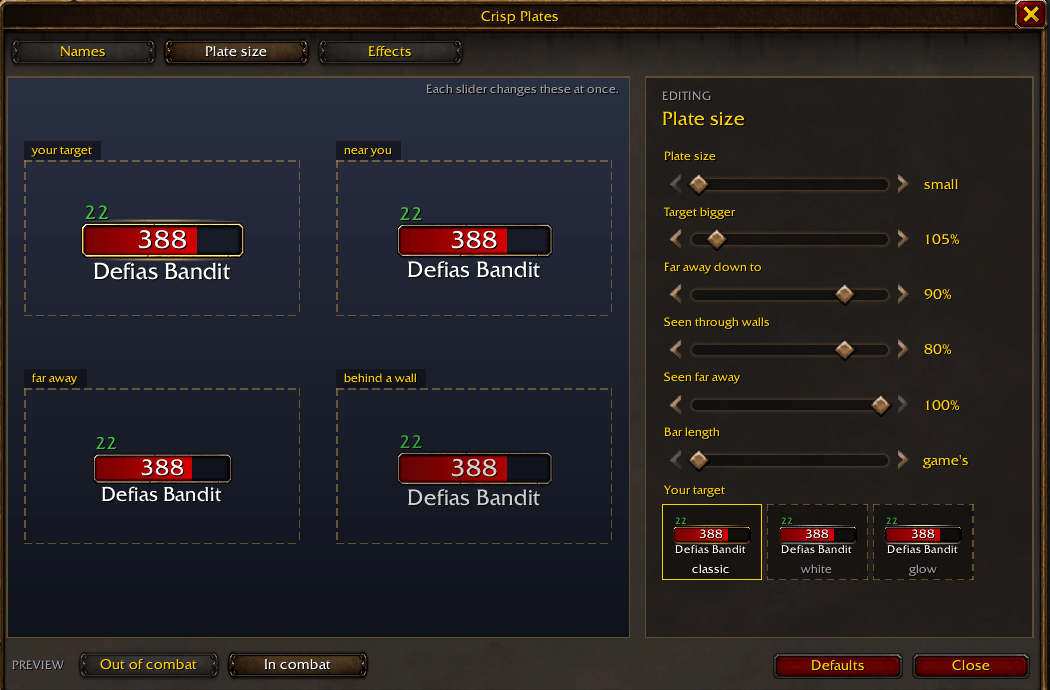
3-plate-size.png
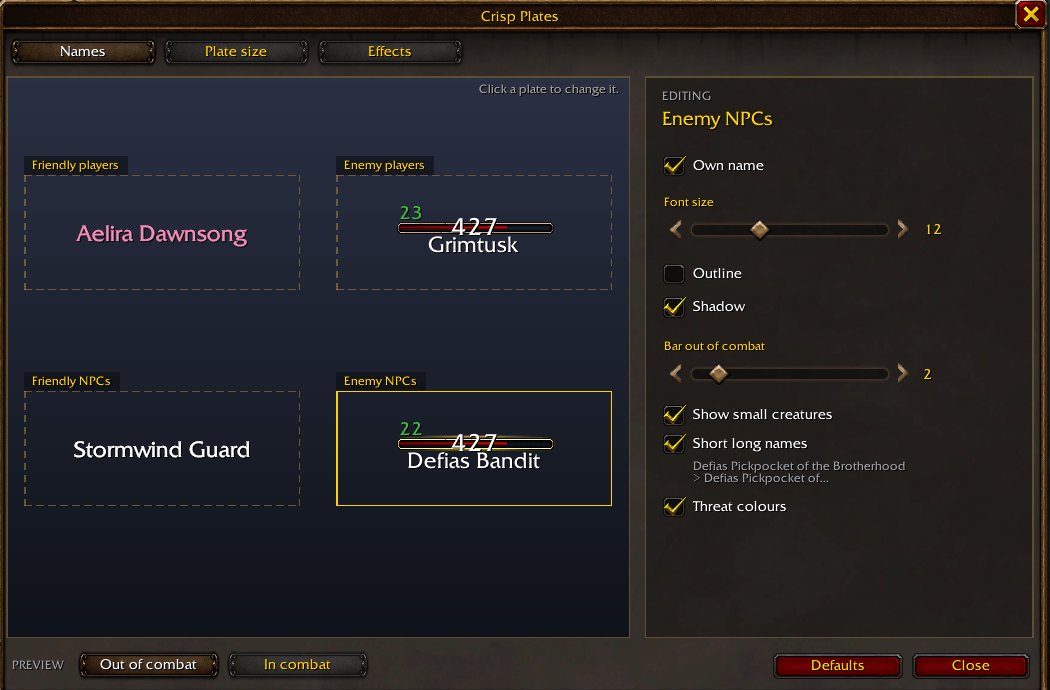
4-names-out-of-combat.png
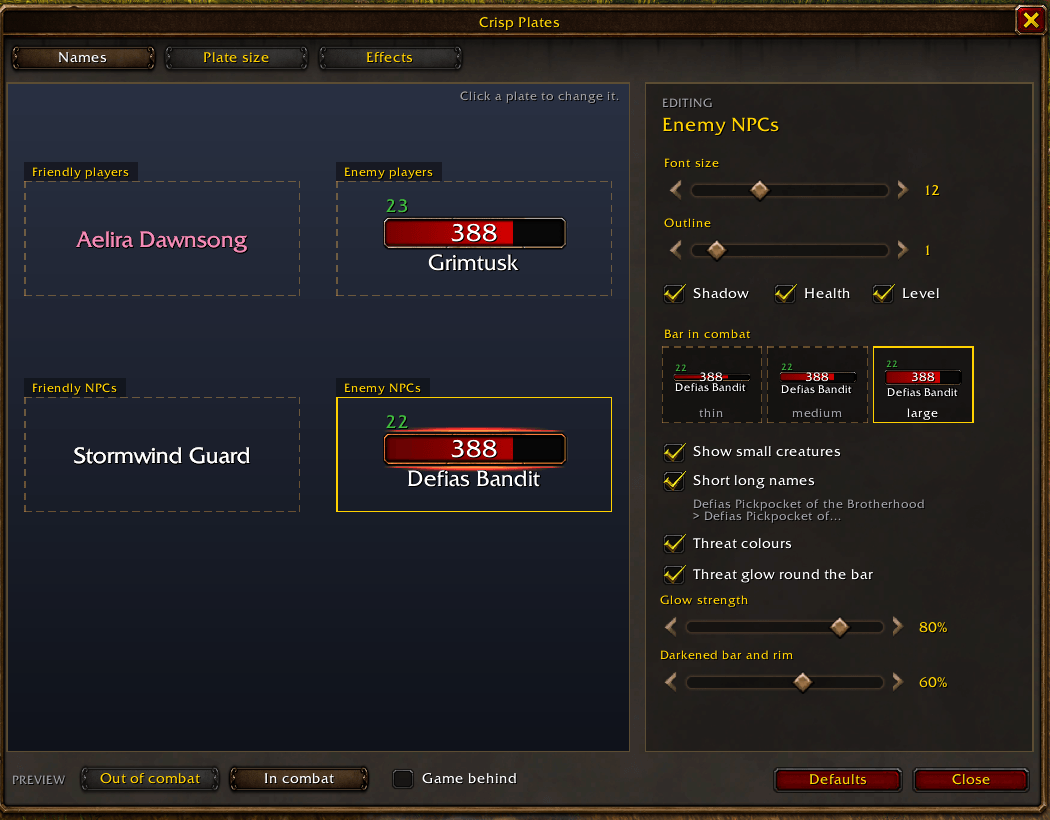
names-enemy-npcs.png
Description
The game's own nameplates, made crisp: readable names, thin bars out of combat, large ones in combat, and your DoTs right on the health bar.
Crisp Plates keeps the game's nameplates, their gold bevelled rim included, and gives them your own fonts, sizes and colours. Every setting is in one window with live example plates that play a little fight, so you see each change at once, on the examples and on the plates in the world. Switch the examples' backdrop to the game to see them over the game itself. Open the window with the minimap button or /crisp. The interface is in English or Russian.
Works with Smooth Animated Bars. With Smooth Animated Bars installed, its liquid health and DoT liquids take over the bars, and the settings window shows its liquid with your own Smooth Animated Bars effects (lightning, bubbles, waves). Crisp Plates keeps the names, levels, cast bar, threat look and effects, draws them over the liquid and keeps the rim whole round it.
Thin out of combat, large in combat
An enemy's bar stays thin until the mob fights you or your pet, then grows to the large one, eased, not a jump:
Your DoTs on the health bar
Crisp Plates on its own: your DoTs in the smouldering look.
With Smooth Animated Bars installed (a separate addon): the purple DoT liquids and the liquid health below are its own. Install it next to Crisp Plates and pick its look on the Effects page.
- The part of the health your DoTs will still burn away, drawn on the bar, with a skull left of it when they will finish the mob.
- Three looks: the colour of their magic school, smouldering (dark red with glowing stripes running through it), or Smooth Animated Bars' own DoT liquids (picking it switches them on at once). The stripes can run over the school colours too; see-through and stripe brightness on sliders.
- Shaped like the game's own fill and kept inside the rim, on the thin bar and the large one alike.
Names
- Each kind its own: friendly players, enemy players, friendly NPCs and enemy NPCs each get their own font size, outline and shadow.
- Health number and level: the level over the bar's left end in the difficulty colour, with the elite or rare mark beside it; the health number on the bar; each on or off for each kind.
- Long NPC names shortened the way the target frame does it.
- Friendly NPCs: names for all of them, or only for your target and the NPCs of your quests. Small creatures' plates on or off.
- Title under the name for friendly and enemy NPCs (a vendor's trade, a mob's clan), a switch of its own.
- Players' names in their class colour, friendly and enemy alike, a switch for each; the guild under the name for both.
- Outline and bold shadow on the level and the health number, set for each kind.
Friendly players
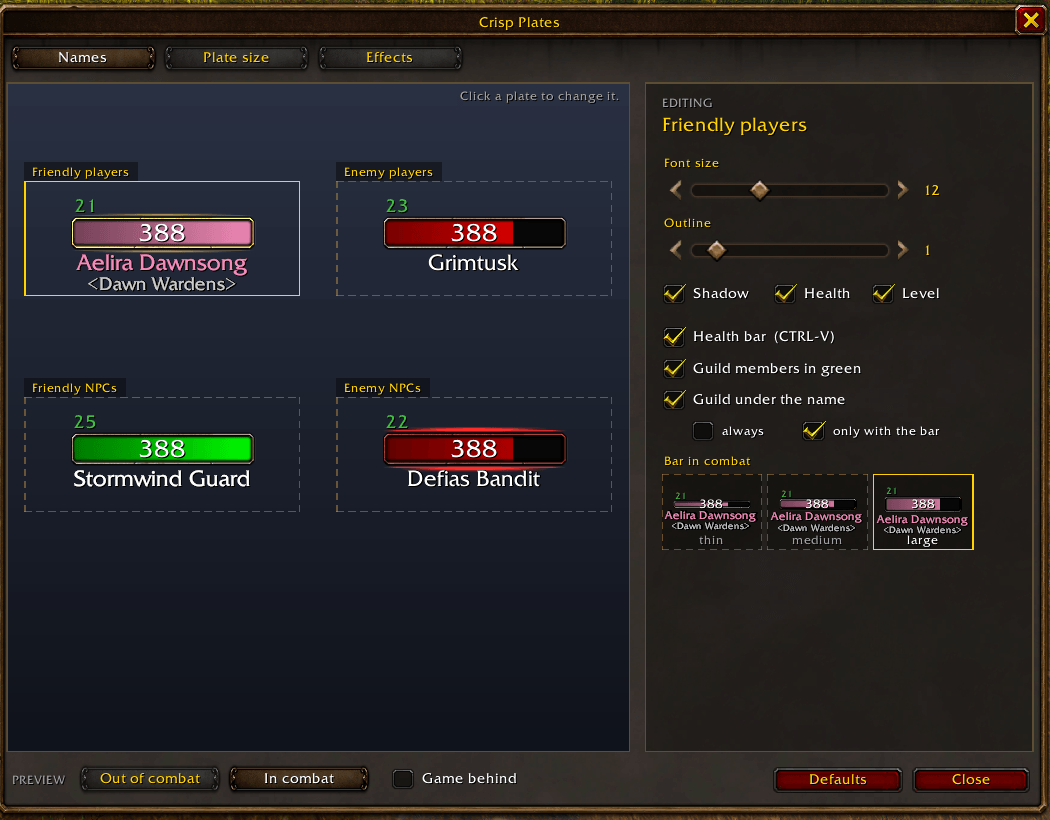
Health bars on and off with one key of your own (set it on the Bars page or in Key Bindings > AddOns > Crisp Plates):
The guild under the name, a switch of its own:
- Names only, or names with a health bar in their class colour, laid out like enemies' plates: level over the bar, health on it, name under it.
- A key of its own switches that health bar on and off; the game's friendly nameplates key stays the game's. Names stay crisp either way.
- Thin bar out of combat, a larger one while they fight.
Pets
- Friendly and enemy pets get plates of their own, with their own fonts and sizes, and the owner's name on them.
- Shown always, or only when the pet is your target (friendly pets by default), so a crowd of pets does not bury the players.
Bars, target and threat
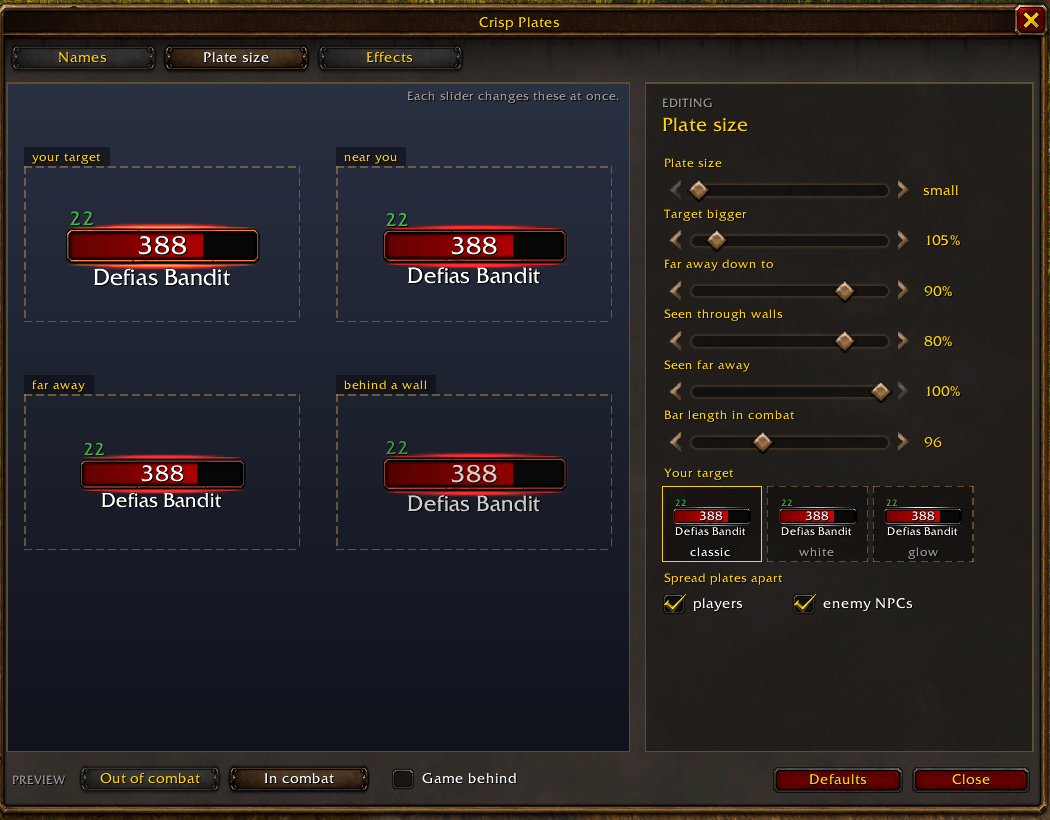
- Thin bars out of combat, large bars in combat: an enemy's bar grows the moment it fights you or your pet, and shrinks back after. The change is smooth, not a jump.
- Smooth health: the bar eases down with every hit and up with every heal.
- Bar length set apart for in combat and out of combat.
- Your target: the game's classic frame, a white rim, or a soft glow, with a light over and under the bar, soft or bright, each picked on a tile that shows it.
- Your target and your soft target grow smoothly to the size you set, and shrink back the same way, instead of jumping. The soft target (the game's action targeting) gets a faint light of its own.
- Threat look on enemy NPCs: threat colours on name and bar, and a red glow and rim round the mob on you, your target included. Shown in a group or with a pet. The glow (soft, normal, bright) and the darkening (light, medium, strong, or off) are picked on tiles.
- Tanks see their own threat: a mob you hold glows red, one you lose turns blue. Crisp Plates knows you tank from your talents (most points in Protection), your group role or bear form.
- The rim's colour: light, bronze or dark bronze, set apart for the thin bar and the full one.
- Raid marks large (2.5x by default, as big as the game's over a character's head), their size and place (over the name or beside the bar) on the Plates page.
- Far away and behind walls, names, health and level fade with their plate; players' names stay clear.
- Spread plates apart, players and enemy NPCs each: names in a crowd stack up instead of melting into one heap.
- The game's own plate size, how much bigger your target is, how small and see-through far plates get, and plates behind walls.
The game's unit frames in class colour
- Your own frame, your target and your focus: their health bar in the player's class colour, two switches on the Plates page.
- The game's own bar picture is recoloured, so its shading and rim stay as they are; a brightness slider (85% by default) makes the colour darker.
Execute phase
- A mark on enemies' bars at your finishing spell's threshold, and the bar in a colour of yours below it (orange, purple, white or blue).
- The threshold is read from your own spell: Execute, Hammer of Wrath and the like, whatever their percent. Without such a spell learned nothing is shown.
- Mark and colour on or off apart, on the Effects page.
Effects, cast bar, shield and immunity
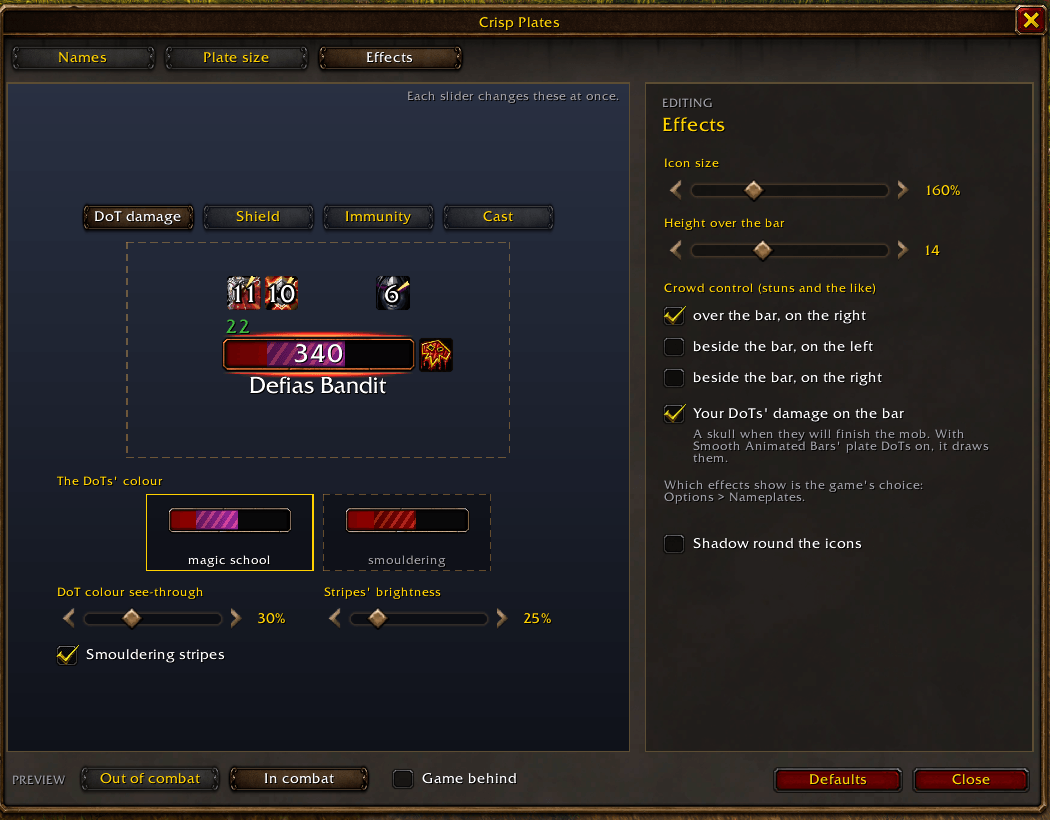
- Debuffs over the bar, buffs and crowd control (stuns and the like) beside it or over its right end; icon size and height over the bar on sliders; the icons' dark rim on or off.
- Cast bar right under the health bar and just as wide: the spell's icon beside it, its name inside, its target on the right, the time left at its end. Four looks (the game's, classic, smooth, flat), coloured by the cast's kind. Height, icon size, name size and the gap to the health bar on sliders, set apart for in combat and out of combat. Cast bars can be switched off.
- Shields (absorbs) drawn on the bar from the health's end, see-through and line brightness on sliders.
- Immunity: when your hits do nothing, the bar gets a pale smouldering veil and a shield icon by the buffs, or the icon alone.
Light
With 40 plates on screen Crisp Plates takes about 9 ms of CPU a second and 2 MB of memory. It restyles a plate only when something on it changes.
Works with
- Smooth Animated Bars: its liquid on enemy and friendly plates, its DoT liquids as a DoT look, its effects in the settings window's examples.
- Questie: friendly NPCs with a quest for you keep their names in the «target and quests» mode, and its quest icon stands over the name.
- ForeverQuestMark: its quest mark next to the bar.
- Other addons' icons: each plate offers the frame plate addons usually give (
unitFrame), so their icons find it. - SharedMedia: Nowar Sans: if you have it, names use its FrizCJK font (Latin, Cyrillic and Asian names alike).
Credits
The DoT tracking comes from Smooth Animated Bars (MIT licence, included); the idea of showing whether your DoTs will kill comes from DoesItDie.
По-русски
Таблички самой игры, только чёткие: читаемые ники, тонкие полоски вне боя и крупные в бою, урон ваших дотов прямо на полоске здоровья. Золотая рамка игры остаётся целой.
- Урон дотов на полоске и череп, если доты добьют; цвет школы магии, тлеющий или жидкости Smooth Animated Bars.
- Ники: свой размер шрифта, обводка и тень для союзных и вражеских игроков и НПС; HP и уровень по отдельности, значок элиты у уровня; длинные ники НПС сокращаются; подпись под ником у НПС.
- Союзники: только ники или ники с полоской цвета класса; своя клавиша включает и выключает полоску (кнопка на странице «Полоски» или Назначение клавиш > Модификации > Crisp Plates); гильдия под ником включается отдельно.
- Цвет класса для ников союзных и вражеских игроков, у каждого свой выключатель; гильдия под ником и у врагов.
- Питомцы: свои таблички для союзных и вражеских питомцев, с именем хозяина; всегда или только когда питомец в цели.
- Рамки игры: полоска HP своей рамки, цели и фокуса в цвете класса; перекрашивается сама картинка игры, тень и рамка остаются; ползунок яркости (85 % по умолчанию).
- Полоски: тонкие вне боя, крупные в бою, переход плавный; плавное HP; длина отдельно в бою и вне боя; подсветка цели и свет над и под полоской (мягкий или яркий); цель и автотаргет плавно увеличиваются; цвета угрозы и красная подсветка моба, который бьёт вас (в группе или с питомцем), её свет и затемнение на выбор; таблички раздвигаются и не сливаются в кучу; танку: красный, пока моб на нём, синий, когда моб ушёл (танк определяется по талантам, роли в группе или облику медведя); цвет рамки полоски (светлая, бронза, тёмная бронза); крупные рейдовые метки, их размер и место.
- Фаза добивания: метка на полоске врага на пороге вашего заклинания добивания (порог берётся из самого заклинания) и свой цвет полоски ниже него.
- Эффекты: дебаффы над полоской, контроль сбоку; размер иконок, тень иконок вкл/выкл.
- Каст под полоской и той же ширины, время каста, четыре вида полосы, выключатель; размеры и отступ на ползунках, отдельно в бою и вне боя.
- Щит и неуязвимость: щит на полоске, неуязвимость тлеющей пеленой и значком.
- Совместим со Smooth Animated Bars (отдельный аддон, фиолетовые доты-жидкости на второй анимации — от него): его жидкость на табличках и в окне настроек вместе с вашими эффектами SAB.
Окно настроек: кнопка у миникарты или /crisp; фон примеров можно переключить на саму игру. Интерфейс на русском и английском.
Crisp Plates Team