CrestForge
- By
painted unit frames, cast bars and action bar - every class, race and faction with its own frame, liquid health and power bars, and a faction frame that fits any action bar.
Unitframe-choices-1.jpg
Unitframe-choices.jpg
castbar & actionbar.jpg
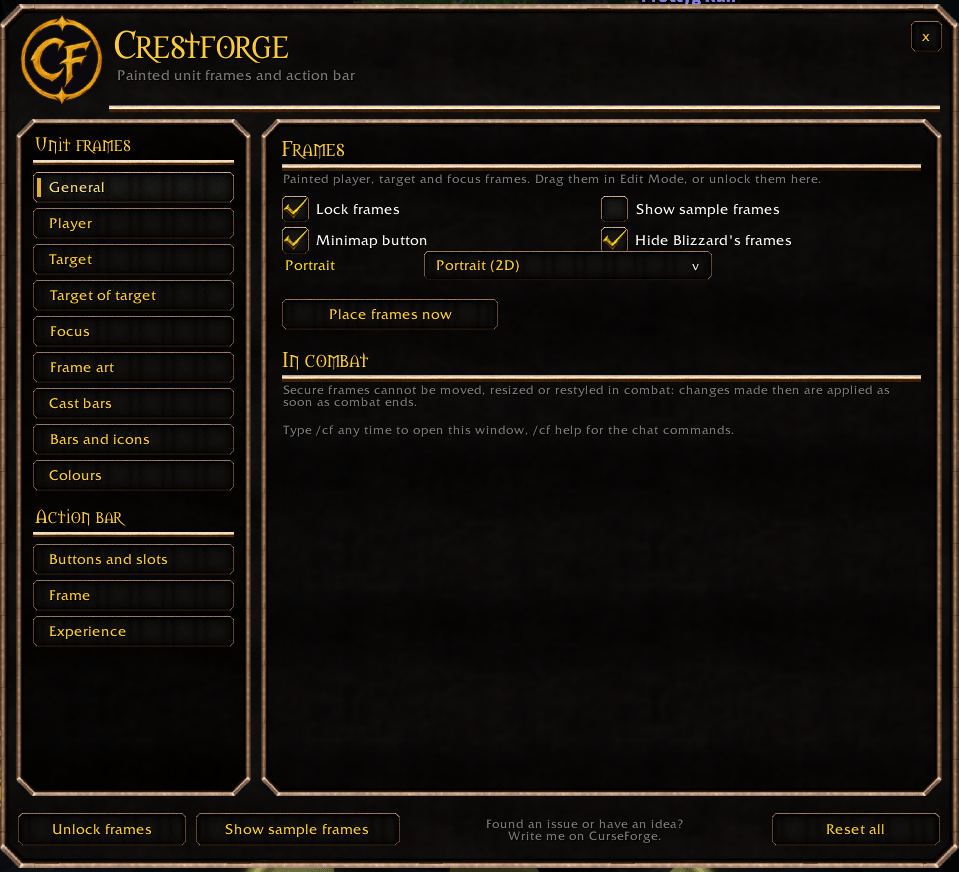
menu.png
Description
I wanted unit frames that actually look like they belong in the game world, so I painted my own. Crestforge replaces your player, target, target of target and focus frames, adds matching cast bars, and puts a faction frame around your action bar.
New in 1.9.0: hunters and warlocks finally get a pet frame, rogues and cat druids get their combo points as little painted gems, and warlocks see their soul shards. It also speaks your language now if you play in German, French, Spanish, Portuguese, Russian, Italian, Korean or Chinese.
In 1.8.0: profiles, so each character can have its own setup.

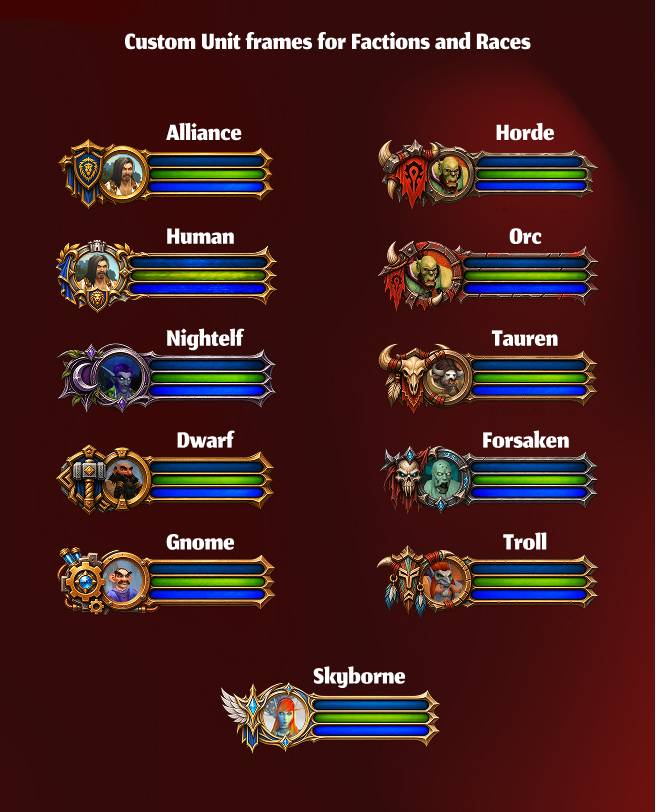
Every class has its own frame, and so does every race and both factions. You decide per frame which one players show - class, race or faction - or just pick one you like and keep it.
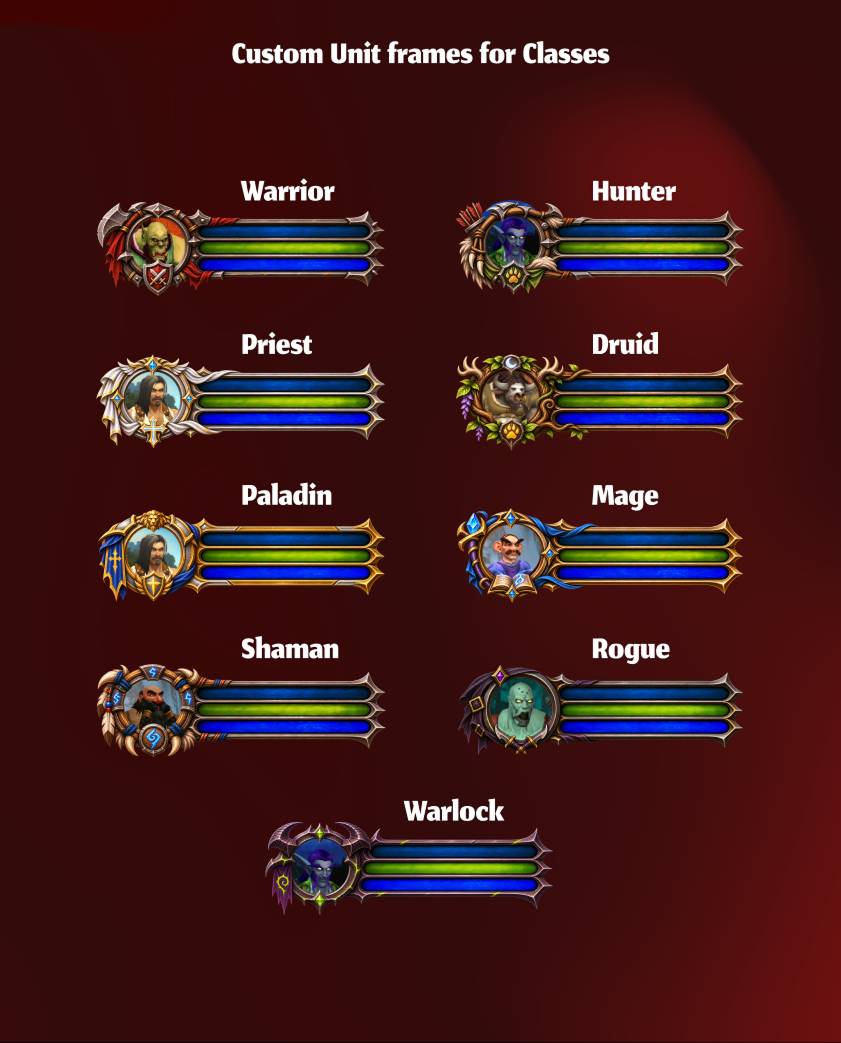
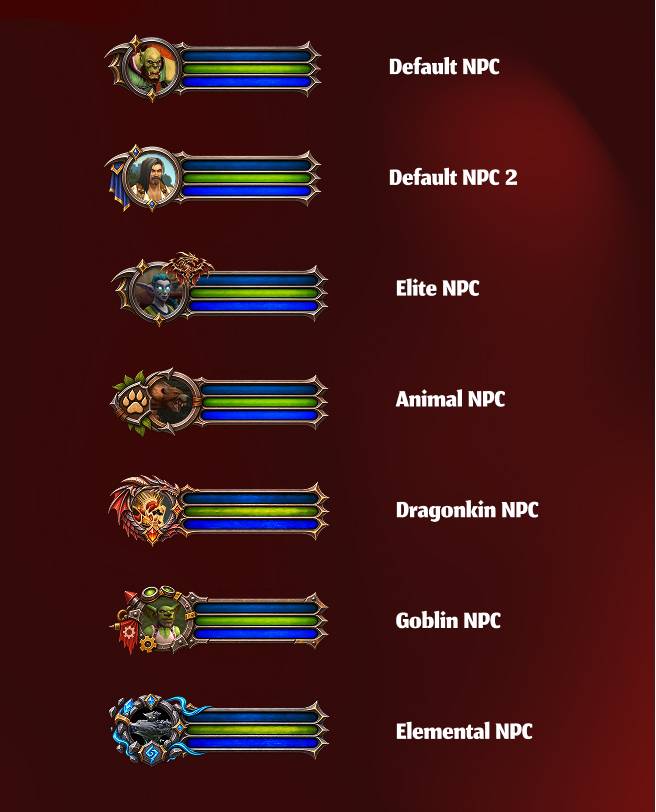
NPCs get their own art too. Guards and townsfolk wear their side's colours, so an Orgrimmar grunt gets the red Horde frame and a Stormwind guard the blue Alliance one, while bandits and other neutral folks get a plain one. Beasts, dragonkin and elementals each have their own, and everything else falls back to the default. Don't like a pick? Swap it on the Frame art page.
Your pet gets its own smaller frame with a paw on the ring, sitting next to yours.
Health and power are drawn as liquid in the bars. You can change the colours, and you get a short damage trail when you take a hit and a pulse when you're low. Elites and bosses get a gold dragon crest, rares a silver one. Small badges on the portrait show when someone's in combat, resting, away, dead, mounted, in stealth or on a flight path, and an eye pops up when your target is looking at you. Mouse over any frame and you get the usual unit tooltip (you can turn that off, or just hide it in combat).

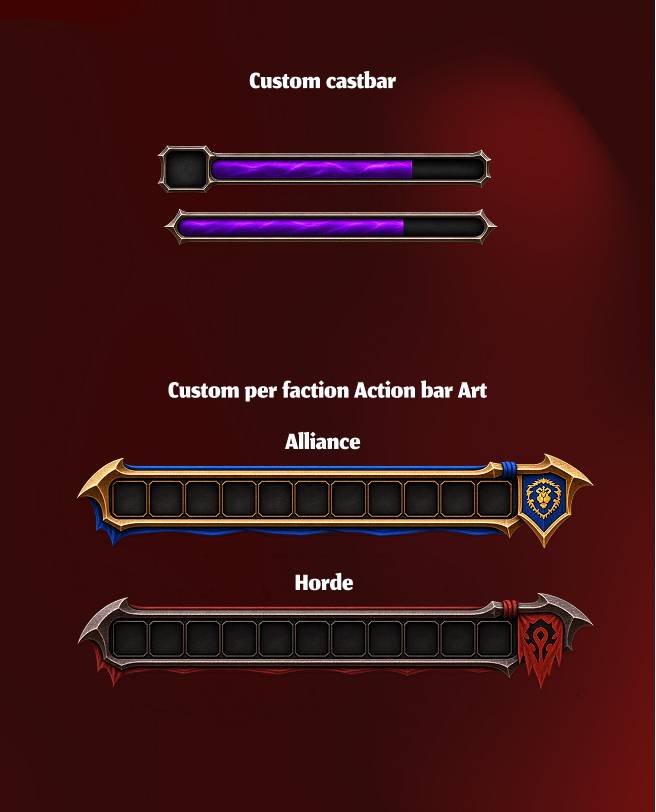
Player, target and focus each get one, with the spell icon, name and time left. There are three looks to choose from. Leave them under their frames or drag them wherever you want.

Target and focus show their buffs and debuffs the way Blizzard's frames do: cooldown sweep, stack count, debuffs outlined by type (magic, curse, poison, disease) and the normal tooltip when you hover one.
Buffs and debuffs are placed separately. I like buffs on top of the frame and debuffs underneath, but you can put both under it, both above, or drag either one anywhere on screen. Icon size, how many per row and how many rows are up to you, and there's an "only mine" switch for debuffs if you just want to track your own DoTs.
Combo points and soul shards. Rogues and druids in cat form get a row of gems in bronze settings, warlocks get purple shard crystals. Lit ones are yours, dark ones are still to fill. Put the row under your frame, above it, or drag it anywhere.

A Horde or Alliance frame wraps your main bar. It fits whatever length your bar is, so it works with 2 rows, 3 rows, a short bar or a long one. Buttons, bags and the micro menu get painted slots. You still move and size the bars in Edit Mode like normal, and the frame follows.

The first time you log in, Crestforge asks if you want to place your frames. Drag them where you like and hit Done. You can do it again any time with /cf setup, and /cf opens the options.
Got alts? Every character picks its own profile on the Profiles page (or with /cf profile). Make a fresh one, copy the one you're on, or copy one profile over another. New characters start on Default, and switching reloads your interface.
It doesn't do any work in the background beyond keeping the frames up to date, and it never touches anything protected in combat.

A goblin (or tauren, or gnome...) shows a class frame, not a race one. Why?
Each frame picks its art by class to begin with. Open /cf, go to that frame's page and set Players by to Race. You can also choose Faction, or one fixed frame for everyone.
How do I move things?
/cf setup for the unit frames, cast bars, buffs and debuffs. The action bar moves in Edit Mode, and the frame comes with it.
Can I have buffs above the target and debuffs below?
Yes. Open /cf, go to Target auras and set the buffs' Position to Above the frame. Same thing for the focus under Focus auras.
Can my alts have a different setup?
Yes. Open /cf, go to Profiles, make a new profile (from scratch or as a copy) and pick it under This character. Each character remembers its own.
I want Blizzard's frames or cast bars back.
Untick Hide Blizzard's frames or Hide Blizzard's cast bars in /cf, then type /reload.
Something's off and I want to start over.
Each frame page has Reset position, and Reset all at the bottom of the window puts everything back to how it was when you installed it.
Enjoying the addon?
This project is completely free, and I intend to keep it that way.
If you enjoy using it and would like to support its continued development, you can leave a small donation. It is entirely optional and always appreciated.
Thank you for your support!
---
Some AI tools and AI generated Assets were used to accomplish this project.
Found an issue or have a recommendation? Write me here on CurseForge - I read every message.
CrestForge Team