CraftVault
- By
Tracks all know receipes within warband, connected with receipe tracker. It shows which items are in warband characters, or which need to be bought. Combined with MailVault, and StockVault, full automation! Gold digging combination!
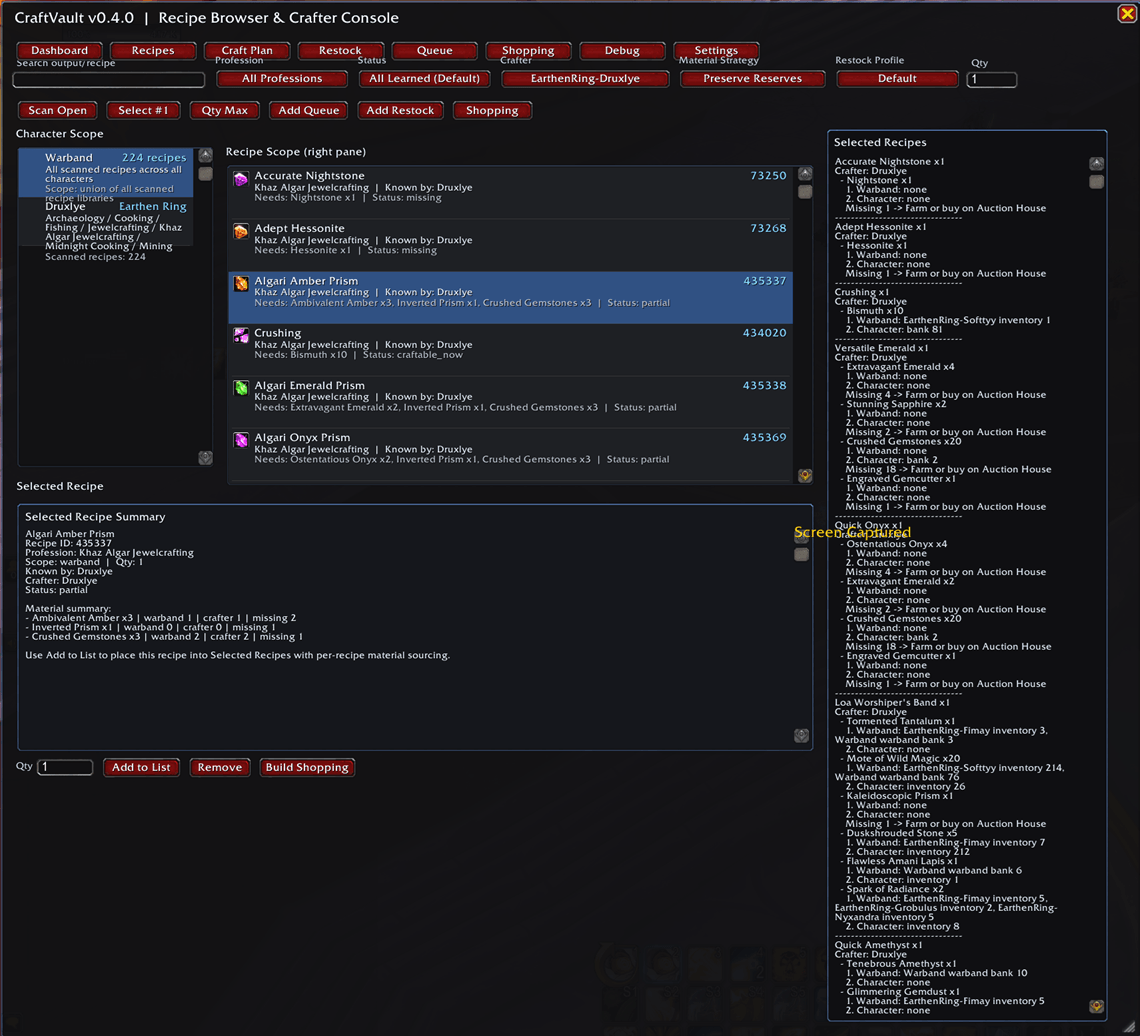
CraftVault screenshot.png
Description
⭐ CraftVault & StockVaultMailVaultBridgeBroker
A smarter, safer way to manage your professions, materials, and crafting workflow in World of Warcraft
CraftVault is a modern profession‑management addon built for World of Warcraft Retail 12.0.x (Midnight). It streamlines recipe tracking, material planning, and cross‑character crafting workflows—while keeping full control in your hands through a review‑first, never‑auto‑send philosophy.
Bundled with CraftVault is the StockVaultMailVaultBridgeBroker, a lightweight compatibility layer that safely connects CraftVault to StockVault and MailVault without modifying their databases or sending mail on its own.
🔧 What CraftVault Does
-
Warband‑wide profession & recipe scanning Quickly build a complete overview of every recipe your crafters know. Use
/cv scanon each crafter to populate your shared data. -
Material availability planning See exactly what you can craft, what you’re missing, and which character has the materials.
-
Review‑first dispatch workflow CraftVault only creates draft requests—never sends mail automatically. You stay in control with
/cv review,/cv confirm,/cv preview, and/cv drafts. -
Blizzard recipe tracking integration (v0.3.5) Tracking a recipe in Blizzard’s UI automatically adds it to your Selected Recipes queue. Untracking removes it again. No extra steps needed.
-
Diagnostics for power users
/cv debugand/cv probe ...help troubleshoot or inspect data paths.
🖥️ Modern, Evolving UI
CraftVault’s interface is undergoing a major refinement pass:
Current UI Features
-
Main window uses focus‑to‑front behavior for clean interaction.
-
Picklist dropdowns now appear above all CraftVault UI layers.
-
Selected Recipes live in a new raised sidebar panel anchored to the right.
-
Recipe Scope remains in the main workspace for clarity.
-
Main window is resizable, with smart clamping and internal layout adjustments.
Upcoming UI Enhancements
- In‑game validation of sidebar layering vs. other addons.
- Visual polish: titles, shadows, backdrop styling.
- Optional setting for pinned sidebar width.
- Upgrading the GUI, everything must become interactive eventually
⚙️ Settings & Customization (v0.3.4+)
- New Settings tab.
- Toggle Show Mail Workflow to hide MailVault‑related UI if you don’t use it.
- Review/Confirm/Preview/Drafts buttons hide automatically when mail workflow is disabled.
🧩 Safe, Non‑Invasive Integration
StockVaultMailVaultBridgeBroker ensures CraftVault interacts with StockVault and MailVault only through their public APIs:
-
No direct edits to StockVaultDB or MailVaultDB.
-
No mail is ever sent automatically.
-
All requests are created as drafts for manual review.
CraftVault Team