ApiVault
- By
In-game API browser, developer reference, safe test lab, addon audit tool and debug bridge for World of Warcraft addon authors.
apivault interface4.png
apivault interface.png
apivault interface1.png
api function screenshot
Description
ApiVault
ApiVault is an in-game developer reference, API browser, metadata explorer, controlled test lab and debug bridge for World of Warcraft addon authors.
Ready to use addonshim.lua, read the doc in /ApiVault/docs/ADDON_INTEGRATION_SHIM.md
Built for World of Warcraft: Midnight / Interface 120007, ApiVault is designed for developers who want to understand Blizzard APIs, inspect UI metadata, test safe API calls, review secure-pattern risks, audit addon snippets and debug their own addons directly inside the game.
ApiVault turns the WoW client into a developer cockpit.
What is ApiVault?
ApiVault is not a normal gameplay addon. It is a tool for addon developers.
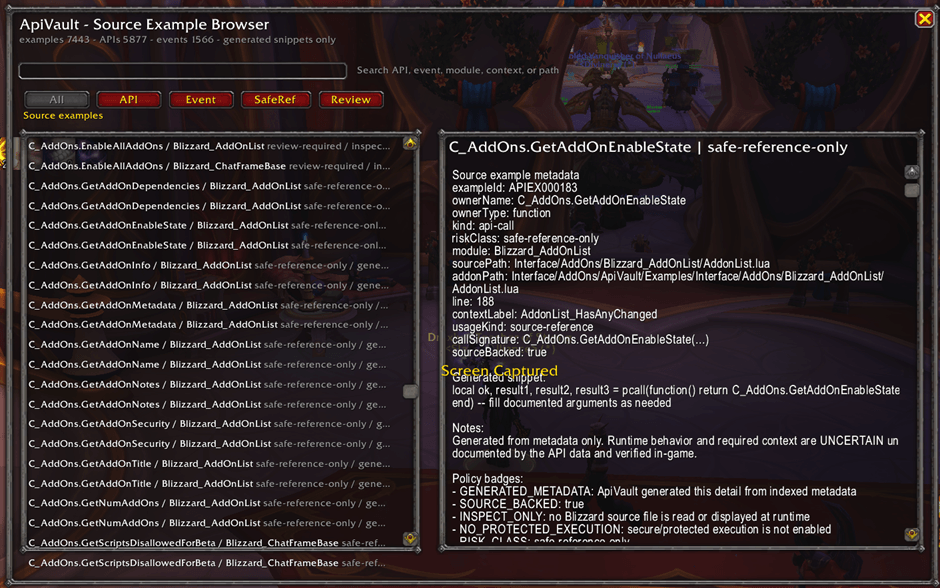
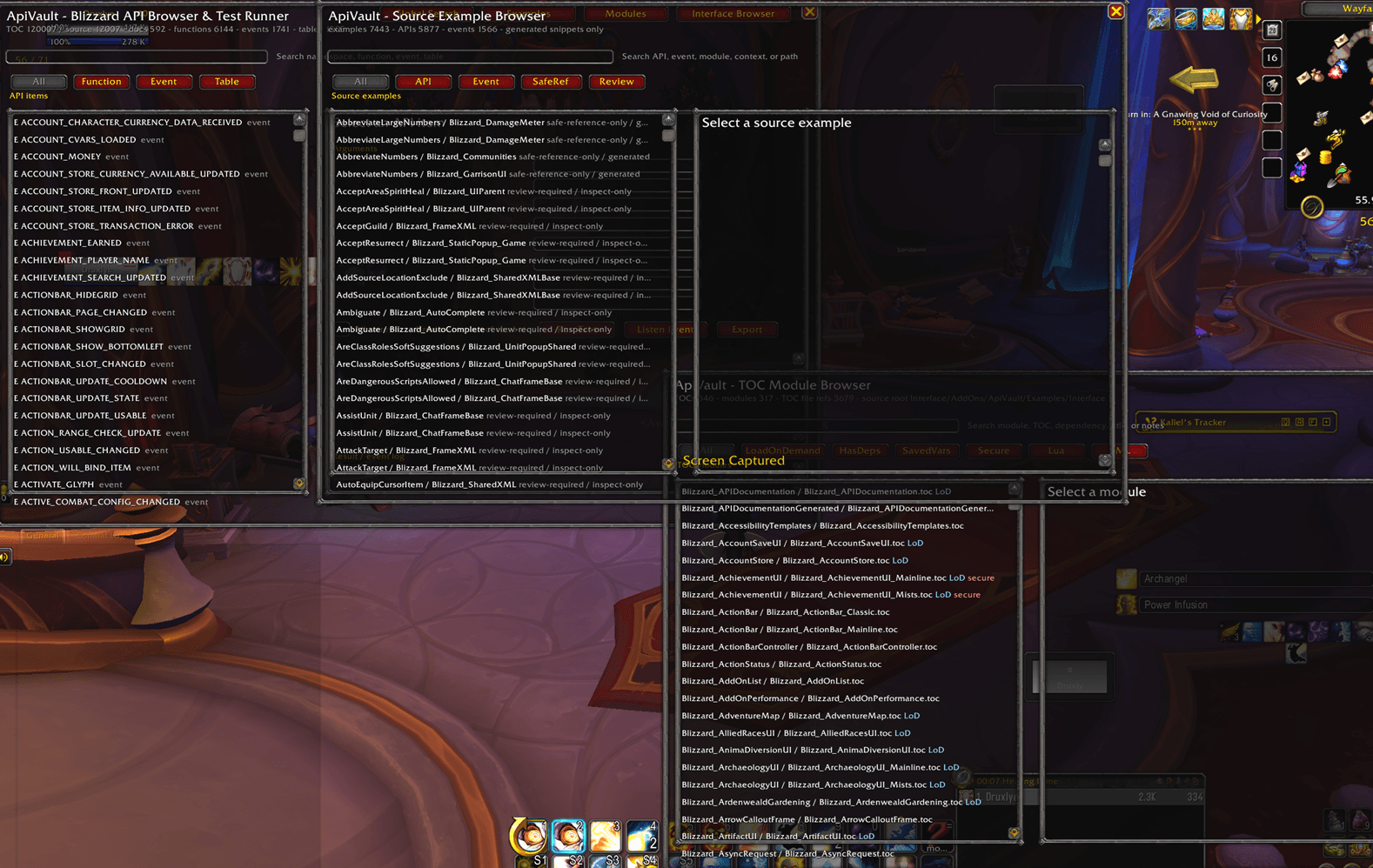
It provides searchable in-game access to generated Blizzard API documentation, source usage references, Interface metadata, XML templates, TOC modules, widget methods, symbols, runtime globals, addon audit helpers, secure-pattern warnings, event payload tools and a public debug API that other addons can connect to.
Instead of constantly switching between the game, source dumps, editor windows and scattered reference pages, ApiVault brings a large part of the development workflow into one in-game interface.
Main Features
In-Game Blizzard API Browser
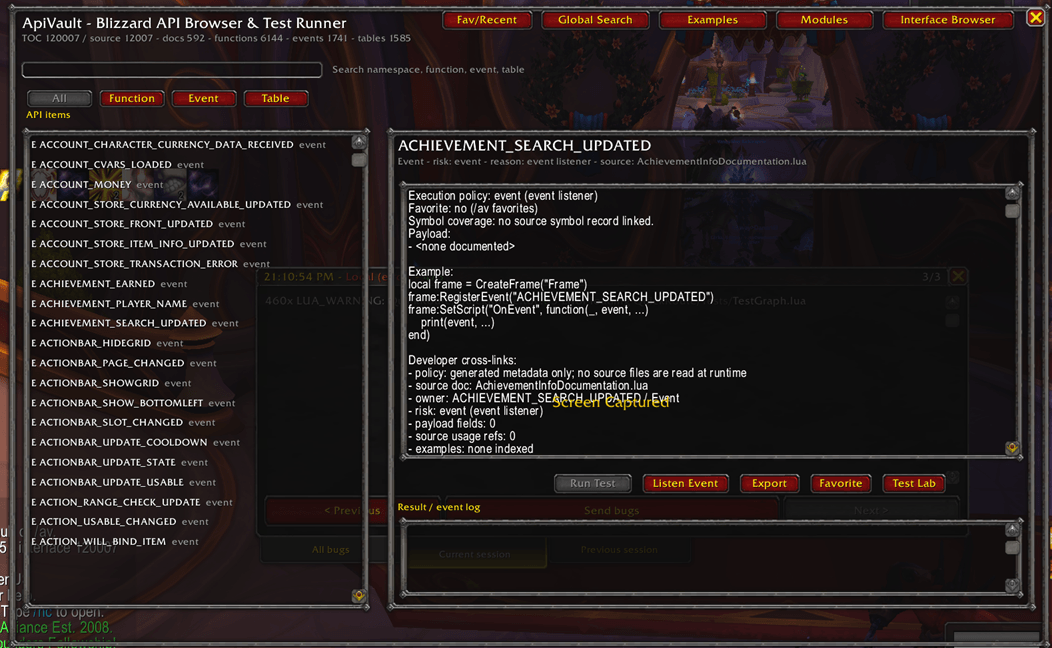
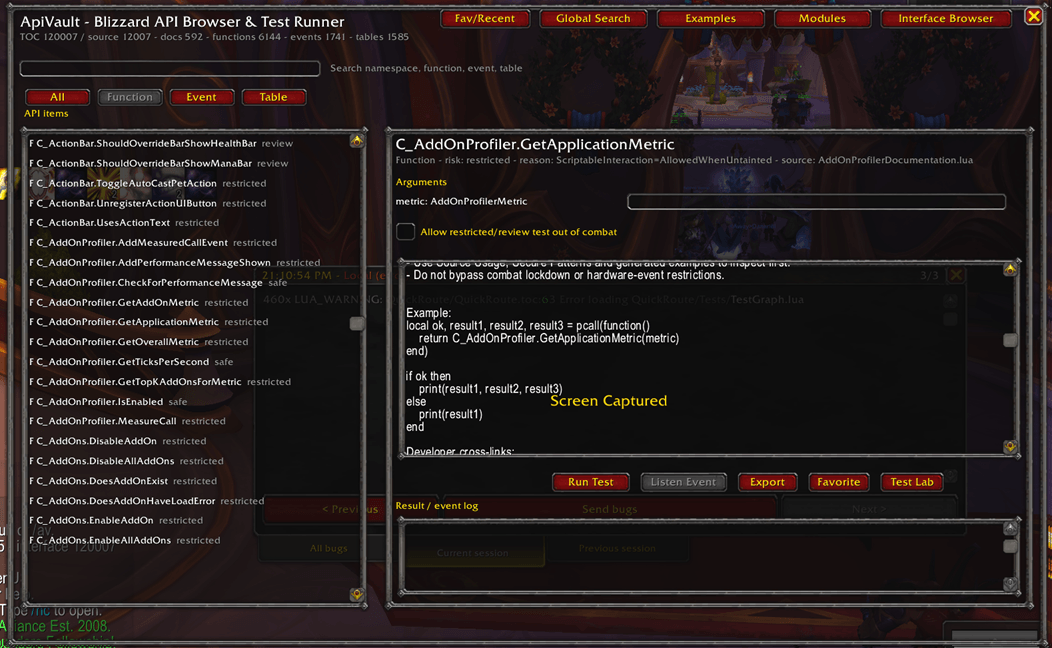
Search and inspect documented Blizzard APIs directly in-game.
ApiVault includes:
-
Documented API functions
-
Events
-
Tables and structures
-
Arguments
-
Return values
-
Event payload metadata
-
Risk labels
-
Generated example snippets
-
Source usage references
-
Secure-pattern links
Use it to quickly answer:
-
What is the exact function name?
-
What arguments does it take?
-
What does it return?
-
Is it safe to test?
-
Is it protected, restricted, metadata-only or review-required?
-
Does Blizzard source reference this API?
Unified Developer Search
ApiVault includes a global search system across its major metadata layers.
Search through:
-
APIs
-
Events
-
Tables
-
Interface files
-
Interface folders
-
XML templates
-
TOC modules
-
Source examples
-
Secure patterns
-
Symbols
-
Runtime globals
-
Widgets
-
Script handlers
-
Constants
-
Slash commands
-
Bindings
-
Settings and CVar references
This makes ApiVault useful as a single in-game lookup tool for addon development.
Source Usage References
ApiVault can show where Blizzard Interface source metadata references APIs and events.
This helps developers see:
-
Which Blizzard modules reference an API
-
Which files contain event registrations
-
How often a reference appears
-
Which source path and module are involved
-
Which references are linked to templates, examples or secure patterns
Source usage references are static metadata generated from the Interface files used to build ApiVault. They are not live call traces and do not mean that Blizzard is currently calling that API in-game.
Bundled Interface Resource Browser
ApiVault includes a metadata browser for the bundled Interface reference tree.
You can inspect:
-
File paths
-
Folder paths
-
File types
-
File sizes
-
Line counts
-
Module names
-
API usage counts
-
Event usage counts
-
XML template counts
-
Secure pattern counts
The bundled Interface reference files are not loaded through the addon TOC and are not read at runtime. ApiVault uses generated metadata for in-game browsing.
XML Template Catalog
Browse XML templates and frame metadata in-game.
ApiVault can show:
-
Template names
-
Frame types
-
Virtual template flags
-
Inheritance metadata
-
Script handlers
-
Mixins
-
Parent keys
-
Frame strata
-
Source and addon paths
-
Secure/reference flags
This is useful when building UI, finding template names, understanding inheritance and checking whether a template might be secure-sensitive.
TOC Module Browser
ApiVault can inspect Blizzard TOC module metadata.
View information such as:
-
Module name
-
TOC path
-
Title and notes
-
Interface version
-
Dependencies
-
Optional dependencies
-
LoadOnDemand status
-
SavedVariables
-
SavedVariablesPerCharacter
-
Secure/useSecureEnvironment flags
-
Lua/XML file counts
-
Linked APIs, events, templates and secure patterns
This helps addon developers understand how Blizzard modules are organized.
Secure Pattern Reference Index
ApiVault includes a secure/taint-sensitive reference layer.
Search and inspect metadata for:
-
SetAttribute
-
GetAttribute
-
RegisterStateDriver
-
UnregisterStateDriver
-
SecureActionButtonTemplate
-
SecureHandler templates
-
SecureUnitButtonTemplate
-
SecureFrameTemplate
-
InCombatLockdown
-
hooksecurefunc
-
sec = NotAllowed
-
Secret/restricted API metadata
Secure-sensitive entries are treated as inspect-only. ApiVault does not attempt to bypass Blizzard’s protected execution model.
Complete Function and Symbol Coverage
ApiVault goes beyond documented API functions.
It can also index and browse:
-
Source global functions
-
Source local functions
-
Table functions
-
Method-style functions
-
Mixin methods
-
XML script handlers
-
Slash command handler symbols
-
Runtime globals from
_G
This helps developers distinguish between:
-
Documented API functions
-
Source-only symbols
-
Local-only functions
-
Mixin methods
-
Runtime globals
-
Metadata-only entries
Runtime Global Inspector
ApiVault includes a read-only runtime global inspector.
It can categorize _G entries by type:
-
function
-
table
-
string
-
number
-
boolean
-
frame/userdata
-
other
ApiVault does not call discovered functions. Runtime global inspection is session-specific and read-only.
Constants, Slash Commands, Bindings and Settings Catalogs
ApiVault includes additional developer catalogs for:
-
Constants
-
Slash command declarations
-
SlashCmdList handlers
-
Key binding metadata
-
Settings references
-
CVar references
Useful commands include:
-
/av constants -
/av slash -
/av bindings -
/av settings
Widget / Frame / ScriptObject Explorer
ApiVault includes metadata for widget and frame-related development.
Browse:
-
Widget methods
-
Frame method metadata
-
ScriptObject references
-
XML script handlers
-
CreateFrame usage references
-
SetScript and HookScript references
Useful for UI authors who need to understand Blizzard-style frame construction and script handling.
Runtime Test Lab
ApiVault includes a controlled runtime test lab for safe API experimentation.
Features:
-
Argument builder
-
SafeRunner-based guarded execution
-
Safer return serializer
-
Table depth cap
-
Table key cap
-
Recursive table detection
-
Frame/userdata summarizer
-
Test history
-
Blocked reason panel
Protected, secure-sensitive, metadata-only and review-required entries remain blocked unless explicitly classified as safe for testing.
Event Lab and Payload Recorder
ApiVault can manually listen to selected events and record capped payload history.
Features:
-
Manual event listener
-
Start/stop event recording
-
Stop all listeners
-
Payload serialization
-
Payload history cap
-
Listener snippet generation
-
Event count tracking
ApiVault does not auto-register every event.
Addon Audit Mode
Paste Lua, XML or TOC snippets into ApiVault and generate checklist-style findings.
Addon Audit Mode can detect:
-
C_* API references
-
Event registrations
-
XML template references
-
TOC metadata
-
SavedVariables declarations
-
Secure-sensitive patterns
-
OnUpdate and timer patterns
-
Dynamic execution warnings
ApiVault does not rewrite code automatically. It produces audit notes, checklists and references.
Loaded Addon Runtime Inspector
Inspect runtime addon metadata without forcing LoadOnDemand addons to load.
ApiVault can show:
-
Addon name
-
Title
-
Notes
-
Version
-
Author
-
Interface metadata
-
Loaded/loadable state
-
Dependencies
-
Optional dependencies
-
SavedVariables metadata
Public Developer Debug API
ApiVault includes a public data-only bridge that other addons can use to send debug data into ApiVault.
External addons can register:
-
logs
-
errors
-
API traces
-
event traces
-
secure risk reports
-
SavedVariables status
-
checkpoints
-
debug sessions
Example:
local AV = ApiVault and ApiVault.GetPublicAPI and ApiVault:GetPublicAPI("MyAddon", 1)

if AV then
    AV:RegisterAddon({
        name = "MyAddon",
        version = "1.0.0",
        interface = select(4, GetBuildInfo()),
    })

    AV:Log("info", "MyAddon initialized")

    AV:TraceAPI("C_Item.GetItemInfo", {
        file = "MyAddon/Items.lua",
        line = 42,
        context = "Item cache refresh",
    })
end
External addon input is treated as data only. ApiVault does not execute addon-provided functions.
Bug Advisor and External Error Bridge
ApiVault includes a generic external error ingestion system.
External addons or bug-detection tools can send errors into ApiVault:
ApiVault.BugAdvisor:IngestError({
    addon = "MyAddon",
    message = "MyAddon/Core.lua:42: attempt to index field 'settings' (a nil value)",
    stack = debugstack and debugstack() or nil,
    source = "Custom"
})
Bug Advisor can:
-
normalize error records
-
classify error categories
-
parse stack traces
-
link errors to APIs, events, templates, modules and secure patterns
-
generate suggested fix checklists
-
generate copyable bug reports
A passive BugGrabber adapter shape is included, but ApiVault does not assume BugGrabber internals unless its API/source is supplied.
Developer Debug Dashboard
ApiVault can show debug information from external addons that use the Public Developer Debug API.
Dashboard views include:
-
registered addons overview
-
unified debug timeline
-
error timeline
-
API trace timeline
-
event trace timeline
-
secure-risk timeline
-
SavedVariables status
-
session view
-
complete debug report export
Export Panels and Checklists
ApiVault can generate copyable developer output such as:
-
API summaries
-
generated snippets
-
module summaries
-
secure warnings
-
audit notes
-
test checklists
-
bug reports
-
debug reports
Output is displayed in EditBoxes so it can be manually copied in-game.
Favorites and Recent Items
ApiVault can track:
-
favorite entries
-
recent selections
-
recent searches
Useful when repeatedly inspecting the same APIs, modules, templates or debug records.
In-Game Documentation
ApiVault includes a full in-game user and developer manual.
Open it with:
-
the Documentation button in the main interface
-
/av docs -
/av documentation -
/av manual -
/av help
The documentation includes:
-
user workflows
-
developer workflows
-
feature explanations
-
all slash commands
-
safety model
-
troubleshooting
-
known limitations
Slash Commands
Main
/apivault
/av
/av stats
/av compat
Search and Browsing
/av search
/av global
/av interface
/av resources
/av templates
/av xml
/av modules
/av toc
/av symbols
/av globals
/av mixins
Catalogs and Widgets
/av catalogs
/av constants
/av slash
/av bindings
/av settings
/av widgets
/av frameapi
/av scripts
/av createframe
/av scriptobjects
Examples, Secure References and Cross-Links
/av examples
/av secure
/av links
/av crosslinks
Runtime Tools
/av testlab
/av tests
/av testhistory
/av runtime
/av lab
/av events
/av eventlab
/av payloads
/av recorder
/av addons
/av loaded
Audit and Debugging
/av audit
/av scan
/av addoncheck
/av auditmode
/av devapi
/av debugbridge
/av addondebug
/av reports
/av bugadvisor
/av bugs
/av externalerrors
/av errorbridge
/av dashboard
/av debugdashboard
/av timeline
/av debugtimeline
Export, Favorites and Layout
/av export
/av checklist
/av checklists
/av favorites
/av favs
/av recent
/av history
/av polish
/av todo
/av actions
/av compact
/av layout
/av uistability
/av clamp
/av windows
Documentation
/av docs
/av documentation
/av manual
/av help
Who Is ApiVault For?
ApiVault is built for:
-
WoW addon developers
-
UI authors
-
addon auditors
-
framework maintainers
-
secure UI investigators
-
developers learning Blizzard API structure
-
developers debugging runtime errors
-
developers testing safe API calls
-
authors who want in-game documentation and tooling
If you build addons, debug addons, audit addons or want to understand the Blizzard UI/API surface better, ApiVault is designed for you.
What ApiVault Does Not Do
ApiVault intentionally does not:
-
bypass protected execution
-
automate gameplay
-
automatically call protected APIs
-
automatically call SetAttribute
-
create secure buttons for automated testing
-
force LoadOnDemand addons to load
-
read bundled source files at runtime
-
display full Blizzard source code in-game
-
claim uncertain API behavior as fact
-
rewrite addon code automatically
ApiVault is a reference, inspection, test and debug tool. It helps developers make better decisions, but live testing is still required.
Important Notes
ApiVault is large because it contains extensive generated metadata and bundled reference material. Its purpose is developer tooling, not lightweight gameplay enhancement.
The bundled Interface reference tree is used as developer reference material and is not loaded through the addon TOC.
Source Usage Reference is static metadata, not live runtime behavior.
Bug Advisor suggestions are advisory and should be validated against the actual addon source.
Summary
ApiVault is an ambitious in-game developer platform for World of Warcraft addon authors.
It combines API browsing, source reference metadata, UI template exploration, secure-pattern inspection, runtime test tools, event payload recording, addon auditing, debug bridge integration, bug advice and full in-game documentation into one package.
If you want a serious in-game tool for developing, auditing and debugging WoW addons, ApiVault is built for that purpose.
ApiVault Team