CraftRoute
- By
Main.png
Tooltip.png
Tooltip_crafted.png
Tooltip_progress.png
Description
CraftRoute — Smarter Profession Leveling for TBC Anniversary
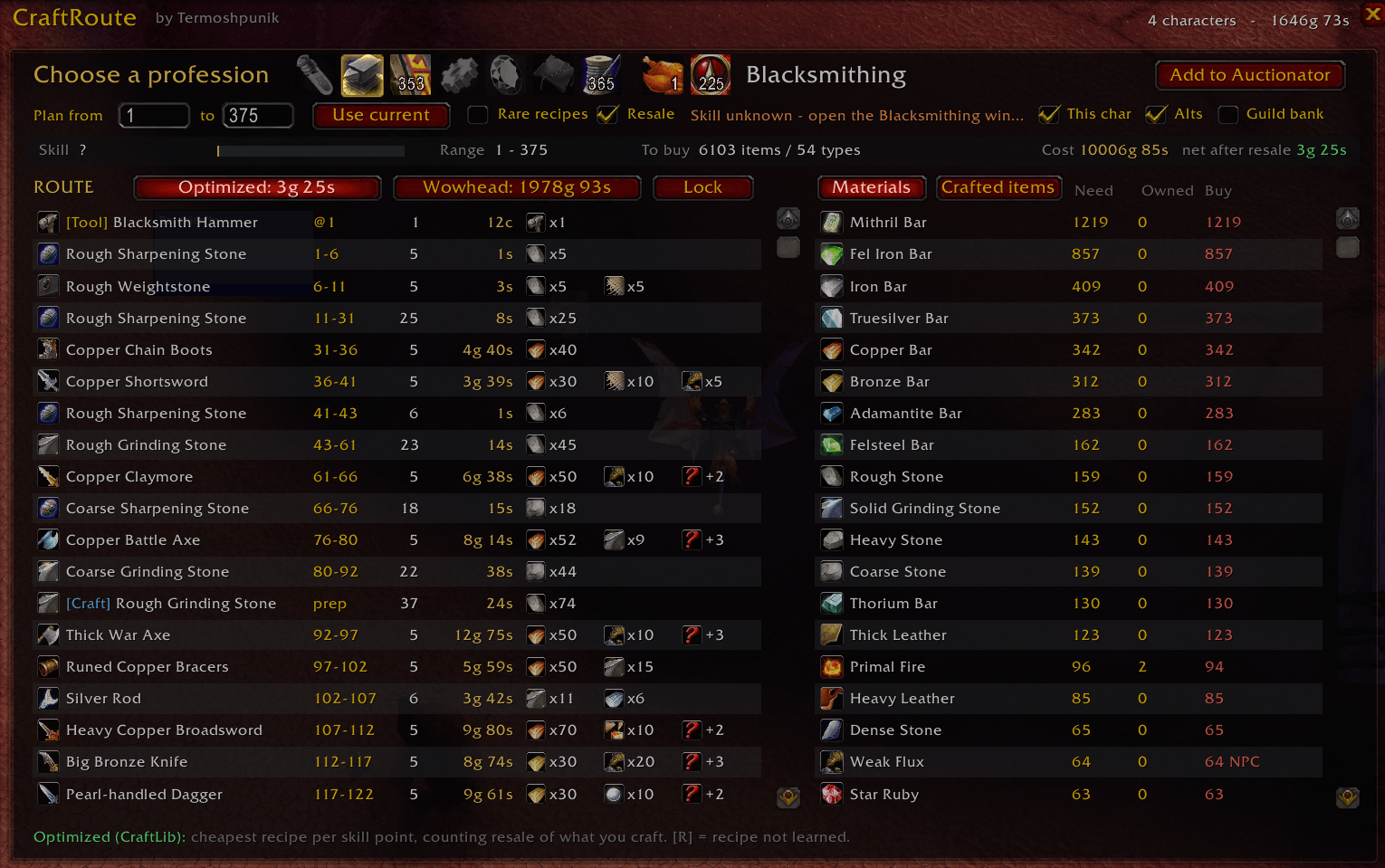
Spend less gold leveling your professions. CraftRoute builds a step-by-step crafting plan using your Auction House prices and the materials you already own. See what to buy, what to craft first, and how to get value from the items you make.
Why CraftRoute?
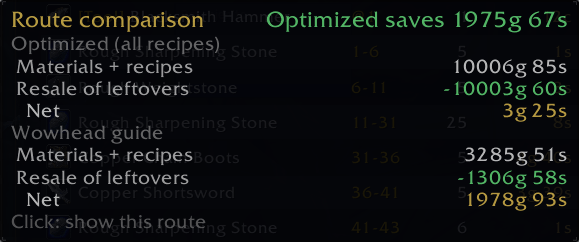
A fixed leveling guide cannot adapt to your realm’s economy. CraftRoute compares recipes at each skill level to find a cheaper route based on available price data, then shows the estimated cost alongside a route based on the Wowhead TBC profession guides.
Features
- Compare two leveling routes. Switch between the Optimized route, powered by CraftLib’s recipe database, and the Wowhead guide route. Each route displays its estimated net cost.
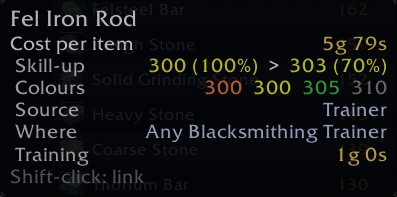
- Plan around skill-up chances. Orange, yellow, and green recipes are weighted by their estimated chance to grant a skill point, giving you a more realistic estimate of the crafts and materials needed.
- Use your materials first. Account for materials on your current character, your alts on the same realm and faction through Syndicator, and optionally your guild bank.
- Plan with Auction House and vendor prices. Use Auctionator’s latest scanned prices and vendor reagent costs, with filters for suspicious listings and unusually high prices.
- Include intermediate crafts and tools. [Craft] steps cover materials such as bolts, settings, and blasting powder. [Tool] steps identify missing tools such as enchanting rods, an Arclight Spanner, or a Jeweler’s Kit.
- See recipe and training costs. The plan includes recipe and training prices and marks recipes you still need to obtain with [R].
- Account for cooldowns. Cooldown recipes are planned once, with transmutes treated as sharing a cooldown.
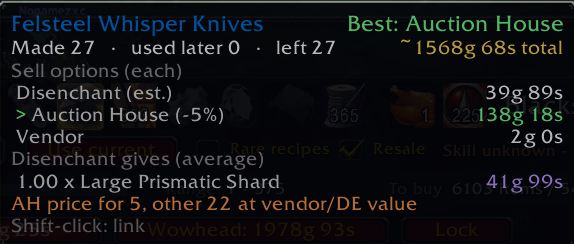
- Find the best use for crafted items. The Crafted items tab compares estimated returns from vendoring, Auction House sales, and disenchanting, highlighting the best option.
- Lock your route and track progress. Keep your chosen plan while you level. Completed steps receive a check mark, the current step shows the remaining crafts, and the materials list updates as you progress.
- Create a shopping list in one click. Send the materials you still need directly to Auctionator with Add to Auctionator.
- Check the details in tooltips. View per-item costs, estimated skill-up chances at each level, reagent prices, and how many materials you already own.
- Open it from your minimap. Drag the minimap button to place it where you prefer.
Supported Professions
Alchemy • Blacksmithing • Enchanting • Engineering • Jewelcrafting • Leatherworking • Tailoring • Cooking • First Aid
Recommended Addons
- CraftLib — Provides the recipe database and skill-up difficulty thresholds used by the Optimized route. Required for optimized planning; without it, CraftRoute uses the Wowhead guide routes.
- Auctionator — Supplies Auction House price data and supports shopping lists exported from CraftRoute.
- Syndicator — Lets CraftRoute account for stored inventory data across your characters, including bags, banks, mail, and optionally guild bank materials.
Getting Started
- Open CraftRoute using the minimap button or /craftroute.
- Choose a profession. Your plan starts at your current skill level.
- Compare the Optimized and Wowhead routes, then select the one you prefer.
- Review Materials and click Add to Auctionator to create your shopping list.
- Press Lock and start crafting.
Open each profession window once per character so CraftRoute can record the recipes you have learned. Scan the Auction House with Auctionator before planning to use fresh prices.
Commands
- /craftroute or /crt — Open or close CraftRoute.
- /craftroute minimap — Show or hide the minimap button.
- /craftroute reset — Move the window back to the center of the screen.
Advanced Price Settings
- /craftroute ahlimit N — Value up to N of each crafted item at its Auction House price. Default: 5.
- /craftroute markup N — Treat an Auction House price above N times the material cost as anomalous. Default: 3.
- /craftroute anomaly N — Value anomalous items at N times the material cost. Default: 1.5.
- /craftroute outlier G — Ignore a single Auction House listing priced above G gold. Default: 500.
Notes & Credits
Costs, skill-up chances, and disenchanting returns are estimates. Actual results depend on skill-up luck, market availability, and sale prices. Auction House prices come from Auctionator’s latest scan.
Guide routes are based on the Wowhead TBC profession guides. Optimized recipe data is provided by CraftLib, which must be installed separately.
The CraftRoute Team