


Crafting and Farming Forever - Profit, Queue & Restock
- By
options.png
crates.png
writs.png
sales.png
restock.png
Description
Crafting and Farming Forever
Know what's worth crafting, buy only what you're missing, gather the rest, and keep the auction house stocked, across all your characters.
Crafting and Farming Forever is a profession and gold making addon for World of Warcraft: Forever (WoW Forever). It's a crafting profit calculator, a craft queue, a shopping list, a farming list, an auction house restock helper and a sales tracker in one window. It also tells you which Craftsman's Writs give the cheapest reputation and which Waylaid Crates give the cheapest Merchant's Favor.
It ranks every recipe your characters know by real profit at current auction house prices. It keeps one craft queue for all of them, and turns that queue into a shopping list that leaves out everything you already own. Anything you'd rather gather becomes a farming list.
Needs Auctionator and Syndicator. Crafting and Farming Forever won't work properly without both. Install them first.
Coming soon: TradeSkillMaster (TSM) support.
What it answers
- What should I craft to make gold? The Profit tab: every recipe ranked by profit after the auction house cut, with each item's chance of selling.
- What's the cheapest way to level a profession? Skill up mode: the cheapest recipes per skill point for Alchemy, Blacksmithing, Enchanting, Engineering, Leatherworking, Tailoring, Cooking and the rest.
- What do I still need to buy? One Auctionator shopping list that skips what's in your bags, bank, mailbox and on your alts.
- Where do I farm these materials? Farm It: which ore veins, herbs and creatures, in which zones.
- Are Craftsman's Writs worth it? The Writs tab: the gold each reputation point costs, cheapest first.
- Which Waylaid Crate should I fill? The Crates tab: the gold each Merchant's Favor costs, with the best buy marked.
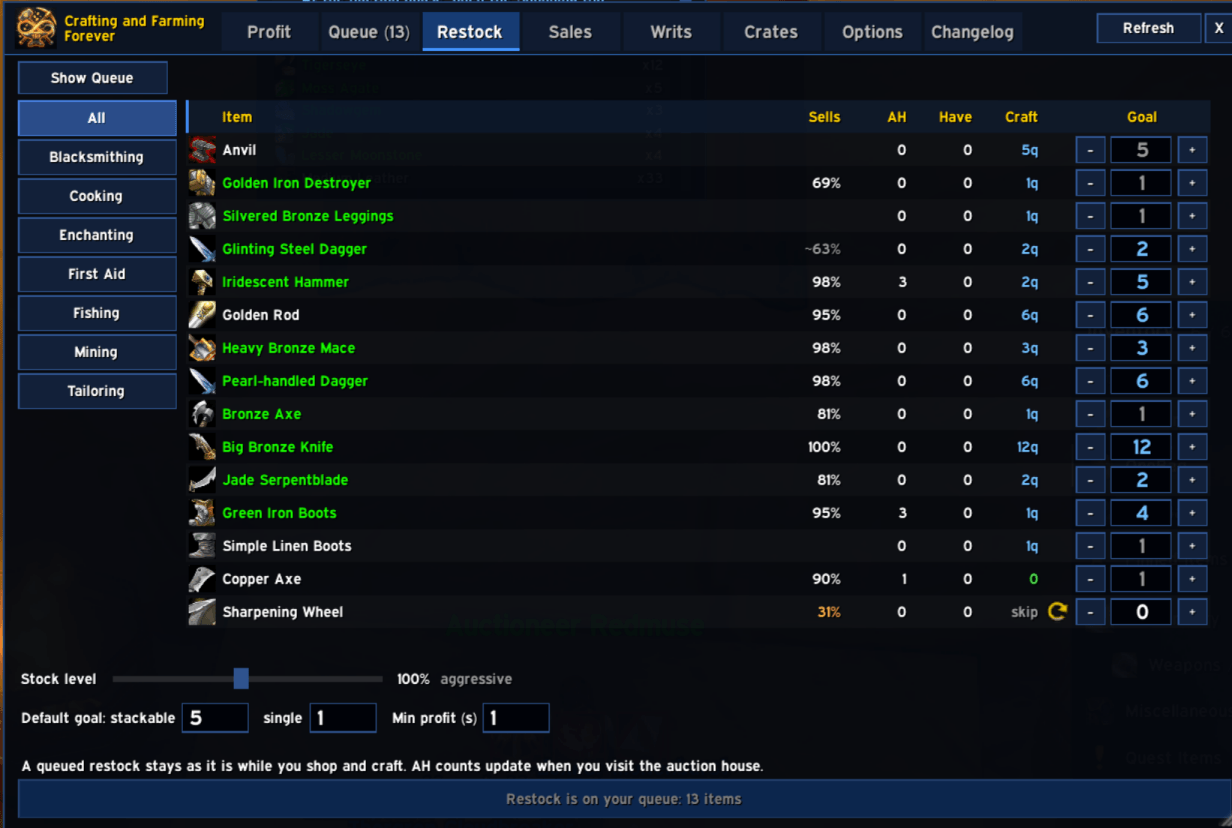
- How many should I post? Restock: a goal per item that follows your own sales, with each item's profit shown and an X to skip one for now.
- How much gold am I really making? The Sales tab: profit today, this week and this month, after the auction house cut and material costs.
Features
Profit list: what to craft for gold
- Every recipe any of your characters knows, ranked by profit after the auction house cut.
- Each material is costed the cheapest way: auction house, vendor, or crafting it yourself.
- Materials you already hold count as free, so ore in your bank means it smelts bars instead of buying them.
- Real buying costs: a price scan only knows the cheapest listing. At the auction house the add-on reads every listing of what your queue buys, so 50 ore count at what 50 really cost, not 50 times the cheapest one. The screen is locked for the few seconds that takes, with the material being read named and its rows outlined: the list scrolls to it, a bar counts through its listings up to the amount you buy and pulses green or red against its usual price (Escape unlocks it). The Profit tab prices each recipe for the crafts its restock goal makes, down the listings read. Restock picks crafts at the cheapest listings, and a queued restock is decided again once the listings are read: crafts that no longer pay are cut.
- A tab per profession, a search box, and sorting by name, sell chance or profit.
- Hide unprofitable recipes with one tick.
- Bind-on-pickup crafts are listed with their crafting cost, so you can still plan them.
Skill up: profession levelling at the lowest cost
- A levelling (leveling) view of the same list: the recipes that can still give a skill point, cheapest per point first.
- The real cost of a point: materials less what you get back for what you make, from a vendor or (tick Selling on the AH) the auction house. Crafts that earn gold while levelling show in green.
- Coloured orange, yellow and green as in the game, with each colour's chance of a point.
- Uses today's auction house prices, so it's a levelling guide that's never out of date.
Recipes: what to learn next, and where
- Every recipe in the game you haven't learned yet, by the skill it needs, green when you can learn it now.
- What each one would earn per craft, and how many crafts it takes to pay for the recipe at its auction house price: sort by it before you buy a recipe.
- Hover one for where it comes from: trainer, vendor (with its price, tokens or Merchant's Favor, and reputation), quest, dungeon boss, drop, world drop or holiday, and whether you can buy it on the auction house.
- An Auctionator shopping list per profession of the recipe items you can learn right now, lowest skill first, ready to search on the Shopping tab.
- Hide bind-on-pickup crafts to see only recipes whose items you can sell, with what each craft sells for.
- See which of your characters have learned it or can learn it, or switch to all characters to see every recipe an alt is still missing.
One craft queue for every character
- Queue from the profit list, or with the Queue button on any recipe page.
- The Queue tab is a numbered to-do list in working order: fetch from an alt, take from the bank, buy at the auction house, collect the mail, buy from a vendor, then craft.
- Tools: crafts that need a Blacksmith Hammer, an Arclight Spanner or a runed rod put the tool on that list when it isn't in your bags, so you don't reach the anvil without it.
- Camp stations: crafts that need a Fermenter, a Spinning Wheel, a Loom, an Iron Oven or another camp station put the station and a campfire kit on the list, at their cost. Everything else is crafted first, then the station is placed and its crafts made back to back. A station stands 15 minutes and all stations share a 1 hour cooldown, so Restock picks the one station that pays most after its own cost and queues only what fits its 15 minutes. Station crafts restock in batches (3x the goal by default) once you're under the goal, so one station pays for itself.
- Cooldowns: recipes with a cooldown, like transmutes, are restocked one craft at a time and skipped while on cooldown; a material whose recipe is on cooldown is bought instead.
- Each character only buys and crafts its own part; then you're told which alt to log in to next.
- Sub-crafts like bars, bolts and leather are worked out for you, and shrink as your stock grows. They're only made while that's cheaper than buying, down every listing: when the cheap ore runs out, the rest of the bars are bought.
- Bag space: when a big queue's materials won't fit in your bags, it tells you what to put in the bank first and, if that isn't enough, splits the queue into runs that fit, crafting what uses up the most room first. At the bank, Bank it on the Next step bar does the moving for you.
- Vendor reagents in one click: at a vendor that sells something your queue needs, Buy for your queue (under the vendor window and on the Next step bar) buys exactly what's missing.
- Total profit for the whole queue, and Still to buy compared with the gold you're carrying.
- Next step bar: while anything is queued, a small bar at the top of the screen shows the next thing to do, with its own Craft Next when it's time to craft. At a vendor, the bank, a mailbox or the auction house it jumps to the step you can do right there, then goes back to the normal order. Fold it to one line; it disappears when the queue is empty.
- Craft Next crafts the next thing this character can make. If it can't, it tells you why (the next craft is on your alt, say), and if the craft needs a different profession it opens that one for you. It's also a progress bar: while you craft it shows how far through the batch you are (8 / 20) and how long until that batch and all your crafts are done. Turn on the Craft alert (Options) and a sound of your choice plays a few seconds before a batch ends while more crafts are queued, so you can alt-tab and still come back in time. Each craft floats up with its profit, a streak and session earnings counter sits above the bar, and a finished batch ends with a burst.
- After each scan, prices show what they were before: was 1s 20c, now 1s 45c, red when it hurts your profit and green when it helps.
A shopping list that knows what you own
- One Auctionator shopping list, kept up to date as you craft, loot and buy. Find it in the auction house's Shopping tab (Auctionator), list Crafting and Farming Forever Queue.
- What you buy leaves the list the moment the purchase goes through, and the queue reminds you to collect it from your mailbox.
- It counts your bags and bank, and with Syndicator your alts' bags and banks too, so you never buy what's already sitting on an alt, unless buying it costs less than the postage to mail it over.
- Vendor materials are listed separately, so you don't search the auction house for thread.
Farm It: a gathering and farming list
- One click turns the queue into what to gather yourself: which veins, herbs and creatures, in which zones, and what to disenchant.
- The Next step bar at the top of the screen tells you everything to gather and where, grouped by mining, herbalism, skinning and so on. It puts your current zone first and counts down as you gather.
- Where each material comes from is built from AllTheThings data and ships with the add-on, so you don't need AllTheThings installed.
Craftsman's Writs: the cheapest reputation
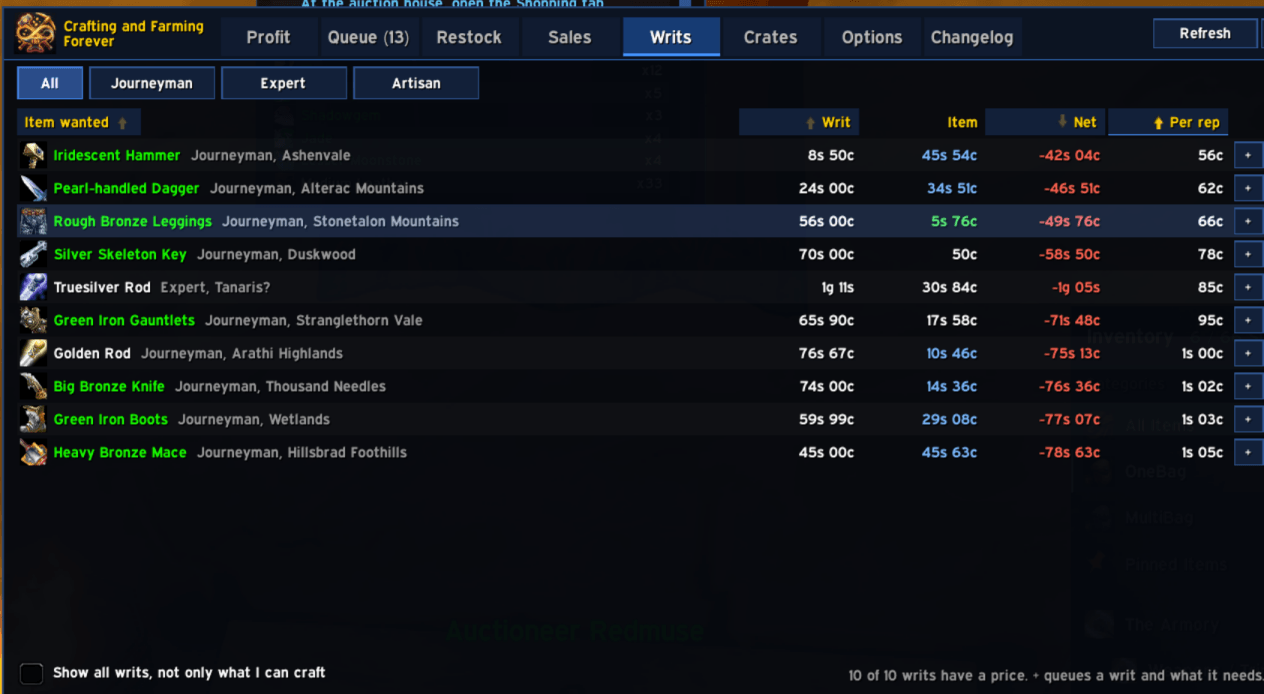
- The Writs tab lists every Craftsman's Writ with its auction house price, the cost of the item it wants (crafted by your characters when that's cheaper), the average coin pouch and the gold each reputation point costs you, cheapest reputation first.
- For the daily writ quests of the Azeroth Commerce Authority and Durotar Supply and Logistics.
- It starts with the writs your characters can craft for; one tick shows them all. Show one level (Journeyman, Expert, Artisan) or sort by any column.
- Holding writs? The tab turns gold with the count, and the ones you hold are tinted gold at the top of the list.
- Filter by zone: tick one or more hand-in zones to see only their writs. Sort by zone to plan one trip: each zone shows the combined cost and reputation of its writs, cheapest zone first, and one + queues them all.
- + puts a writ on your queue: the shopping list gets the writ and its item, or the item's materials when crafting it is cheaper. It comes off the queue when you hand it in.
Waylaid Crates: the cheapest Merchant's Favor
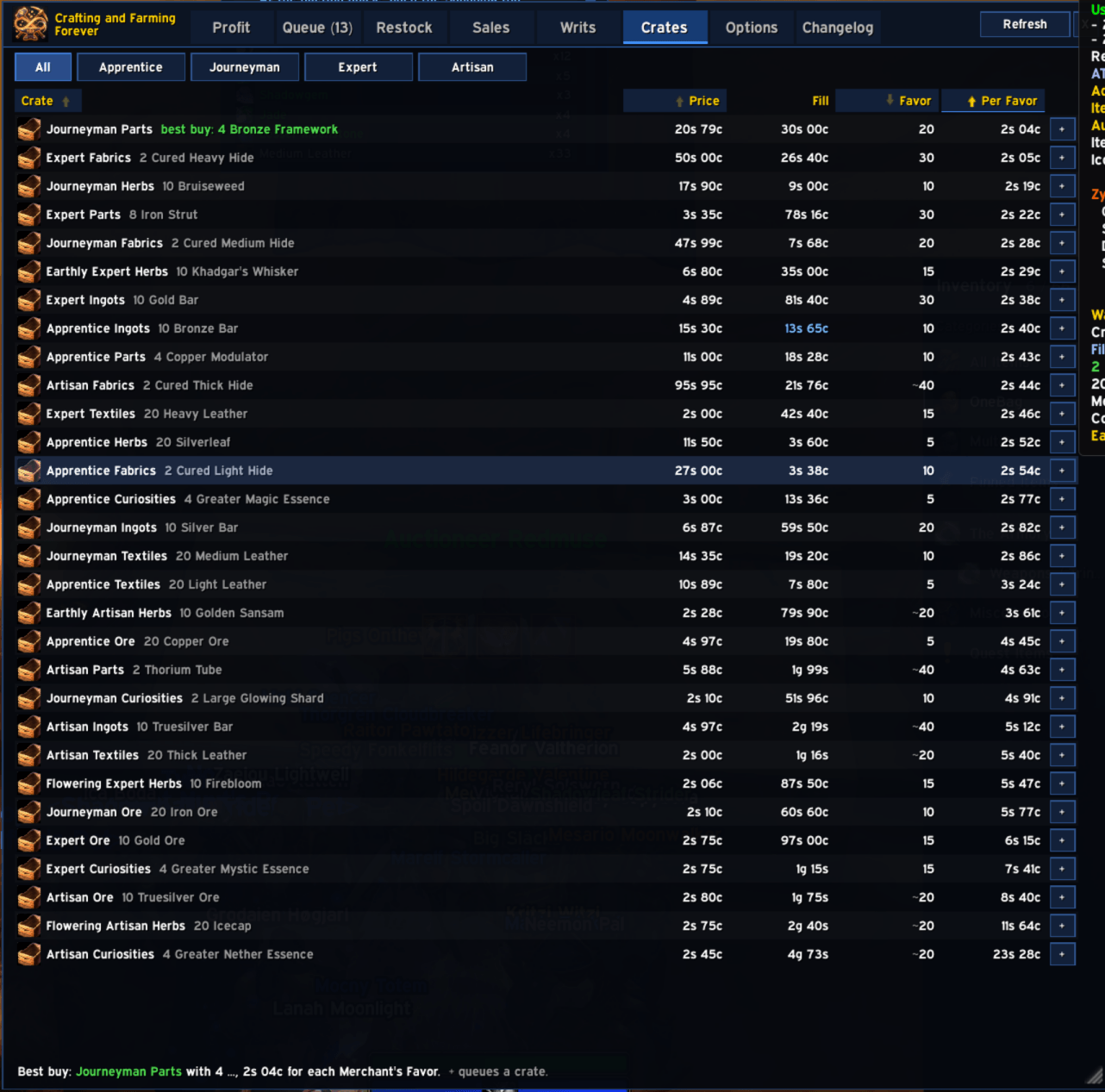
- The Crates tab lists every Waylaid Crate with its auction house price, its cheapest bundle of materials, the Merchant's Favor it pays and the gold each Merchant's Favor costs you, cheapest first, with the best buy marked.
- Covers the crates of gathered materials (ore, herbs, leather and so on) and of crafted ones (Fabrics, Ingots, Parts), Apprentice to Artisan. No profession needed to fill them.
- Hover a crate to see every bundle that fills it, with its cost.
- Need 300 favor? Type it in and the tab works out the cheapest mix of crates for it, down the auction house listings of the crates and their materials, crates you hold first. One click queues them, and at the auction house the mix is checked again against the real listings.
- Holding crates? The tab turns gold with the count, and the ones you hold are tinted gold at the top of the list.
- + puts a crate on your queue: the shopping list gets the crate and its cheapest bundle of materials, less what you hold. It comes off the queue when you fill it.
Restock the auction house
- A goal for each item you sell: how many you want listed. Your auctions, bags, banks and mail count towards it.
- Smart goals learn from your auctions: a step up each day an item sells out, a step down when it expires (quickly, if it stops selling), sized for how often you restock and for the profit against the deposit. An item whose expired auctions cost more in deposits than its sales earn is paused and tried again a few days later. Never more than a quarter of your gold on one item, and daggers in pairs (buyers usually want two). A slider goes from cautious to aggressive (on the Restock tab and in Options, goals update as you drag it, with a clock beside it showing about how long the restock takes to craft, sub-crafts included), and you can turn them off.
- Short on gold? You get a partial restock: the items that earn the most for their materials, cut to what you can afford. Gold for the auction house deposits is always kept back, plus an amount of gold you choose (1 gold to start with), so you can post what you craft.
- A restock stops where it stops paying: when the cheap materials on the auction house run out, an item is cut to the crafts that still earn your minimum profit.
- Clear columns for what's listed, what you hold and what to craft. Goals you set yourself stand out from the defaults, and one click puts them back.
- One button queues whatever is missing.
- Bank alt mode: name a bank alt in Options (its full name, both parts) and your other characters mail it what they craft, with one click on Send crafts at a mailbox, or by themselves if you untick Mail on a click (whole stacks, 12 to a mail; crafts in the bank come out on the bank step). Press Keep on a queue row to keep some for yourself. Postage counts in the profit. The bank alt posts everything; its materials and gold stay out of your crafters' shopping.
- A Restocking tab inside the auction house lists what you can post from your bags. It checks the live price, suggests the lowest listing's price (no undercutting), never below break-even, and posts with one click.
- It warns you before you post below what a vendor would pay.
Sales tracker: profit and money on its way
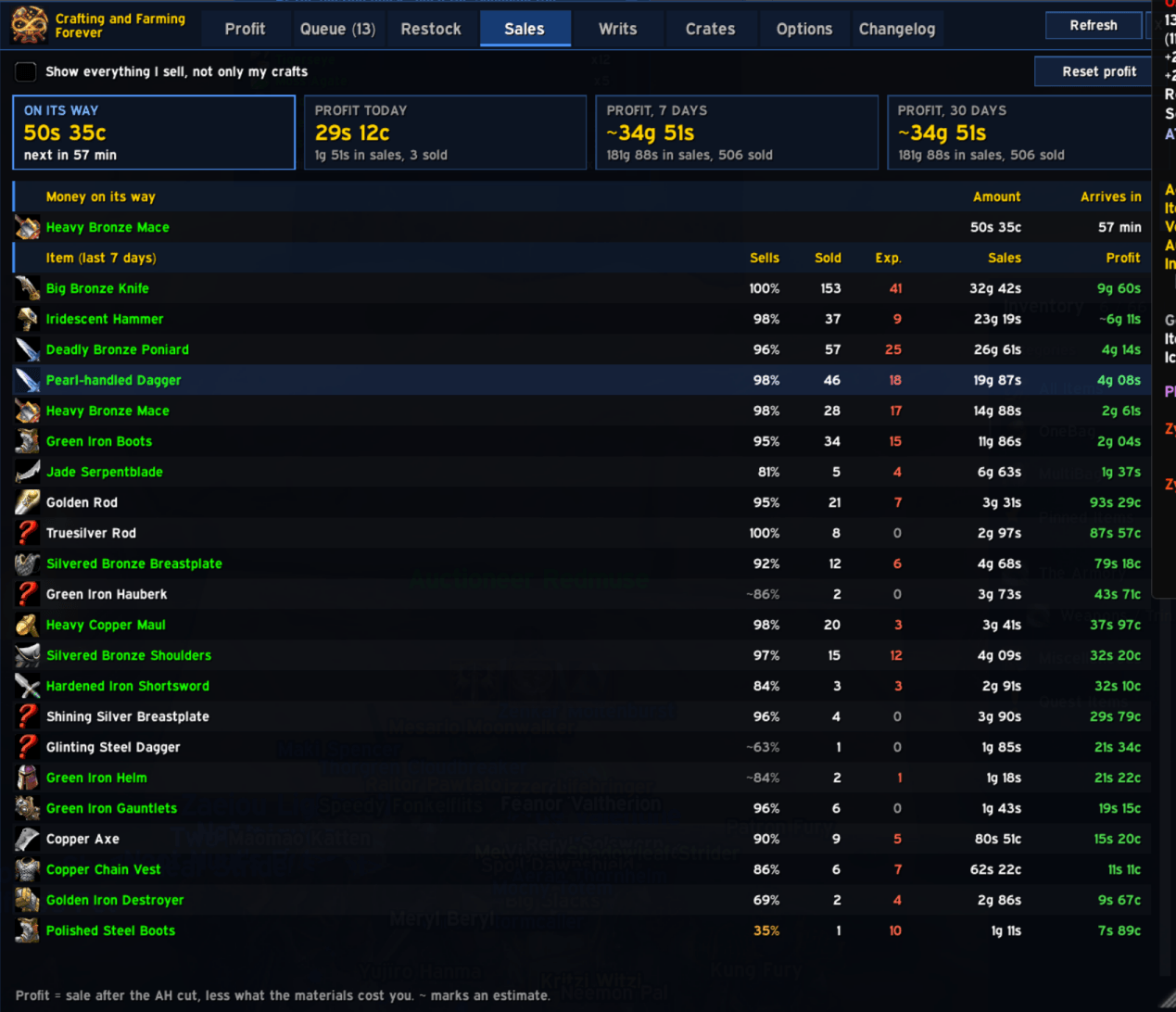
- Real profit, not just sales: what you received after the auction house cut, less what the materials cost. Bought materials count at the price you paid, ones you already had or gathered at the market price on the day you used them. Today, the last 7 days and the last 30, and per item.
- Money on its way: when an auction sells, you're told in chat how much is coming, and the Sales tab and the minimap button count down the hour until it reaches your mailbox. No trip to the auction house needed.
- What sold and what expired, read from your auction house mail, including sales made while you were offline.
- Each item's chance of selling within 24 hours, which gets more accurate the more you sell.
- Lists only what you craft, or everything you sell with one tick.
- Reset profit starts the count again from zero whenever you like.
Advertise and quote
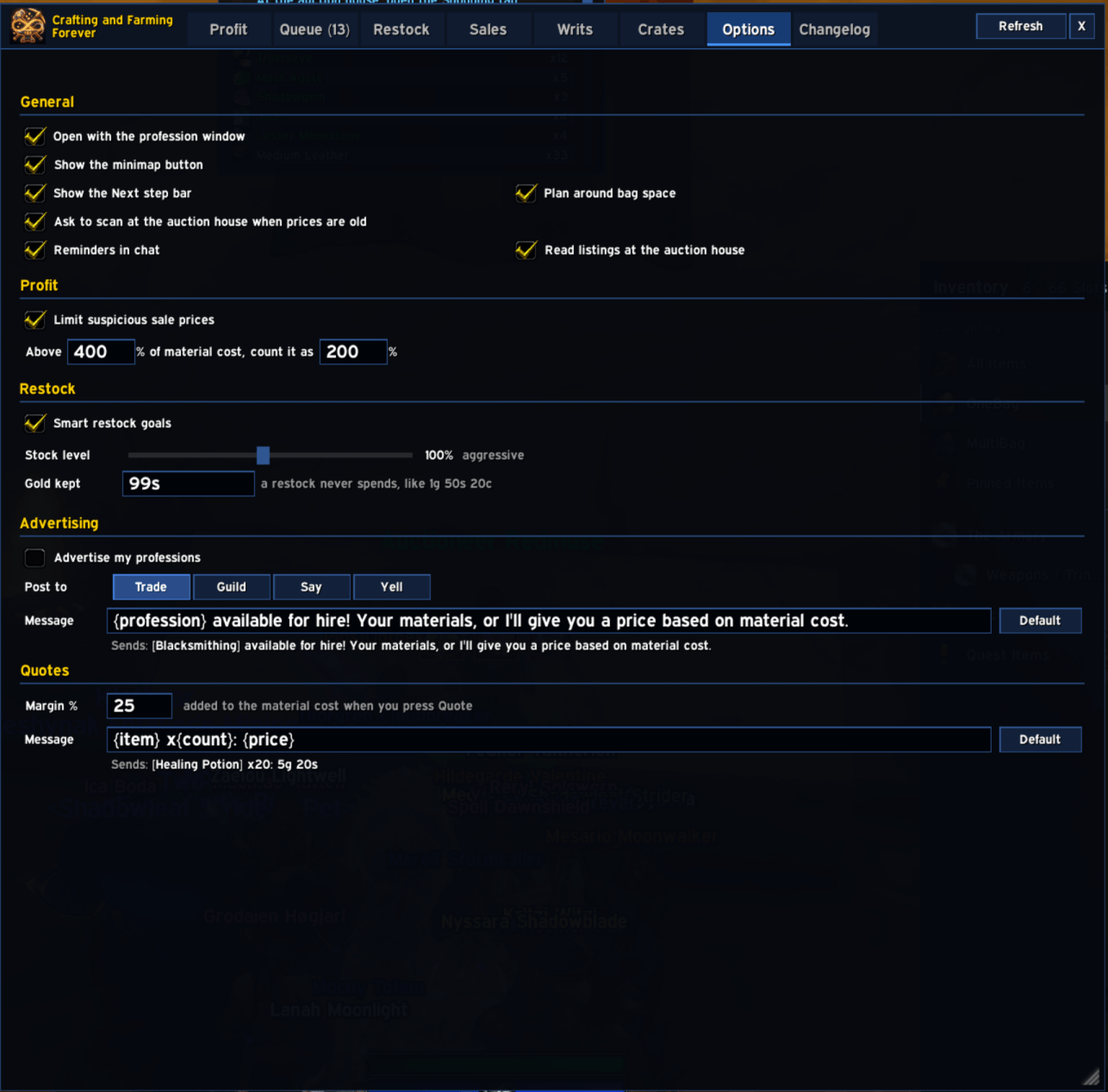
- A small Ad box beside the chat posts your profession link to Trade, Guild, Say or Yell in one click.
- Quote fills in a reply to your last whisper with one price for the whole order: material cost plus a margin you choose, from 0% up to 1000%. Handy for crafting orders and tips in Trade chat.
- Word both messages your way, or turn advertising off, on the Options tab.
Suspicious prices
- A crafted item listed far above its material cost (over 400% by default) is marked "check price", since that is often one odd listing that won't sell; profit still counts the listing. Recipes with a cooldown (Mooncloth, transmutes) are left alone. The limit is in Options.
- Price spikes: the add-on learns each item's usual price from your scans (the middle of the last 7 days). A crafted item listed at 400% of it or more counts at its usual price, and spikes of 130% or more are marked, so you don't craft at spiked material prices for a sale that won't last. A price that holds for 3 scan days, or that your own sales keep getting, becomes the new usual price.
Stale-price warning
- If your auction house prices are more than a day old, it asks for a new scan.
Minimap button, options and changelog
- A minimap button opens the window (left-click) or the options (right-click) and shows the money on its way. It works with minimap button collectors and broker bars.
- One Options tab to leave characters out of everything (their recipes and stock) and to switch things on or off: the suspicious-price limit, smart restock goals, the minimap button, the Next step bar, the scan question, each kind of chat message and advertising. It's also in the game's Options under AddOns.
- A Changelog tab lists what changed in each version. It lights up after an update; nothing pops up.
Requirements
- Auctionator: required. All prices and the shopping list come from it; without it the add-on doesn't load.
- Syndicator: required to work properly. It counts your alts' bags and banks and what you have on the auction house. Without it only the logged-in character counts, so the add-on may tell you to buy what an alt already has, and the Restock tab is off. You'll get a reminder in chat at each login until it's installed.
TradeSkillMaster (TSM) support is coming in a future update.
Getting started
- Install the add-on along with Auctionator and Syndicator, and restart the game.
- Open each profession once on each character so its recipes are recorded.
- Run an auction house scan when it asks.
- Queue something profitable, a writ or a crate, then search the Crafting and Farming Forever Queue list in Auctionator's Shopping tab.
- Press Craft Next until the queue is empty, then post what you made from the Restocking tab at the auction house.
Commands
/cffor/craftfarm: show or hide the window/cff profit,/cff queue,/cff restock,/cff sales,/cff writs,/cff crates,/cff options: open a tab/cff next: fold or unfold the Next step bar/cff minimap: hide or show the minimap button/cff refresh: re-read recipes, stock and prices/cff clear: empty the queue/cff changelog: open the Changelog tab/cff auto: toggle opening with the profession window/cff diag: diagnostics for bug reports
Bugs and suggestions
The best place for bugs and ideas is GitHub issues: the form asks for everything needed (your add-on version, the output of /cff diag and any Lua error text from BugSack), and you can follow each report until it's fixed. Comments here are read too. The add-on is actively developed, and suggestions are welcome.
Support
Enjoying the add-on? You can buy me a coffee on Ko-fi. It's entirely optional and the add-on stays free.
Credits
- Auctionator by plusmouse and Borjamacare: prices, price history and the shopping list.
- Syndicator by plusmouse: stock across your characters.
- AllTheThings by Crieve and the AllTheThings team: Farm It's data on where materials come from and the Recipes list's data on where recipes come from, used under the MIT License.
License
All Rights Reserved. You're welcome to use the add-on and read its code, but please don't re-upload it or copy it into other projects without permission.
World of Warcraft and Blizzard Entertainment are trademarks or registered trademarks of Blizzard Entertainment, Inc. This add-on isn't affiliated with or endorsed by Blizzard Entertainment.
Crafting and Farming Forever - Profit, Queue & Restock Team
