Forever CraftCompass
- By
Profession window helper: shows which recipes are upgrades for you and your group, and where to get every missing reagent.
Bildschirmfoto_20261110_130132.png
Bildschirmfoto_20261110_130922.png
Bildschirmfoto_20261110_130232.png

Bildschirmfoto_20261110_130316.png
Bildschirmfoto_20261110_130337.png
Bildschirmfoto_20261110_143554.png
Bildschirmfoto_20261110_144317.png
Bildschirmfoto_20261110_145655.png
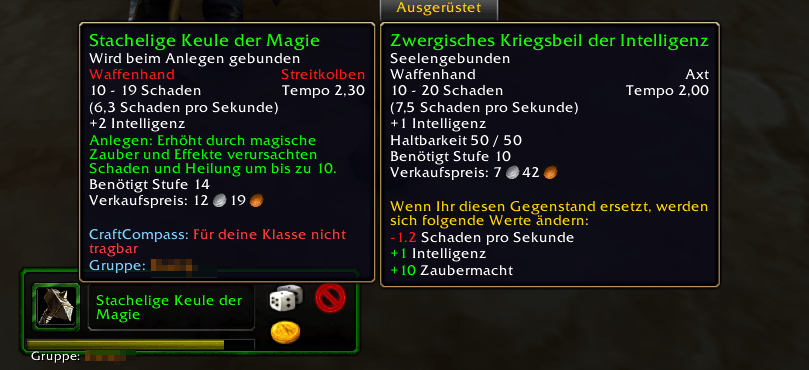
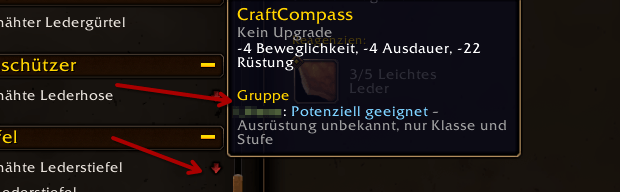
Group/Gruppe shows the best matching Player forr this Item
Bildschirmfoto_20261112_112305.png
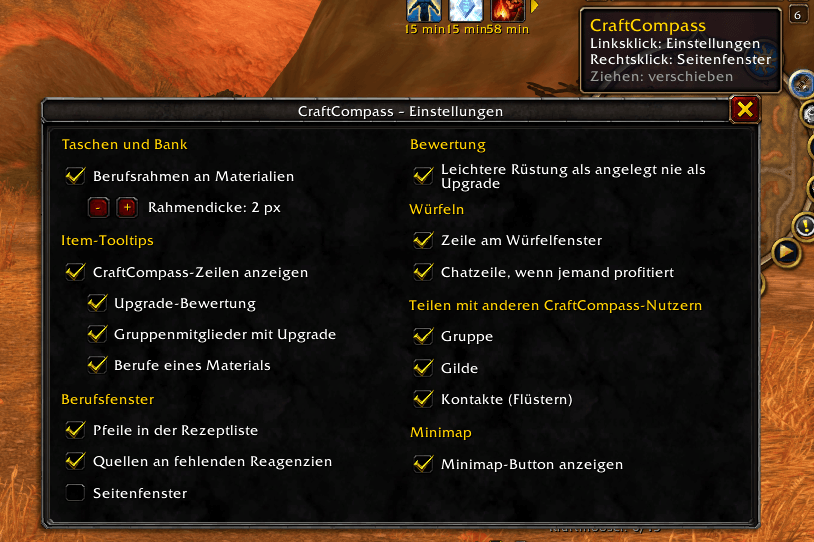
Bildschirmfoto_20261112_122559.png
Description
CraftCompass
Know what to craft, and where to get what's missing. CraftCompass extends Blizzard's profession window in World of Warcraft: Forever. It works in every profession and for every class.
Recommended: Questie – CraftCompass reads vendors, loot mobs and gathering nodes from its database.
Deutsche Beschreibung weiter unten.
What it does
Is it an upgrade?
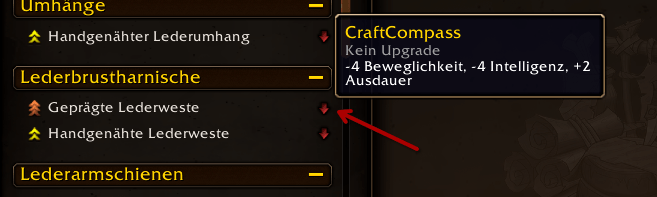
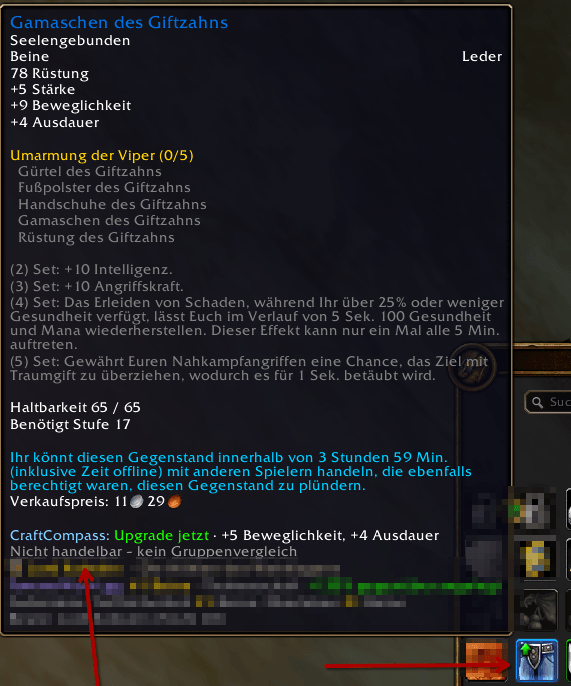
Every recipe that makes equipment gets a small arrow in the recipe list:
- Green arrow: an upgrade for you right now
- Orange arrow with a number: an upgrade from that level on
- Red arrow pointing down: worse than what you wear
- Blue arrow: not for you, but for someone in your group
- Grey ?: no comparison possible (yet)
The side panel next to the profession window explains the rating: the item you wear in that slot, every stat that changes (the one that matters most comes first) and the total score. It also tells you when an item binds on pickup and is therefore only craftable for you.
The rating follows your class and your talent specialisation: 9 levelling profiles plus 14 profiles for tanks, healers, casters and melee. CraftCompass also checks whether your class can wear the item at all.
Where do I get the missing reagent?
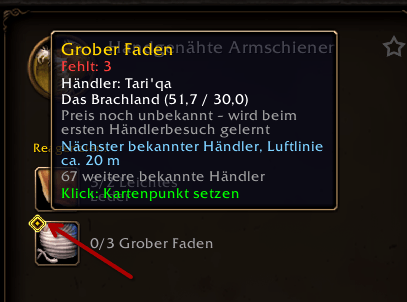
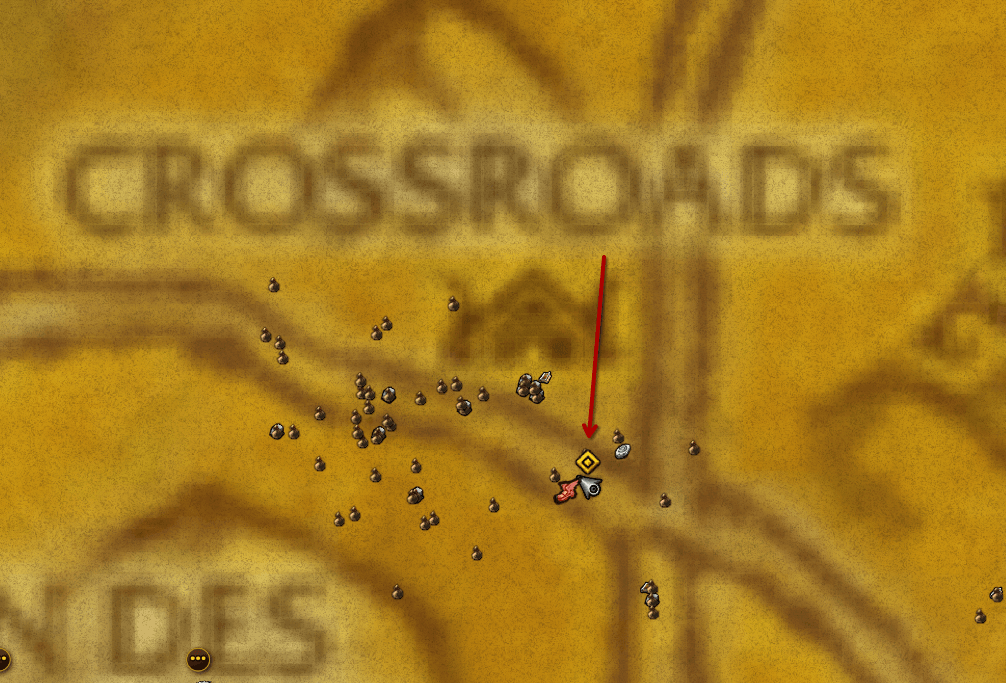
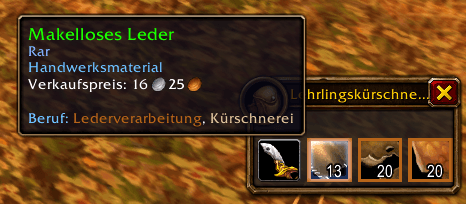
For each missing reagent, CraftCompass shows the amount you lack and the best known source, with a map pin you can click:
- Vendor: the nearest known vendor of your faction, with zone, coordinates and price (prices are learned at the vendor and shared)
- Skinning, Mining, Herbalism, Fishing: the nearest matching beast, ore vein, herb or fishing spot, plus the skill you need and the skill you have
- Craft it: which profession makes it (bars, bolts of cloth, sharpening stones …), learned from every profession you or other users open. A click opens the recipe.
- Loot: the mobs with the best drop chance, with zone and coordinates
- Disenchanting: which item levels give this dust, essence or shard
- Auction house: the lowest buyout from your last scan
Up to three more farm spots per material are listed below, each with its own map pin.
Group and loot rolls
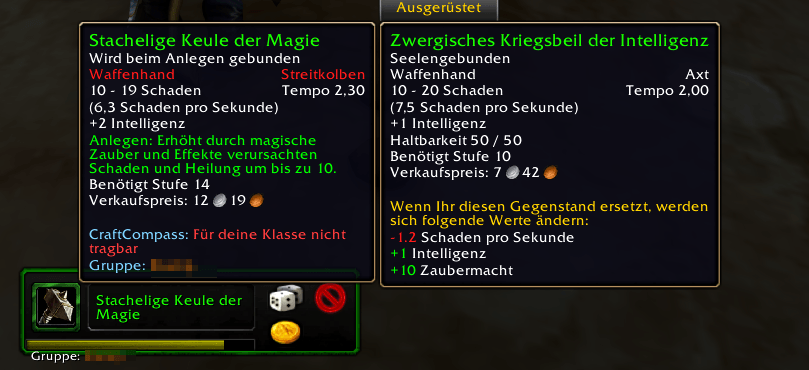
- Group comparison: for tradable items, CraftCompass shows who in your group or raid would get a real upgrade. Gear comes from automatic inspect, or straight from other CraftCompass users. When only class and level are known, it says potentially suitable.
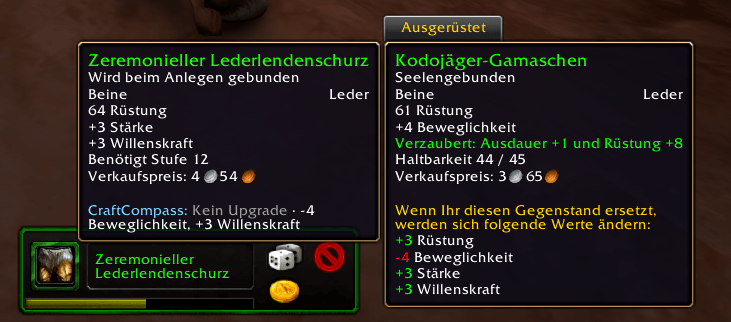
- Loot roll window and item tooltips: the same verdict wherever you see an item, in bags, chat links, loot and rolls.
It learns while you play, and shares
CraftCompass remembers the beasts you see, what you skin, what mobs drop, where you mine, pick herbs and fish, vendor prices, which profession makes what, and the auction prices you scan.
CraftCompass users share this peer to peer through invisible addon messages. No chat channel is used and nothing appears in your chat. Users find each other through group and guild and pass on their contacts, so the network grows by itself. New spots, prices and crafting info go to your online contacts, and when you log in, a few of them send you the latest. Shared data is always labelled as shared. /cc sync off turns sharing off.
Languages
English, Deutsch, Français, Español, Português, Italiano, Русский. Stat, zone, item, recipe and profession names come from your game client. All languages except English and German are machine translated, and corrections are welcome.
Commands
| Command | |
|---|---|
/cc |
Show or hide the side panel |
/cc profile |
Show or choose your rating profile (/cc profile 2, /cc profile auto) |
/cc group |
Group members whose gear is known |
/cc sync |
Sharing status and settings (on, off, net off, guild off) |
/cc ah |
Scan the open auction house now |
/cc tooltip on/off |
CraftCompass lines in item tooltips |
/cc reset |
Reset the panel position |
/cc diag |
What your client supports, for bug reports |
Good to know
- Distances are straight-line distances on the same continent, without flight paths. So the panel says nearest known, not fastest.
- Without Questie, CraftCompass only knows what it learns and what other users share, so vendors, loot and nodes fill in while you play.
- Wear rules for group members follow Classic, for example mail for hunters from level 40.
- Optional: with TomTom installed, map pins also set a TomTom arrow.
Data and credits
CraftCompass ships no third-party world data. Vendors, loot mobs, gathering nodes and beasts are read at runtime from the installed QuestieDB through its public API, and drop chances from Questie. Thanks to the Questie team (GPL-3.0). Everything else is learned in game. CraftCompass is not affiliated with Blizzard Entertainment.
License: GPL-3.0. Bug reports and ideas are welcome, best with the output of /cc diag.
CraftCompass (Deutsch)
Wissen, was sich herzustellen lohnt, und wo es das fehlende Material gibt. CraftCompass erweitert Blizzards Handwerksfenster in World of Warcraft: Forever. Es funktioniert in jedem Beruf und für jede Klasse.
Empfohlen: Questie. CraftCompass liest Händler, Beute-Mobs und Vorkommen aus dessen Datenbank.
Was es kann
Ist das ein Upgrade?
Jedes Rezept, das Ausrüstung herstellt, bekommt einen kleinen Pfeil in der Rezeptliste:
- Grüner Pfeil: jetzt ein Upgrade für dich
- Oranger Pfeil mit Zahl: ein Upgrade ab dieser Stufe
- Roter Pfeil nach unten: schlechter als dein angelegtes Item
- Blauer Pfeil: nicht für dich, aber für jemanden in deiner Gruppe
- Graues ?: (noch) kein Vergleich möglich
Das Seitenfenster neben dem Handwerksfenster erklärt die Bewertung: das Item, das du in diesem Slot trägst, jede Werteänderung (die wichtigste zuerst) und die Gesamtwertung. Es zeigt auch, wenn ein Item beim Aufheben gebunden wird und damit nur für dich herstellbar ist.
Die Bewertung richtet sich nach deiner Klasse und deiner Talent-Spezialisierung: 9 Leveling-Profile und 14 Profile für Tanks, Heiler, Zauberer und Nahkämpfer. CraftCompass prüft außerdem, ob deine Klasse das Item überhaupt tragen kann.
Wo bekomme ich das fehlende Reagenz?
Für jedes fehlende Reagenz zeigt CraftCompass die Fehlmenge und die beste bekannte Quelle, mit einer Kartennadel zum Anklicken:
- Händler: der nächste bekannte Händler deiner Fraktion, mit Zone, Koordinaten und Preis (Preise werden beim Händler gelernt und geteilt)
- Kürschnern, Bergbau, Kräuterkunde, Angeln: das nächste passende Wildtier, Erz- oder Kräutervorkommen oder der nächste Angelplatz, dazu die nötige und deine eigene Fertigkeit
- Selbst herstellen: welcher Beruf es herstellt (Barren, Stoffballen, Schleifsteine …), gelernt aus jedem Beruf, den du oder andere Nutzer öffnen. Ein Klick öffnet das Rezept.
- Beute: die Mobs mit der besten Dropchance, mit Zone und Koordinaten
- Entzaubern: welche Itemstufen diesen Staub, diese Essenz oder diesen Splitter geben
- Auktionshaus: der günstigste Sofortkauf aus deinem letzten Scan
Darunter stehen bis zu drei weitere Farmspots pro Material, jeder mit eigener Kartennadel.
Gruppe und Würfeln
- Gruppenvergleich: Bei handelbaren Items zeigt CraftCompass, für wen in deiner Gruppe oder deinem Schlachtzug es ein echtes Upgrade wäre. Die Ausrüstung kommt per automatischem Inspizieren oder direkt von anderen CraftCompass-Nutzern. Sind nur Klasse und Stufe bekannt, steht dort potenziell geeignet.
- Würfelfenster und Item-Tooltips: dieselbe Einschätzung überall, wo du ein Item siehst, in Taschen, Chat-Links, Beute und beim Würfeln.
Lernt beim Spielen und teilt
CraftCompass merkt sich die Wildtiere, die du siehst, was du kürschnerst, was Mobs fallen lassen, wo du Erz abbaust, Kräuter sammelst und angelst, Händlerpreise, welcher Beruf was herstellt, und die Auktionspreise, die du scannst.
CraftCompass-Nutzer teilen das Peer-to-Peer über unsichtbare Addon-Nachrichten. Es wird kein Chat-Kanal benutzt, und im Chat erscheint nichts. Nutzer finden sich über Gruppe und Gilde und reichen ihre Kontakte weiter, so wächst das Netz von selbst. Neue Fundorte, Preise und Herstellinfos gehen an deine Kontakte, die online sind, und beim Einloggen schicken dir einige von ihnen den neuesten Stand. Geteilte Daten sind immer als geteilt gekennzeichnet. Mit /cc sync aus schaltest du das Teilen ab.
Sprachen
Englisch, Deutsch, Französisch, Spanisch, Portugiesisch, Italienisch, Russisch. Werte-, Zonen-, Item-, Rezept- und Berufsnamen kommen aus deinem Spielclient. Alle Sprachen außer Englisch und Deutsch sind maschinell übersetzt, Verbesserungen sind willkommen.
Befehle
| Befehl | |
|---|---|
/cc |
Seitenfenster ein- oder ausblenden |
/cc profil |
Bewertungsprofil anzeigen oder wählen (/cc profil 2, /cc profil auto) |
/cc gruppe |
Gruppenmitglieder, deren Ausrüstung bekannt ist |
/cc sync |
Teilen: Status und Einstellungen (an, aus, netz aus, gilde aus) |
/cc ah |
Offenes Auktionshaus jetzt scannen |
/cc tooltip an/aus |
CraftCompass-Zeilen in Item-Tooltips |
/cc reset |
Position des Seitenfensters zurücksetzen |
/cc diag |
Was dein Client unterstützt, für Fehlerberichte |
Gut zu wissen
- Entfernungen sind Luftlinie auf demselben Kontinent, ohne Flugrouten. Deshalb heißt es nächster bekannter, nicht schnellster.
- Ohne Questie kennt CraftCompass nur, was es selbst lernt und was andere Nutzer teilen. Händler, Beute und Vorkommen füllen sich dann beim Spielen.
- Tragbarkeit für Gruppenmitglieder folgt den Classic-Regeln, zum Beispiel Kette für Jäger ab Stufe 40.
- Optional: Mit TomTom setzen die Kartennadeln zusätzlich einen TomTom-Pfeil.
Daten und Danksagung
CraftCompass liefert keine fremden Weltdaten mit. Händler, Beute-Mobs, Vorkommen und Wildtiere liest es zur Laufzeit über die offizielle Schnittstelle aus dem installierten QuestieDB, Dropchancen aus Questie. Danke an das Questie-Team (GPL-3.0). Alles andere lernt CraftCompass im Spiel. CraftCompass steht in keiner Verbindung zu Blizzard Entertainment.
Lizenz: GPL-3.0. Fehlerberichte und Ideen sind willkommen, am besten mit der Ausgabe von /cc diag.
Forever CraftCompass Team