CompactPad
- By
Description
A compact, resizable controller layout for World of Warcraft: Forever.
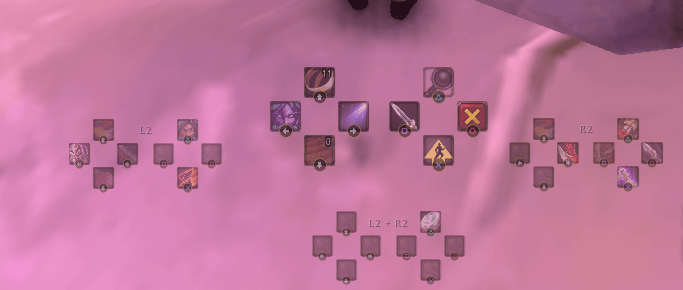
WoW Forever's controller layout shows every hotbar at once, and it takes up a lot of the screen. CompactPad replaces it with one small, controller-shaped cluster: the D-pad on the left, the face buttons on the right. It shows only the layer you're using. Hold LT, RT or both, and the same 8 buttons swap to that layer's spells, so 32 abilities fit in the space of 8.
Features
- One cluster for the layer you're holding. It switches instantly when you press a trigger, in or out of combat.
- Other layers at a glance. Optional smaller previews of your L2, R2 and L2 + R2 layers, so you can see what's on each trigger without holding it. Show them side by side, stacked, or place each one anywhere on screen.
- Resize, move and fade everything. The main layer and each of the other layers have their own size (30%–200%), position and opacity (10%–100%). An optional idle fade dims the layout when you're out of combat with no target.
- Works with WoW Forever's gamepad bar. CompactPad reads your spells straight from Forever's own gamepad bar and hides the built-in one, so Forever still handles every button press. Spells you add from the spellbook show up automatically, including on the bars Forever shows for possess, friendly and hostile targets.
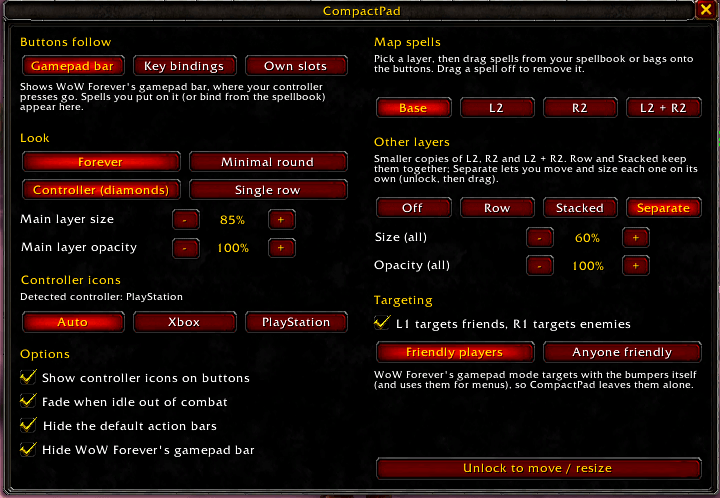
- Xbox and PlayStation icons. Your controller is detected automatically: a DualSense or DualShock gets ✕ ○ □ △ and L2 / R2, and anything else gets A B X Y and LT / RT. The D-pad always shows arrows. You can also pick a style yourself.
- Two looks. Forever uses the game's own action-button frames to match your bars. Minimal round gives small round buttons. Arrange the buttons as controller diamonds or a single row.
- Everything you'd expect on a button: icons, cooldowns, charges, out-of-range and not-enough-power coloring, and tooltips.
Getting started
- Install CompactPad and log in. It switches itself to WoW Forever's gamepad bar the first time.
- Open the settings, either with /cpad or by pressing Esc and clicking the CompactPad button under the menu.
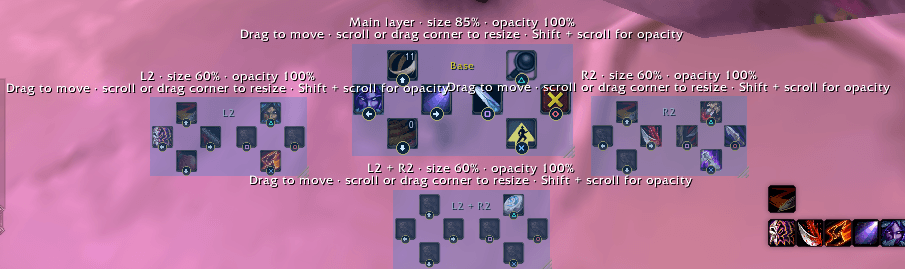
- Click Unlock to move / resize. Drag the blue overlays to move things. Scroll, or drag the corner grip, to resize. Hold Shift and scroll to change opacity.
- Click Lock when you're done. CompactPad also locks itself when combat starts.
You can also open the settings from Esc → Options → AddOns → CompactPad, or from the addon list button under the minimap.
Where your spells come from
In the settings, Buttons follow sets where CompactPad gets each button's spell:
- Gamepad bar (the default in WoW Forever's gamepad mode) mirrors Forever's own gamepad bar, which is where Forever sends your controller presses. Add spells the way Forever expects, and they appear on CompactPad.
- Key bindings shows whatever each button combo is bound to in your key bindings.
- Own slots gives each layer its own 8 action slots. CompactPad takes over the D-pad and face buttons, and you drag spells onto them.
On Forever's base layer, the four face buttons have fixed jobs, such as Jump. CompactPad shows the same icons there, and, just like in Forever, nothing can be placed on them.
Commands
| Command | What it does |
|---|---|
/cpad | Open the settings window |
/cpad unlock / lock | Move and resize the main layer and the other layers |
/cpad scale 0.3–2 | Main layer size |
/cpad opacity 0.1–1 | Main layer opacity |
/cpad others off / row / column / separate | How the other layers are shown |
/cpad others scale 0.3–2 | Size of the other layers |
/cpad others opacity 0.1–1 | Opacity of the other layers |
/cpad fade 0–1 | Idle fade out of combat (1 turns it off) |
/cpad look forever / round | Game button art or minimal round buttons |
/cpad layout diamond / row | Controller diamonds or a single row |
/cpad icons auto / xbox / ps | Controller button icons |
/cpad source forever / game / addon | Gamepad bar, key bindings or own slots |
/cpad gamepadbar on / off | Hide or show WoW Forever's own gamepad bar |
/cpad hideframe FrameName | Hide another piece of the built-in UI (run again to show it) |
/cpad scan | Collect setup details to include with a bug report |
/cpad reset | Restore all defaults |
/cpad help lists every command in game.
Good to know
- The main layer can't be moved or resized in combat. This is a game restriction on action buttons. The other layers can be.
- The bumpers are left to WoW Forever, which already uses them for targeting and menus. Outside Forever's gamepad mode, CompactPad can set LB / L1 to target friends and RB / R1 to target enemies.
- "Incompatible" in the AddOns list? Forever is still in beta, and its version number can change. Type
/dump select(4, GetBuildInfo())in chat and report the number, or add it to the## Interface:line inCompactPad.toc.
Reporting a problem
If a button shows the wrong spell or a layer looks off, type /cpad scan. It records how Forever's gamepad bar is set up, then watches for 20 seconds while you hold each trigger. Copy the report from the window that opens and include it in your comment or issue.
CompactPad is a fan-made addon and isn't affiliated with or endorsed by Blizzard Entertainment.
CompactPad Team