CommunityNexus
- By
A modern World of Warcraft community management addon that combines multiple communities, chats, member tracking, and inactivity management in one interface.
Screenshot 2026-09-16 124226.png
Screenshot 2026-09-16 124248.png
Screenshot 2026-09-16 124308.png
Screenshot 2026-09-16 124319.png
Screenshot 2026-09-16 124328.png
Description
English
CommunityNexus
CommunityNexus is a World of Warcraft addon created for large communities, streamer communities, guild networks, and player groups that have grown beyond a single WoW Community.
Instead of constantly switching between several Community windows, CommunityNexus brings community chats, member information, activity tracking, inactive member management, broadcast preparation, and its own cross community Nexus Network into one central interface.
Developed by CrankBerlinTV.
Why CommunityNexus?
Large communities often reach the point where one WoW Community is no longer enough.
You may end up with:
• Community 1
• Community 2
• Community 3
• One or more guilds
• Raid groups
• Streamer communities
• Additional player groups
CommunityNexus helps organize all of them from one interface.
The goal is simple:
One addon. Multiple Communities. One central hub.
Community Dashboard
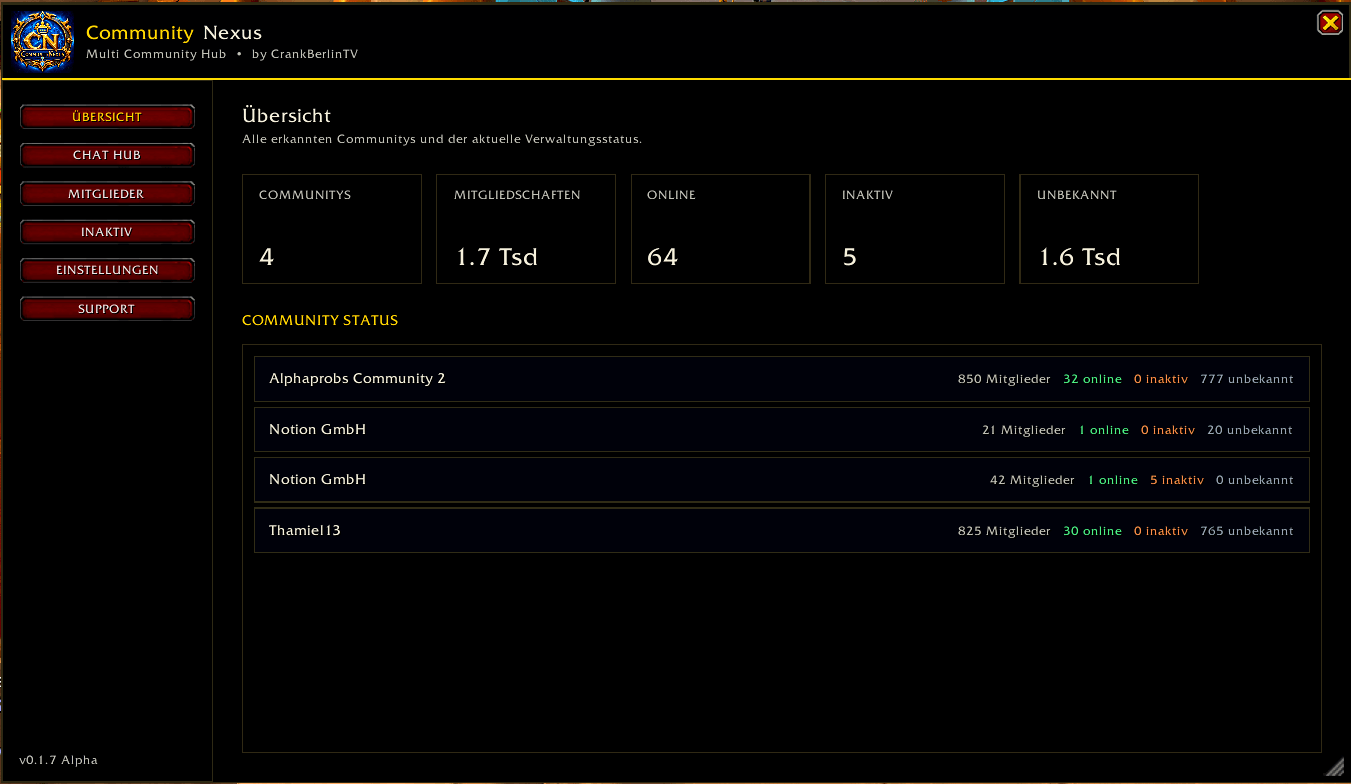
The dashboard provides an overview of all detected Communities and optionally Guilds.
You can quickly see:
• Number of detected Communities
• Total memberships
• Online members
• Inactive members
• Members without reliable activity information
• Individual Community statistics
This gives moderators and community leaders a much faster overview of large player networks.
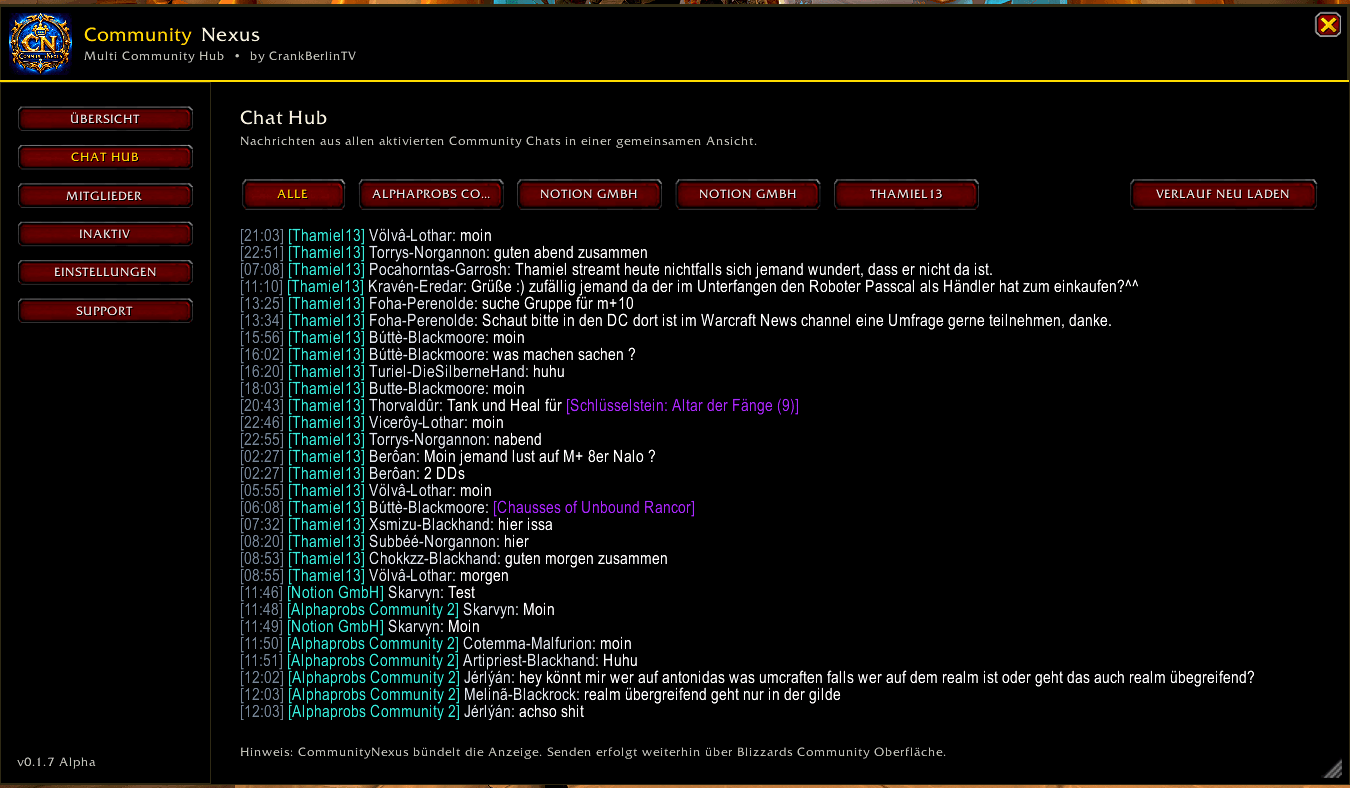
Multi Community Chat Hub
CommunityNexus combines the available chats from your Communities into one central Chat Hub.
Messages are clearly marked with their originating Community and stream.
Example:
[19:30] [Community 1 / General] PlayerA:
Anyone for Mythic+?

[19:31] [Community 3 / General] PlayerB:
I'm in.

[19:31] [Community 2 / General] PlayerC:
Do we still need a healer?
Select which chats you want to see
You decide which Community chats appear inside CommunityNexus.
Use Select Chats to individually enable or disable Community streams.
You can:
• Enable individual chats
• Disable chats you do not need
• Enable all chats
• Disable all chats
• Keep your selection saved between sessions
This is useful when you belong to many Communities but only want to monitor specific ones.
Nexus Network
Nexus Network is CommunityNexus' own shared communication system.
It allows CommunityNexus users from different Communities to communicate through one common Nexus chat.
For example:
Community 1
Community 2
Community 3
Guild
Raid Team
can all communicate inside the same Nexus Network.
Requirements
All participating players need:
• CommunityNexus v0.4.0 or newer
• The same Network ID
• The same password if the network uses one
How to join a Nexus Network
Open:
CommunityNexus → Nexus Network
Enter a Network ID.
Example:
CrankBerlinTVIf your group uses a password, enter the same password as everyone else.
Then enter your personal label.
Examples:
Community 1
Community 2
Community 3
Guild
Moderator
Raid Team
Streamer Team
Press Join.
You can then communicate with everyone using the same Nexus Network.
Example:
[19:30] [Community 1] PlayerA:
Anyone for +12?

[19:31] [Community 3] PlayerB:
I'm coming.

[19:31] [Guild] PlayerC:
Need a healer?
The label makes it easy to see where each player belongs.
Nexus Network protection
CommunityNexus keeps Nexus Network status information inside the addon instead of intentionally printing Nexus errors into the normal WoW chat.
If communication is temporarily unavailable, messages can be queued and retried when possible.
Broadcast
The Broadcast section helps community leaders prepare the same announcement for several Blizzard Community chats.
Write your message once.
Then select several targets such as:
Community 1 / General
Community 2 / General
Community 3 / General
CommunityNexus keeps track of every target with statuses such as:
Ready
Opened
Completed
You also get a progress display:
2 / 3 completedBroadcast workflow
Write your message once.
Select the required Community chats.
Press Prepare for the first target.
CommunityNexus opens the appropriate Blizzard Community chat and prepares the message where possible.
Confirm the message through Blizzard's chat interface.
Return to CommunityNexus and mark that target as completed.
Then continue with Next Target.
This makes large announcements much easier to manage without rewriting the same message multiple times.
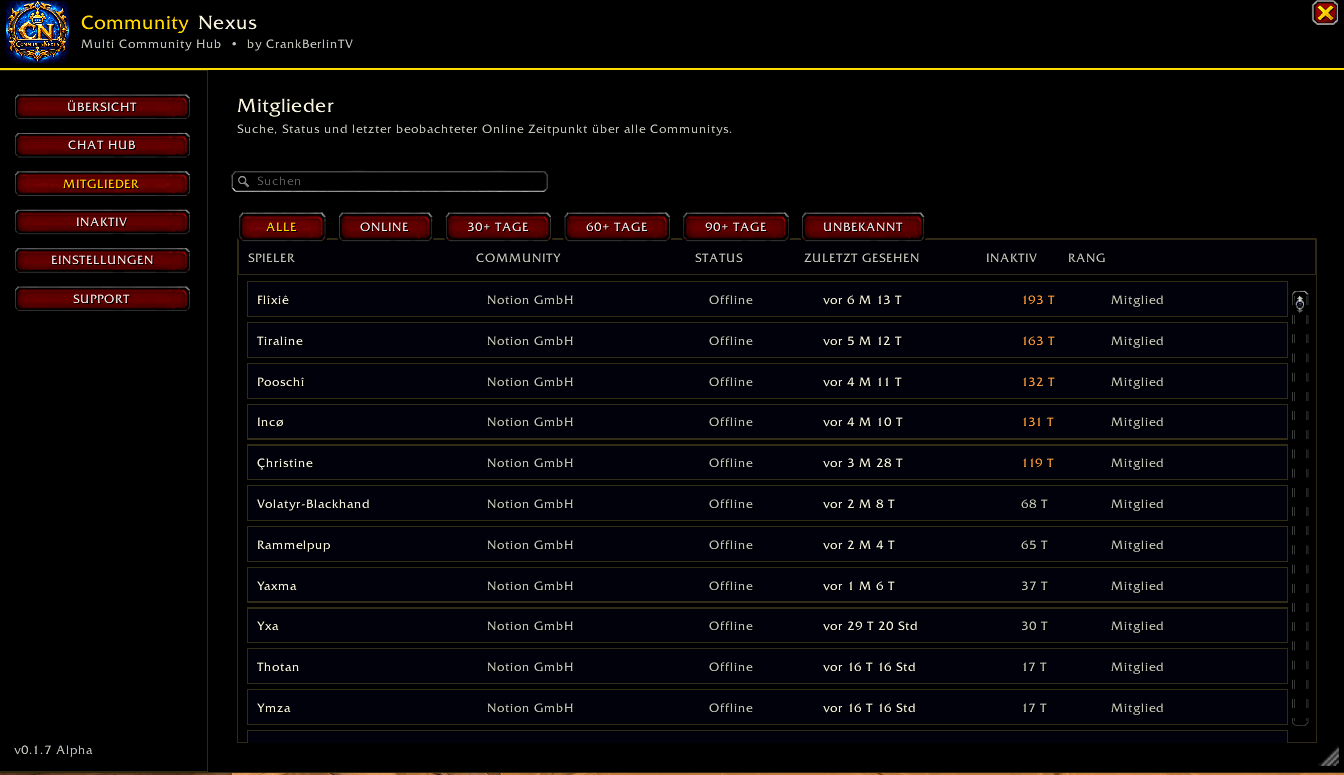
Member Management
CommunityNexus provides one combined member overview across your detected Communities.
The member list can show:
• Player name
• Community
• Guild when enabled
• Online status
• Role
• Last observed activity
• Inactivity duration
You can also search for individual players.
Activity and Last Seen Tracking
CommunityNexus tracks available activity information and locally remembers when members were observed online.
Possible states include:
Online now
Last observed date
Blizzard activity information
Not yet observed
CommunityNexus does not invent activity dates when no reliable information is available.
In that case the member is shown as:
Not yet observed
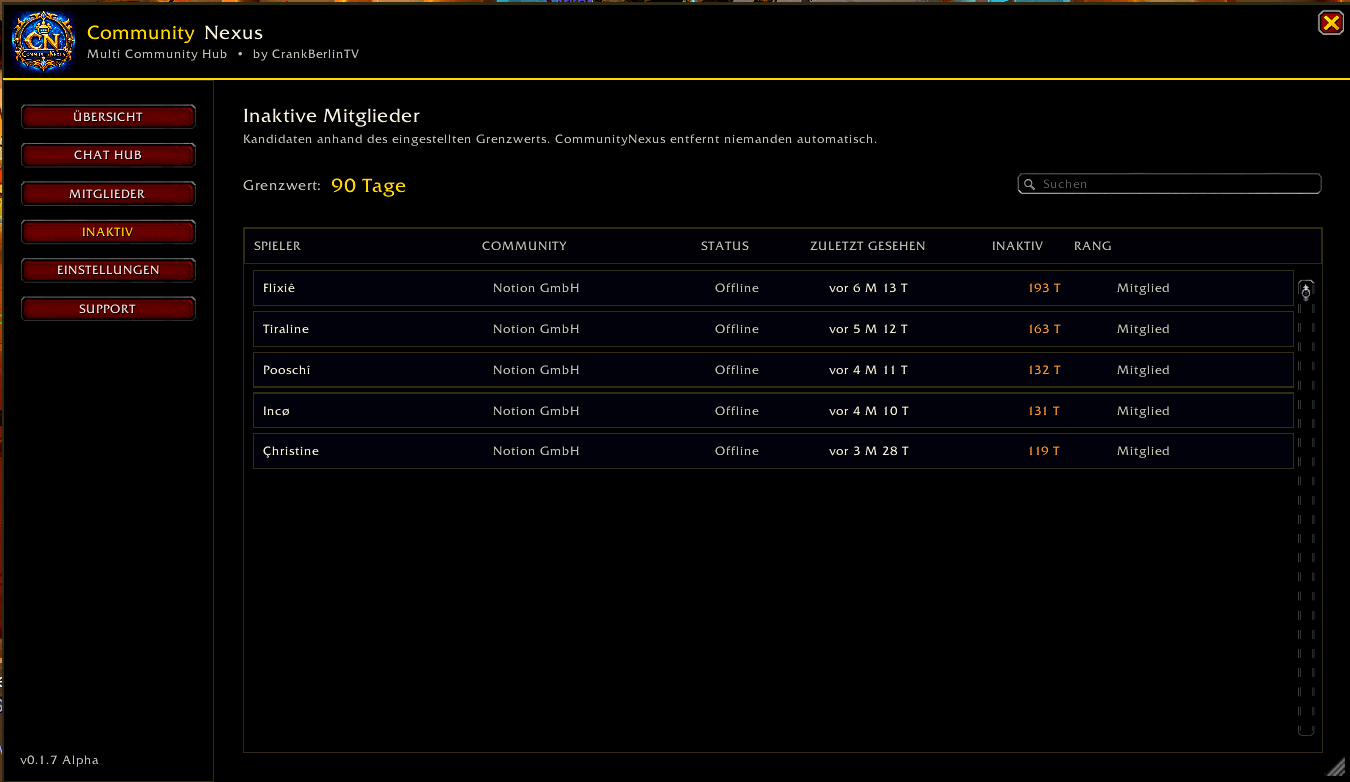
Inactive Member Management
The dedicated Inactive Members section helps moderators identify members who may no longer be active.
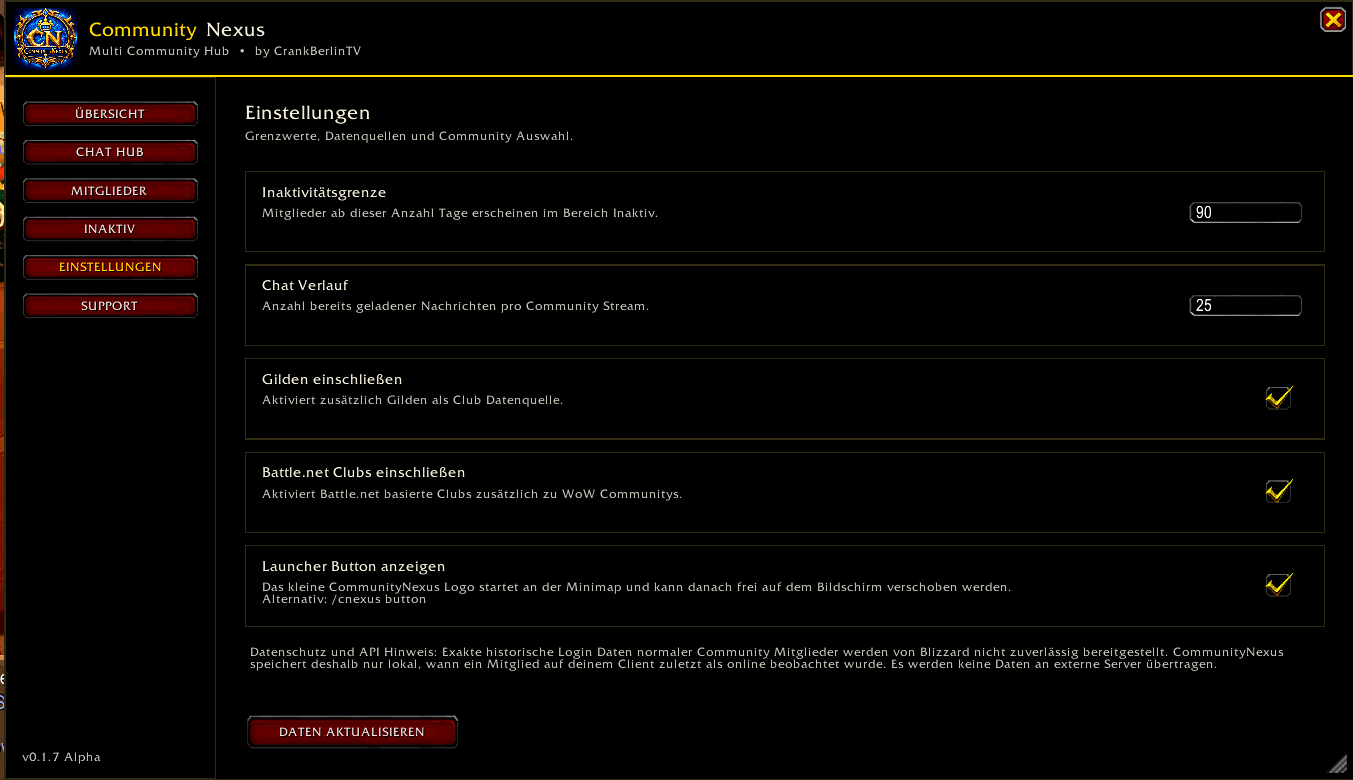
The inactivity threshold can be configured freely.
Examples:
30 days
60 days
90 days
180 days
365 days
Members exceeding the selected threshold appear in the inactive member list.
CommunityNexus does not automatically remove members.
The final moderation decision always remains with the Community or Guild staff.
Community and Guild Filter
The inactive member list can be filtered by Community or Guild.
You can select:
All Communities & Guilds
Community 1
Community 2
Community 3
Guild
This is especially useful when managing several large Communities.
Guild Support
Guilds can optionally be included as an additional data source.
Enable:
Settings → Include Guilds
Guild members can then appear in supported member and inactivity views.
Combat and Raid Protection
CommunityNexus includes additional safeguards for raids and combat situations.
Large member refresh operations are delayed while necessary and processed afterward to reduce unnecessary background activity and avoid problematic Community API refresh situations during encounters.
This was added specifically to improve stability during:
• Raids
• Boss encounters
• Group content
• Frequent Community presence updates
Interface
CommunityNexus uses a World of Warcraft inspired interface with its own blue and gold branding.
The addon includes:
• Official CommunityNexus logo
• Blizzard inspired controls
• Compact navigation
• Movable launcher button
• Minimap integration
• ESC support
• Saved window and launcher positions
The launcher can be moved freely around the screen.
Launcher Controls
Left click:
Open or close CommunityNexus
Right click:
Open Support
The launcher can also be disabled in the settings.
Support
CommunityNexus is free to use.
Players who would like to support further development can use the integrated Support section.
Developer:
CrankBerlinTV
Commands
/cnexus
Open CommunityNexus

/cnexus button
Show or hide the launcher

/cnexus buttonreset
Reset the launcher position

/cnexus broadcast
Open Broadcast

/cnexus bc
Open Broadcast

/cnexus network
Open Nexus Network

/cnexus net
Open Nexus Network
Important Information
CommunityNexus does not automatically remove Community or Guild members.
Broadcast does not automatically send one Blizzard Community message to several Communities with a single automated action. It helps prepare and organize the sending process.
Nexus Network is a separate CommunityNexus communication layer and requires participating players to have CommunityNexus installed.
Current Main Features
• Multi Community Dashboard
• Combined Community Chat Hub
• Individual chat selection
• Nexus Network
• Multi Community communication between CommunityNexus users
• Optional Network password
• Custom Community labels
• Broadcast system
• Member management
• Online status
• Last Seen tracking
• Inactivity tracking
• Adjustable inactivity threshold
• Community and Guild inactivity filters
• Optional Guild support
• Raid and combat safeguards
• Search system
• Movable launcher
• Minimap integration
• ESC support
• Support section
Current Version: 0.4.0 Alpha
Developer: CrankBerlinTV
Changelog v0.4.0 Alpha
New
• Added the new Nexus Network
• Players from different Communities can now communicate through one CommunityNexus network chat
• Added custom Network IDs
• Added optional Network password support
• Added custom Community, Guild, Raid Team or Moderator labels
• Added dedicated Nexus Network chat history
• Added message queue handling when communication is temporarily unavailable
• Added automatic retry handling for queued Nexus messages
• Added /cnexus network command
• Added /cnexus net shortcut
• Added protection to keep Nexus Network status and errors inside CommunityNexus instead of intentionally posting them into normal WoW chat
Existing Systems Included
• Multi Community Chat Hub
• Selectable Community chats
• Member overview
• Inactivity management
• Community and Guild filtering
• Configurable inactivity threshold
• Broadcast system
• Raid and combat protection
• Movable launcher
• ESC closing support
• CommunityNexus branding and logo
Version: 0.4.0 Alpha
Author: CrankBerlinTV
Deutsch
CommunityNexus
CommunityNexus ist ein World of Warcraft Addon für große Communitys, Streamer Communitys, Gildenverbünde und Spielergruppen, bei denen eine einzelne WoW Community irgendwann nicht mehr ausreicht.
Statt ständig zwischen mehreren Community Fenstern wechseln zu müssen, verbindet CommunityNexus Community Chats, Mitgliederinformationen, Aktivitäts Tracking, Inaktivitätsverwaltung, Broadcast Vorbereitung und das eigene Nexus Network in einer zentralen Oberfläche.
Entwickelt von CrankBerlinTV.
Warum CommunityNexus?
Große Communitys kommen irgendwann an einen Punkt, an dem eine einzige WoW Community nicht mehr ausreicht.
Dann entstehen zum Beispiel:
• Community 1
• Community 2
• Community 3
• Eine oder mehrere Gilden
• Raid Gruppen
• Streamer Communitys
• Weitere Spielergruppen
CommunityNexus hilft dabei, diese Strukturen über eine gemeinsame Oberfläche zu verwalten.
Das Ziel:
Ein Addon. Mehrere Communitys. Eine zentrale Anlaufstelle.
Community Übersicht
Die Übersicht zeigt alle erkannten Communitys und optional auch Gilden.
Du siehst unter anderem:
• Anzahl erkannter Communitys
• Anzahl der Mitgliedschaften
• Online Mitglieder
• Inaktive Mitglieder
• Mitglieder ohne zuverlässige Aktivitätsinformationen
• Status der einzelnen Communitys
Damit erhalten Moderatoren und Community Verantwortliche deutlich schneller einen Überblick über größere Spielergruppen.
Multi Community Chat Hub
CommunityNexus bündelt die verfügbaren Chats mehrerer Communitys in einem gemeinsamen Chat Hub.
Jede Nachricht zeigt an, aus welcher Community und welchem Chat sie stammt.
Beispiel:
[19:30] [Community 1 / Allgemein] SpielerA:
Wer kommt M+?

[19:31] [Community 3 / Allgemein] SpielerB:
Ich bin dabei.

[19:31] [Community 2 / Allgemein] SpielerC:
Brauchen wir noch Heal?
Chats selbst auswählen
Du entscheidest selbst, welche Community Chats CommunityNexus anzeigen soll.
Über Chats auswählen können einzelne Community Chats aktiviert oder deaktiviert werden.
Die Auswahl wird gespeichert.
Du kannst außerdem:
• einzelne Chats einschalten
• einzelne Chats ausschalten
• alle Chats einschalten
• alle Chats ausschalten
Das ist besonders praktisch, wenn du Mitglied in vielen Communitys bist, aber nur bestimmte Chats verfolgen möchtest.
Nexus Network
Das Nexus Network ist der gemeinsame Netzwerk Chat von CommunityNexus.
Damit können CommunityNexus Nutzer aus verschiedenen Communitys über einen gemeinsamen Nexus Chat miteinander kommunizieren.
Beispielsweise können Spieler aus:
Community 1
Community 2
Community 3
Gilde
Raid Team
denselben Nexus Network Chat verwenden.
Voraussetzungen
Alle Teilnehmer benötigen:
• CommunityNexus v0.4.0 oder neuer
• dieselbe Netzwerk ID
• bei Verwendung eines Passwortes dasselbe Passwort
So trittst du einem Nexus Network bei
Öffne:
CommunityNexus → Nexus Network
Trage eine Netzwerk ID ein.
Beispiel:
CrankBerlinTVFalls eure Gruppe ein Passwort verwendet, trägst du dasselbe Passwort wie die anderen Teilnehmer ein.
Danach legst du deine Kennzeichnung fest.
Beispiele:
Community 1
Community 2
Community 3
Gilde
Moderator
Raid Team
Streamer Team
Drücke anschließend Beitreten.
Danach kannst du mit allen Spielern schreiben, die dasselbe Nexus Network benutzen.
Beispiel:
[19:30] [Community 1] SpielerA:
Wer kommt +12?

[19:31] [Community 3] SpielerB:
Bin dabei.

[19:31] [Gilde] SpielerC:
Brauchen wir noch Heal?
Durch die Kennzeichnung ist sofort erkennbar, zu welcher Community oder Gruppe ein Spieler gehört.
Schutz des Nexus Network
CommunityNexus verarbeitet Statusmeldungen des Nexus Network innerhalb des Addons.
Nexus Network Fehler sollen dadurch nicht absichtlich in deinem normalen WoW Chat ausgegeben werden.
Wenn die Kommunikation vorübergehend nicht verfügbar ist, können Nachrichten zwischengespeichert und später erneut versucht werden.
Broadcast
Der Bereich Broadcast hilft Community Verantwortlichen dabei, dieselbe Ankündigung für mehrere Blizzard Community Chats vorzubereiten.
Du schreibst die Nachricht nur einmal.
Danach wählst du mehrere Ziele aus.
Beispiel:
Community 1 / Allgemein
Community 2 / Allgemein
Community 3 / Allgemein
CommunityNexus speichert den Bearbeitungsstatus jedes Ziels.
Beispiele:
Bereit
Geöffnet
Erledigt
Zusätzlich gibt es eine Fortschrittsanzeige:
2 / 3 erledigtBroadcast Ablauf
Nachricht einmal schreiben.
Gewünschte Community Chats auswählen.
Beim ersten Ziel Vorbereiten drücken.
CommunityNexus öffnet den entsprechenden Blizzard Community Chat und bereitet die Nachricht soweit möglich vor.
Die Nachricht wird anschließend über die Blizzard Oberfläche bestätigt.
Danach kann das Ziel in CommunityNexus als Erledigt markiert werden.
Mit Nächstes Ziel geht es direkt mit dem nächsten Community Chat weiter.
Dadurch müssen größere Ankündigungen nicht jedes Mal neu geschrieben werden.
Mitgliederverwaltung
CommunityNexus bietet eine gemeinsame Mitgliederübersicht für erkannte Communitys.
Angezeigt werden können:
• Spielername
• Community
• Gilde bei aktivierter Gildenunterstützung
• Online Status
• Rang
• zuletzt beobachtete Aktivität
• Dauer der Inaktivität
Zusätzlich gibt es eine Spielersuche.
Aktivität und Last Seen
CommunityNexus verwendet verfügbare Aktivitätsinformationen und merkt sich lokal, wann ein Spieler zuletzt online beobachtet wurde.
Mögliche Anzeigen sind beispielsweise:
Jetzt online
Zuletzt beobachtetes Datum
Blizzard Aktivitätsinformation
Noch nicht beobachtet
Wenn keine zuverlässigen Informationen vorhanden sind, erfindet CommunityNexus kein Datum.
Der Spieler wird dann als:
Noch nicht beobachtet
angezeigt.
Inaktive Mitglieder
Der Bereich Inaktive Mitglieder hilft Moderatoren und Community Verantwortlichen beim Auffinden länger inaktiver Spieler.
Die Inaktivitätsgrenze kann frei eingestellt werden.
Beispiele:
30 Tage
60 Tage
90 Tage
180 Tage
365 Tage
Spieler oberhalb des festgelegten Grenzwerts erscheinen in der Inaktivitätsübersicht.
CommunityNexus entfernt keine Mitglieder automatisch.
Die Entscheidung bleibt vollständig bei den zuständigen Moderatoren oder Community Verantwortlichen.
Community und Gilden Filter
Die Inaktivitätsliste lässt sich nach Community oder Gilde filtern.
Beispielsweise:
Alle Communitys & Gilden
Community 1
Community 2
Community 3
Gilde
Damit können Verantwortliche gezielt eine einzelne Community kontrollieren.
Gildenunterstützung
Gilden können optional als zusätzliche Datenquelle aktiviert werden.
Aktiviere:
Einstellungen → Gilden einschließen
Danach können Gildenmitglieder in unterstützten Mitglieder und Inaktivitätsansichten berücksichtigt werden.
Schutz für Raid und Kampf
CommunityNexus besitzt zusätzliche Schutzmaßnahmen für Schlachtzüge und Kampfsituationen.
Größere Aktualisierungen der Mitgliederlisten werden bei Bedarf während des Kampfes verschoben und danach nachgeholt.
Dadurch werden unnötige Hintergrundabfragen reduziert und problematische Community Aktualisierungen während Begegnungen vermieden.
Diese Schutzmaßnahmen sind insbesondere für folgende Situationen gedacht:
• Schlachtzüge
• Bosskämpfe
• Gruppeninhalte
• viele gleichzeitige Community Statusänderungen
Benutzeroberfläche
CommunityNexus verwendet eine an World of Warcraft angelehnte Oberfläche mit eigenem blau goldenem Design.
Enthalten sind:
• offizielles CommunityNexus Logo
• Blizzard inspirierte Bedienelemente
• kompakte Navigation
• frei verschiebbarer Launcher
• Minimap Integration
• ESC Unterstützung
• gespeicherte Fenster und Launcher Position
Launcher
Linksklick:
CommunityNexus öffnen oder schließen
Rechtsklick:
Support öffnen
Der Launcher kann in den Einstellungen deaktiviert werden.
Support
CommunityNexus ist kostenlos.
Wer die weitere Entwicklung unterstützen möchte, findet dafür einen integrierten Support Bereich.
Entwickler:
CrankBerlinTV
Befehle
/cnexus
CommunityNexus öffnen

/cnexus button
Launcher ein oder ausblenden

/cnexus buttonreset
Launcher Position zurücksetzen

/cnexus broadcast
Broadcast öffnen

/cnexus bc
Broadcast öffnen

/cnexus network
Nexus Network öffnen

/cnexus net
Nexus Network öffnen
Wichtige Hinweise
CommunityNexus entfernt keine Community oder Gildenmitglieder automatisch.
Broadcast versendet nicht automatisch eine einzelne Blizzard Community Nachricht mit nur einem automatischen Klick an sämtliche Communitys. Der Bereich hilft beim Vorbereiten und Organisieren des Versands.
Nexus Network ist eine eigene Kommunikationsschicht von CommunityNexus. Teilnehmer benötigen CommunityNexus, damit sie darüber miteinander schreiben können.
Aktuelle Hauptfunktionen
• Multi Community Dashboard
• Gemeinsamer Community Chat Hub
• Einzelne Chats aktivierbar und deaktivierbar
• Nexus Network
• Kommunikation zwischen CommunityNexus Nutzern verschiedener Communitys
• Optionales Netzwerk Passwort
• Eigene Community Kennzeichnung
• Broadcast System
• Mitgliederverwaltung
• Online Status
• Last Seen Tracking
• Inaktivitäts Tracking
• Frei einstellbare Inaktivitätsgrenze
• Community und Gilden Filter
• Optionale Gildenunterstützung
• Raid und Combat Schutz
• Spielersuche
• Frei verschiebbarer Launcher
• Minimap Integration
• ESC Unterstützung
• Support Bereich
Aktuelle Version: 0.4.0 Alpha
Entwickler: CrankBerlinTV
Changelog v0.4.0 Alpha
Neu
• Neues Nexus Network hinzugefügt
• Spieler aus unterschiedlichen Communitys können über einen gemeinsamen CommunityNexus Netzwerk Chat miteinander kommunizieren
• Eigene Netzwerk IDs hinzugefügt
• Optionales Netzwerk Passwort hinzugefügt
• Eigene Community, Gilden, Raid Team oder Moderator Kennzeichnung
• Eigener Nexus Network Chatverlauf
• Nachrichten Warteschlange bei vorübergehend nicht verfügbarer Kommunikation
• Automatische erneute Zustellversuche für wartende Nexus Nachrichten
• Neuer Befehl /cnexus network
• Neuer Kurzbefehl /cnexus net
• Schutz eingebaut, damit Nexus Network Status und Fehler innerhalb von CommunityNexus bleiben und nicht absichtlich im normalen WoW Chat ausgegeben werden
Bereits enthalten
• Multi Community Chat Hub
• Community Chats einzeln auswählbar
• Mitgliederübersicht
• Inaktivitätsverwaltung
• Community und Gilden Filter
• Einstellbare Inaktivitätsgrenze
• Broadcast System
• Raid und Combat Schutz
• Frei verschiebbarer Launcher
• Schließen mit ESC
• CommunityNexus Branding und Logo
Version: 0.4.0 Alpha
Autor: CrankBerlinTV
The CommunityNexus Team