

Doesn't have anything at all to do with Commodity, but I was amused that this comic came out shortly after Commodity. All credits to Randall Munroe. http://www.xkcd.com/798/
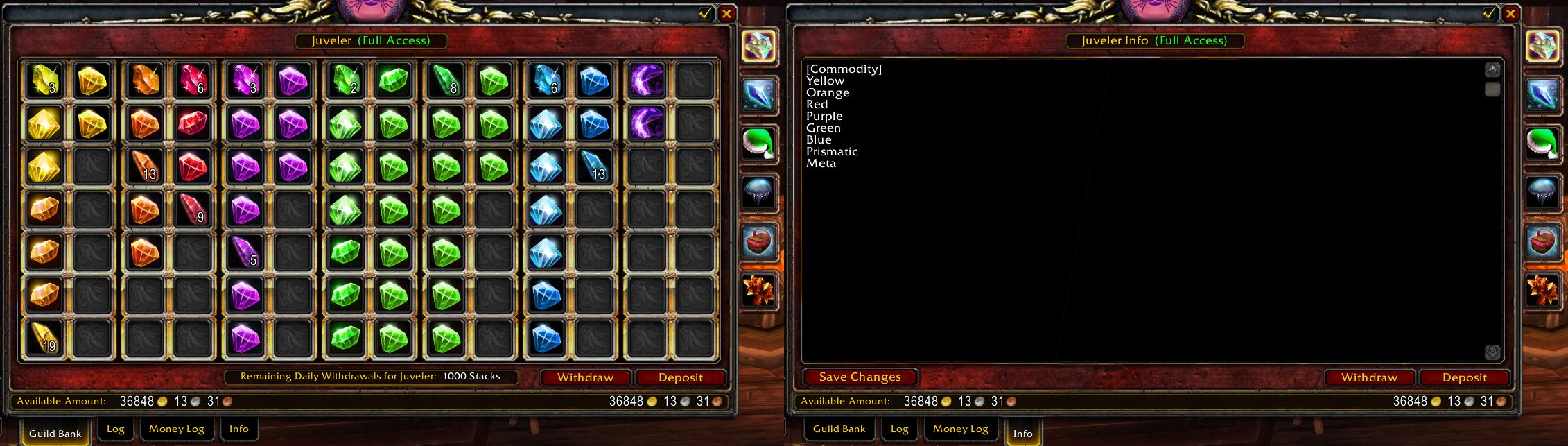
How Commodity 2 looks & works
Description
Commodity is an addon for automatically sorting a guild bank. Commodity 2.0 is very different from earlier versions, before you used to reserve each slot to a given item, now you just tell Commodity which items goes in the slot and it will handle the sorting on its own.
Currently this project is no longer actively developed. It didn't turn out quite the way I wanted. Maybe I'll pick it up again later. Sorry guys :(
Usage
You need to have write access to the "Info" page for a guild bank tab in order to tell Commodity what items should be placed in the tab. When you got that, it's really easy to tell Commodity which items should go in the tab: First, you need to tell Commodity that it should sort the tab, you do this by writing "[Commodity]". Then you need to tell Commodity what items should be in the tab, you do this by either writing the name of the item, the type of the item or the subtype of the item. Currently you can only write one item per line, and each line, despite currently only being able to have one item/type/subtype is what I'll refer to as a "group". I'm considering making it possible to write multiple items on the same line in future versions. After the items you can optionally write an end tag "[/Commodity]" to tell Commodity not to look for any more items (in case you want to add more text after the Commodity data).
Note that the text is case sensitive, if you write "embersilk cloth" that will not match "Embersilk Cloth", likewise will Commodity ignore "[commodity]" and "[/commodity]", it must have correct capitalization.
Example
The image illustrates how you can sort gems in a tab. Unfortunately, uncut gems got the same type, subtype and item level as some cut gems, which makes Commodity sort on name, putting them in the middle of cut gems.
Sorting and grouping
Commodity first sorts after the order you wrote in items/types/subtypes in the "Info" page, then it sorts after type (alphabetically), then after subtype (alphabetically), then item level (highest item level first) and finally name (alphabetically).
Grouping is more difficult to explain. First Commodity reserve complete columns for unique item names, meaning that if you got 6 stacks of Embersilk Cloth then the 7th slot for that column will be empty (and if you got 8 stacks of Embersilk Cloth then 2 columns will be used where the 6 last slots are empty), and the next row will start with other stacks of another unique names. If there is not enough room to do this then it will try again, but using item subtype instead of item name as the grouping modifier. If there's still not enough free slots then it will try again, this time with the groups you wrote in the "Info" page. If free space still is an issue after this then it will try again, this time using item type as the grouping modifier. If even this fail, then it will not group, but it will still sort the items. This will make more sense when you see it in action.
Item types and subtypes
Basically this is what you find in the left menu at the auction house. Otherwise WoWWiki got a nice list. I'm not writing the full list here as types and subtypes are added and removed from the game once in a while, so it's easier to link to another site which hopefully is more updated.
Known issues
- You sometimes get "Internal guild error" or "Item not found" when sorting the guild bank. Only problem with this is the error message, it's not a serious issue, it's just Commodity being a bit too eager on the sorting.
- Commodity will not work too well in guilds where players got different localization (i.e. one player got english client and english item names, another player got german client and german item names. While I've not tried, I believe Commodity will work on non-english clients too).
Possible improvements in later releases
- Multiple items/types/subtypes per group (again, "group" is one line within the Commodity block in the "Info" page of the guild bank tab).
- Improved grouping, currently you need to reserve complete columns for an item/type/subtype, this could probably be improved to better utilize the guild bank tab.
The Commodity Team


