Comfy Chatting
- By
A comfortable, multi-line input field that makes writing long messages and switching channels a breeze. Send up to 5000 characters at once - the perfect tool to enhance your default chat.
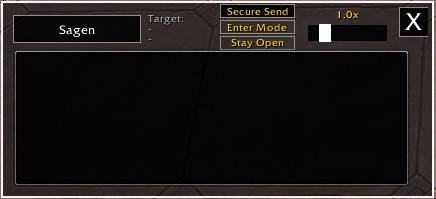
ComfyChatting is a tool designed to make writing in World of Warcraft much more comfortable. Instead of squeezing your text into the tiny default chat line, it provides a multi-line input field - perfect for long messages.
It doesn’t replace your chat window; it simply acts as an addition for a better writing experience.
Key Features
- Write Without Limits: Send up to 5,000 characters at once. The addon automatically splits your text into multiple messages for you. Just press enter to send your text when finished with writing.
- Easy Access: Open the window via Slash command, the Minimap button, by setting a custom Keybinding in the WoW Options or just by pressing Enter in non protected situations so you can start typing when Enter Mode is active. It acts that way like the default chat insert field. If you want the window to stay open after you sent your text just click the Stay Open button.
- Easy Channel Switching: Simply left-click the current channel button (e.g., "Say" or "Guild") to open a menu and quickly switch between channels.
- Quick Whispering: Left-click any player name in the default chat to instantly set them as your target and switch to whisper channel.
- Whisper History: Left-click the "Target:" label at the top of the window to open a dropdown of your 20 most recent whisper targets. Left-click a name from the list to set it as your current target. Right-click puts it in the favorite list.
- Favorite Whisper Targets: Right-click on the "Target:" label opens a dropdown where you can store up to 100 names for quick set as whisper target. Left-click sets it, right-click deletes it from the favorites. Write them by hand or copy them over from the whisper history with a right click.
- Adjustable Scale: Use the built-in slider to resize the window to fit your UI perfectly.
- Persistent State: The addon remembers if the window was set to Stay Open when you log out or reload.
- Secure Sending: The window has a special “Secure Send” button. This allows you to send messages during M+ (only outside of combat), but they are limited to 255 characters per message. However, once the first 255 characters have been sent, the addon cuts them off so that you can send the next block of text with another left-click. Just keep clicking the left mouse button until everything has been sent.
Keyboard Shortcuts
- Enter: Activate the writing box or send your message.
- Alt + Up/Down Arrow: Navigate through your message history to quickly resend or edit previous messages (up to 100 steps).
- Shift + Click (on items/spells): Insert links directly into your text, just like the default chat.
- Tab: Type /w plus one or more letters, then press Tab (Shift+Tab to cycle backward) to cycle through matching whisper names in this order: recent whisper targets, favorites, friends, guild roster.
Slash Commands
/comfychat– Toggles the writing window./comfychat mmbtoggle– Shows or hides the minimap button.
Important to know:
In Mythic+ and during boss fights, the addon window closes automatically so you can use the normal chat instead and won't receive pop-up messages from the game saying that something is blocked. And when the window is closed and you are in combat, normal chat insertion is also used.
I've set up a small Discord Server for my addons https://discord.gg/j3vQVnWUYv Feel free to use it if you have any problems, suggestions or just a simple feedback - I am grateful for everything!
The Comfy Chatting Team