ClickCleanse
- By
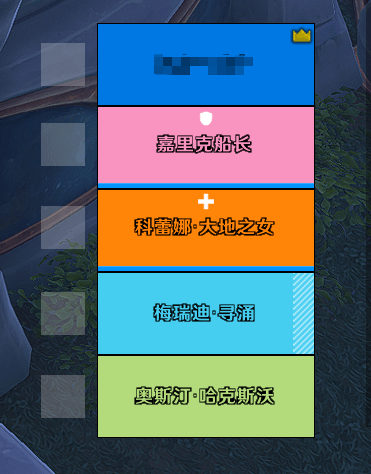
Simplified Decursive for PARTY ONLY: A clickable square by each party bar: lights up in the debuff's color when dispellable — click to cleanse.
Snipaste_2026-08-22_18-08-50.png
Snipaste_2026-08-22_18-08-10.png
Description
Decursive has returned!
~~
ClickCleanse
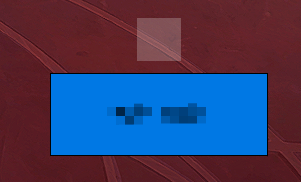
A clickable square beside each party member's health bar: when a dispellable debuff appears, the square lights up in the debuff's type color with a white border — one click casts the dispel on that member.
Features
Auto-discovers the dispels available to your current class and spec, and binds them to mouse buttons: 1 dispel → left click, 2 → left/right, 3 → left/right/middle. Re-detects automatically after spec or talent changes.
When a party member is clean, the square shows only a faint white mark in the center; when a dispellable debuff appears, the whole square turns the type color with a lit white border — works in combat and instances (built on the official 12.1 managed aura system, unaffected by the secret-aura restrictions).
Debuff type color legend:
Type Color Type Color Magic Sky blue Disease Yellow Curse Purple Bleed Red Poison Green Shows dispel cooldowns (sweep animation and countdown numbers, covering both GCD and the real cooldown).
Hover a square to see the party member's name (class-colored) and the current button bindings.
Active solo or in a party, hidden in raids; disables itself when your spec has no dispel, at near-zero cost. Settings (square size and docking position) are saved account-wide and shared across characters.
Commands
/ccl left|right|top|bottom    Dock the square left/right/above/below the health bar (default left)
/ccl 10-100                   Set the square size (default 30)
Compatibility
- Specially adapted for Ellesmere Raid Frames (ERF) and the default Blizzard party frames; other standard unit frames (e.g. ElvUI) are usually auto-detected too.
- Works in parties (including solo) only; automatically hidden in raids.
Credits
The implementation of this addon references the following addons — many thanks to their authors:
- Decursive — referenced for the managed aura overlay (AuraContainer) approach.
- SmartDeBuff — referenced for the dispel-type color mapping (ColorCurve).
- Ayije_CDM — referenced for the DurationObject-based cooldown rendering.
- ActionbarEnhanced — referenced for the countdown-number font technique.
The unit frame addon the author uses: Ellesmere Raid Frames.
Note
This addon was made for the author's personal convenience; features follow personal needs and long-term maintenance is not guaranteed.
点击驱散 ClickCleanse
队友血条旁的可点击小方块:出现可驱散减益时,方块变成对应类型的颜色并亮起白色描边,点击即对该队友施放驱散。
功能
自动识别你当前职业、专精可用的驱散技能并绑定到鼠标键:1 个技能绑左键,2 个绑左/右键,3 个绑左/右/中键;切换专精或天赋后自动重新识别。
队友身上没有可驱散减益时,方块只显示中央一圈淡白色印记;出现可驱散减益时整块变色并亮起白色外描边,战斗中、副本内同样有效(基于 12.1 官方托管光环方案,不受保密光环限制)。
减益类型颜色图例:
类型 颜色 类型 颜色 魔法 天蓝 疾病 明黄 诅咒 亮紫 流血 明红 中毒 亮绿 显示驱散技能冷却(转圈动画与倒计时数字,公共冷却和真实冷却都会显示)。
悬停方块可查看队友姓名(按职业染色)与当前的按键绑定。
单人与小队中启用,进入团队自动隐藏;当前专精没有驱散能力时自动停用,几乎不占用任何资源。设置(方块大小、停靠位置)保存在账号下,所有角色共享。
指令
/ccl left|right|top|bottom    设置方块相对血条的停靠位置(默认 left)
/ccl 10-100                   设置方块大小(默认 30)
兼容性
- 对 Ellesmere Raid Frames (ERF) 与暴雪原生小队框架做了专门适配;其他标准单位框架(如 ElvUI)通常也能自动识别。
- 仅在小队(含单人)中工作,团队中自动隐藏。
致谢
本插件的实现参考了以下插件,感谢它们的作者:
- Decursive — 托管光环容器(AuraContainer)方案
- SmartDeBuff — 驱散类型颜色映射(ColorCurve)方案
- Ayije_CDM — 冷却的 DurationObject 引擎渲染方案
- ActionbarEnhanced — 倒计时数字字体的应用技巧
作者自用的单位框架插件:Ellesmere Raid Frames。
说明
本插件为作者个人游玩方便而制作,功能以自身需求为准,不承诺长期维护。
~~
ClickCleanse Team