Click Casting Tooltip
Add a tooltip panel for unit frames to show spell shortcuts added to the Click Casting Binding feature.
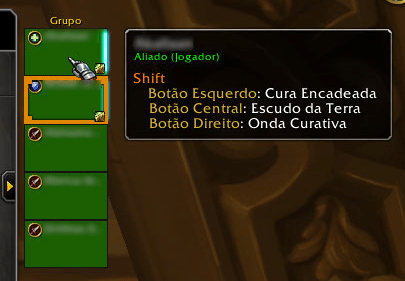
See which spells and macros are bound to each key combination in a healbot-like panel.
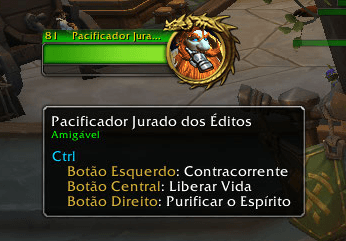
Options on friendly target/focus frame not in group.
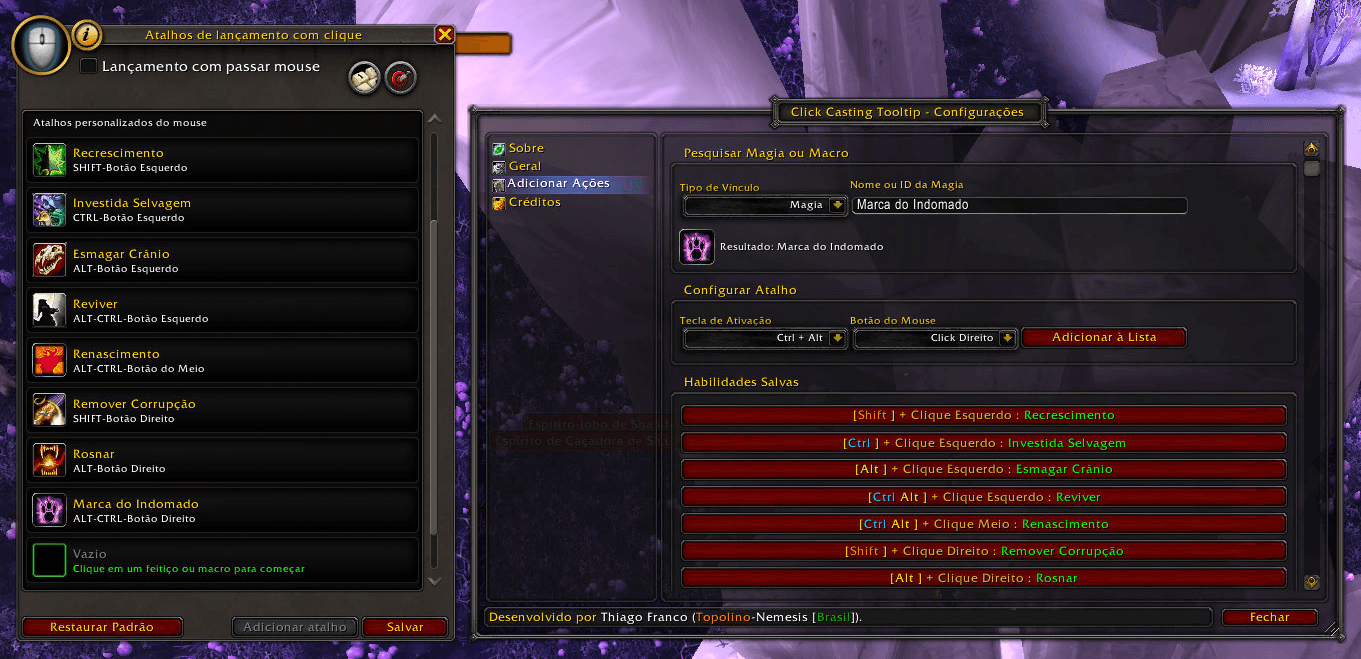
Setup your shortcuts using the game interface and map your bound spells and macros inside the addon panel.
Description


Overview
Add a tooltip panel for unit frames to show spell shortcuts added to the Click Casting Binding feature.
Managing your keybinds just got a lot more intuitive. We’ve introduced a Healbot-style tooltip system for the Click Casting Binding feature, giving you instant clarity on which spells are mapped to your mouse buttons and modifiers.
Total Field Control
This isn't just for healers. The tooltips are active across Party, Raid, Target, Focus and Boss frames. It effectively tracks your bindings for:
- Allies & NPCs: Keep your team alive and interact with friendly units with precision.
- Enemy Targets: React faster by using click-bindings for interrupts and offensive spells directly on enemy frames.
Currently Supported Languages:
Full Support:
- Brazilian Portuguese (ptBR) - Developer Native Language
- English (enUS) - 100% translated
Main Features
Add a healbot like tooltip for spells added to the Click Casting Binding feature.
Works with diferent unit frames UIs.
Functional in party, raid, target and focus frames, for players and NPCs and even enemy targets for some spells and interrupts.
Important: This add-on does not perform automatic spellcasting, combat shortcut configuration (key and shortcut binding), or combat action monitoring (cooldown, etc.). It complies with World of Warcraft add-on guidelines from version 12.0.0 (Midnight) onwards; it only displays a visual reference to what has been defined on the 'Click-to-Cast Bindings' screen and entered separately, but correspondingly, in the add-on settings.
Controls, Configurations, Commands and Usability Features
Use the following slash commands to control the addon if you don't want to keep an icon on your minimap.
/ClickCastingTooltip bindings: Toggle Click Casting Bindings Panel.
/cct bindings: Toggle Click Casting Bindings Panel.
/ClickCastingTooltip config: toggle addon configuration window.
/cct config: toggle addon configuration window.
Troubleshooting
Most problems can be solved by reseting the addon variables:
- Close your game.
- Go to your game folder under "_retail_\WTF\Account\[YOUR_ACCOUNT_ID]\[CHARACTER_REALM_NAME]\[CHARACTER_NAME]\SavedVariables"
- Delete te files named ClickCastingTooltip.lua and ClickCastingTooltip.lua.bak.
- Open tha game.
This will reset the addon as it was when first installed.
Bug Reports
To report bugs, add an issue to the project page on GitHub.
Add relevant information about the error, be it a screenshot or the error output message from the game interface, as without this information we will not be able to help with the problem.
Please be aware that we cannot guarantee any compatibility with other third party add-ons, neither can we assure Blizzard's legacy code stability on old content nor repair their coding issues.
Changelogs and Development Roadmap
You can check the addon changelog and development roadmap on our GitHub project page and Discord server channel.
Comments, Suggestions and Donations on Discord
Find our community at https://discord.gg/M7wQQFRjaq
Help us with a donation using the methods availiable on our Discord Channel on Help Us Chat.
Donations: PagSeguro/PagBank (https://pag.ae/81u_gUZeo) or PayPal (https://www.paypal.com/donate/?business=4VQNAB2VMV4J8).
Only for Donations from Brazil: Pix.
Click Casting Tooltip Team