Chatify (Chat Enhancer)
- By
A lightweight and modular chat enhancement addon. Features include chat history, URL copying, spam filtering, visual customization, and sound alerts.
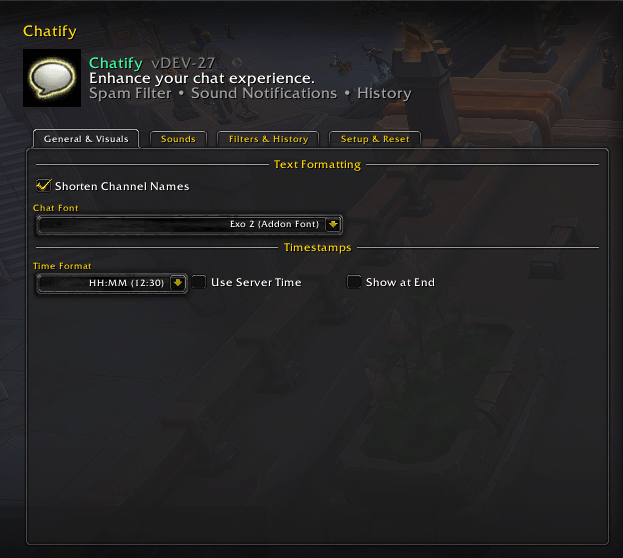
New UI
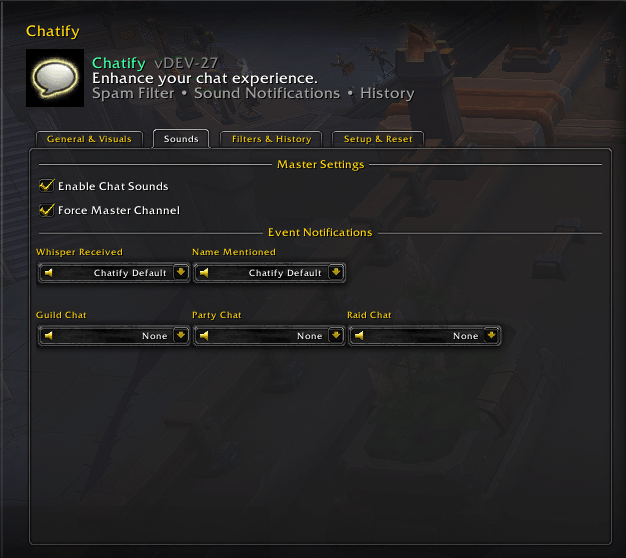
New UI
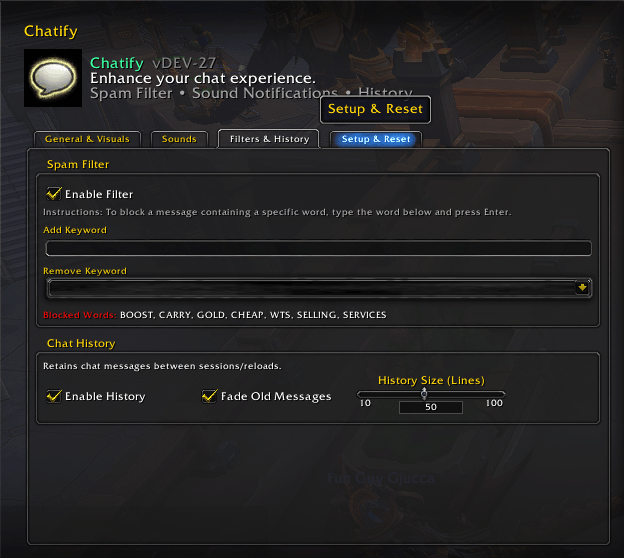
New UI
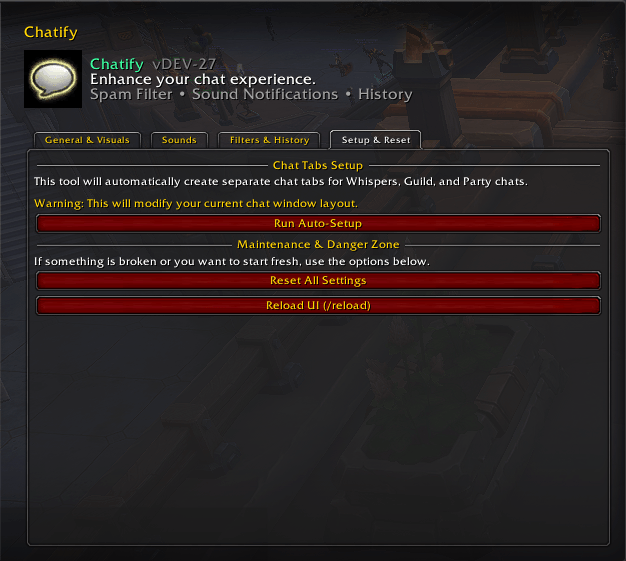
New UI
Description
Chatify
Chatify is a lightweight, modular, and modern chat enhancement addon for World of Warcraft.
It keeps the familiar Blizzard chat experience while adding better readability, advanced chat history, ChatCopy tools, custom channel labels, quick chat buttons, mention alerts, spam filtering, automatic replies, sound notifications, safer modern API handling, and extensive customization.
Chatify does not replace the entire Blizzard chat system. Instead, it enhances the native chat frames and automatically adapts its features to the APIs available on each supported World of Warcraft client.
✨ Visual Improvements
Customize the appearance and readability of your chat without replacing the Blizzard UI.
Chat Text
- Custom chat fonts
- LibSharedMedia font support
- Built-in Chatify fonts
- Adjustable line spacing
- Optional indentation for wrapped messages
- Class-colored player names where supported by Blizzard
- Cleaner message presentation
Timestamps
- Optional timestamps
- Multiple time formats
- Local or server time
- Custom timestamp color
- Timestamp at the beginning or end of messages
- Safe Blizzard timestamp fallback on protected clients
🏷 Channel Labels
Chatify provides a complete channel-label system.
Each supported chat type or channel can use one of four modes:
- Game Default
- Short
- Custom
- Hidden
Examples:
[Guild] → [G]
[Party] → [P]
[Raid] → [R]
[1. General] → [1]
You can also create your own labels.
Examples:
[2. Trade] → [2. Market]
or hide the label completely.
Supported channel types include
- Guild
- Officer
- Party
- Party Leader
- Raid
- Raid Leader
- Raid Warning
- Instance
- Instance Leader
- Say
- Yell
- Whisper
- Battle.net Whisper
- Numbered channels
- Custom
/joinchannels
Custom numbered-channel labels are remembered by channel name instead of channel number, so your settings remain correct even when Blizzard changes channel numbers after zoning, joining, or leaving channels.
⚡ Quick Chat Buttons
Chatify can add a compact vertical chat switcher beside your chat frame.
Quickly switch between:
- Guild / Officer
- Raid / Raid Warning
- Party
- Instance
- Say
Buttons automatically react to your current group state and only expose actions that are actually available.
Customization
- Button size
- Position
- Vertical offset
- Spacing
- Button opacity
- Panel background opacity
- Label scale
- Optional Chatify Settings button
- Automatic theme detection
Available themes:
- Automatic
- Blizzard-style
- ElvUI-style
- GW2 UI-style
Automatic mode follows compatible chat UI addons when they are detected.
🪟 Chat Window Improvements
Chatify includes several improvements that operate directly on Blizzard chat frames.
Scrollback
- Increase the number of retained chat lines
- Default Blizzard chat keeps a relatively small scrollback buffer
- Chatify can significantly increase it
Mouse Wheel Scrolling
- Custom number of lines per mouse-wheel step
Shiftjumps toward the beginning or endCtrlscrolls by page- Automatically avoids conflicting with supported chat replacement addons
Additional Options
- Disable chat fading
- Configure fade time
- Hide Blizzard chat buttons
- Preserve native Blizzard chat behavior when a feature is disabled
📜 Chat History
Chatify includes a persistent multi-frame history system.
Features
- Saves readable chat messages
- Separate history for multiple chat windows
- History survives
/reload - History survives logout/login
- Configurable history size
- Dedicated Chatify History window
- Uses the same tab system as ChatCopy
- Allows selecting individual lines
- Allows selecting the entire history
- Does not replay old messages into live chat
On clients with protected or secret chat payloads, Chatify stores only messages that addons are allowed to read.
Protected messages are never force-read or exported.
📋 ChatCopy 2.0
ChatCopy provides a dedicated copy interface for Blizzard chat.
Multi-Tab Copy Window
- Separate tabs for Blizzard chat windows
- Supports renamed chat tabs
- Supports duplicate tab names
- Automatically detects existing chat windows
- Configurable tab visibility
- Manual include/exclude controls
- Visible/docked tabs mode
- All usable tabs mode
- Manual selection mode
Safety Rules
ChatCopy intentionally excludes:
- Combat Log
- Voice / Voice Chat
These tabs are never exposed through ChatCopy.
Copying Messages
- Click supported timestamps to copy the complete message
- Open recent chat in the ChatCopy window
- Copy individual lines
- Copy selected chat tabs
🖱 Blizzard Direct Chat Selection
On supported clients, Chatify can use Blizzard's native selectable-chat functionality.
Shift + Left Click the ChatCopy button to enable direct text selection inside the chat frame.
Then:
- Select the text
- Press
Ctrl+C
Additional options include:
- Automatically disable selection after a configurable timeout
- Enable selection across visible chat frames
- Compatibility mode for custom chat layouts
- Optional status messages when selection is toggled
World of Warcraft addons cannot directly write arbitrary text to the operating-system clipboard, so Ctrl+C is still required.
🔗 URL & Link Tools
Chatify automatically detects common web links written in chat and turns them into clickable links.
Supported examples include:
- Standard websites
- Discord links
- YouTube links
- Twitch links
- GitHub links
- Other common HTTP/HTTPS addresses
Link Features
- Clickable URLs
- Dedicated URL copy popup
- Custom web-link color
- Safe hyperlink handling
- Optional mouseover tooltips for Blizzard links
When enabled, item, spell, achievement, and similar Blizzard links can display their tooltip directly when you hover over them in chat.
🛡 Spam & System Filters
Chatify includes configurable chat filtering tools.
Spam Filtering
- Custom spam keywords
- Normalized text matching
- Duplicate-message detection
- Per-sender/channel anti-flood cooldown
- Ignore short common messages to reduce false positives
- Whitelist support
- Channel-specific rules
- Block mode
- Logging/debug mode
System Message Filtering
Optional filtering for noisy Blizzard messages such as channel join/leave notifications.
Chatify automatically chooses the safest filtering method available on the current WoW client.
🔔 Mention Manager
The Mention Manager is a rule-based alert system for important names, words, or phrases.
Each rule can configure:
- Text or phrase to detect
- Enable/disable state
- Highlight color
- Sound
- Channel restrictions
- Case-sensitive or case-insensitive matching
- Whole-word matching
- Individual cooldown
Supported rule targets include:
- Guild
- Party
- Raid
- Instance
- Whisper
- Numbered channels
- Trade
- Services
- General
- Communities
- Say
- Yell
You can create multiple independent mention rules.
Example:
Highlight your character name in gold and play a sound whenever someone mentions you in raid or guild chat.
On protected clients, Chatify uses the safest available rendering path and skips messages Blizzard marks as unreadable.
🔊 Chat Sounds
Chatify can play configurable sound notifications for chat events.
Supported examples include:
- Whisper
- Guild
- Party
- Raid
- Mention rules
Sound Options
- LibSharedMedia sound support
- Built-in Chatify notification sound
- Per-event sound selection
- Optional Master audio channel
Using Master allows important notifications to remain audible even when normal game effects are muted.
🤖 Auto Reply
Chatify includes an activity-aware automatic reply system.
It can automatically respond when you are:
- AFK
- Manually marked as busy
- In a queue
- Inside a dungeon
- Inside a raid
- In PvP
Each state has its own configurable message.
Additional Auto Reply Features
- Configurable reply cooldown
- Optional friends/guild-only restriction
- Battle.net friend handling where supported
- Remember players who contacted you while busy
- Automatically notify them when you return
- Custom return message
- Guild mention replies
- Activity detection
- Queue wait-time placeholder support
Example queue message:
I'm in queue. Estimated wait time: %s minutes.
%s is replaced with the detected wait time when available.
Protected Client Safety
Modern WoW clients can protect whisper payloads.
When Blizzard prevents addons from safely reading or replying to them:
- Whisper auto-reply is automatically hidden or disabled
- Battle.net auto-reply is independently disabled when unavailable
- Guild replies remain available only when Blizzard allows outgoing chat
- Chatify never attempts blocked sends during chat messaging lockdown
🗂 Safe Chat Tab Setup
Chatify can automatically create or update common Blizzard chat tabs.
Available templates include setups focused around:
- Private messages
- Guild chat
- Raid/group chat
The system:
- Avoids duplicate windows
- Updates existing windows safely
- Does not modify chat tabs during combat
- Can restore common message groups to the main General window
- Does not delete your custom windows
Because this feature modifies Blizzard chat-window configuration, Chatify clearly marks it when a client uses a legacy or partially verified API path.
🌐 Multi-Frame Support
Chatify is not limited to ChatFrame1.
Major systems support multiple Blizzard chat windows, including:
- History
- Copy
- ChatCopy tabs
- Direct selection
- Visual settings
- Scrollback
- Quick chat controls
- Chat window detection
This also makes Chatify much more usable with players who maintain separate Guild, Raid, Whisper, Trade, or custom chat windows.
🔐 Modern WoW Protected Chat Safety
Modern World of Warcraft clients can mark chat values as protected or secret during certain activities.
Chatify includes a dedicated compatibility system for this.
Every version-sensitive feature is classified internally as:
- Supported
- Limited / Warning
- Unavailable
Supported
The feature operates normally.
Limited
The feature remains available, but Chatify displays a muted orange compatibility warning and uses additional runtime guards.
Unavailable
The feature is completely hidden instead of leaving behind a control that would call an unsupported Blizzard API.
Compatibility is checked both:
- When the settings panel is built
- Again immediately before the feature executes
This prevents old SavedVariables from enabling a function that is unsupported after switching between WoW clients.
🧭 Supported World of Warcraft Clients
Chatify uses separate compatibility paths for different WoW clients instead of treating everything as simply Retail or Classic.
Dedicated targets currently include:
- World of Warcraft Retail / Midnight
- World of Warcraft: Forever / Camelot
- Mists of Pandaria Classic
- Titan Reforged / Wrath progression
- Burning Crusade Classic Anniversary
- Classic Era
Legacy compatibility targets are also retained for:
- Cataclysm Classic 4.4.x
- Wrath Classic 3.4.x
WoW: Forever is handled as its own client flavor rather than being incorrectly grouped with Classic Era.
Forever uses modern Mainline-style UI APIs while maintaining its own addon target and compatibility rules.
Because Forever is currently a beta client, Blizzard API behavior may still change between builds.
🔌 Modern API Compatibility
Chatify prefers current Blizzard APIs where available and uses guarded legacy fallbacks only when older clients require them.
Examples include:
C_ChatInfoC_BattleNetC_AddOnsC_FriendListC_SecretsChatFrameUtil- Modern chat-edit mixins
Features never assume an API exists simply because a client belongs to the "Classic" or "Retail" family.
This greatly reduces errors when Blizzard moves functionality between namespaces or introduces modern APIs into Classic-family clients.
⚠ Compatibility Warnings
Some functionality can technically work on a client while still interacting with protected Blizzard chat systems.
Instead of silently enabling potentially unsafe behavior, Chatify displays a muted orange warning in the affected settings section.
Examples can include:
- Message filters
- Mention rendering
- Custom channel labels
- Chat history
- Chat copying
- Auto Reply
- Chat tab creation
Warnings only appear when relevant to the current client.
Unsupported options are hidden completely.
🌍 Languages
Chatify currently includes:
- English
- Українська
You can follow the WoW client language or choose the addon language manually.
Changing the addon language requires a UI reload.
⚙️ Configuration
Open:
Options → AddOns → Chatify
or use:
/chatify
/cfy
Additional utility commands include:
/chatcopy
/cauto
/chatifyreply
Developer and compatibility diagnostics are also available through Chatify's diagnostic slash commands.
✅ Why Use Chatify?
Chatify is designed for players who want a more capable chat without replacing Blizzard's entire UI.
It combines:
- Cleaner chat
- Better readability
- Persistent history
- Advanced copying
- URL handling
- Custom channel labels
- Quick chat switching
- Mention alerts
- Sound notifications
- Spam filtering
- Automatic replies
- Multi-window support
- Modern WoW API compatibility
- Protected-chat safeguards
- Separate support paths for current WoW client families
The goal is simple:
keep the native World of Warcraft chat experience, but make it more useful, configurable, and resilient across different versions of the game.
The Chatify (Chat Enhancer) Team


Owner