Chat Height Expander
- By
Adds a small button to expand or compact the WoW chat window, with configurable heights and multilingual support.
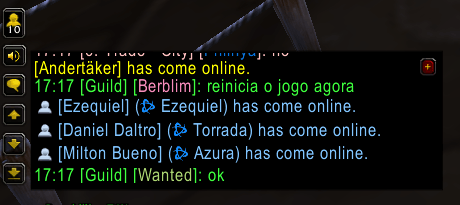
cher-collapsed.png
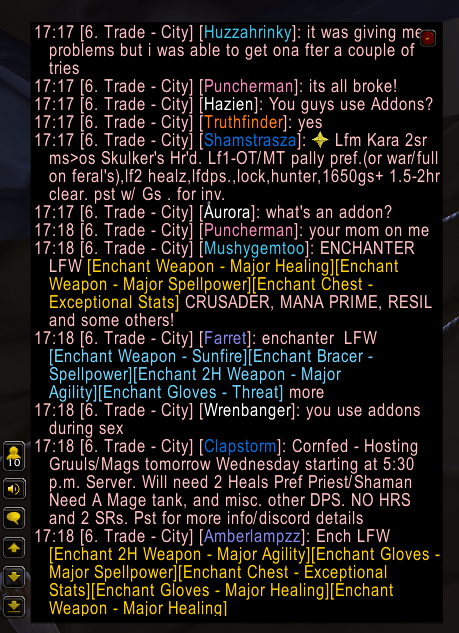
che-expanded.png
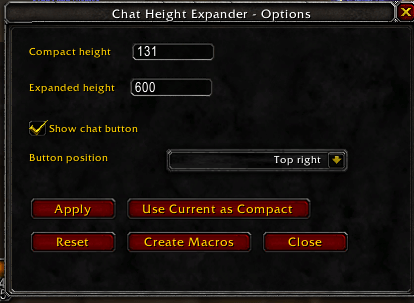
che-config.png
Description
Chat Height Expander adds a small configurable button to the World of Warcraft chat window, allowing you to quickly switch between a compact chat height and an expanded reading view.
It is designed for players who like keeping the chat small during normal gameplay, but occasionally want to expand it to read more recent messages without scrolling.
Features
- Toggle chat height between compact and expanded modes.
- Small
+/-button attached to each chat frame or tab. - Works with additional chat windows created by the player.
- Expanded chat is temporarily raised above other UI panels, then restored when compacted.
- Configurable compact and expanded heights.
- Configurable button visibility and position.
- Options available in the game AddOns options panel.
- Standalone options window with
/che config. - Optional macro creation for quick access.
- Localization for all WoW client languages.
Commands
/che- Toggle compact/expanded chat height./che config- Open the options window./chatheight- Alternative command./che collapsed 160- Set compact height./che expanded 360- Set expanded height./che button- Show or hide the chat button./che reset- Restore default settings.
Compatibility
Built for World of Warcraft: The Burning Crusade Classic Anniversary.
Localization
Chat Height Expander supports English, Brazilian Portuguese, German, Spanish, French, Italian, Korean, Russian, Simplified Chinese, and Traditional Chinese clients.
Chat Height Expander Team