Capped
PvP rank math for WoW Forever: how much you need this week to stay on the fastest track to Warlord or Field Marshal, then it tells you to go rest.
Capped-1.1.0-panel.png
lfgcappedandleaderboard.png
CalloutsEasy.png
YouWintimer.png
calloutseasynew.png
Description
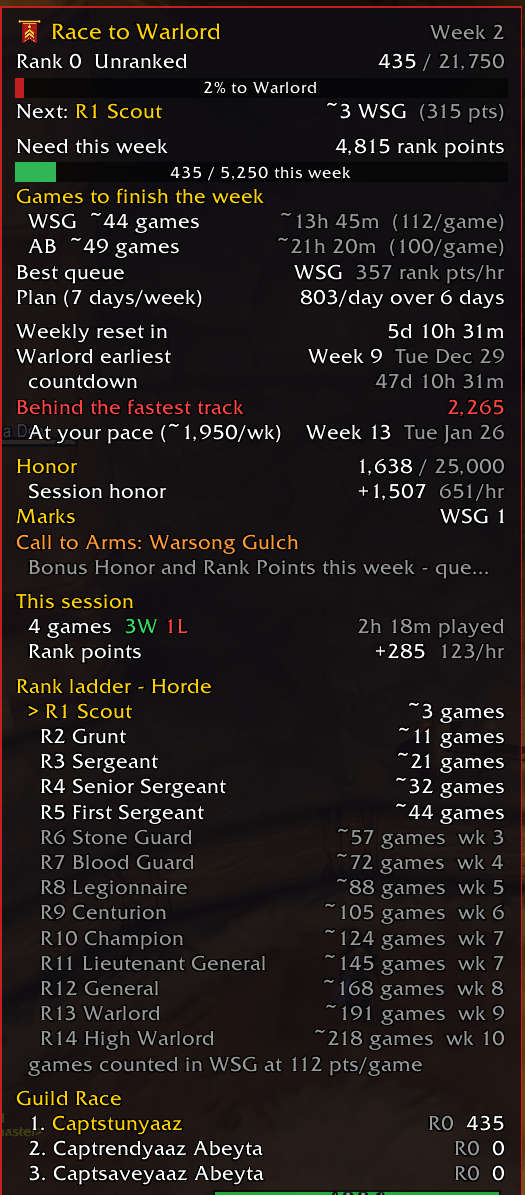
PvP players shouldn't have to grind endlessly. Capped does the rank math for WoW Forever and tells you exactly how much PvP you need this week to stay on the fastest track to Warlord or Field Marshal. When you've done enough, it tells you: "You're capped. Go rest."
Inside a battleground it also calls incomings for you with one click and tells you who is going to win.
Join the Discord for help, feedback and what's coming next.
What you get
- Rank math done for you: exactly how many wins or losses to your next rank and to this week's cap
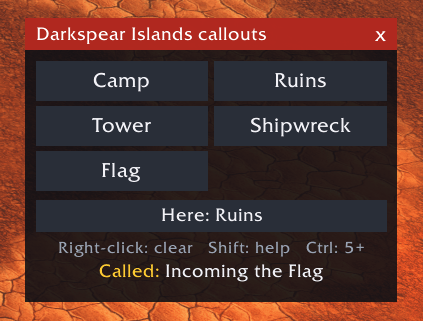
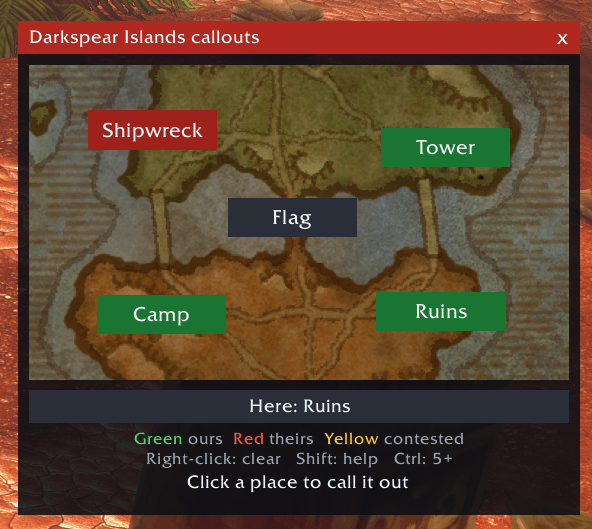
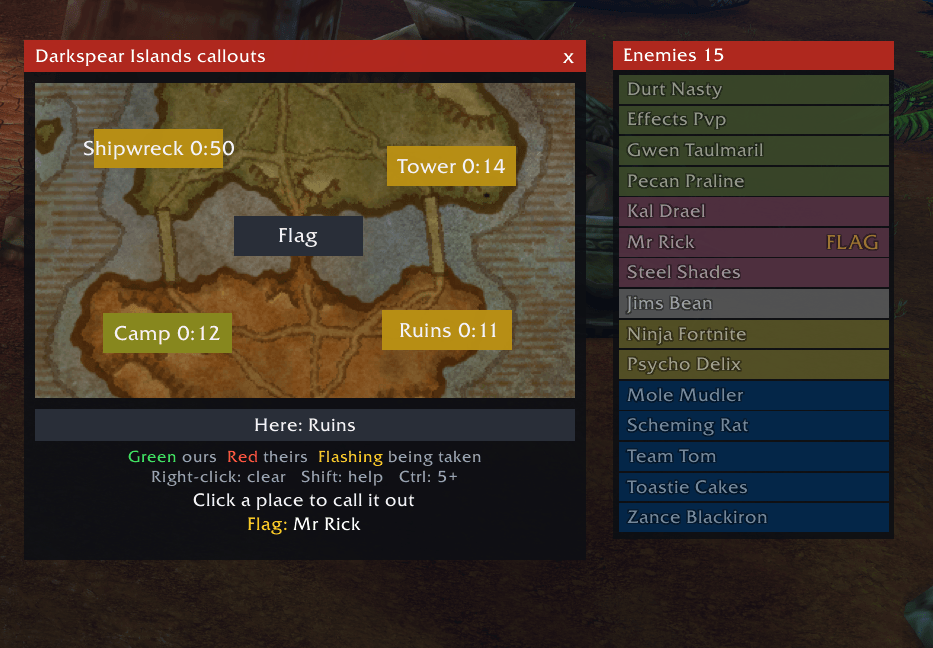
- Battleground map and callouts: a live map showing who holds each place, with capture countdowns. Click one and "Incoming Stables" is typed into battleground chat for you
- Enemy list: the other team in class colours, click a name to target
- Match history: the full scoreboard of every game you finish
- Rank badge: another player's rank insignia when you mouse over them
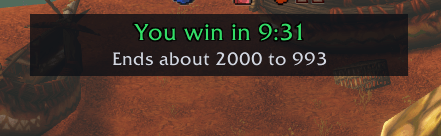
- Winner forecast: who wins, in how long, and the likely final score, live during the match
- Healer marks: a glowing plus over the healers on both teams
- Queue timer: a countdown and a voice warning so you never miss a pop
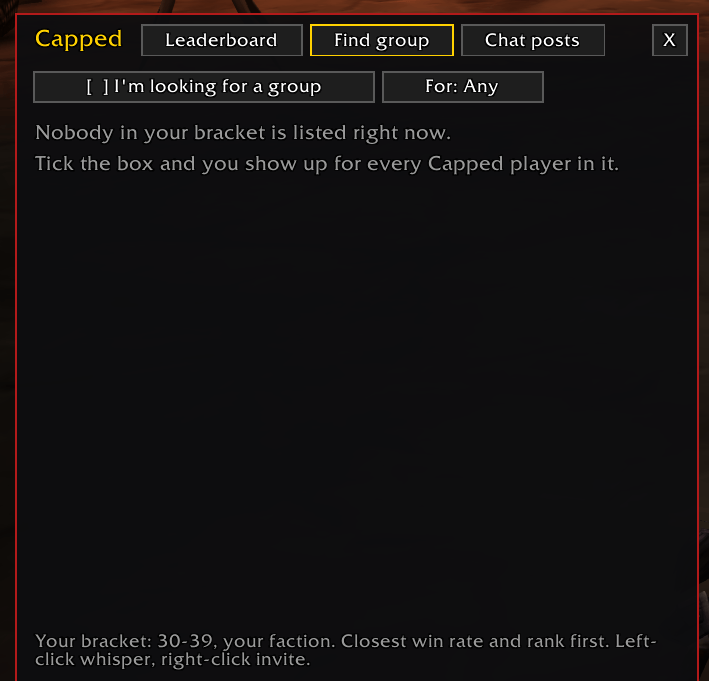
- Group finder and leaderboard: find other players queueing right now
- Honor bar: a warning before you hit the honor cap
Know exactly what it takes
- Your rank, title and rank points against your target: Warlord / Field Marshal by default, High Warlord / Grand Marshal if you want it
- Points needed this week, with a weekly progress bar and a countdown to the reset
- Exact scenarios to your next rank, no guessing: "3 wins", "2 wins + 4 losses", "1 win + 8 losses" or "12 losses", worked out from what your own games pay
- Bonus weekends handled: it uses the payouts from the kind of week you're actually in
- The earliest week and date you can reach your target, and whether you're on track
A live battleground map you can click
- A small map of the battleground appears on its own when you enter, with a button on each place right where it sits on the real map
- See who holds what at a glance: green is yours, red is theirs, and a place being captured flashes in the colour of the team taking it
- Capture countdowns: a place being taken shows a clock on its button, so you know if you can still get there in time
- Call it without typing: left-click a place to call "Incoming" there in battleground chat. Right-click for "clear", Shift-click for "need help", Ctrl-click for "5+ incoming"
- The wide Here button knows where you are standing. One click calls your spot and drops a warning ping on you
- A gold dot shows where you are, and class-coloured dots show your teammates
- Flag tracking on Darkspear Islands: who is carrying it, a countdown to it coming back, and an alert when it's up
- Arathi Basin and Darkspear Islands get the map. Warsong Gulch and Alterac Valley get a grid of buttons, with capture timers in Alterac Valley
- Callouts only ever post in battleground chat, and lock for a few seconds after two in a row, so nobody can spam with it
The other team, one click away
- Every enemy in the battleground in a list, in class colours. Click a name to target that player, even in the middle of a fight
- A health bar fills in when they are in view
- Healers carry a red plus and the flag carrier is tagged, so the right target is always one click away
Look back at every match
- The full scoreboard of every battleground you finish is saved automatically. Type /capped matches to open the book
- The best damage, healing and killing blows of the match are picked out in gold, with where you placed
- Click a column to sort by it, and see your running wins and losses
Know their rank at a glance
- Mouse over or target a player showing a PvP rank title and their rank badge appears under your chat window, in the game's own badge art
- Want more? /capped card details on turns it into a full card with guild, healer flag and your history with them
Know who wins before it ends
- In Arathi Basin and Darkspear Islands, Capped measures how fast each team is really scoring
- It shows who wins, how long is left, and the likely final score
- When a base changes hands or a flag is captured, the forecast catches up within seconds
- A "close" tag shows when both teams would finish within seconds of each other
Spot the healers
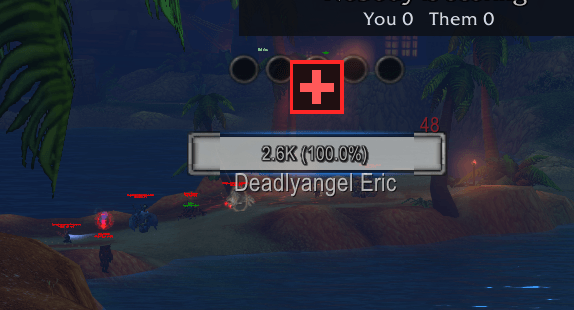
- A pulsing plus sign above a healer's head: red on the other team's healers so you know who to kill first, green on yours so you know who to protect
- Your own team's healers are found in the prep area, before the gates open
- Marked from the first second: Capped reads the role each player queued as, so healers on both teams are marked as soon as the match starts
- Healers also get a red plus at the front of their row in the enemy list and sort to the top, so they are one click away
- Only committed healers are marked: a damage dealer who throws the odd heal doesn't get one
- Turn nameplates on to see the marks: press V for enemy nameplates and Shift-V for friendly ones. Capped tells you in chat if either is off
Never miss a queue pop
- A countdown bar appears when a battleground pops, showing how long you have to enter
- A voice says "Battleground ready" at the pop
- "Last chance to enter!" is called at 10 seconds left, with the bar pulsing red
- Move the bar anywhere, turn the voice off, or change the warning time
Find a group for any battleground
- Tick "I'm looking for a group" and pick a battleground (or Any). Other Capped players can see you until you untick it
- The list only shows your faction and your level bracket, sorted by the closest win rate and rank to yours
- Left-click a name to whisper, right-click to invite
- The Chat posts tab collects battleground group posts from chat for 15 minutes, and writes your own "LF premade" post for you
Know who you're playing with
- Mouse over another Capped player to see their rank, rank points, lifetime kills and whether they're capped this week
- Everyone from your finished battlegrounds gets their kills and killing blows remembered, addon or not
- Leaderboard with three views: rank points, lifetime kills, and kills in your battlegrounds
- The leaderboard and group list are built from Capped players your game has heard from, so they grow as more people install it
Don't waste honor
- A small, movable honor bar in your faction's colours: red for Horde, blue for Alliance
- It fills as you near the honor cap, with chat warnings at 80%, 90% and when you're capped, so you spend it before any is wasted
The whole ladder at a glance
- All 14 ranks with Horde or Alliance titles, and the wins or losses it takes to reach each
- Which week each rank opens under the weekly cap
- Best battleground to queue for rank points per hour, from your own results
- Session summary and win/loss history for every battleground
- Guild Race: see who in your guild or party is capped this week
Getting started
- Install it and log in. The panel opens on its own.
- Play a battleground. Capped learns what a win and a loss are worth from your own games.
- Type /capped to show or hide the panel, and /capped queue test to try the queue timer.
- If the game won't let addons read your rank points, type them in once with /capped set rp and it keeps them updated from then on.
Commands
- /capped shows or hides the panel, /capped status prints where you stand
- /capped target 13 or 14 picks your target rank
- /capped queue sets up the queue timer (test, off, voice off, warn 10)
- /capped honor shows or hides the honor bar (drag to move, right-click to hide)
- /capped targets shows the enemy list (targets test, lock, size 1.2, off)
- /capped matches opens your match history
- /capped card sets up the rank badge (card unlock to move it, card details on)
- /capped callouts shows or hides the callout window (callouts test, lock, size 1.2, ping off)
- /capped predict sets up the winner forecast (predict test, lock, off)
- /capped healers turns the healer marks on or off
- /capped find opens the group finder (find wsg, find ab, find off), /capped top opens the leaderboard, /capped posts shows group posts from chat
- /capped tooltip off hides rank and kills on player tooltips, /capped share off stops all sharing
- /capped ranks lists every rank, /capped history shows your games
- /capped probe shows what the game lets addons read
Good to know
- The callout window can't open, close or resize while you're in combat, and the Here button only updates between fights. The game locks buttons that send chat during combat.
- Capped can't press Enter Battle for you. The game only accepts a real click or key press for that, so the warning is as far as an addon can go.
- The scenarios are exact for what your games have paid so far. If a normal week pays less than a bonus weekend, the counts change, and Capped says which rates it's using.
- Season numbers (rank thresholds and weekly caps) are datamined and live in one file, so they're easy to update if Blizzard changes them.
More from Abeyta
Abeyta Scrolling Combat, my combat text addon for WoW Forever: your damage comes off the enemy, you see what the players around you are hitting for, and a combo meter turns questing into a game. Search for Abeyta Scrolling Combat on CurseForge.
I build things outside of WoW too. Right now I'm working on funding Up & Down, my very own chip-and-putt golf course, with our mascot Chip Abeyta leading the charge. It's skill capped, for all you other golfers out there. Go check it out at upanddowngj.com.
Questions, bugs or ideas? Join the Discord or catch me live at twitch.tv/captsaveyaaz.
Created by Abeyta. Not an alpha. Just Abeyta.
Capped Team