CantPlayForever_Header.jpg
Screenshot_1.png
Screenshot_3.png
Description
Can't play Forever



A clock for your minimap that keeps an eye on the time, so you don't have to.
Can't play Forever replaces the plain minimap clock with a clean analog or digital clock that also handles your alarms and timers. Set an alarm for tonight's raid, a timer for the oven, or a reminder for "go to bed" – and the clock lets you know with sound, a pulsing glow and an on-screen message.
Features
Clock
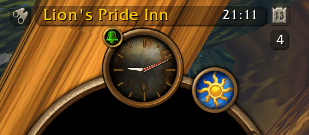
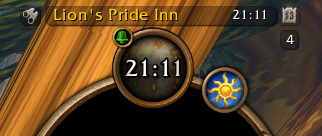
- Analog or digital clock in three sizes, in realm time or local time, 12 or 24 hour
- A small clock in the standard minimap button frame, or a larger free-standing clock
- Icons at the clock edge show a running timer and your armed alarms
- Hides the original Blizzard clock while it is active (optional)
Alarms
- Unlimited named alarms with a clear list: checkbox, edit, delete
- Schedules: every day, selected weekdays, or a fixed date – repeating every month or every year if you like
- Correct handling of short months and leap years
- One-shot or repeating
- Shift + left-click on the clock arms and disarms your selected alarms
Timers
- Save your favorite timers and start or stop them with one click on the hourglass
- Pick one timer as your default and start it straight from the clock
- The remaining time is shown right on the clock
Alerts
- Sound, on-screen message and a red pulsing glow around the clock
- Optional glowing screen edge (off by default, skipped in instances)
- Adjustable pulse speed and number of sound repeats
Quick access
- Left-click: start / stop your default timer
- Shift + left-click: arm / disarm alarms
- Right-click: open the options
- Ctrl + right-click: original stopwatch
- Alt + right-click: original clock menu
Settings
All settings live in one options window. Account-wide or per character profiles, individual modules can be switched off, and everything is available in English, German and French.
Compatibility
Made for World of Warcraft Forever (Interface 16001). Uses Ace3 and LibDBIcon, both included.
Feedback
Found a bug or have an idea? Leave a comment or open an issue. Please include what you clicked, what happened and the LUA Error.
Can't play Forever (Clock replacement) Team