Burning Rush Tracker
- By
Tired of dying because you forgot to turn off burning Rush in a raid? This addon should help you prevent any more warlock fails from neglecting your feet

BurningRush Screenshot 02.png
BurningRush Screenshot 01.png
Burning Rush Tracker - Config Menu.png
Description
Burning Rush Tracker
A simple visual warning for Warlocks who are tired of realizing, too late, that Burning Rush is still on.
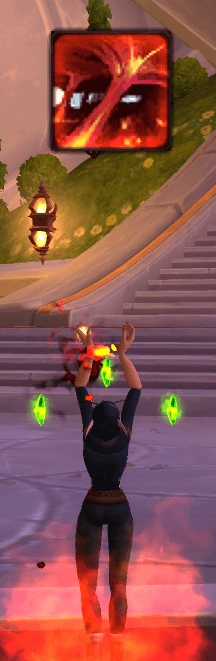
Burning Rush Tracker displays a clear on-screen Burning Rush icon whenever the Warlock ability Burning Rush is active. If you have ever finished dodging a mechanic, kited a mob across half the room, or triumphantly survived a pull only to discover that your own feet were still trying to kill you, this addon exists for you.
No setup. No complicated panels. No extra buttons to manage. When Burning Rush is active, the alert appears. When Burning Rush is off, it disappears.
What It Does
Burning Rush Tracker solves one very specific Warlock problem: forgetting to turn Burning Rush off.
The addon watches your player auras for Burning Rush and shows a dedicated alert frame while the buff is active. The alert uses the real Burning Rush spell icon, pulled directly from the game using the spell ID, so it always looks familiar and immediately recognizable.
To make it harder to miss, the icon includes a fiery orange overlay that gives it a clear “turn me off before I embarrass myself” feel. It sits near the center of the screen by default, slightly lower than center, so it is visible without completely blocking your view.
The frame is also movable. Hold Shift and drag it with the left mouse button to place it wherever it fits best in your UI.
Features
- Tracks the Warlock ability Burning Rush
- Shows an on-screen icon whenever Burning Rush is active
- Hides automatically when Burning Rush is disabled
- Uses the actual Burning Rush spell icon from the game
- Movable alert frame
- Shift + left-click drag positioning
- Lightweight, focused, and automatic
- No required configuration
- No dependencies
Why Use It?
Burning Rush is amazing right up until it is not.
It helps you move faster, escape danger, reposition quickly, and look extremely professional for about five seconds. Then the boss stops casting, the raid stabilizes, the healer relaxes, and you are still quietly draining your own health because you forgot your boots are on fire.
Burning Rush Tracker gives you a simple visual reminder while the effect is active so you can stop donating your health bar to comedy.
Your healers may not thank you out loud, but they will know.
How To Move the Icon
Hold Shift and drag the Burning Rush alert with the left mouse button.
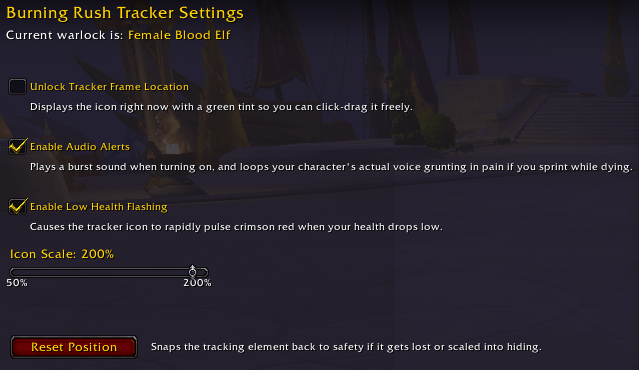
The addon does not currently require an options menu or slash commands. Just move the icon where you want it and let it do its job.
The Hox Suite
Burning Rush Tracker is part of the growing Hox addon suite by Hox Utilities.
Each addon works perfectly standalone. HoxCore is not required, but if you use multiple Hox addons, it helps keep them together through a shared minimap launcher.
HoxCore
The minimap launcher for the Hox addon suite. HoxCore creates a single minimap button that opens a drawer of installed Hox addons, helping reduce minimap clutter as the suite grows.
Hox FlightTools
Cockpit-style flight instruments for Skyriding, including airspeed, heading, vertical speed, resource tracking, flight alerts, speed history, and post-flight debrief information.
Burning Rush Tracker
A lightweight Warlock reminder addon for players who enjoy moving fast but prefer not to die to their own toggle.
Hox DevTools
Development and debugging utilities for addon authors. [UNDER DEVELOPMENT]
Chronicle of Heroes
A warband roster and gear audit tool for tracking gear, enchants, sockets, upgrade tracks, currencies, reputation, and character progression across your account. [UNDER DEVELOPMENT]
Love Lust Leave
A social and relationship-themed mini-game addon. [UNDER DEVELOPMENT]
Compatibility
Burning Rush Tracker is designed to be lightweight and self-contained.
It listens for player aura changes and checks only the local player’s Burning Rush status. It should work alongside most UI replacements, raid frames, WeakAuras, and general addon setups because it does not modify Blizzard UI behavior or depend on external libraries.
The alert frame is parented to the main UI and can be moved manually if it overlaps another part of your interface.
Installation
Install through CurseForge, or manually place the BurningRush folder into:
World of Warcraft/_retail_/Interface/AddOns/
Then restart the game or reload your UI.
If the addon is marked as out of date after a World of Warcraft patch, either update to the latest version or enable Load out of date AddOns from the addon selection screen.
For Warlocks Who Have Suffered Enough
Burning Rush Tracker will not make you a better Warlock.
But it might stop you from sprinting heroically into the afterlife because you forgot to turn your feet off.
Burning Rush Tracker Team