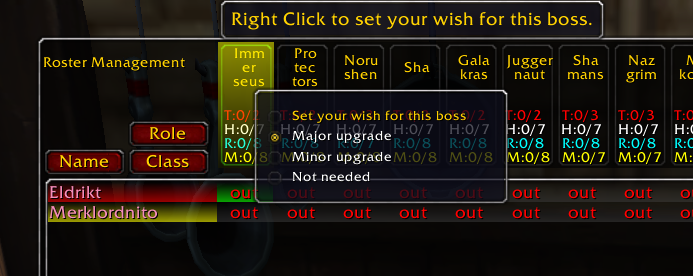
Every player can select which bosses have upgrades for him
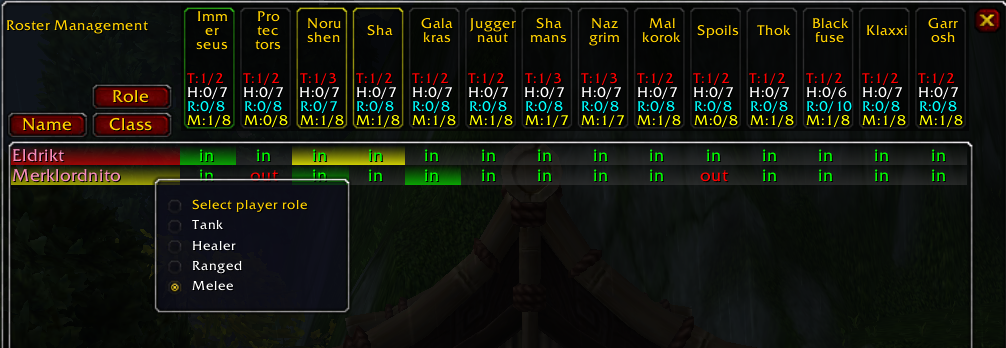
Should the role of a raider not be recognized, the raid leader or an assistant can set it manually
Description
What is BossRotation
BossRotation allows Raid Leaders and assistants to manage the rotation of the raiders during raids.
- The raid leader and his assistants can quickly select which raider will be in the encounter and which will have to be on stand by.
- The required numbers per role and per boss are adjustable for your raid needs.
- Raiders can select which bosses they need and help the officers to create a better rotation.
- Color codes show the class and role for each player in the raid as well as their needs for every boss.
- Changes in the configuration are broadcasted to all raid members with the addon installed in order to simplify management.
- No need for lengthy discussions: just let the officers for each role pick the correct setup from the available raiders
How to use this addon
First of all you need to be in a group to see anything meaningfull out of the addon. If everything is installed correctly there will be a minimap icon for you to open the interface. You can hide the icon from the addon settings under the Blizzard Interface options. If you dont see the minimap icon you can also type /br show in the chat. When the main interface is open you are presented with a list of all group members and all bosses. Currently only SoO is supported, more to come later.
As a raider you can rightclick a boss name and set up how much you need the boss. There are 3 options available: "Major upgrade", "Minor upgrade" and "Not needed". A color border around the boss name indicates the preference you have selected for each boss. You should also see that in the line with your name on the column of the boss the button is also colored according to your preference.
The main area of the window is a grid showing which raiders are in or out for a boss. The Raid Leader and his Assistants can click on these buttons to change their status from "out" to "in" and vice versa. This gives an overview on the planned rotation for incomming bosses and simplifies rotation management.
The list of raiders is sortable by name, by class and by role. The addon diferentiates between 4 roles for raiders: Tanks, Healers, Ranged dps and Melee dps.
What can the Raid Leader and his Assistants do with the addon
In addition to all actions doable by regular raiders, the raid leader and the assistants can do the following:
- Left Click a boss name to setup the number breakdown for a boss. That is to set how many raiders for each role are needed for every boss. The boss name button will reflect this information and will also count for you the number of players for every role that have already been set to in, so you can see if you have selected enough raiders.
- Right Click a boss name to report the setup you have planned for a boss to a channel of your choice. Reporting happens on a per role basis.
- Right Click a raider name to set the raider's role. The addon tries to make an educated guess about which role every raider is fulfilling. This might be correct most of the time, but might as well be wrong. Here you have the option to fix the addons mistake.
- Right Click a cell in the grid to set a raiders preference for a boss. This has the same effect as the raider rightclicking on the bosses name in his addon. Quite handy if not all of your raiders use the addon but you know which bosses they need. This information can help you decide who gets in for a boss and who can be moved on standby.
- Right Click a boss name and swap the raiders you have selected in and out of the first 5 groups of the raid. Keep in mind that there needs to be enough room in the raid to do that. If you already have a full group and try to get 3 new healers in without moving at least 3 out it cannot possibly work.
Help, its not working!
First check if the addon is loaded correctly. Some users don't get the minimap icon and cannot show the addon's main frame using /br show. Should this apply to you as well grab Ace3 from Curse.com and install it separately. Ace3 is actually embeded into the addon and you should not have to install Ace3 separately, but if it's not working this is the way to go.
If you dont see anything in the addon window you are probably not in a group. You need to be in a group or even better in a raid to get the most out of the addon.
The addon is not working in LFR. Yep, thats true unfotunately. It seems that Blizzard is treating LFR groups differently than normal groups and raids. Thus most functions are not behaving well in a LFR environment. I am planning to fix this eventually, but it is not very high on my priority list.
What to do with bugs and suggestions?
Send them over! I mean it! I'm open for all sorts of suggestions and complaints. Drop a comment on curse or on the project page on curseforge and I'll make sure to reply in a timely manner. This is the most complex addon I've made till now and I'm happy to tinker with it and improve it as much as I can.
The BossRotation Team