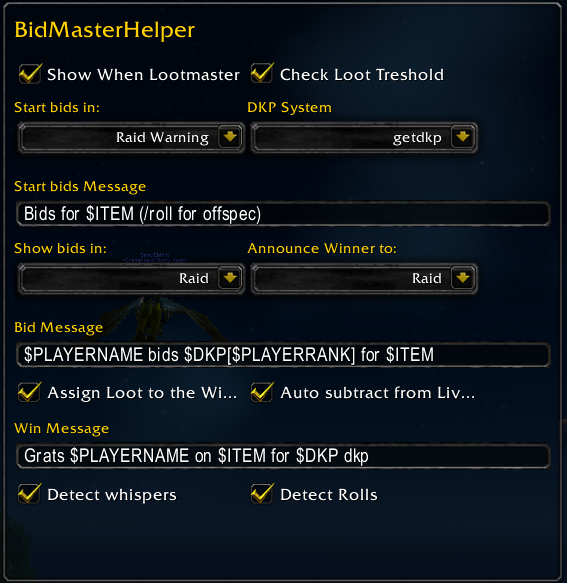
The options window of Bid Master Helper
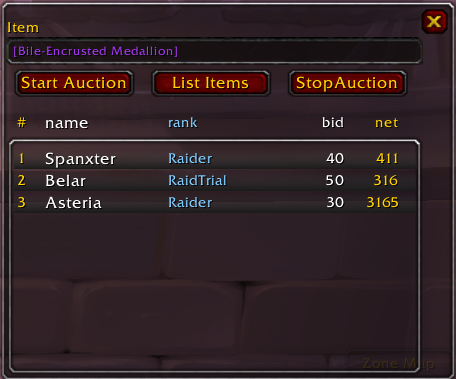
The Main Window
Description
Offers a simple tool to utilize the job of the lootmaster.
Here a list of features:
- The Toolbox opens when you are the MasterLooter and in the loot is an item above the selected loot threshold (can be turned off from the options)
- You can shift+click items in chat/loot box/backpack to add a link to the Toolbox
- Use the "Start Auction" Button to announce the start of the auction in /rw (configurable from the options)
- Incoming whispers will be parsed for a number and will be shown in the interface
- Shift+click on an entry in the interface will announce the bid in the chat
- Shift+right click will announce the end of the auction and will prompt to give the item to the player who won the auction.
- Click the "Stop Auction button to stop parsing of incoming whispers.
- If you have Quick DKP installed with Auto Detect Winners option on, the message you send to the chat should trigger the autodetect system
- Use /bmh show to show the Toolbox if you have the autoShow option off and want to start an auction
- Use /bmh menu to show the options (or go to Blizzards Interface->Addon pane)
- Now with getDkp support! Just select the appropriate dkp system from the options.
The BidMasterHelper Team