Boomerbags
Boomerbags keeps your inventory organized with item categories, recent loot tracking, one-click gear set swapping, and profession bag support—all in a customizable, classic-style bag window.
Boomerbags — Classic style.
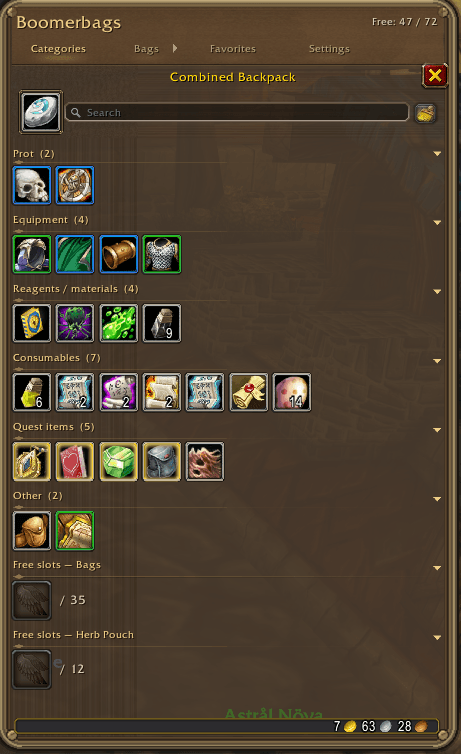
Boomerbags brings your inventory together in one customizable window for WoW Forever, with a classic leather-and-brass appearance and a transparent background that keeps the world visible behind your bags.
Find what you need
-
Item categories: Keep equipment, consumables, reagents, quest items, and junk together in clear rows.
-
Search: Quickly find items across your visible bags.
-
Recent loot: Newly received items appear in their own section for two minutes—including materials, potions, equipment, and gray items.
-
Favorites: Pin frequently used items above the other categories.
-
Hearthstone dock: Keep your Hearthstone beside the search field.
Take control of your bags
-
Show or hide individual bags using the bag icons.
-
View profession and specialty bag contents alongside your inventory.
-
See separate free-space counts for ordinary bags and specialty bags.
-
Replace equipped bags by dropping a new bag onto the top bag bar.
-
Collapse categories to keep the window compact.
-
Keep your selected Categories or Normal layout when opening bags during combat.
Make it yours
Adjust window size and background transparency, toggle item-quality borders and recent-loot highlights, and move the window by dragging its frame. Bag filters and window position are saved per character.
Includes English and Danish text, plus a vendor junk-selling preview so you can review eligible gray items before confirming a sale.
Equipment Manager — Beta
Manual gear tagging has been removed in favor of WoW’s Equipment Manager.
Known issue: Saved Equipment Manager sets may not appear as rows in Boomerbags in the current beta.
Getting started
Install the Boomerbags folder in Interface/AddOns, enable it, and open your bags normally.
Type /bb settings to customize the addon or /bb help for commands.
Designed for WoW Forever beta 1.60.1.70338.
Boomerbags Team