Boomer Classic Meter
A clean, Classic-style damage and healing meter for WoW Forever, featuring spell breakdowns and multiple movable, resizable windows.
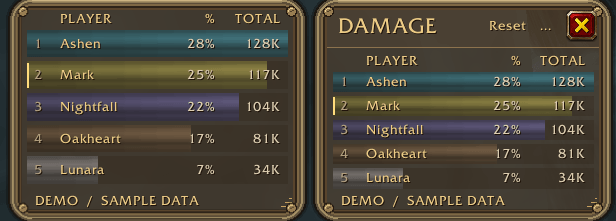
Classic Meter
A clean damage, healing, and threat meter for WoW Forever Beta, styled to match the Classic UI.
Warm brown backgrounds, thin gold borders, Classic fonts, and subtle class colours keep your combat information easy to read. Use one compact window or create up to eight independent windows, each with its own view, size, position, and display settings.
Combat tracking
-
Damage: Damage Done, DPS, Damage Taken, Enemy Damage Taken, and Avoidable Damage.
-
Healing: Healing Done, HPS, Absorbs, and recognized potion/healthstone healing after combat.
-
Miscellaneous: Interrupts, Dispels, and Deaths, with clickable death recaps when available.
-
Live Threat: Tracks players and pets against your current enemy target. AGGRO % bars show how close each unit is to taking aggro.
A layout that fits your UI
-
Drag any border to move the meter.
-
Resize from the bottom corner or use Ctrl + mouse wheel to adjust its scale.
-
Automatically hide the top bar when the mouse leaves.
-
Choose short or full numbers, decimal precision, and group-total or top-player damage-bar scaling.
-
Show or hide ranks, spell icons, column headings, and your own-row highlight.
-
Reset Current and Overall combat history from the top bar, with confirmation.
Spell breakdowns and chat reports
Click a player to see their recorded spells, matching icons, and contributions in the selected combat view.
Preview and share results after combat to Party, Raid, Instance Group, Guild, Say, or Whisper. Choose up to 40 rows, report a player’s spell breakdown, or copy the report text manually.
Quick start
-
Right-click the view title to choose a category.
-
/cfm new threat— add a separate Threat window beside DPS. -
/cfm options— open display and number settings. -
/cfm report— preview a chat report. -
/cfm demo— toggle clearly labelled sample data.
Beta notes
Some combat data is protected by the beta client. Threat uses group order when sorting is unavailable; spell details and calculated damage percentages may become available after combat.
Threat follows your current target and has no Current/Overall history. Reset cannot clear an enemy’s actual threat. Overhealing is currently unavailable.
No Details installation or additional libraries required.
Boomer Classic Meter Team